
pixel-platformer
A complete 2D pixel-art platformer - character physics, levels, enemies and collectibles. Proof that we go down to the game-engine layer, not just assemble ready-mades.
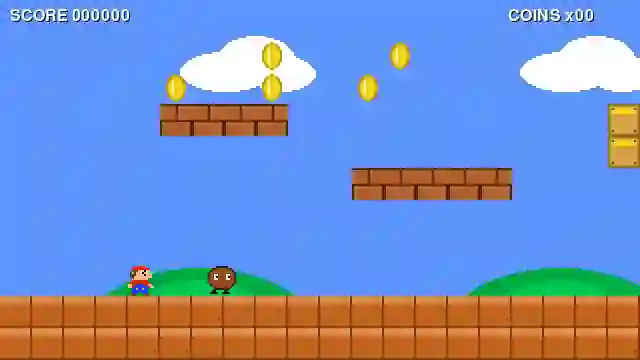
A 2D platformer that runs in the browser. It was never about the feature count - it was about the jump having a good "feel" and staying smooth even on a weaker laptop.
Overview
A platformer is one of those projects that look trivial from the outside. A square hops across tiles, how hard can it be? All the difficulty sits in things a player never sees yet feels within a few frames: whether the jump is springy, whether the controls lag, whether you can reach that ledge.
This project was built for fun, and to really understand where good controls come from. Instead of piling on mechanics, we took one thing to a high standard: character movement that sits well in the hand, and a game loop that behaves the same on any hardware.
A player judges a game in the first few seconds, and not with reason but by touch. A character that is too light slips out from under your fingers, one that is too heavy drags and frustrates. Between the two lies a narrow band where the jump feels good - and that band is found only by tuning single values: jump force, gravity, friction on landing.
That is why a platformer is such a good exercise. There is no grand architecture to design, but there is merciless feedback: one badly chosen number and the game stops being fun at once. The rest of this case study is about what had to be put in order so that tuning could even make sense.
One physics step, every machine equal
The most common mistake in games built after hours: a loop tied to the frame rate. On a 60 Hz monitor the character jumps normally, on 144 Hz it flies twice as fast, and on a weak laptop dropping frames it slows down. The physics cannot depend on how fast the screen draws.
The fix is simple and proven: the simulation runs on a fixed step, and drawing happens separately, with interpolation between ticks. The world updates exactly sixty times a second regardless of the monitor, and the renderer gets the state plus a fraction of the step so the motion stays smooth.
Two game loops
| Approach | On a fast screen | On a weak laptop |
|---|---|---|
| Loop tied to frames | character flies too fast | character crawls |
| Fixed step plus interpolation | same pace | same pace |
Collisions that do not cheat
The second thing that ruins the "feel" is collisions. The character has to stop exactly at the edge of a tile, not a pixel early and not a pixel late, otherwise the player senses something is off even without being able to name it. The simulation computes it more simply than it seems: velocity, then the X and Y axes separately against the tile grid, with a position correction on contact.
we read keys once per frame, but feed them to the simulation, not straight into movement.
the fixed step computes velocity, gravity and collisions against the tile grid.
the renderer gets the world state plus a fraction of the step so motion stays smooth between ticks.
A fixed simulation step plus interpolation on draw is the simplest way to make a game behave identically on any hardware. The physics knows nothing about the monitor's frame rate, and that is what decides whether the jump feels fair.
The result you feel in your hand
What comes out is a small game that genuinely plays well, with code that stays readable and easy to extend. The jump has good weight, collisions are honest, and the pace is the same on every monitor. This is not a tech demo pretending to be a game, but something taken to a state where you want to play it longer than it takes to launch.
More projects
More work from the same category - see how we tackle similar challenges.




Have a similar project?
Get in touch - a quote is free and comes back within an hour.