
vulp
A terminal tool for managing many repositories at once. From one place it shows the state of the whole workspace, does batch syncs, handles PRs, issues and contribution stats. It has a TUI surface for people and a prompt-free JSON CLI for scripts and automation.
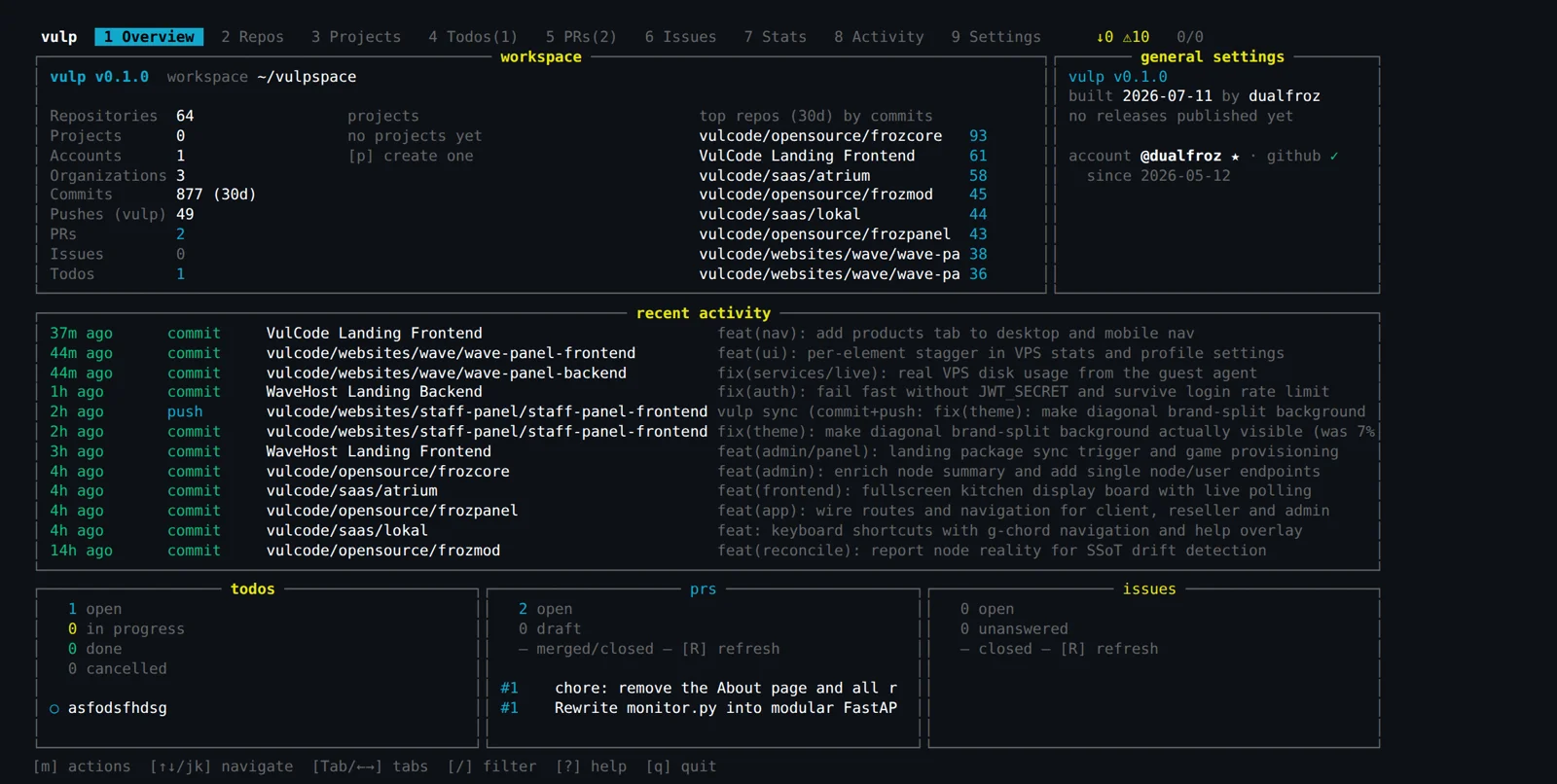
vulp is one interface to a whole workshop of repositories: dozens of repos, the same state and the same operations in batch. Underneath sits a single core, and on top two front ends - a prompt-free CLI with JSON output for scripts and a full-screen TUI for a human. Guardrails keep you from pushing the wrong thing to the wrong place, and drift detection compares each repo against its mirror on the server.
Overview
vulp grew out of our own workshop, not out of a product idea. We run dozens of repositories at once - brands, panels, bots, tools - and at some point just keeping in your head which one is waiting on a commit and which on a push cost more than the work itself. Plain git is excellent for one repo and completely helpless against thirty at once.
So we built a tool that treats the whole workspace as one thing: it scans every repo in a single pass, folds their state into one table and lets you run the same operation across many at once. We set one hard condition from the start - the same tool has to serve both a human at the keyboard and a script in CI, without two separate codebases to maintain.
Thirty repos, one clicking loop
When you run a single repo, plain git is entirely enough. At thirty it becomes a ritual: cd into the directory, check the branch, see whether the tree is clean, check whether you are ahead of the remote, back out, next. By the time you grasp the state of the whole, fifteen minutes are gone, and it is still easy to miss the one repo sitting on unpushed changes from two days ago.
The worst part is that this cost grows linearly with the number of repos while human attention does not. The more directories to walk, the higher the chance one gets skipped - and it is usually the one with something hanging in it. A shell loop over directories helps a little, but every such loop is another script to write and maintain, rewritten from scratch each time a different operation is needed.
vulp pulls that state into one place and lets you do the same thing across many repos in a single command. Instead of thirty git status calls you get one table, and instead of a loop over directories - one command with a clear scope.
one pass over every repo collects the branch, tree cleanliness and how many commits you are ahead of or behind the remote.
the state of the whole lands in one table, sorted so that what needs attention is at the top.
commit and push run across the selected repos in a single command, not directory by directory.
after the operation vulp compares local state against the server mirror and shows the deploy drift.
One core, two front ends
The most important architectural decision was made at the very start: all the logic lives in the core, and the CLI and TUI are just two skins over the same thing. The CLI is prompt-free and returns JSON, so it drops into scripts and CI without parsing text meant for humans. The TUI gives that same knowledge to a person who would rather look at a table than remember flags.
Because of that a new operation shows up in both places at once. You write it once, in the core, and both the cron script and the human on a keystroke get exactly the same behavior - with the same safeguards. A whole class of "does something different by hand than from the pipeline" mismatches disappears.
Guardrails that would rather refuse
The clean-tree flag is not a whim. Without it a batch push can ship half-finished work alongside the done part - and across thirty repos at once, so the mistake will not be undone in one move. The guardrails in vulp default to conservative: we would rather the tool refuse and ask you to be explicit than quietly do something irreversible.
The same principle applies to mass operations. A push to a protected branch, a push to a repo that is ahead of your local state, a commit with a dirty tree where there should not be one - these are all things the tool is meant to stop and ask about, not guess intent. Automation without brakes is faster exactly until the first mistake.
A batch operation across dozens of repos is just as fast at doing good as at doing harm. One bad push multiplies by the repo count, so guardrails here are not caution for its own sake - they are the condition under which we allow batch operations at all. Block by default, require an explicit flag for an exception.
Drift against the server mirror
The push itself is not the end of the story - what matters is what actually stands on the server. We keep a mirror of the repositories there, and after an operation vulp compares local state against that mirror and shows where the code in a repo has drifted from what is really deployed. This catches the classic trap: a change committed and pushed, but never deployed, so it lives only in git.
On top of that comes the daily work around repos, which also goes through the same tool: reviewing PRs, issues and contribution stats. Instead of opening a browser for each repo separately, you see it in aggregate, right where you are already looking at workspace state.
By hand versus vulp
| Task | By hand, repo by repo | Through vulp |
|---|---|---|
| Checking state | thirty cd-ins and git status | one pass, one table |
| Pushing what is ready | a loop over directories | one scoped command |
| Protection against a bad push | memory and attention | guardrails in the core |
| Deploy drift | you find out when something breaks | mirror comparison after the operation |
What is left of it
The effect is boring in the best sense of the word: checking workspace state and pushing what is ready stopped being a morning clicking ritual. It became one command you can run by hand or schedule and forget - with the same safeguards in both cases.
The deeper gain is that the tool scales with the number of repos rather than against it. The twentieth repo adds no ritual, because the whole workshop is walked in one pass anyway. A new operation is a fix in the core that the CLI, the TUI and the CI script all get - in a single commit, with no version drift.
Most importantly, vulp is not a separate gadget next to our work - it is the same layer through which both a hand and an automation pass. A human clicks, cron fires, and they do exactly the same thing, just as safely. That is the difference between a script that works for its author and a tool you can rely on every day.
More projects
More work from the same category - see how we tackle similar challenges.

Have a similar project?
Get in touch - a quote is free and comes back within an hour.