
Spectra
A native desktop client for the Spectra panel on Windows and Linux, written in C#/.NET. A real binary with system access, not a wrapped Chromium. The same view as the web, but with native performance and desktop integration.
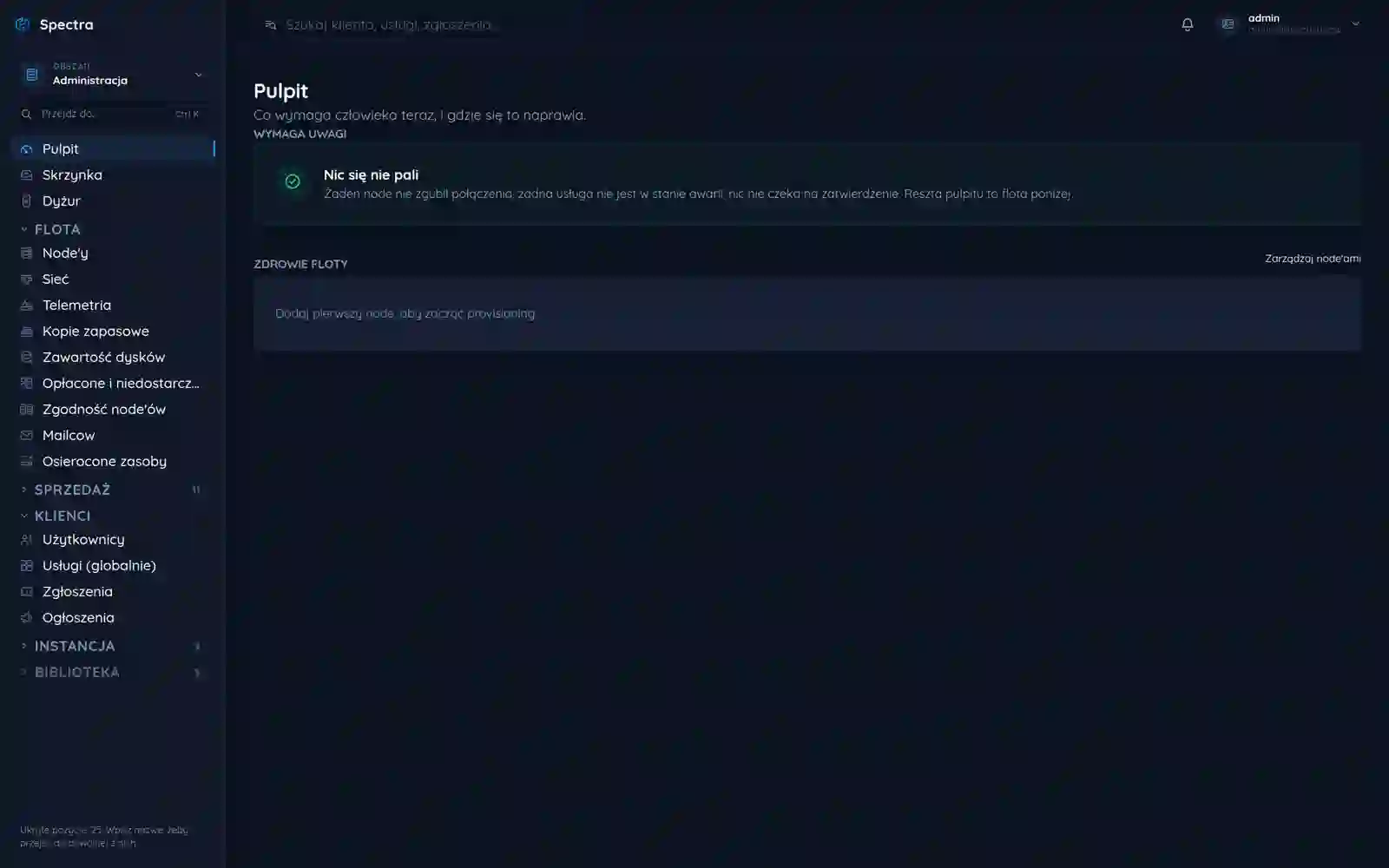
A native admin client for Spectra game-server hosting on Windows and Linux, built in C#/.NET on Avalonia. The same view as the web panel, but as a real binary wired straight into the platform core and its huge frozcore/frozmod API - with system access, native speed and logic shared with the rest of Spectra, not rewritten a second time.
Overview
Spectra is a game-server hosting brand we built the full panel stack for. This case study covers one, but crucial, piece of that puzzle: the native desktop client for admins. It is not a separate app living next to the panel - it is another shell over the same core, talking to the same backend as the web version. To see why it was a challenge, you first have to see how big the system underneath is.
The desktop client does not render pretty screens over a void. It stands on a full platform: server provisioning, power management, files, databases, telemetry, billing and permissions. Our job was to give the admin a native window onto all of it - without a wrapped browser and without duplicating logic that already lived in the web panel.
A panel you sit in all day
An admin of game servers does not check the panel once a week. They keep it open for eight hours next to a console, a game client and a messenger. In that mode another browser tab is not convenience, it is a fifth wheel: it gets lost in a crowd of tabs, has no icon of its own on the taskbar, ignores system shortcuts and cannot see local files.
We wanted to give the same view as the web, but as an app that behaves like the rest of the programs on the desktop. One hard condition: no wrapped Chromium. A client that adds 200 MB of memory on startup just to show the exact same thing defeats the point before it even finishes launching. If the admin is going to spend most of the day here, the app has to be light, instant and native to their system, not another browser window pretending to be a program.
By the numbers
| Metric | Value |
|---|---|
| Systems from one codebase | Windows and Linux |
| Typical memory footprint | ~40 MB |
| Shared core with the web panel | one |
| Views wired to the API | dozens |
What Spectra really is underneath
The biggest misconception on a project like this is thinking "it is just a panel". In reality the panel is a thin layer over a backend that does the heavy lifting: it starts and stops game servers, allocates resources, holds databases, streams logs and the console live, and enforces limits and billing. That backend is the sizeable frozcore/frozmod API - dozens of endpoints, real-time events and a permission model that decides who sees what and what they can do.
The desktop client has to talk to the exact same API as the web panel. There is no "simplified desktop version": if the admin changes a server memory limit or restarts an instance, they do it through the same contract the web uses. So before a single screen existed, we had to understand and tame the scale of that API - and that was the real part of the challenge, not the look of the window.
The console and log stream run live. This is not a refresh every few seconds but a continuous stream of events from the backend - the desktop client subscribes to it just like the web does, so the admin sees a server's output the moment it happens.
One core, two shells
The domain logic - authorization, the server model, power commands, the log stream, mapping permissions onto that API - lives in a single .NET library. The web panel and the desktop client are two shells over that one core, so a fix in a permission rule or in how an endpoint is handled lands in both places at once. A whole class of "works on the web, broken on the desktop" bugs simply disappears.
Avalonia draws the view layer. It is not a webview - controls render straight through Skia, the same path on Windows and Linux, so the app looks identical on both. Along the way it gets real access to the file system, clipboard and notifications that a wrapped page never had.
Stack
| Layer | Choice | Why |
|---|---|---|
| Language and runtime | C# / .NET | one language for logic and UI, good tooling |
| View layer | Avalonia (Skia) | native render, identical on Windows and Linux |
| Domain core | shared .NET library | the same logic and the same API client as the web panel |
| Network layer | typed frozcore/frozmod client | one contract, web and desktop speak the same |
| Distribution | self-contained publish | one binary, no runtime install on the client |
Integrating with a giant API
This was the heaviest part. The Spectra backend exposes dozens of operations: server lifecycle, console, files, databases, task schedules, backups, users and permissions, resource telemetry. To keep the desktop client from turning into a tangle of calls, we wrapped the whole API in a single typed client in the core - with one place for authorization, retries and error handling.
every frozcore/frozmod endpoint behind a single interface, with authorization and retries in one place, so neither web nor desktop repeats that logic.
console, logs and telemetry as event subscriptions, not polling in a loop; the same mechanism as the web panel.
what an admin can see and do follows the same rules as the web, computed in the core, not guessed at in the UI.
API responses land straight in native Avalonia controls, with no DOM in the middle.
Wrapping the whole API in one client in the core paid off twice: a backend contract change is a single fix in the library that web and desktop get in the same commit. No version drift, no "works on my machine".
Performance and being native
Since the boundary condition was "no wrapped Chromium", performance was not an add-on but the goal. Avalonia draws the interface directly, with no browser engine inside, so a binary holding the full panel weighs a fraction of what the same view would weigh in Electron, and starts in a fraction of a second.
Startup memory footprint (illustrative, MB)
On top of that comes everything a browser never gave: real file-system access (you point at server files straight from disk, without uploading them to a browser first), system shortcuts, native notifications and a taskbar icon. For someone who sits in the panel all day, that is not cosmetics but a daily time saving.
How we wired it all together
With a core that holds the API client and a shell on Avalonia, the whole thing assembled in a repeatable way. The key was that one source produced two standalone binaries, genuinely tested on both systems, not merely compiling for both.
authorization, the server model, commands and the API client were cut away from the web view and moved into a separate library that knows nothing about who draws it.
the same screen layout as the web, but in native controls, wired to the core through plain calls, not HTTP to itself.
publish to win-x64 and linux-x64 from the same source, each as a standalone binary.
the same thing runs for real on Windows and on Linux, wired to the real backend, not merely compiling for both.
What the partnership actually delivered
The admin gets a program that starts in a fraction of a second, sits on the taskbar like any other app and shows exactly the data the web panel does - because underneath it is the same code and the same API. System shortcuts work, files on disk can be picked without uploading them to a browser first, the console and logs run live, and the window does not get lost in a thicket of tabs. Instead of a "page in a window" the admin gets a tool that feels like part of their system.
On Spectra's side the gain is just as concrete and long-lived. One logic and one API client instead of two kept in sync by hand mean that developing the platform does not multiply by the number of shells. A new permission rule, a new backend endpoint or a change in the server model lands on web and desktop in the same commit. A whole class of sync bugs disappears, and the desktop client stops being a separate project to maintain.
Most importantly, the desktop is not a "light version". It talks to the same full frozcore/frozmod API as the web panel, so the admin never has to go back to the browser for a feature the app lacked - because it lacked none. That is the difference between a wrapped page and a real, native platform client: the latter grows with the backend instead of trailing behind it.
More projects
More work from the same category - see how we tackle similar challenges.
Have a similar project?
Get in touch - a quote is free and comes back within an hour.