
vulp
The same multi-repo tool, as a full-screen terminal interface. The whole workspace on one screen, keyboard-driven, without ever leaving the terminal. For people who live in the console.
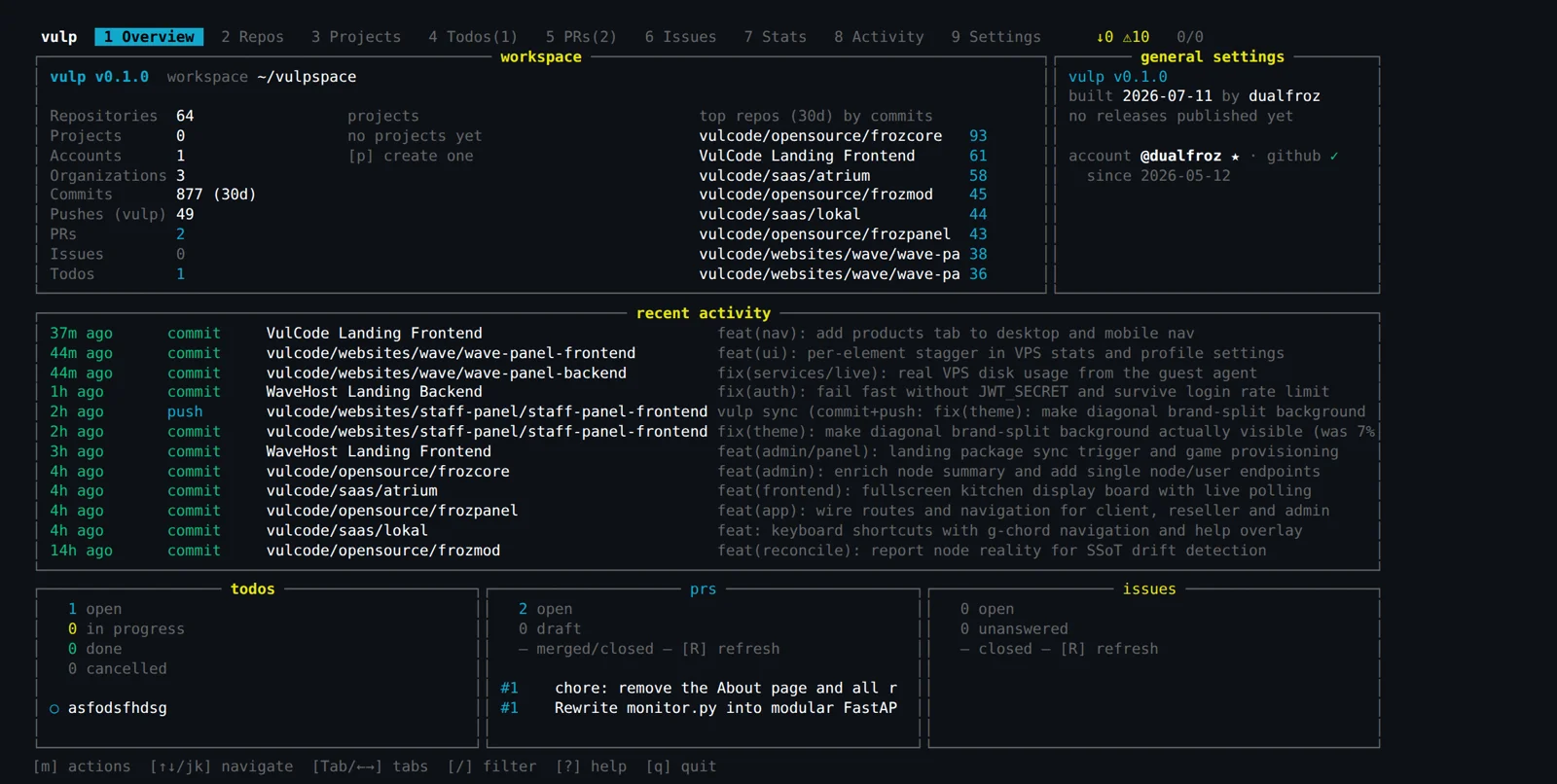
A full-screen terminal interface (TUI) for managing a whole workshop of repositories, driven entirely from the keyboard. The whole workspace and its state on one screen, the same core as the prompt-free CLI - without leaving the terminal.
Overview
vulp is a tool for managing a workshop of repositories: dozens of repos you need to keep under control at once. This case study covers its terminal face - a full-screen TUI that shows the state of the whole workspace on one screen and lets you act on it in batch, without moving a hand off the keyboard.
The key point is that the TUI is not a separate program. Underneath sits the same core as the prompt-free CLI with JSON output - the one automation uses. A human and a script call the same logic, just through a different entry point: one with a key, the other from a pipeline.
For those who live in the console
Some people work in the terminal and do not want to leave it for something as basic as a repository overview. If all the work happens in the console, opening a browser just to check where the changes are breaks the rhythm. The tool should be where you already are.
vulp respects that. It does not add a separate window or force a context switch - you launch it in the same console you are already sitting in, get the full picture of the workshop and go back to work. No mousing around, no waiting for a page to load.
Context instead of a git status loop
When you have dozens of repositories, checking them one by one is a loop: cd into the directory, git status, git fetch, back out, next. Ten minutes of clicking to learn that changes are waiting in three of them. The more repos, the less realistic it is to keep this in your head.
vulp lays the whole workshop on one screen: which repo has uncommitted changes, which is ahead of its remote branch, where a pull is waiting, where a deploy has drifted from the server mirror. Instead of entering each one separately, you see the state of the whole and act precisely where something needs attention.
Manual loop vs vulp
| Task | Manual loop | vulp |
|---|---|---|
| State of 40 repos | 40x cd + git status | one screen |
| Commit and push across many repos | repo by repo | one selection, one keypress |
| Deploy drift from the server | manual comparison | detected and shown |
| Contribution stats | separate commands | in the same view |
The same CLI, a second face
The TUI is an interactive shell over the core that also powers the prompt-free CLI. Workspace scanning, batch operations, handling PRs and issues, guardrails against pushing the wrong thing - that is one set of logic, whether a human calls it with a key or a script does from a pipeline.
Because of that a new operation shows up in both places at once, and what you do by hand in the TUI has exactly the same safeguards as a call from automation. There is no human version and script version that drift apart over time and catch different bugs.
Shortcuts you do not have to learn
A good TUI can be used without reading a manual. Shortcuts follow what they do: s for sync, r for refresh, q for quit. If you have to remember that F7 does a commit, the interface design took a wrong turn. vulp holds to that principle, so the whole workshop can be handled with fingers on the keyboard, without a cheat sheet next to you.
The other half of the comfort is safety. Batch operations are convenient right up to the moment when one keypress pushes something bad to ten repos at once. So guardrails from the shared core stand between you and that move - the same ones that protect calls from automation.
Batch operations are the sharpest tool in this box. One keypress can touch many repos at once, so the guardrails are not decoration - they are what catches the moment convenience turns into a mass mistake. vulp would rather block a doubtful push than spread it across the whole workshop.
a single pass gathers the state of every repo before anything shows up on screen.
the repo list with their state, a details panel and a shortcut bar, without scrolling in a typical terminal window.
sync, fetch or push across selected repos at once, one keypress instead of a loop.
the same blocks against pushing the wrong thing as in the CLI, because it is the same code.
What the final result is
Instead of a loop over directories you get one screen that tells you where the changes are, where a pull is waiting and where a deploy has drifted from the server - and lets you handle it in batch, without moving a hand off the keyboard. An overview that used to eat hours takes a few seconds.
And because it is a shell over the same core as the CLI, a human and a script do exactly the same thing, just as safely. The guardrails do not vanish when you move from automation to hand work, and a capability added once is immediately there both in the terminal and in the pipeline.
The whole workshop on one screen, and every move by hand has the same safeguards as a move by a script.
More projects
More work from the same category - see how we tackle similar challenges.
Have a similar project?
Get in touch - a quote is free and comes back within an hour.