
PayU integration through the REST API
Orders, notifications, refunds, saved cards and BLIK on your own page, built on REST API 2.1. For stores and apps where a ready plugin cannot handle the way you sell.
How we build a PayU integration
The six most common situations and how we build the PayU integration in each.
If you are starting a new PayU integration,
then we build it on PayU's current API. The older Classic protocol is no longer open to new integrations, so nothing will need rewriting.
If the customer pays without an account in your store,
then the integration connects to PayU with your point of sale's key and renews its access before it expires, so payments never stop mid-day.
If the customer is signed in and pays with a saved card,
then we link the card to their account in your store. PayU has to enable saved cards, so we check that before quoting.
If payment has to be part of a panel, app or booking,
then we write an integration that fits the way you sell, with BLIK and cards on your own page and no redirect. A ready plugin cannot do that. The gateway comparison
If a customer returns part of an order,
then you order a partial refund in your panel. The panel shows how much is still refundable, because refunds cannot add up to more than the order.
If you want to test first,
then we start in the PayU test environment, and a public test point of sale covers the first tries. We run heavy-traffic tests on our side, because the PayU test environment is not meant for them.
From the cart to a paid order
The simplest flow, with a redirect to the PayU payment page.
Your server
connects with the point of sale's key
At the startorder 10517The order in PayU
amount, products, the notification address and the return page
From step 1creates the orderPayment page
the customer picks a method and pays
From step 2the payment linkNotification
signed, sent to the address given in the order
From step 3status changeStatus in your system
after checking the signature and amount
From step 4receipt confirmed
When it works
COMPLETED: the payment is accepted and we start fulfilling the order.
Held for a person to check
From step 4: the signature or amount does not matchThe order keeps its status, and a notification without a matching signature is turned away.
When it fails
CANCELED: the payment is cancelled and the buyer was not charged. The order goes back to payment or expires.
Confirmed or resent
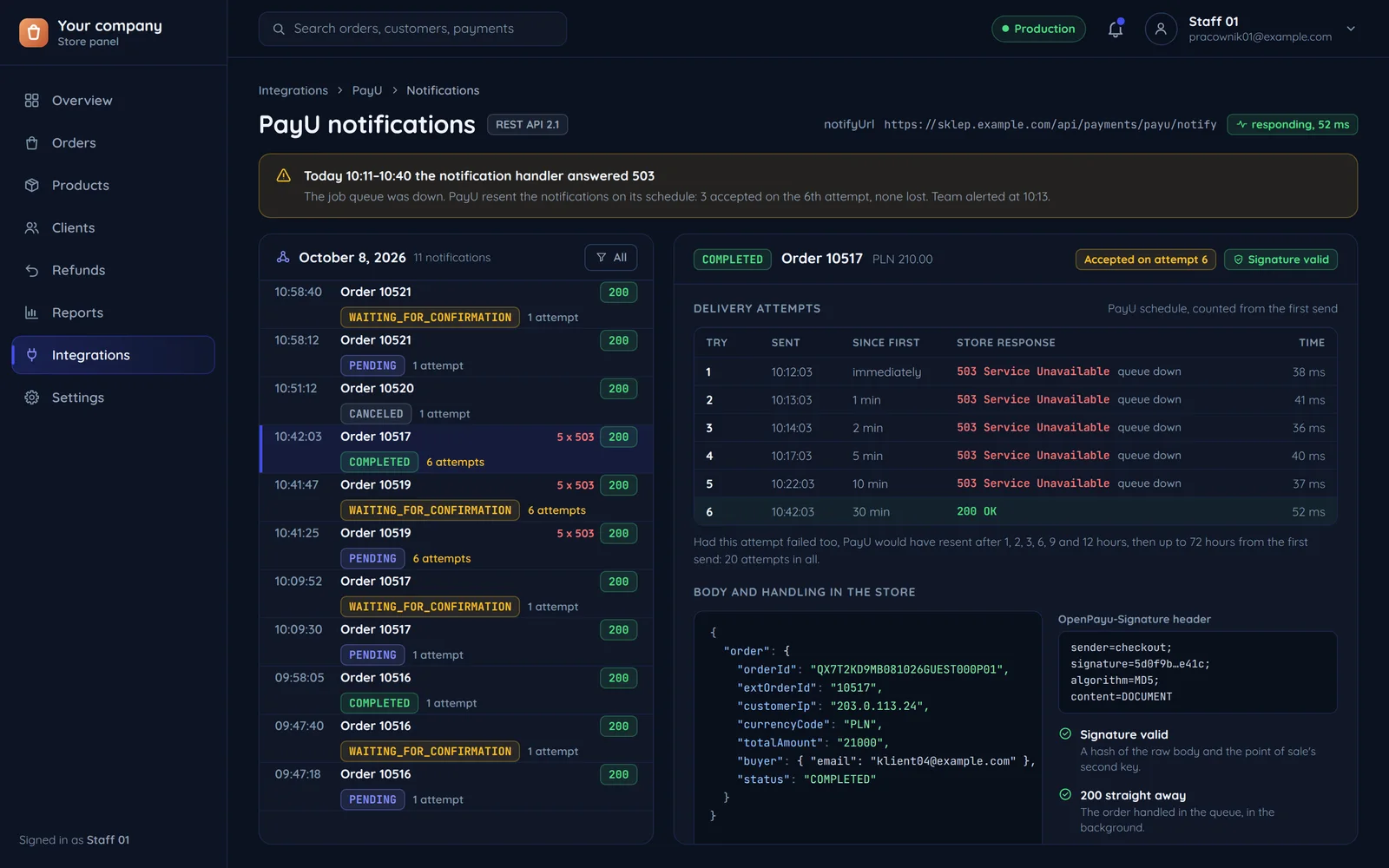
PayU waits for your server to confirm it got the notification. Without that it sends it again on its schedule, so no payment is lost.
Paid stays paid
Once a payment is accepted (COMPLETED), further notifications about the same order no longer change its state.
Manual capture
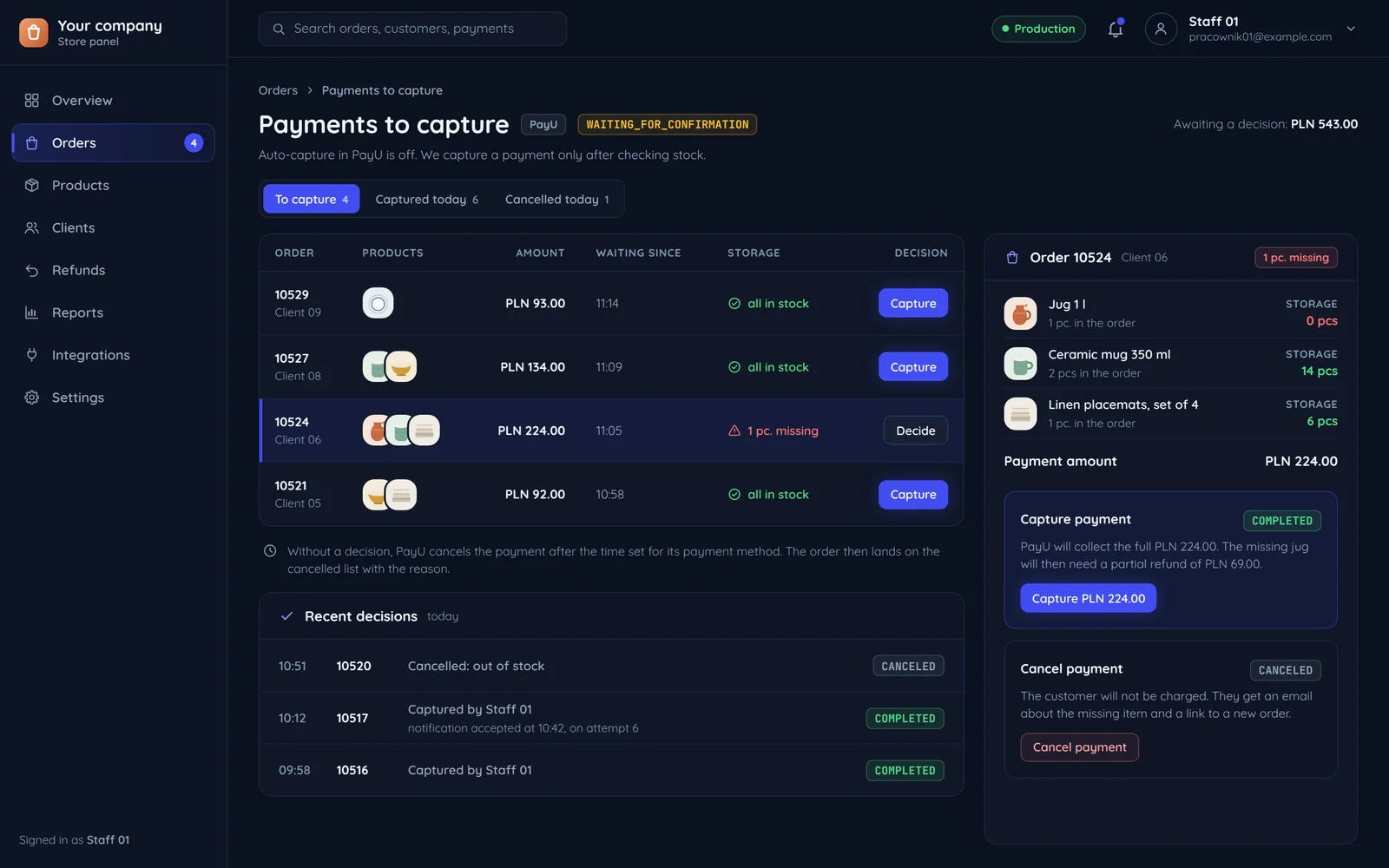
A payment can wait until your system captures or cancels it, for example after a stock check. Without a decision PayU cancels it after the time set for the payment method.
A checked signature
We check every notification with your point of sale's second key before doing anything with it, so a forged notification never changes an order's status.
How long PayU keeps resending notifications
When your server does not confirm a notification, PayU sends it again. The schedule spans three days.
What our module does: A short server outage loses no payment; the queue takes the notice on the next attempt.
What our module does: Monitoring flags the unresponsive notification address before a customer notices.
What our module does: Orders without confirmation go on a list, and we check them by fetching the transaction data straight from PayU.
Four ways to take payment through PayU
From a redirect to a card saved on the customer's account. We roll out each of them and match them to how much should happen on your own page.
| PayU payment pageredirect | BLIK on your pagecode entered in the shop | Card via Secure Formcard fields from PayU | Saved cardon the customer's account | |
|---|---|---|---|---|
| The customer stays on your page | PayU payment pagenoon the PayU page | BLIK on your pageyesin your form and the banking app | Card via Secure Formyesin PayU fields embedded in your page | Saved cardyesin one click on the next purchase |
| Card data bypasses your server | PayU payment pageyes | BLIK on your pageyes | Card via Secure Formyes | Saved cardyes |
| Works without extra PayU configuration | PayU payment pageyes | BLIK on your pagepartly | Card via Secure Formyes | Saved cardnoPayU has to enable saved cards, and some older points of sale do not have them. |
| Works without a customer account | PayU payment pageyes | BLIK on your pageyes | Card via Secure Formyes | Saved cardnoA saved card is linked to the customer's account. |
| Good for | PayU payment pageA quick start and many methods at once | BLIK on your pagePhone purchases without leaving the shop | Card via Secure FormCard payments with no redirect | Saved cardStores with returning customers |
Your order, the PayU order
This is how we join the data so every notification reaches the right order.
- Your systemorder number 10517→unique, ties notifications to the orderPayUthe order identifier in PayU
- Your systemorder total 210.00 PLN→PayU counts in groszePayUan amount of 21000 grosze
- Your systemcart lines→unit prices in groszePayUproducts with price and quantity
- Your systemcustomer email→PayU sends its confirmation therePayUbuyer email
- Your systemcustomer IP→required when creating the orderPayUbuyer IP
- Your systemnotification handler address→can differ for each paymentPayUnotification address
- Your systempage after payment→for the customer only, confirms nothingPayUreturn page
| What | Direction | When |
|---|---|---|
| The order | Your system → PayU | When the customer clicks "Pay". The reply carries the link to the payment page. |
| A status notification | PayU → Your system | After every status change, signed. We check the signature before the order changes. |
| The customer coming back | PayU → Your system | After paying. It is a page for the customer and confirms nothing. |
Common questions about PayU
Answers about cards, saved cards, notifications, capture, refunds and the quote.

Read next
Other gateways and pages that connect to payments.
How do your customers pay today?
Tell us where PayU payments should work and what should happen after payment. We will reply within an hour with questions and a quote.