
VulCode

Przelewy24 integration through the REST API

Przelewy24 payments where a ready plugin cannot reach: your own store, client panel, app, booking system or subscription. With server-side verification of every payment, refunds and BLIK.

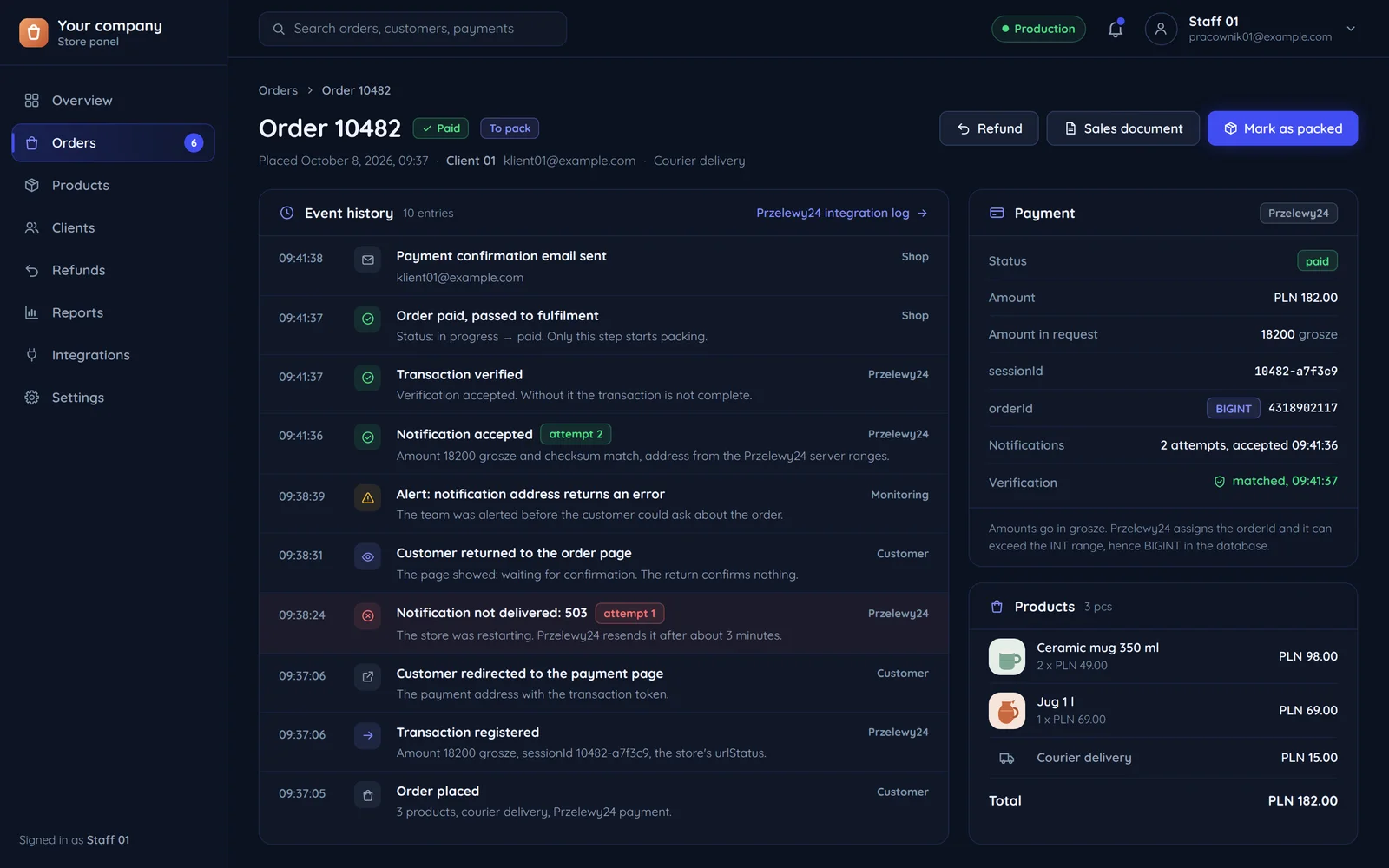
A store panel: order 10482 paid through Przelewy24, its event history with a failed first notification and the transaction verification

The path of one payment

The customer returning to your site confirms nothing. The notification and a server-side verification decide.

  • Customerbrowser or app
  • Your serverthe payment module
  • Przelewy24
  1. CustomerYour server

    Step 1 of 8: Clicks "Pay"

    The order gets its own unique payment number

  2. Your serverPrzelewy24

    Step 2 of 8: Transaction registration

    The amount, the return page for the customer, the notification address and a signature with the panel key

  3. Przelewy24Your server

    Step 3 of 8: Payment identifier

  4. Your serverCustomer

    Step 4 of 8: Redirect to the payment page

    The Przelewy24 payment page for this order

  5. CustomerPrzelewy24

    Step 5 of 8: Pays by transfer, BLIK or card

  6. Przelewy24Your server

    Step 6 of 8: Result notification (in the background)

    Sent whether or not the customer returned

  7. Your serverPrzelewy24

    Step 7 of 8: Transaction verification

    Without verification the transaction is not complete

  8. Your serverCustomer

    Step 8 of 8: Order paid

    Only now does the status change and fulfilment start

When your server misses a notification

Przelewy24 resends the notification until the transaction is verified. The schedule is fixed and documented.

Przelewy24: delivery attempts
  1. first notification
  2. after 3 min
  3. after 5 min
  4. after 15 min
  5. after 30 min
  6. after 60 min
  7. after 150 min
  8. after 450 min
  9. No more notifications, unverified transaction

The notification addressA notification without a verified transaction comes back on the next attempt, with the same parameters.

The order
in progress: the payment waits for a notification and verification
  • Paid: verification passed

Payment statuses in your system

This is how we run a payment on your order. The upper lane holds the events at Przelewy24, the lower one the order status, which turns paid only after verification.

Przelewy24
Registration

The amount, the notification address and a signature with the panel key.

Your system
new

Transaction registered, the customer has the payment link.

Przelewy24
The customer pays

By transfer, BLIK or card on the payment page.

Your system
in progress

The customer is on the payment page or confirming BLIK in the banking app.

cancelled or timed out
abandoned

The customer cancelled or time ran out. The order waits for another attempt.

Przelewy24
Notification

Sent even if the customer did not come back.

Your system
notified

A notification arrived, but the amount and signature are not yet checked.

does not match
mismatch

The amount or signature does not match the order. We stop and alert a person.

Przelewy24
Verification

Without it the transaction is not complete.

Your system
The status changes only after verification
paid

Verification passed. Only this status starts fulfilment.

refund from your panel
refunded

A full or partial refund ordered from your panel, without signing in to the gateway. The refund status arrives in a separate notification.

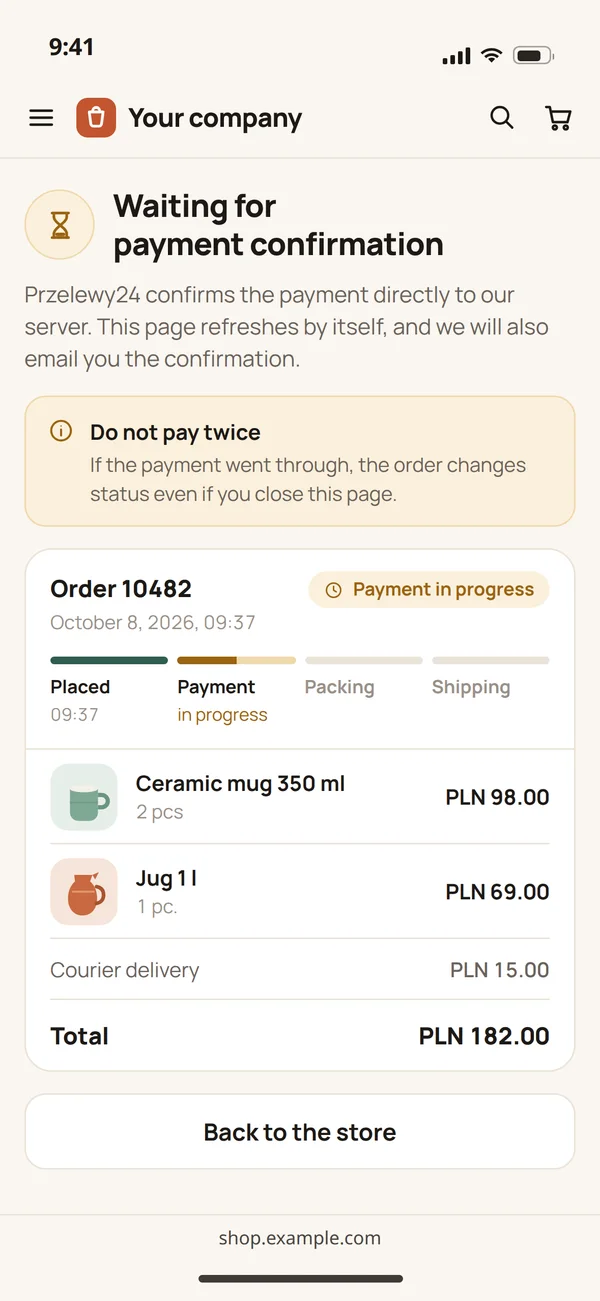
The page of order 10482 on a phone after returning from payment: waiting for the payment confirmation, payment in progress

What the customer sees meanwhile

Coming back to the site confirms nothing, so the page shows the payment in progress until the server verifies the transaction. The order changes status even if the customer closes the page.

A plugin or an API integration

Przelewy24 ships ready plugins for popular platforms. We write code only where there are none.

Your store or system

Where customers should pay and what should happen after payment.

A plugin is enough

When
  • Your store runs on WooCommerce, PrestaShop, Magento or Shopify, for which Przelewy24 provides plugins.
  • Shoper has a partner module you install in the store panel.
  • After payment, a status change inside the platform is all you need.
Verdict

We install and set up the plugin, with no code there is any reason to pay for.

You need an API integration

When
  • Payment happens in your own system: a client panel, mobile app, booking engine or a platform with accounts.
  • Something has to happen after payment: a service activation, an invoice, a shipment, a seat allocation.
  • You want refunds, BLIK on your own page or splitting payments between sellers.
Verdict

An integration with Przelewy24 in your system, with every payment verified on the server and statuses in your panel.

Common questions about Przelewy24

Answers about the account, BLIK, mobile apps and the quote.

Where should payments work?

Tell us which system customers should pay in and what should happen after payment. We will reply within an hour with questions and a quote.