
BaseLinker integration through the API
BaseLinker gathers orders from marketplaces and stores. When your store, panel or ERP has no ready connection to it, we write one through the BaseLinker API, within its limits and with every order checked.
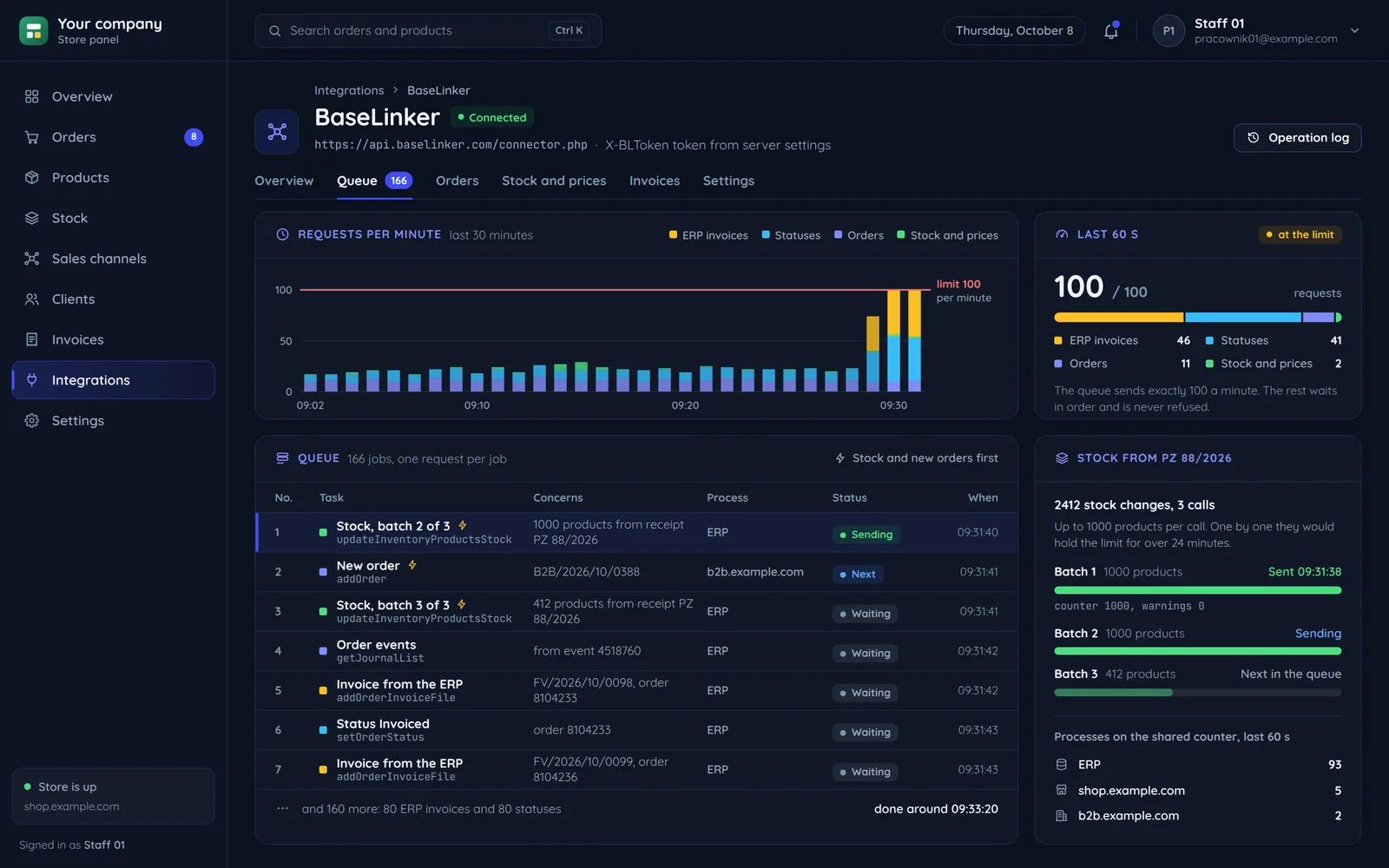
A ready connection or your own integration
BaseLinker has hundreds of ready connections. First we check whether your case is already there.
Ready connections are enough
- The store runs on a popular platform BaseLinker connects to itself.
- Your ERP is Subiekt GT or nexo, which have a free integrator.
- The flow is standard: order, label, document.
You need your own integration
- The store, panel or warehouse system is custom-built.
- The invoice is made in the ERP and should replace the BaseLinker invoice on the order.
- Statuses, extra fields or rules go beyond what the ready connection can do.
The numbers that shape the design
The BaseLinker API has simple rules and hard limits. We design the integration around them from the start.
- 100 requests per minute
Every job goes through one queue with a counter, even with several stores.
- 100 orders
We page by the confirmation date, shifted by a second.
- 1000 products
We batch changes instead of sending each alone.
- 3 days
A longer outage needs a date-based fetch, so both methods live in the code.
Fetching new orders within the limit
We fetch confirmed orders only, from the last confirmation date plus one second, as the documentation recommends. The screen shows a first import of a week and a few minutes of the event journal.
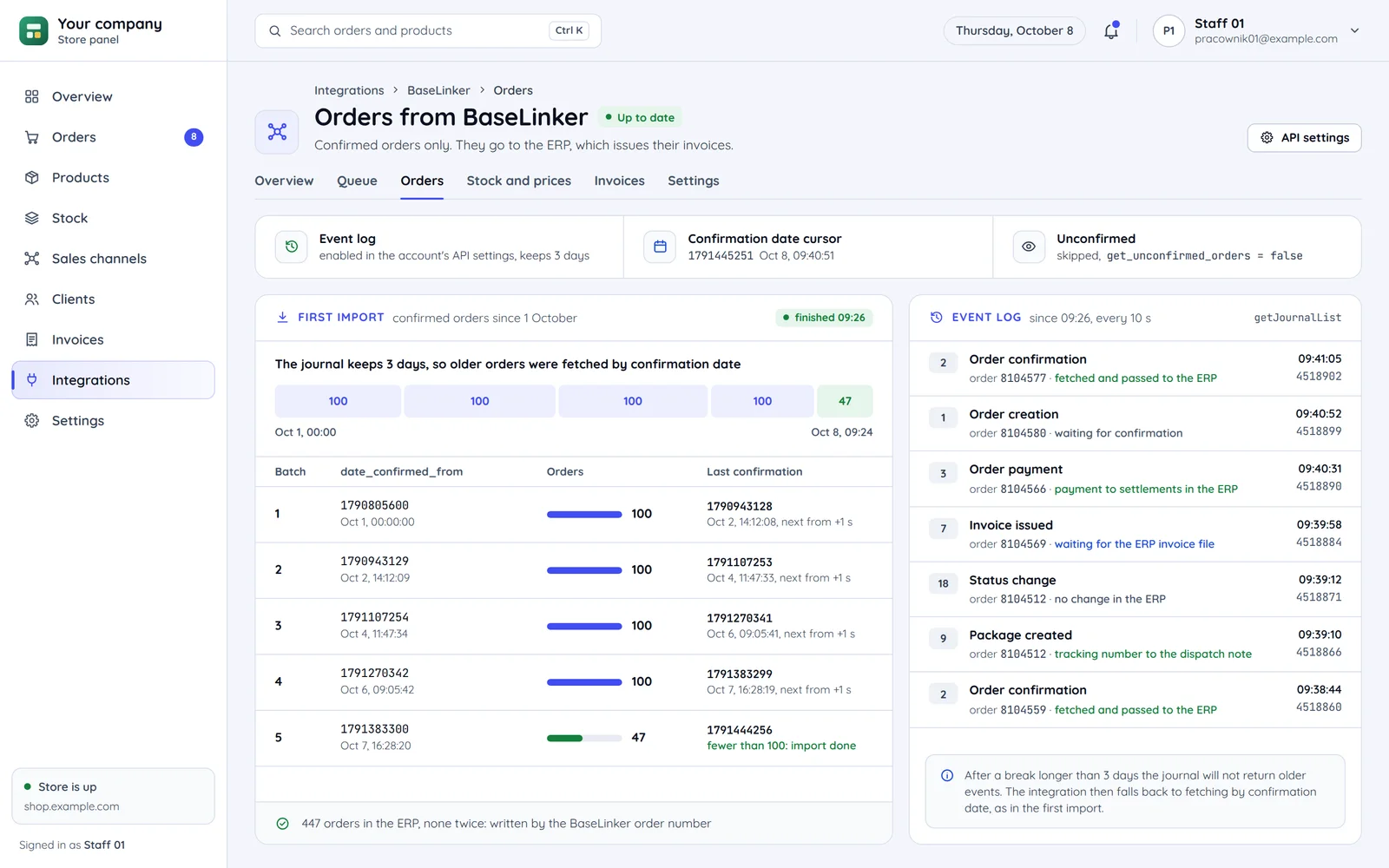
Fetching from the confirmation date
An order cannot appear with an earlier confirmation date, so fetching from the last saved date guarantees nothing is lost.
Batches of 100 orders
A batch smaller than 100 orders means there is nothing left to fetch.
The event journal switched on
Unless it is enabled in API settings the journal returns empty responses and the integration looks broken.
BaseLinker, Apilo or Sellasist
Three multichannel selling systems. We compare them from the integration side, not pricing.
| BaseLinkerone entry point for all data | Apiloa separate entry point for each kind of data | Sellasistseparate entry points under your account address | |
|---|---|---|---|
| A fixed access key from the panel | Yes | No | Yes |
| A per-minute request limit in the documentation | Yes | Yes | With a condition |
| Order changes read from a journal | With a condition | No | Yes |
| Statuses from the account's list, not hard-coded | Yes | Yes | Yes |
| An invoice from the accounting program on the order | Yes | Yes | Yes |
- A fixed access key from the panel (BaseLinker): a key from the BaseLinker account settings
- A fixed access key from the panel (Apilo): access through signing in to Apilo, renewed automatically
- A fixed access key from the panel (Sellasist): a key from Integrations, API keys
- A per-minute request limit in the documentation (BaseLinker): 100 per minute
- A per-minute request limit in the documentation (Apilo): 150 per minute
- A per-minute request limit in the documentation (Sellasist): per the account documentation
- Order changes read from a journal (BaseLinker): events from the last 3 days, once enabled in the API settings
- Order changes read from a journal (Apilo): changes fetched with a date filter on the order list
- Order changes read from a journal (Sellasist): a change history with an operation tag on every entry
- An invoice from the accounting program on the order (BaseLinker): the ERP invoice file in place of the BaseLinker invoice
- An invoice from the accounting program on the order (Apilo): an external document attached among the sales documents
- An invoice from the accounting program on the order (Sellasist): issued in Sellasist or in a connected program
A store order as a BaseLinker order
This is how we pass a store order to BaseLinker: every field lands in its place by a rule agreed with you. The screen shows an order after it went to BaseLinker, and its history.
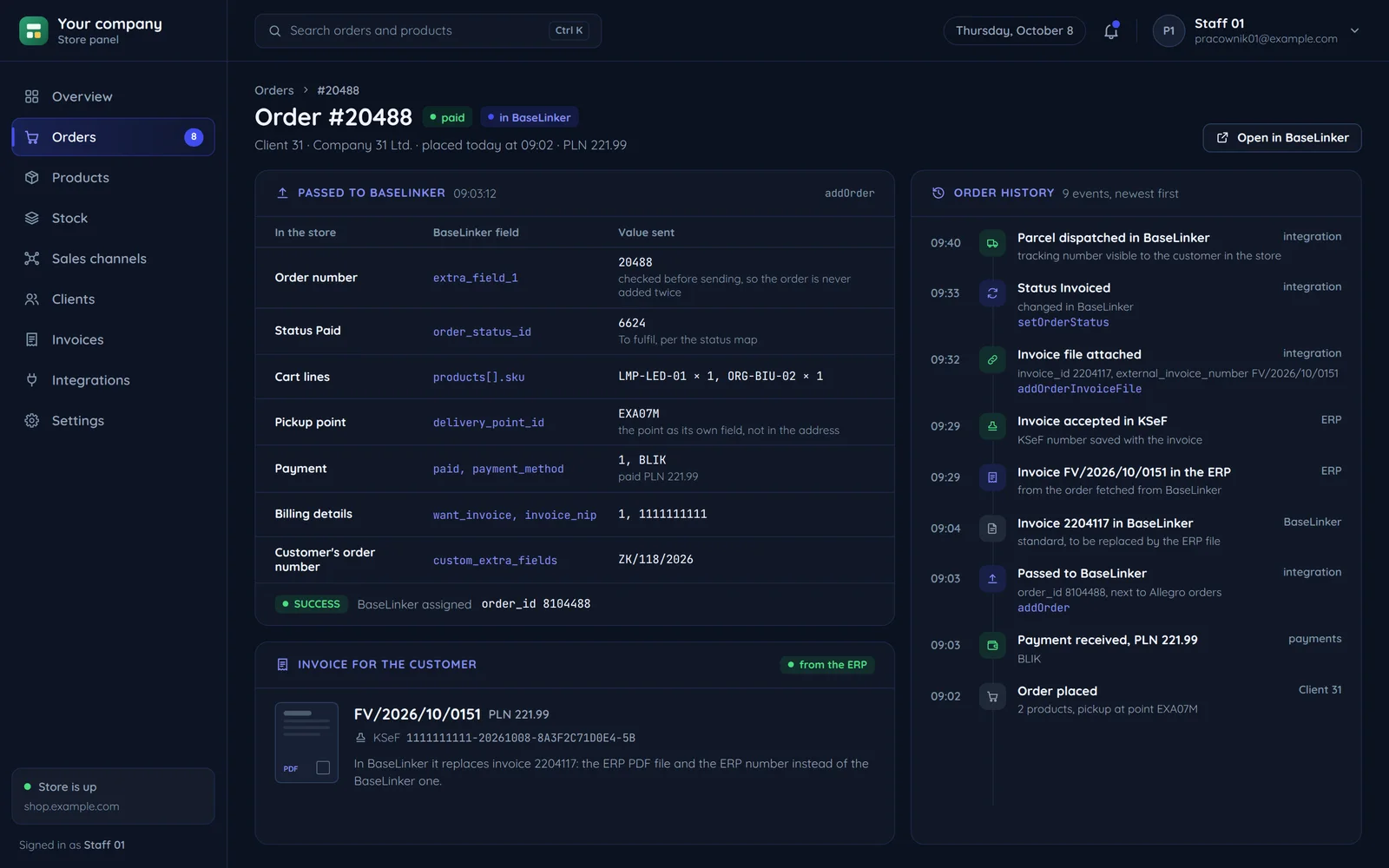
Your storeBaseLinker
Number and status
- order numberexternal id
so the order is never added twice
- store statusa status from the BaseLinker list
a status map agreed with you
Cart, delivery and payment
- cart linesorder products
by SKU or EAN
- delivery and pickup pointdelivery method and address
pickup point as its own field
- paymentpaid amount and payment method
the amount paid, not just ordered
- custom fieldsorder extra fields
e.g. a customer's B2B order number
The ERP invoice
- Invoices from the ERPthe invoice file on the order
issue in the ERP: a file attached to the order in place of the BaseLinker invoice
Common questions about BaseLinker integration
Answers about ready connections, stock, ERP invoices and the quote.

Read next
The channels and systems we connect to BaseLinker most often.
Where do your orders land today?
Tell us what store or system you have and what should go to BaseLinker. We will reply within an hour with a quote.