VulCode

E-commerce automation and growth for a store that already sells

Your store sells, but the team re-types orders, fixes stock and issues invoices by hand? We connect it with Allegro, BaseLinker, ERP, couriers and KSeF, or move it to custom code.

Commerce and tech
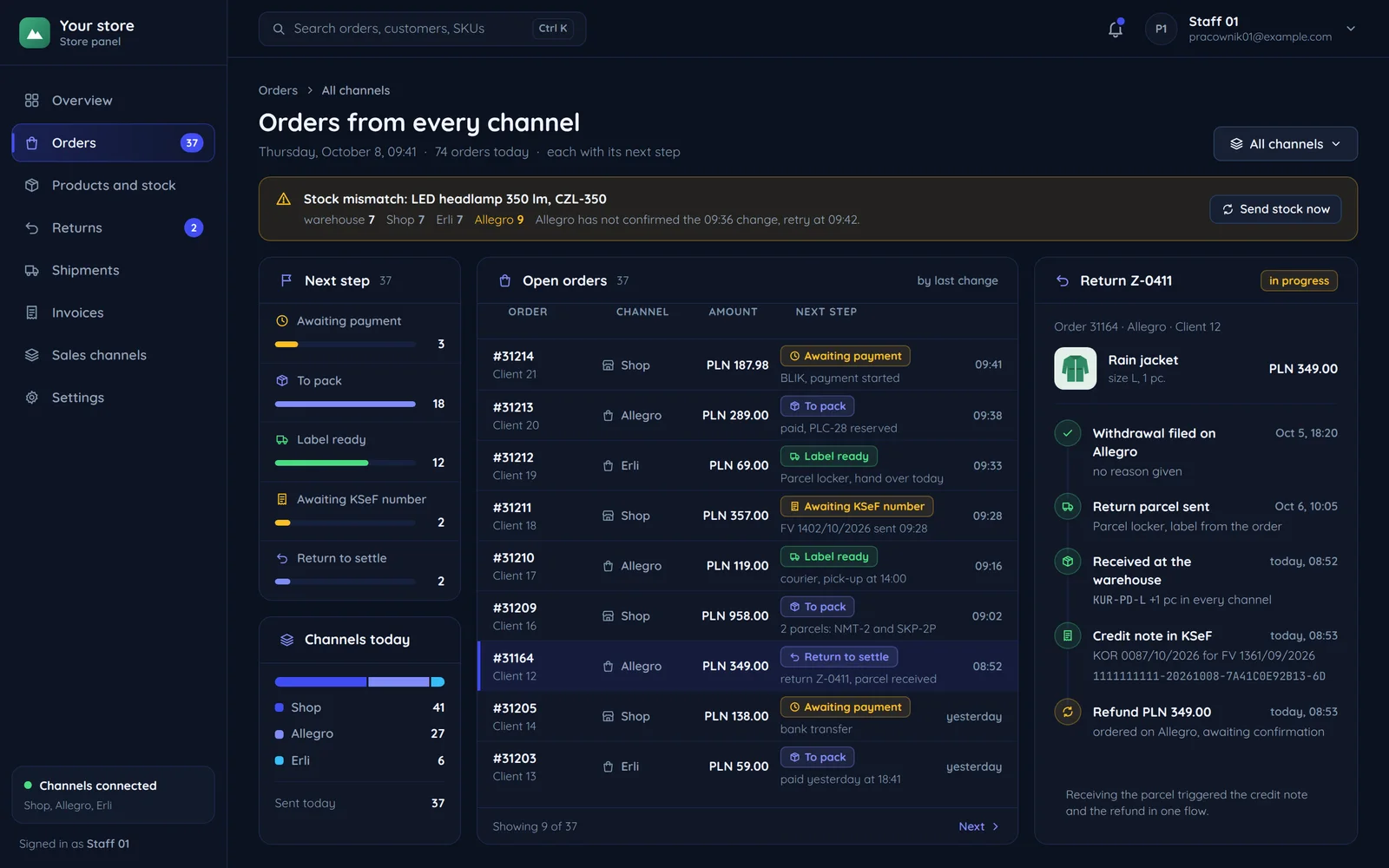
The store order panel: orders from the store, Allegro and Erli with their next step, a stock mismatch on top and a return in progress

Where a store team loses time

Four tasks that eat hours a day in a growing store. Each can be automated.

Today

One order in several panels

  • The Allegro panel
  • The store panel
  • The warehouse system
  • Accounting software
  • The courier panel

The order, the stock, the invoice and the address all pass through the team's hands.

After integration

Statuses that say something

  • Awaiting payment
  • Label ready
  • Invoice in KSeF

Instead of "new" and "done" you see the next step: awaiting payment, label ready, invoice in KSeF.

Orders from several channels

Today: Orders from Allegro and the store in separate panels, some re-typed into the warehouse system.

After integration: Every channel in one place, through BaseLinker or your own order hub.

Stock levels

Today: A product sold in the store is still listed on Allegro, so you sometimes sell what you do not have.

After integration: A stock change reaches every channel at once, the moment an order is accepted.

Invoices

Today: Invoices typed by hand in accounting software, and since 2026 also sent to KSeF.

After integration: The document is created from the order in your ERP and reaches KSeF without copying data.

Labels and shipping

Today: Addresses copied into the courier panel, tracking numbers pasted into customer emails.

After integration: The label is generated from the order and tracking reaches the customer on its own, through couriers.

An order nobody re-types

Five systems a single order passes through. There is no person with a spreadsheet between them.

Store and AllegroOrder hubERPCourierKSeF
At the start
listings with stock
BaseLinker, Apilo or a custom module, depending on scale.
stock, prices and documents
InPost, DPD, Furgonetka, Apaczka
no invoice for this order yet
An order from AllegroAn order from the store or Allegro.
a new order
saved once, with its channel and IDChange came from: Store and Allegro
no change
no change
no change
No duplicate ordersChannels can send the same order twice. We check the channel and ID before saving anything.
the same order again
skipped, it is already savedChange came from: Store and Allegro
no change
no change
no change
Reserve before publishing stockStock is reserved first and only then pushed to channels. Two orders for the last item cannot both go through.
the new stock in every channelChange came from: Order hub
no change
stock reservedChange came from: Order hub
no change
no change
Label and tracking numberLabel, pick-up and a tracking number for the customer.
the tracking number with the customerChange came from: Order hub
no change
no change
label and pick-upChange came from: Order hub
no change
Documents straight awayThe warehouse document and invoice are created in the ERP from the same order, with no exports.
no change
no change
warehouse document and invoice
no change
an invoice with a KSeF number, which returns to the order historyChange came from: ERP
Stock mismatches on topWhen a channel's stock does not match the warehouse, the panel shows it right away instead of waiting for a complaint.
stock different from the warehouse
the mismatch on top of the panelChange came from: Store and Allegro
no change
no change
no change
At the start
Store and Allegro
listings with stock
Order hub
BaseLinker, Apilo or a custom module, depending on scale.
ERP
stock, prices and documents
Courier
InPost, DPD, Furgonetka, Apaczka
KSeF
no invoice for this order yet
An order from Allegro
An order from the store or Allegro.
Store and Allegro
a new order
Order hub
saved once, with its channel and ID
Change came from: Store and Allegro
No duplicate orders
Channels can send the same order twice. We check the channel and ID before saving anything.
Store and Allegro
the same order again
Order hub
skipped, it is already saved
Change came from: Store and Allegro
Reserve before publishing stock
Stock is reserved first and only then pushed to channels. Two orders for the last item cannot both go through.
Store and Allegro
the new stock in every channel
Change came from: Order hub
ERP
stock reserved
Change came from: Order hub
Label and tracking number
Label, pick-up and a tracking number for the customer.
Store and Allegro
the tracking number with the customer
Change came from: Order hub
Courier
label and pick-up
Change came from: Order hub
Documents straight away
The warehouse document and invoice are created in the ERP from the same order, with no exports.
ERP
warehouse document and invoice
KSeF
an invoice with a KSeF number, which returns to the order history
Change came from: ERP
Stock mismatches on top
When a channel's stock does not match the warehouse, the panel shows it right away instead of waiting for a complaint.
Store and Allegro
stock different from the warehouse
Order hub
the mismatch on top of the panel
Change came from: Store and Allegro

Returns and corrections: A return from any channel triggers a credit note and a refund in one flow.

The integrations we connect to stores most often

Each has its own page describing what we send and in which direction.

Your store

your current platform or custom code

We connect a store on a ready-made platform without changing the platform. How we do it on each of them is on the e-commerce platforms page.

Allegro

Both ways
  • Listings and stock
  • Orders and returns
  • Buyer messages

BaseLinker

Both ways
  • Orders from many channels
  • Statuses and documents

Apilo and Sellasist

Both ways
  • Alternative multichannel sales hubs

Couriers

We send
  • Labels and tracking numbers
  • InPost, DPD, Furgonetka, Apaczka

ERP

Both ways
  • Stock, prices and documents
  • Subiekt, Optima, enova365, Symfonia

KSeF

We send
  • Invoices with a KSeF number
  • Offline mode handling

Store obligations we build into the code

Polish rules that apply to most stores selling to consumers. We keep to them with every change. We write this as the website builder, not a law firm, so it is not legal advice.

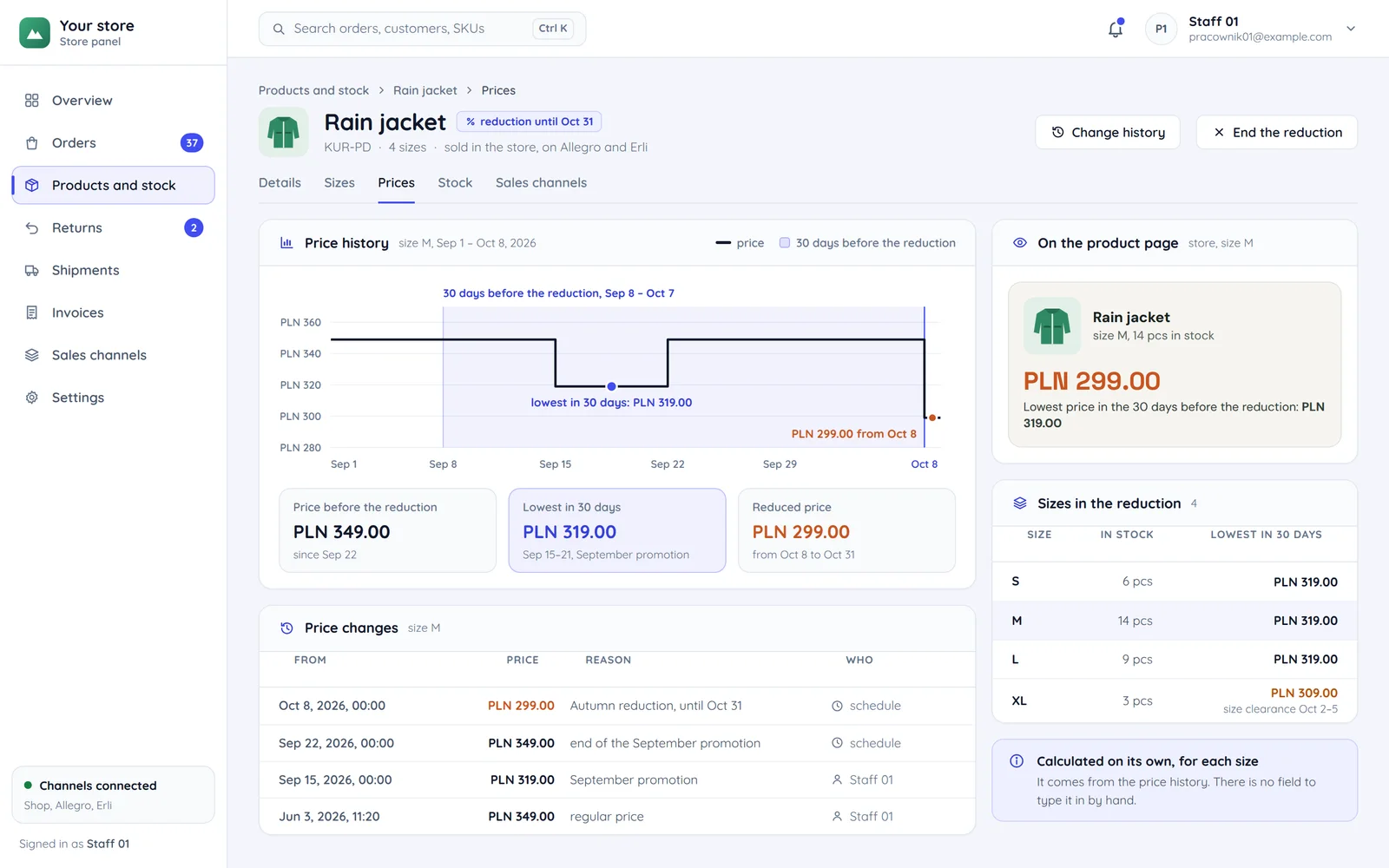
The rain jacket's prices in the store panel: price history with the 30-day window before the reduction, the lowest price PLN 319.00 and the product page at PLN 299.00
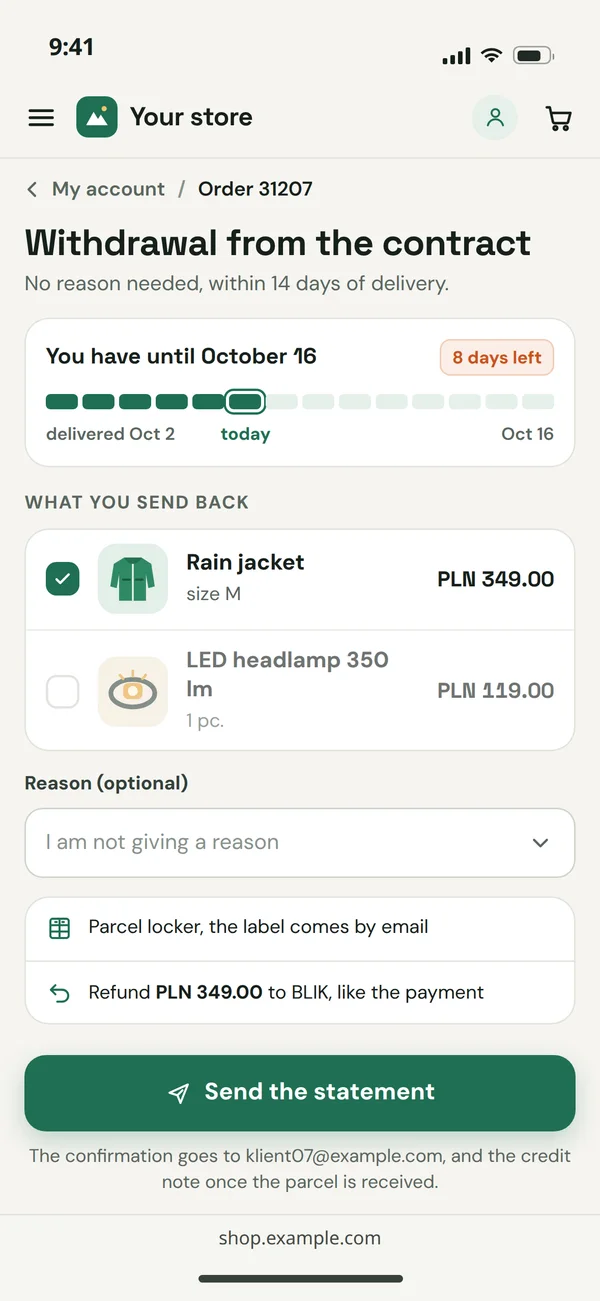
Withdrawal from the contract in the customer account on a phone: the deadline of 16 October, the items, an optional reason and the button that sends the statement
  1. The lowest 30-day price next to promotions

    With every price reduction you show the lowest price from the 30 days before it (art. 4(2) of the Polish act on price information).

  2. From the price history

    We calculate it from price history.

  3. 14 days to withdraw

    Consumers may withdraw from a distance contract within 14 days without giving a reason (art. 27 of the Polish Consumer Rights Act).

  4. A form in the store

    The return form and order correction are part of the store, not an email to support.

  5. Store accessibility since 28 June 2025

    E-commerce services for consumers must meet accessibility requirements unless provided by a microenterprise. We cover this in our article on digital accessibility.

Stay on the platform or move to custom code

Migration is not a goal in itself. Often it is better to stay on the platform and add integrations.

Your store on a platform

Most integrations connect to your current platform.

Platform and integrations

Unusual processes: configurator, B2B, subscriptionsplugins and workarounds
What it looks like
  • A standard store with growing ordersusually enough
  • Platform fees and commissionper the platform's pricing
  • Store speedwithin the theme
Conclusion

Often it is better to stay on the platform and add integrations. Risk of losing Google rankings: none.

Custom code

A standard store with growing orderstoo early
What it looks like
  • Unusual processes: configurator, B2B, subscriptionsbuilt exactly for the process
  • Platform fees and commissionhosting and maintenance costs
  • Store speedfull control
Conclusion

If you move to custom code, we do it as a migration without losing rankings, with a redirect map. Risk of losing Google rankings: only with a bad migration.

Questions from store owners

The most common questions before automating a running store.

Let us count the hours automation gives back

Tell us where you sell and what your team does by hand. We will reply with a list of integrations, their order and a free quote.