
A hotel website with direct booking built in
The guest picks dates, pays a deposit and gets a confirmation on your website, and reception sees it straight away in the Atrium panel with a live floor plan. Booking portals stay one of your channels, not the only way to reach guests.
Where a hotel loses money and time today
Four situations we hear about most often. Each one has a concrete fix in code, not in yet another spreadsheet.
A booking by email and phone
- An enquiry
- A reply with prices
- A request for a transfer
- Checking the payment
- An entry in a notebook or a spreadsheet
Every step is room for a mistake.
The calendar on the hotel website
- The price of the selected nights
- The deposit taken with the booking
- The booking saved in the panel
Reception re-types nothing.
Paying OTA commission on guests who were looking for you
Today: A guest finds the hotel on Google or Instagram, but the website has no booking, so they go back to a portal and book there with commission.
After launch: Booking with payment works on your own site. A guest who searches for your hotel by name books with you, and the portal only earns on guests it actually brought.
Bookings by email and phone
Today: An enquiry, a reply with prices, a request for a transfer, checking the payment, writing it into a notebook or a spreadsheet. Every step is room for a mistake.
After launch: The calendar prices the selected nights, takes the deposit and saves the booking in the panel. Reception re-types nothing.
The same room sold twice
Today: Availability on the website and on portals is updated by hand, so in high season you get overbookings and moved guests.
After launch: The panel blocks booking collisions and a channel manager sends availability changes to the portals.
Reception and housekeeping without a shared picture
Today: Reception does not know if a room is ready, and housekeeping learns about departures from a note on paper.
After launch: A floor plan shows the status of every room, and cleaning and maintenance run in one flow in Atrium.
Direct booking in four screens
This is the guest journey on a phone. Each screen has one job, and the price and cancellation rules are visible before payment, not after it.
Dates and guests
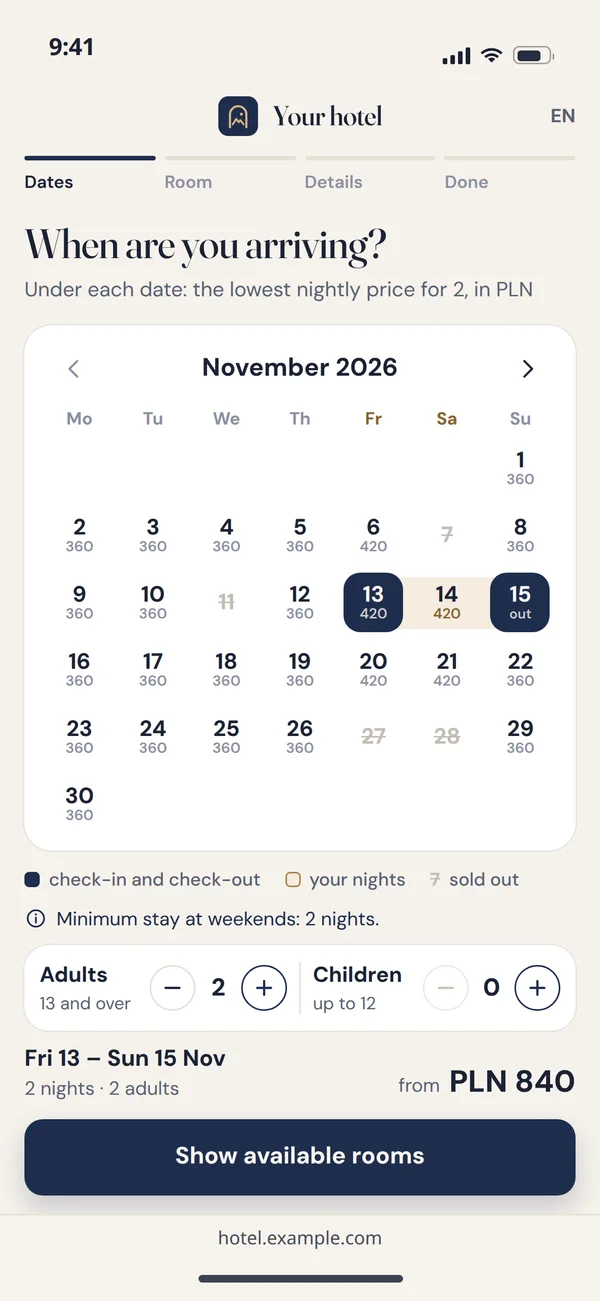
The calendar only shows free nights, with the lowest nightly price under each date. Sold-out days are crossed out, and on a weekend the screen itself says the minimum stay is two nights. The guest marks arrival and departure, sets the number of adults and children, and sees right under the calendar what the whole stay starts from. Minimum stay, seasonal prices and maintenance blocks are set in the panel, and the calendar takes them from there without anyone editing the website.
Choosing a room
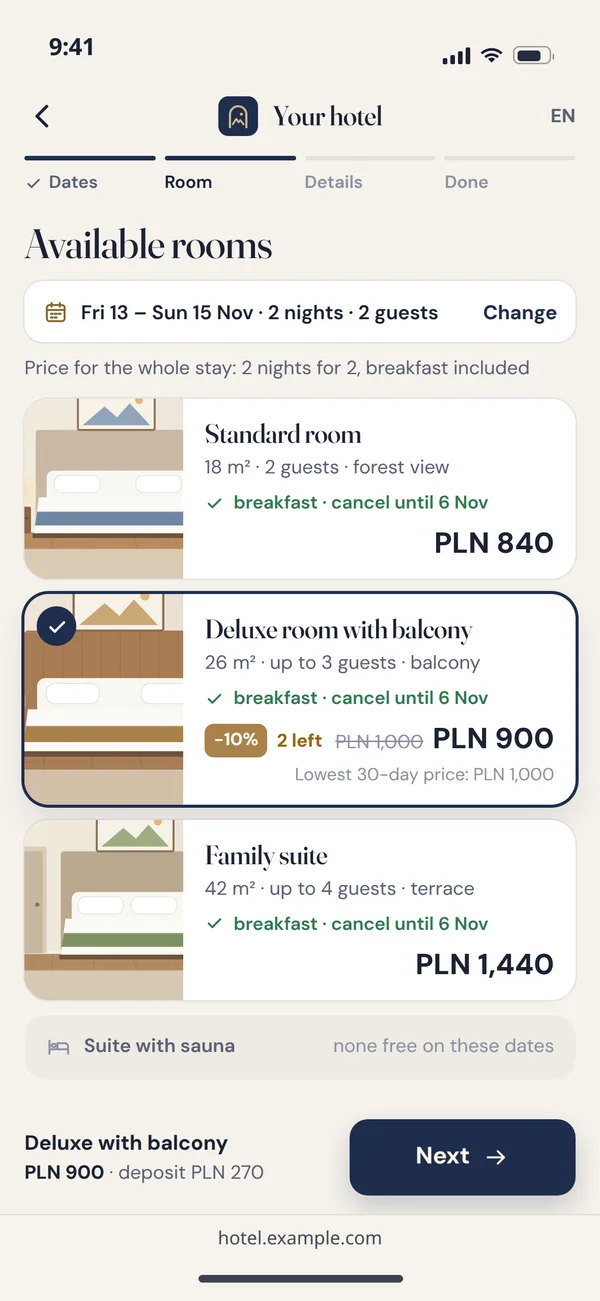
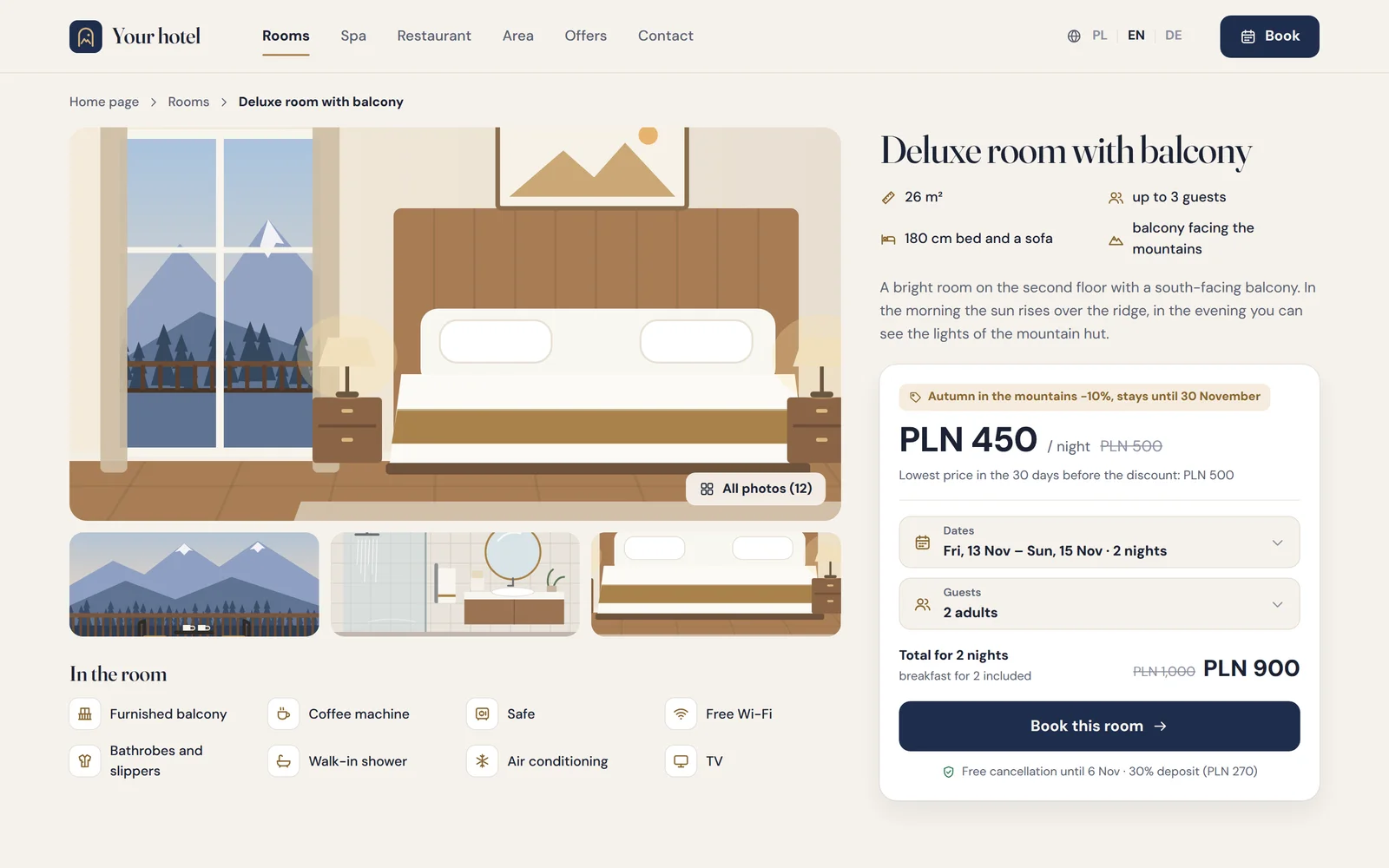
The guest sees only the rooms free on those dates, with the price for the whole stay, not a nightly rate they have to multiply. Each card shows the size, how many people it sleeps, what is included and the date until which cancellation is free. On a promotion the lowest price from the last 30 days sits next to the reduced one, worked out by the panel from price history, and a room type with nothing free stays on the list marked as unavailable for those dates. At the bottom of the screen the guest sees the chosen room with its price and the deposit before moving on.
Details and deposit
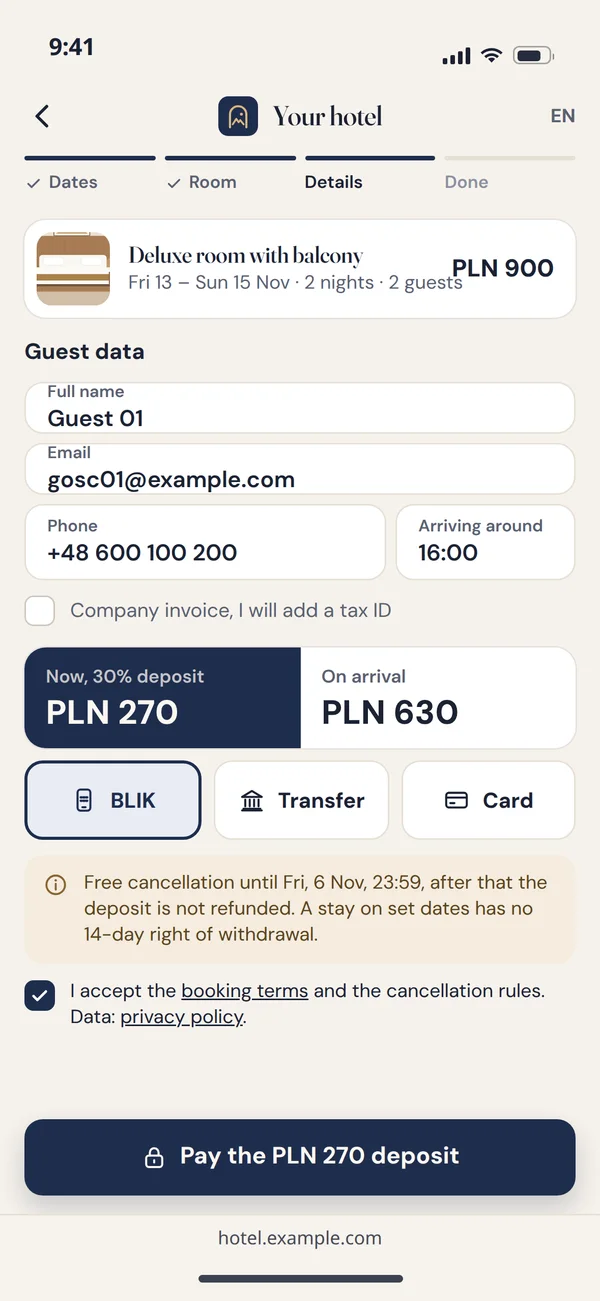
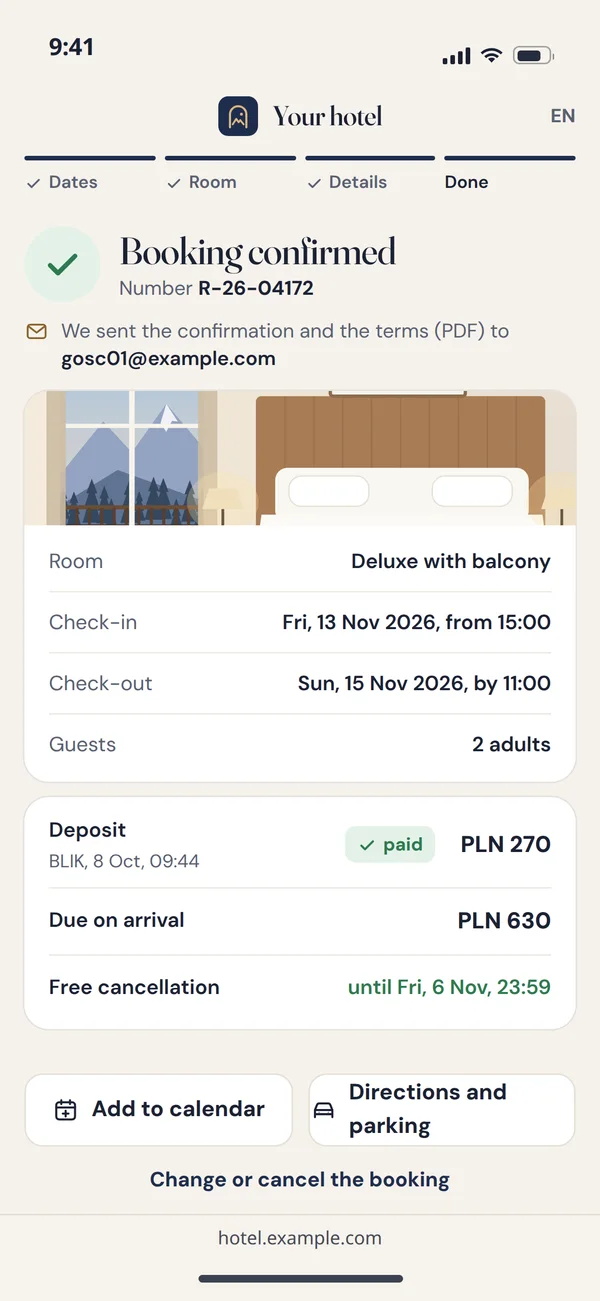
The form only asks for what reception needs: full name, email, phone and a rough arrival time, and a business guest ticks the company invoice box and adds a tax ID. Before payment the screen splits the amount into the deposit now and the rest on arrival, and shows the free cancellation deadline and that a stay on set dates has no 14-day right of withdrawal. The guest accepts the booking terms and pays by BLIK, transfer or card through a payment operator such as Przelewy24. You set the deposit size and the free cancellation window in the panel, so reception does not explain the rules over the phone.
Confirmation
The guest gets a booking number and an email with the terms. In the panel the booking shows up as paid, with a room assigned. The guest's screen keeps everything they might ask reception about: the room, arrival and departure times, the number of guests, the paid deposit, the amount due on arrival and the free cancellation deadline. Reception copies nothing from an email into a spreadsheet, and the panel will not accept a second booking for that room on those nights.
A website that sells rooms, not just shows them
The booking engine is half the job. The other half is a website guests find in search and trust enough to pay on.
- Every room on its own pagePhotos, size, amenities and a booking button with that room type preselected. A separate address is also a separate chance in Google for searches like "apartment with a balcony".
- Language versions with hreflangPolish, English and German are standard in tourism. We build them as multilingual websites with correct hreflang, not a machine translation widget.
- Speed on a phoneMost guests book on a phone. Modern image formats and light code are a requirement we check in a technical SEO audit.
- Content you edit yourselfPrice lists, packages, news and galleries are edited in the panel. We quote a company website with a CMS like this for your scope, and the booking engine separately.
Atrium: a property panel with a live floor plan
If you do not need a panel built from scratch, you can start with our product. Bookings from the website go straight into it.
- FreeThe room is waiting for a guest.
In the panel: A booking from the website goes straight into the panel with a room assigned.
- OccupiedA guest is staying in the room.
In the panel: Reception clicks the room and sees the guest, the booking and the folio.
- To cleanThe guest has left, the room waits for housekeeping.
In the panel: Housekeeping gets the list of rooms to prepare.
- Out of orderThe room is blocked until it is repaired.
In the panel: A reported fault blocks the room until someone closes it.
Bookings, housekeeping and checkout in one panel
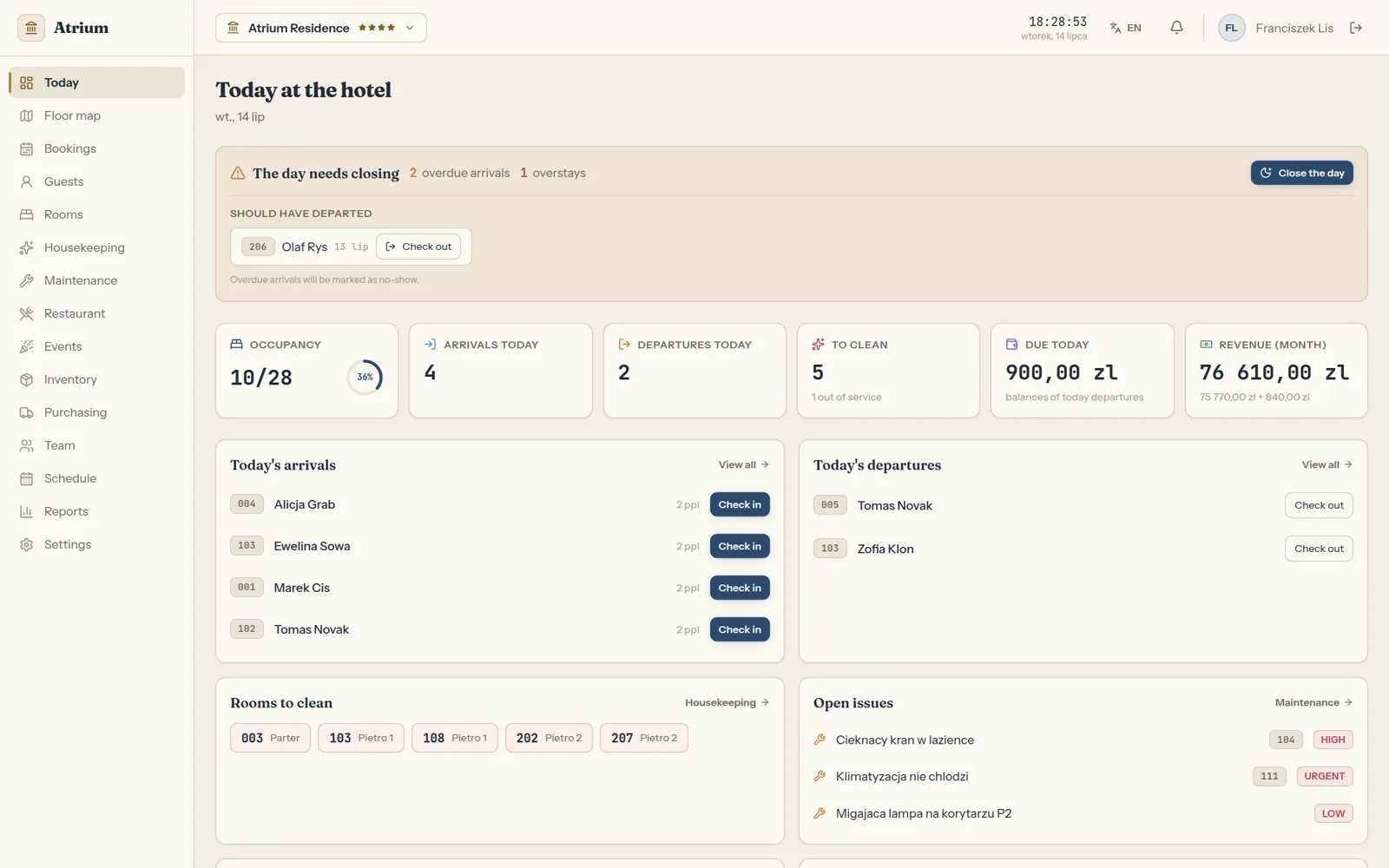
Three real Atrium screens: the booking timeline, the list of rooms to prepare and the reception day with departures to settle.
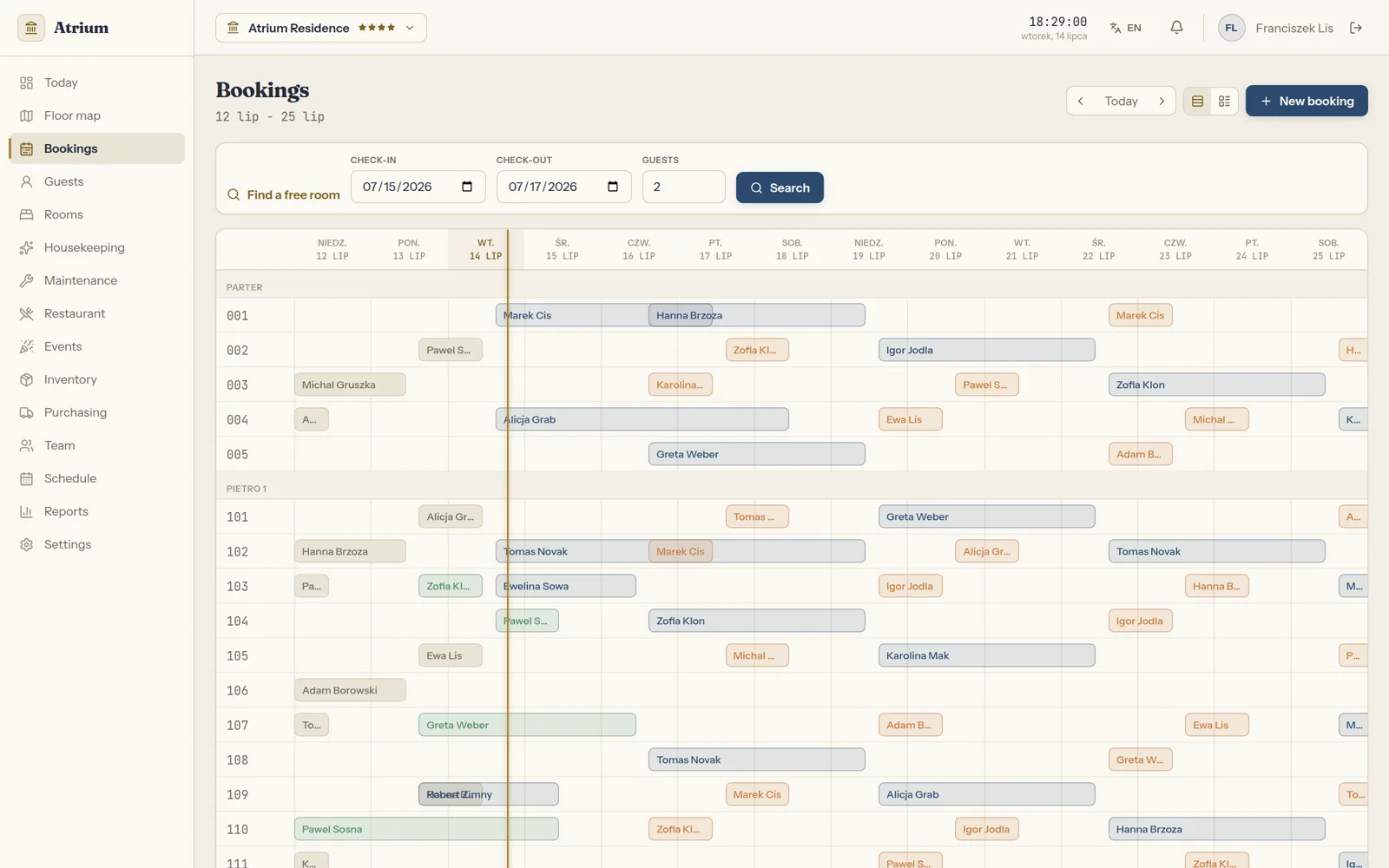
A 14-day booking gantt
- A 14-day timeline with the rooms grouped by floor
- Collision control: two bookings for the same room and night cannot go through
- A free room search by check-in, check-out and number of guests
- A line for today and the new booking button above the timeline
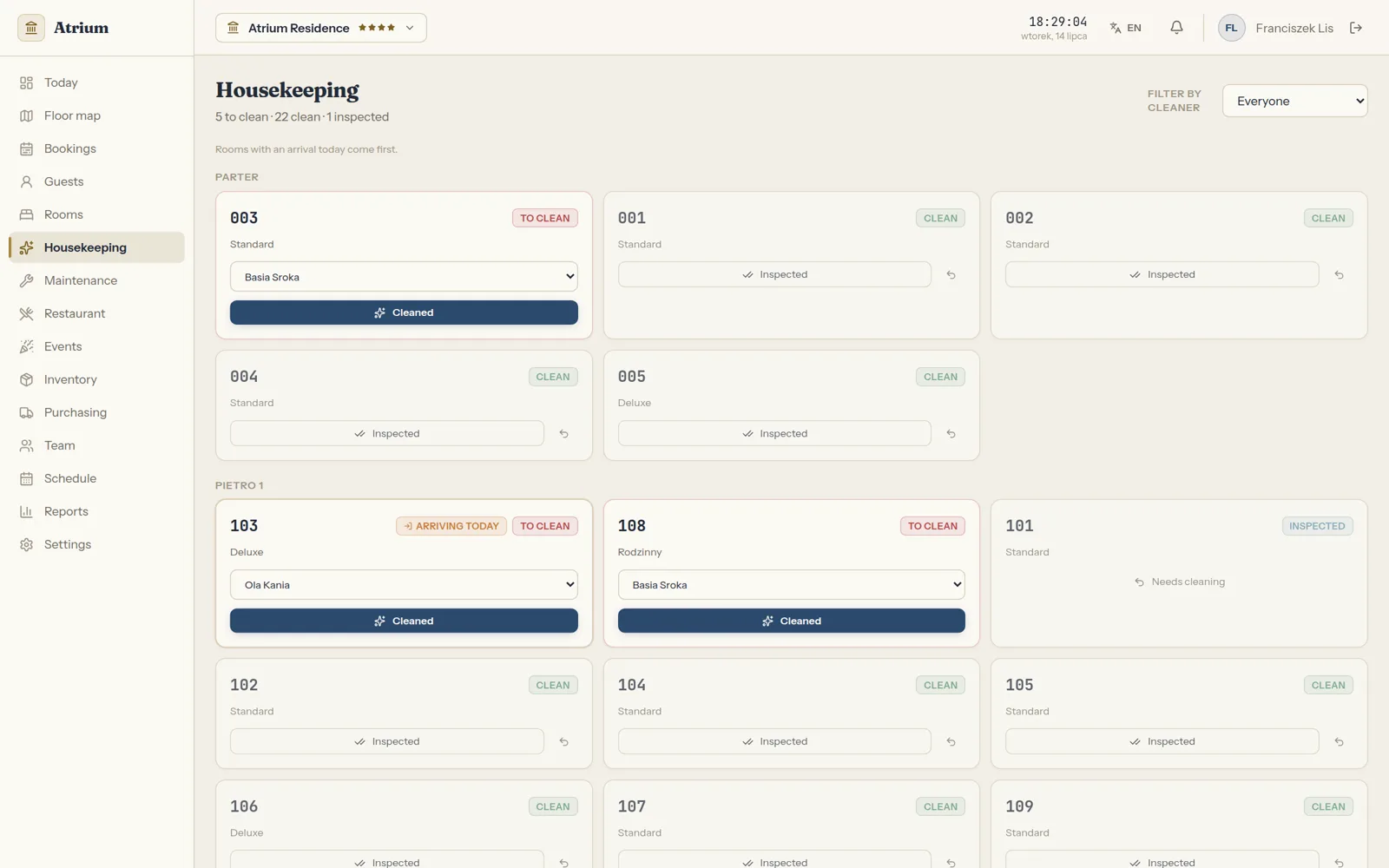
The list of rooms to clean
- Rooms with an arrival today at the top of the list
- A cleaner assigned to each room to clean and a filter by cleaner
- Housekeeping marks a room as cleaned, and after the inspection as inspected
- An inspected room can be sent back for cleaning
The reception day with departures to settle
- Today's arrivals and departures with check-in and check-out buttons
- Balances due on today's departures, from a folio that collects the stay and extra services
- Closing the day with overdue arrivals and guests who should have left
- Rooms to clean and open faults with their priority
How a booking moves through the system
Four places a single booking passes through. Each connection is an integration with its own page.
Hotel website
Dates, room, guest details and acceptance of the terms.
At the startone room booking with a depositPayment operator
A deposit or full payment through Przelewy24, or by card through Stripe for guests from abroad.
From step 1room and nightsAtrium or your own panel
The booking with a room assigned, the folio and the payment status.
From step 2payment confirmedChannel manager
The availability change reaches Booking.com and other portals.
From step 3new availability
When the booking goes through
The guest gets a booking number and an email with the terms. In the panel the booking shows up as paid, with a room assigned.
The second booking does not go through
From step 3: the same room and nightBookings on a timeline with collision control, so two bookings for the same room and night cannot go through.
When the room is already taken
The panel blocks booking collisions and a channel manager sends availability changes to the portals.
A portal booking
A portal booking travels the same way in the other direction.
An invoice for a business guest
Invoices for business guests go from the panel to KSeF, Poland's e-invoicing system.
A deposit refund
You start a refund from the panel and its status lands on the booking, so reception sees what was returned.
Channel manager and KSeF
We have not yet deployed a channel manager or KSeF for a hotel, so their pages describe how the rollout works rather than a finished module.
What an online booking needs before the guest pays
A website where consumers sign a distance contract has obligations under Polish law. We build them into the booking journey instead of patching them in later. We write this as the website builder, not a law firm, so it is not legal advice.
Saying there is no 14-day withdrawal for dated stays
For accommodation services with a set day or period, consumers have no statutory right of withdrawal (art. 38(1)(12) of the Polish Consumer Rights Act). That is why the cancellation rules must be clearly written in the terms and shown before payment.
- Cancellation rules written in the terms
- Cancellation rules shown next to the price, before payment
- The terms accepted with the booking
The lowest 30-day price next to a promotion
When you announce a room price reduction, you show the lowest price from the 30 days before it next to the reduced one (art. 4(2) of the Polish act on price information). The panel works it out from price history, nobody does it by hand.
- The room price history in the panel
- A room price reduction
- The lowest price from the 30 days before it next to the new one
An accessible booking journey
Since 28 June 2025, e-commerce services for consumers must meet accessibility requirements unless they are provided by a microenterprise (art. 3(2) and art. 4 of the act of 26 April 2024, Poland's EAA law). We build the booking path for keyboard and screen readers from day one.
- The whole booking path from the keyboard
- A path a screen reader can follow
- From the first day of the build
Only the guest data you need
The form collects what the stay and billing require, and the privacy policy says how long data is kept. We cover this in our article on GDPR on your website.
- The form asks for what the stay and billing need
- The privacy policy says how long data is kept
Questions hotels ask
Answers to the questions that come up in the first call.

Read next
A smaller property, room rentals and booking portals.
Let us work out how many bookings come back to you
Tell us how many rooms you have and where your guests come from today. We will reply with a proposed scope and a free quote.