
DPD API integration: labels and pickups
Parcel numbers, labels, the handover protocol and a DPD courier booking straight from your warehouse panel. No retyping addresses into a second system and no hand-made protocols.
A warehouse day with a DPD integration
The order of operations the integration does for the warehouse team. Each is a separate DPD service operation.
- PackingPacks the order, enters weight and dimensions
- PackingPrints the label while packing
- Courier visitHands over the parcels with the protocol to sign
- PackingSends parcel and recipient data to DPD
- PackingFetches the label for the same waybill
- End of dayCreates the handover protocol for dispatched parcels
- End of dayChecks available slots and books the courier
- A customer returnIssues a return label in the client panel
- PackingAssigns waybill numbers
- End of day - Courier visitConfirms the visit and picks the parcels up
- A customer returnHands back the return label
Waybill number
Your system DPD Poland. Registering parcels returns waybill numbers, which go straight onto the order.
Pickup booking
Your system DPD Poland. The courier comes at a slot picked from the available ones, with no phone call to DPD.
Return label
Your system DPD Poland. The customer gets it in the store panel after requesting a return.
What to do when one parcel has an error
When registering several parcels at once, the DPD service takes one of three policies. We choose it with the warehouse.
STOP_ON_FIRST_ERRORstop at the first error
- For the warehouse it means
- a quick signal something is wrong
- Fits
- small batches with manual checks
IGNORE_ERRORSskip the failing ones, register the rest
- For the warehouse it means
- some parcels go, some wait for a fix
- Fits
- large daily batches
ALL_OR_NOTHINGall or none
- For the warehouse it means
- a multi-parcel order is always complete
- Fits
- orders with several parcels
What it looks like at the end of the day in the warehouse panel
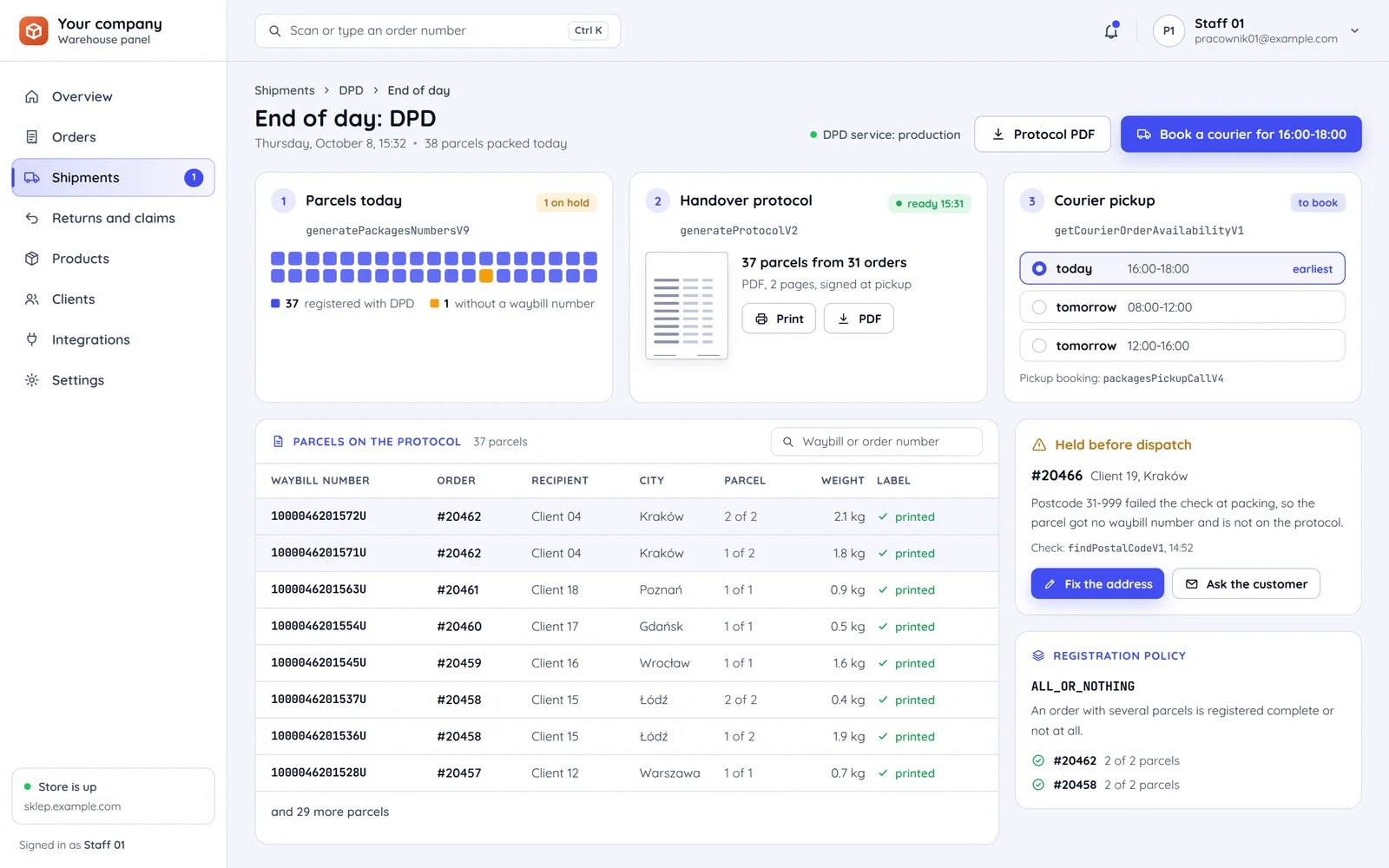
A parcel without a waybill number
The day's list shows at once which parcel got no number and will not make the protocol.
An error stopped before DPD
The postcode failed the check at packing, so the warehouse fixes the address before the parcel goes to registration.
The policy in the settings
This panel registers an order with several parcels complete or not at all.
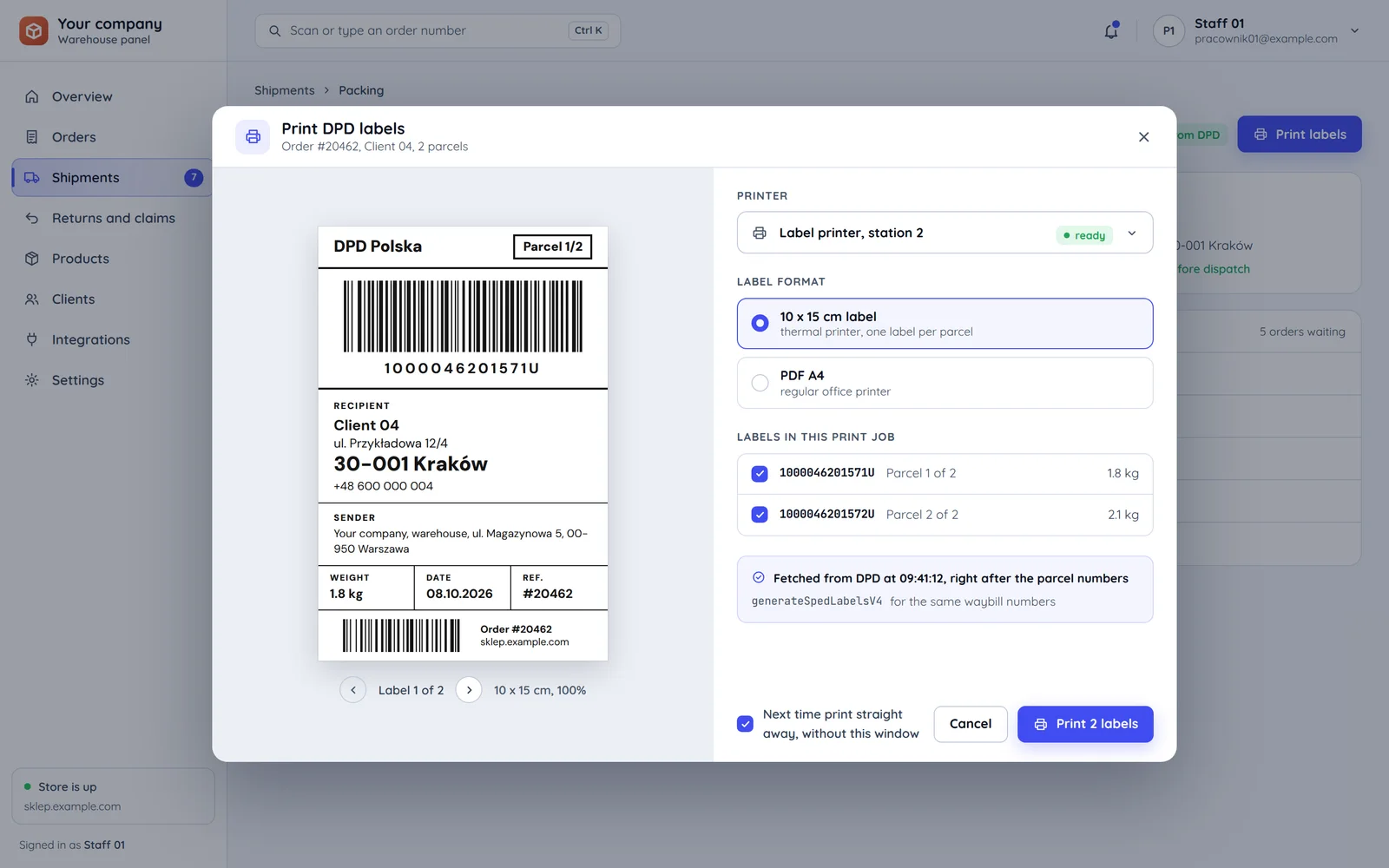
A parcel number and label in one step
Registering a parcel returns the waybill number, and we fetch the label straight away for that number, so the warehouse prints it while packing.
The waybill number from DPD
DPD assigns it when the parcel is registered. We take the field structure from the WSDL of the chosen operation version, not from memory.
The address from the order
Recipient data comes from the order, with no retyping. We check the postcode before the parcel reaches DPD.
Weight and dimensions
The warehouse enters them while packing or takes them from the catalogue, as a parcel needs realistic data.
The number goes back to the order
The waybill and label go on the order, and the number to the customer and the marketplace if the order came from one.
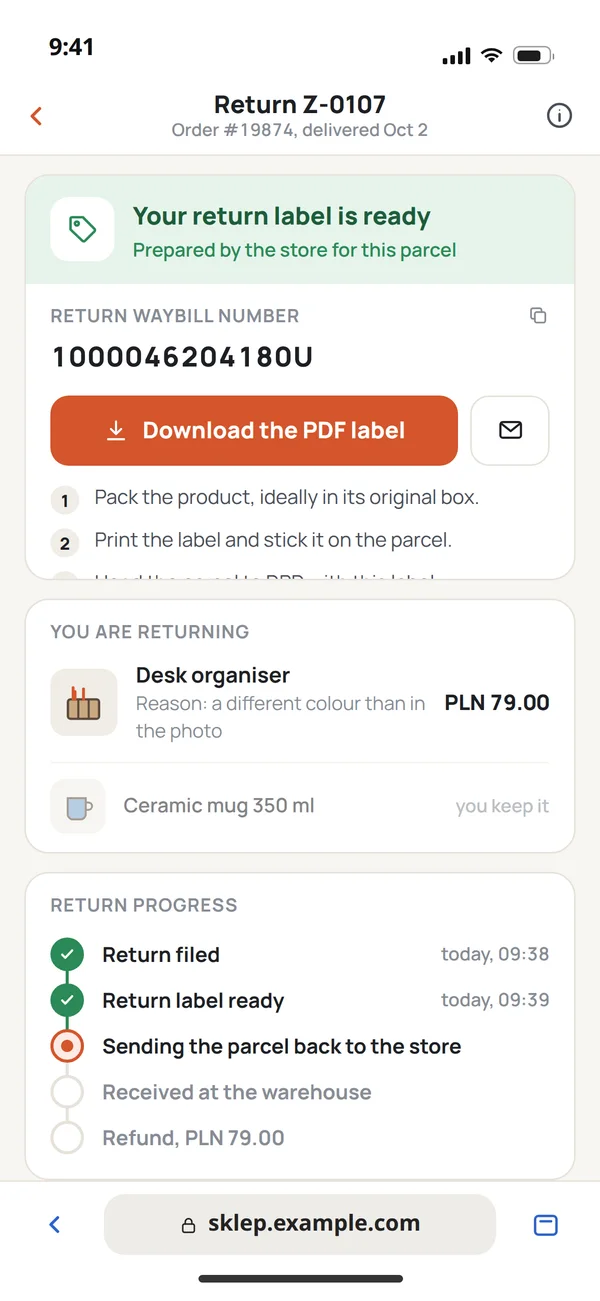
A return without calling the store
The DPD service has operations for return labels, so the customer gets the label in the store panel and the team does not send it by hand.
Delivery
- Warehousea labelled parcel
- DPDpickup and delivery
- Customerthe order delivered
Return
- Customer
Requests a return in the store panel, and your system fetches a return label from DPD straight away.
- DPD
Picks up the parcel with the return label and carries it to the store.
- Warehouse
Receives the parcel with the return waybill number already on the request in the panel.
What we watch out for with DPD
Things that stop dispatching when the integration does not plan for them.
If the postcode is wrong,
then parcel registration stops. We check it earlier, at checkout or while packing.
If weight and dimensions are guessed,
then the parcel carries unrealistic data. The warehouse enters them while packing or takes them from the catalogue.
If newer operation versions support more services,
then we pick one version and stick to it rather than mixing several in one codebase.
If DPD extends the service with new versions,
then we check parameter names and operation versions against the account's WSDL before rollout.
If you have no service access yet,
then DPD grants access and the test environment under your agreement, and all we need from you is the demo and production credentials.
Common questions about DPD integration
Answers about the DPD agreement, returns, aggregators and the quote.

Read next
Other carriers and aggregators.
How do you ship with DPD today?
Tell us where orders come from and how many parcels you ship. We will reply within an hour with questions and a quote.