
Furgonetka integration: many couriers, one API
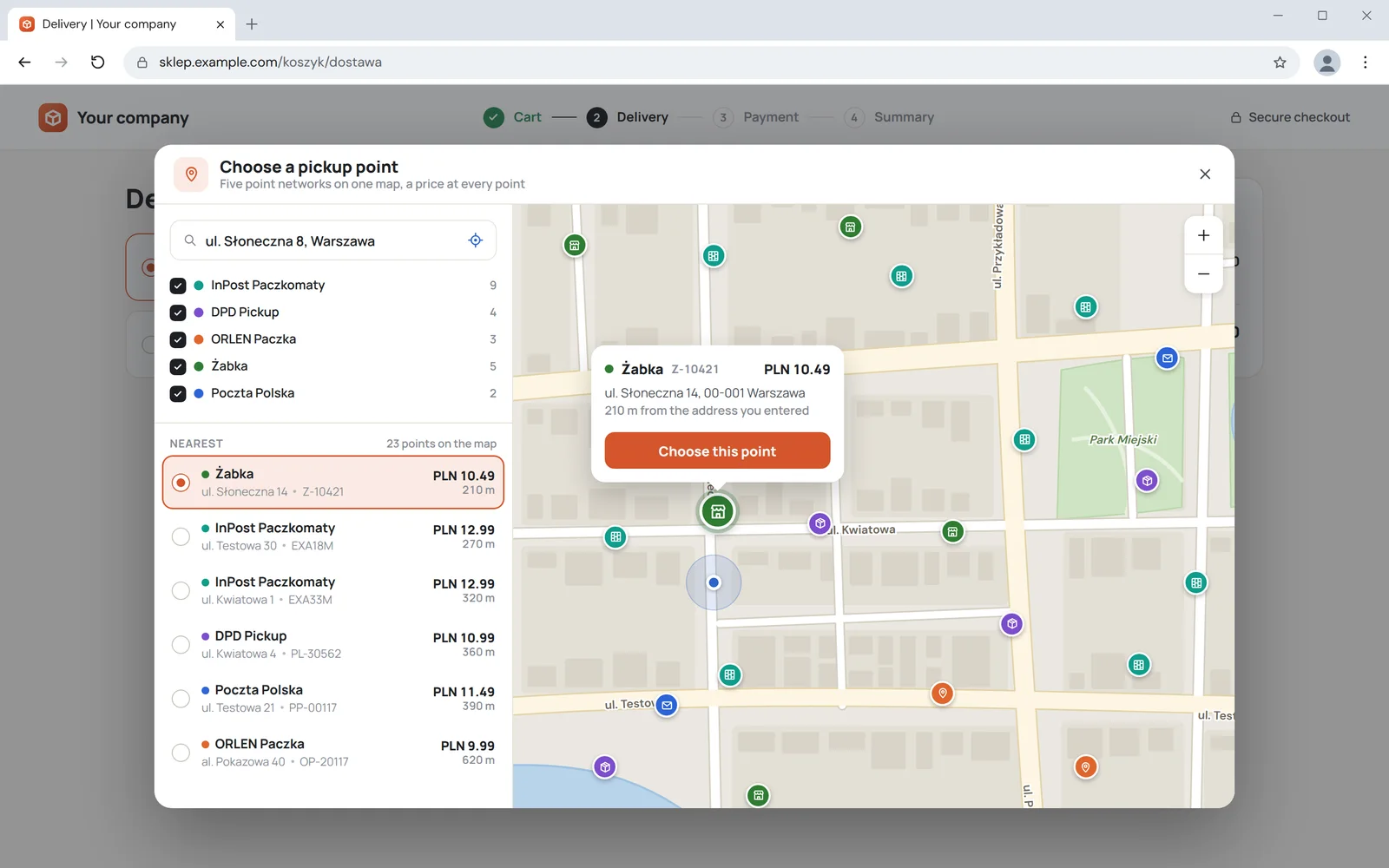
Instead of a separate integration with each carrier, one integration with Furgonetka. The customer picks a point on a shared map, and your system orders the shipment, label and tracking from whichever carrier they chose.
An aggregator or separate carrier integrations
Furgonetka is an aggregator. That is convenient, but not always best.
One integration for many carriers and a shared map of pickup points.
On the carrier's side
Control over services
A carrier's own API gives full control over its services, the aggregator only part of it.
Where they meet Furgonetka
Agreements
With the aggregator, one agreement with Furgonetka; with separate APIs, one with each carrier.
In your store
Who it suits
The aggregator for stores giving the customer a choice of courier. Separate APIs for large volumes with one carrier.
The main carrier directly, the rest through the aggregator
- We often combine both: the main carrier directly and the rest through an aggregator.
- For the other carriers your agreement is then with Furgonetka, and with the main one separately.
Account, shipment, fix
First a one-off OAuth2 connection of the Furgonetka account, then shipments from your panel, and when Furgonetka rejects a shipment, the reason shows on the order.
An account with no password in the store
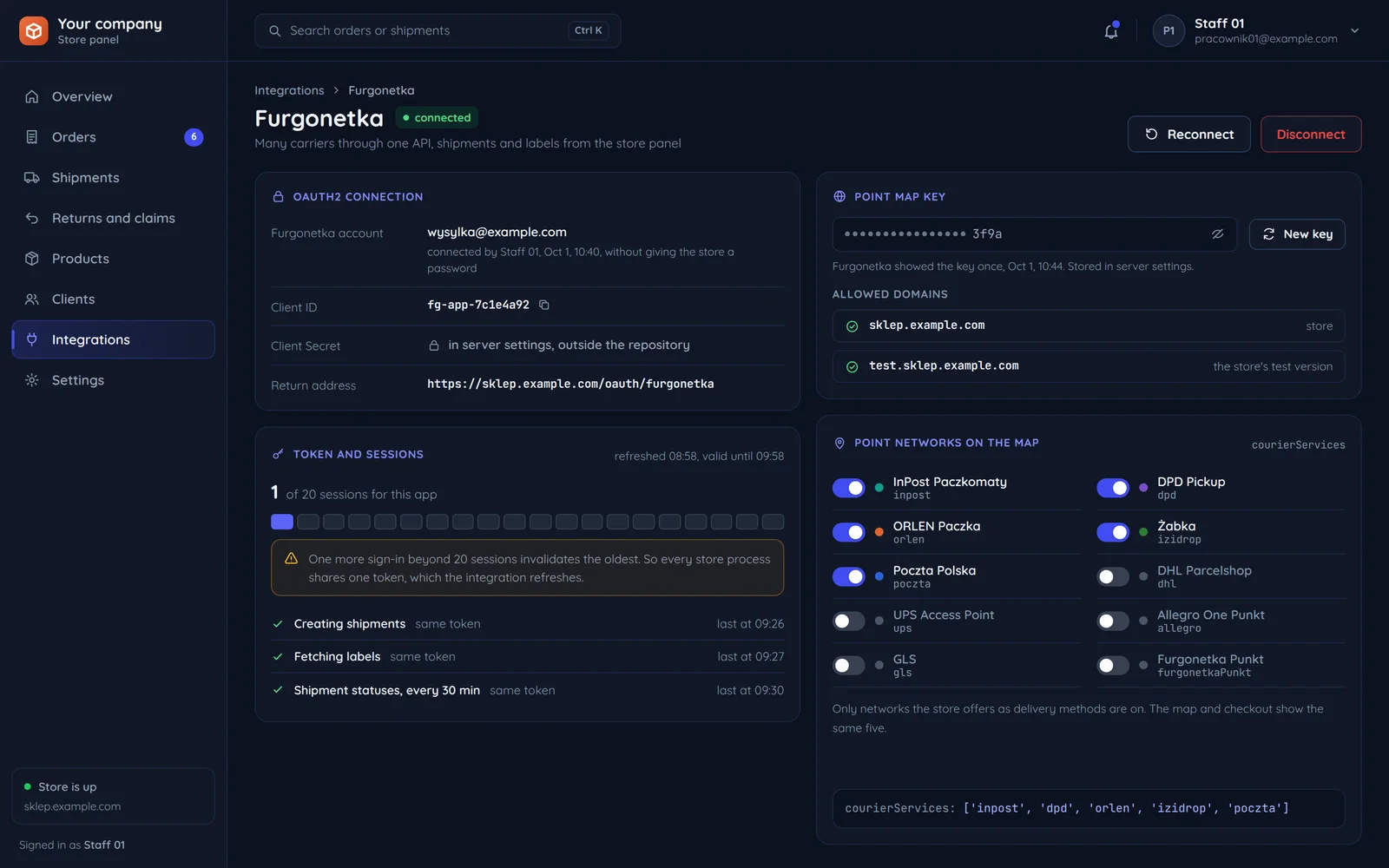
The account owner signs in to Furgonetka and gives consent, and your system exchanges the authorisation code for a JWT token. Before that we register the app with a Client ID, a Client Secret and a return address that leads back to the store panel. The panel then shows which Furgonetka account is connected and who connected it when, with buttons next to it to reconnect or disconnect. The Client Secret and tokens stay in the server settings, never in the repository or the browser, so the Furgonetka password never reaches the store at all.
One token for every process
An app can hold up to 20 open sessions, and a new one over the limit invalidates the oldest. So the integration refreshes one token instead of minting new ones, and creating shipments, fetching labels and checking statuses all use that same token. The panel shows how many sessions are open, when the token was refreshed and until when it is valid, and for each process when it last used it. Next to it sits the point map key with its allowed domains, because the key only works on the listed domains and the store's test version needs its own entry.
A shipment with the chosen carrier
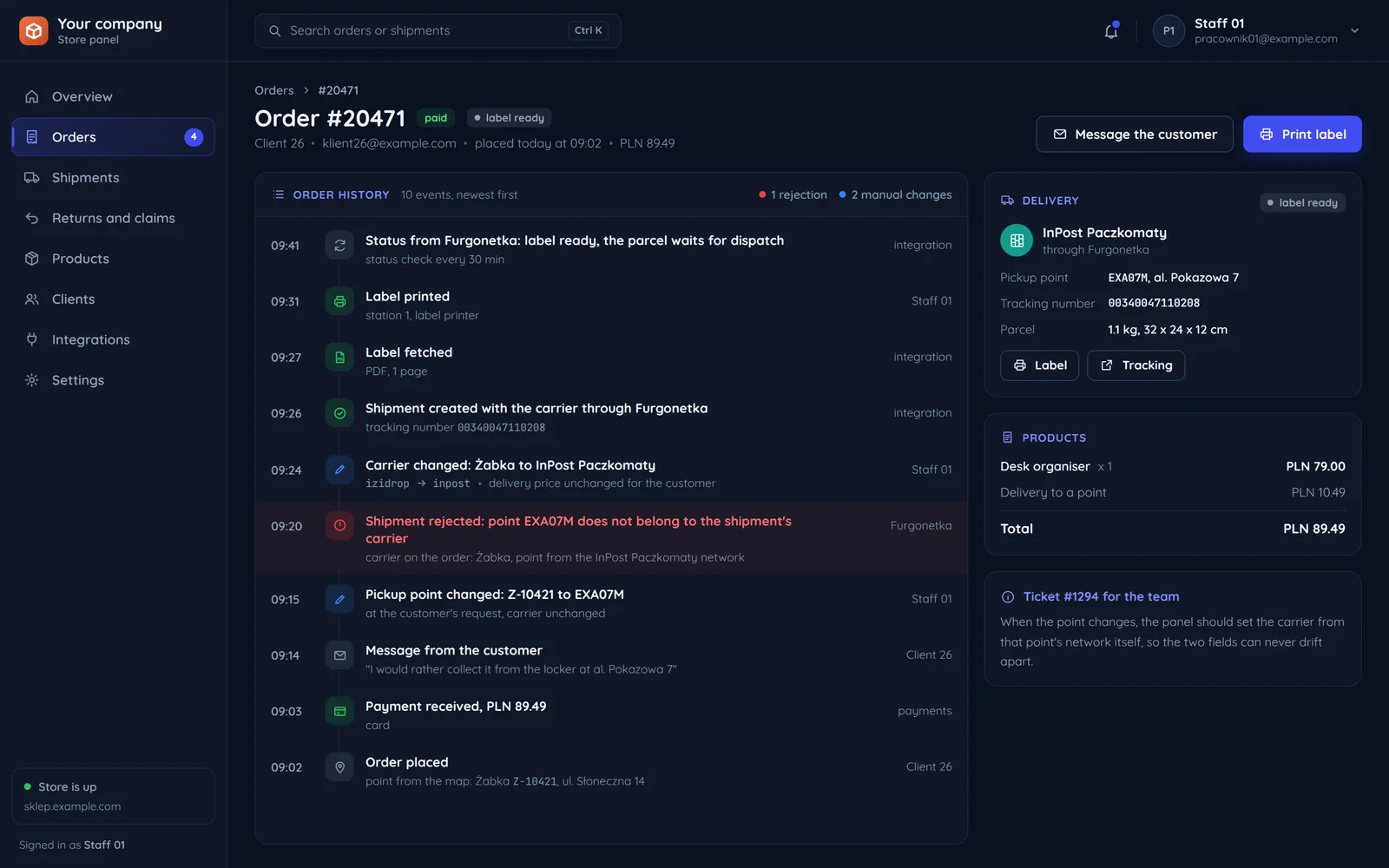
The order carries the carrier and the code of the point picked on the checkout map. The shipment, the label to print and the tracking number come back to the order, with no Furgonetka sign-in. Every step is saved in the order history with its time and who did it: the integration, a staff member or the customer, and the shipment statuses are added by themselves. Staff print the label straight from the order while packing, and the customer sees the shipment in the store panel.
A rejection with a reason to fix
The point code must belong to the shipment's carrier, or the shipment order fails. That happens, for example, when a customer asks for a different point and the order still carries the carrier of their first choice. The rejection reason shows in the order history, so the team fixes the carrier in the panel and sends the shipment again, without digging through logs. The fix is saved in the history too, with who made it and what changed.
Point networks available on the map
Selected ids used to limit the map to the carriers you offer.
At this store's checkout
- InPost Paczkomaty
inpost - DPD Pickup
dpd - ORLEN Paczka
orlen - Żabka
izidrop - Poczta Polska
poczta
courierServices: ['inpost', 'dpd', 'orlen', 'izidrop', 'poczta']The carrier list and the map key limit the map to your domain and the carriers you actually offer. The key only works on the listed domains, so the store's test version needs its own entry.
Left out by this store
- DHL Parcelshop
dhl - UPS Access Point
ups - Allegro One Punkt
allegro - GLS
gls - Furgonetka Punkt
furgonetkaPunkt
The map and checkout show only the carriers you have a price and terms for in Furgonetka. We set the list to match the delivery methods at checkout.
Point availability depends on your account.
Furgonetka's ready integration or your own
Furgonetka has sales platform integrations and its own checkout. We write code for systems not covered there.
What the store runs on
A ready integration exists for the sales platforms Furgonetka already supports. We write code for systems not covered there.
Where the shipment is made
With a ready integration you handle shipping in the Furgonetka panel; with your own, from the panel you already work in.
Documents and statuses
Your own integration keeps the label, the tracking number and the statuses on the order, with the rest of its history.
The work on our side
You configure the ready integration yourself, and we help if needed. Your own one we write with the Furgonetka REST API and the point map, and once accepted the code is yours.
Common questions about Furgonetka
Answers about courier agreements, point choice, Allegro and the quote.

Read next
Other carriers and a comparison of approaches.
How many carriers do you want to offer?
Tell us where you sell and which couriers you want at checkout. We will reply within an hour with questions and a quote.