
Paynow integration through the API
Paynow is a payment gateway from the mBank Group. We connect it to your store or app through the API: BLIK, fast transfers, cards, signed requests and notifications, and refunds from your panel.
Seven Paynow payment statuses
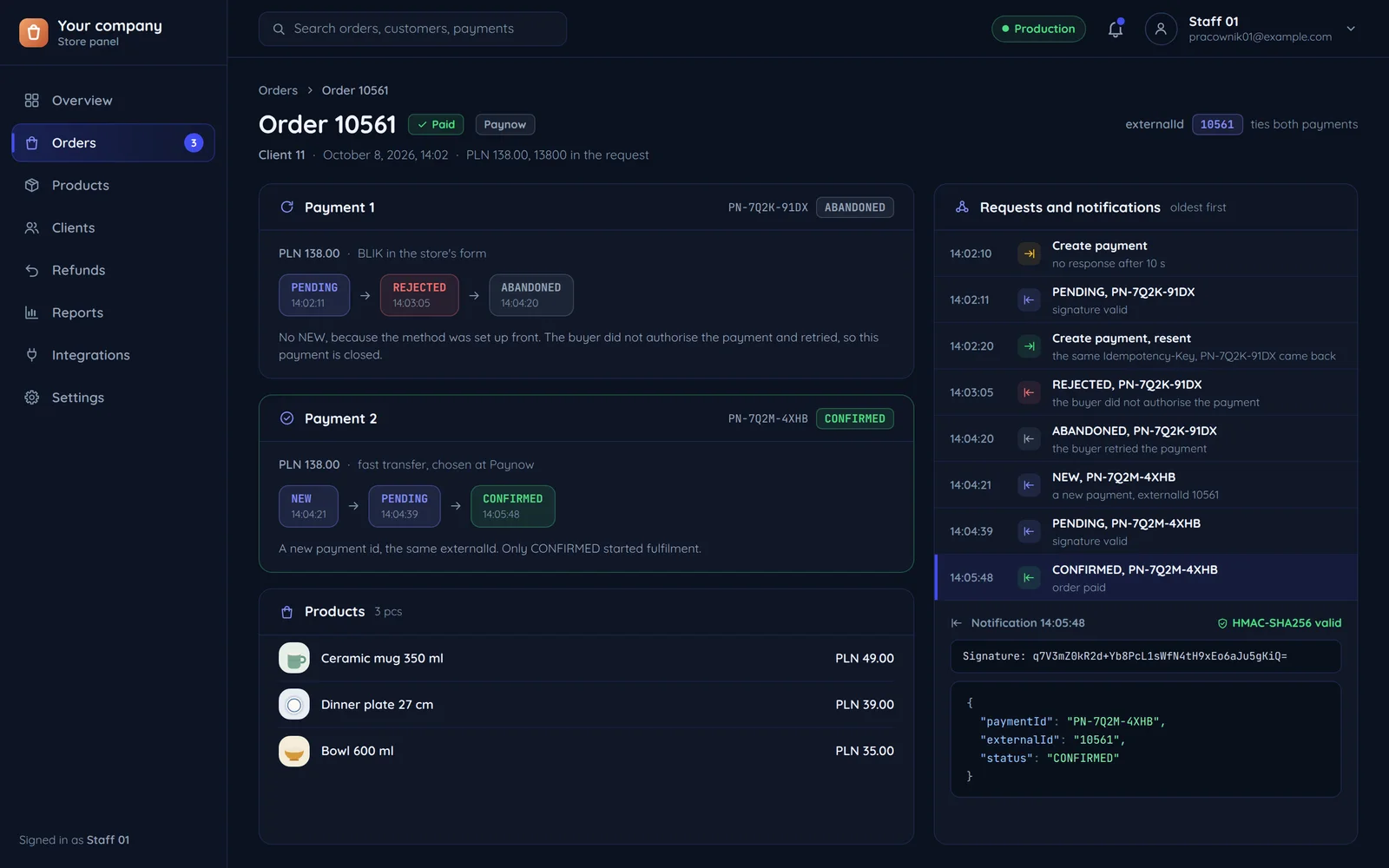
Paynow documents the whole payment cycle. Each status has its own reaction in your system. The board holds the two payments of one order from the screen above, each in the status it ended in.
Payment accepted, no method picked yet. Only when no method was set up front.
Method chosen and fixed.
Processed, the money reached the recipient.
The buyer did not authorise it.
A problem during payment.
The validity passed: 10 days in NEW or PENDING.
The buyer retried a failed payment; the new one has a new id.
- NEW
Payment accepted, no method picked yet. Only when no method was set up front.
Your system: Waits for the method; the order does not move. - PENDING
Method chosen and fixed.
Your system: Waits for the customer to finish paying. - CONFIRMED
Processed, the money reached the recipient.
Payment 2transferYour system: Starts fulfilling the order. - REJECTED
The buyer did not authorise it.
Your system: Keeps the order open for another attempt. - ERROR
A problem during payment.
Your system: Shows the customer what next and logs the event. - EXPIRED
The validity passed: 10 days in NEW or PENDING.
Your system: Records the expiry on the order, which does not move. - ABANDONED
The buyer retried a failed payment; the new one has a new id.
Payment 1BLIKYour system: Ties the new payment to the order by its number.
Signed requests and notifications
Every request to Paynow and every notification from Paynow is signed, so nobody can forge the news that an order has been paid. Most errors come from how the signed data was assembled, so we assemble it character for character.
The payment request
- Request keys
- the shop key and a one-time request number
- Extra parameters
- none
- Content
- amount 138.00 PLN, order 10561, description, buyer email
- Secret key
- the signing key from the Paynow panel, server only
What gets signed
- Request keys
- the shop key and the request number
Only these two keys are signed, always in the same order.
The signed data
- Extra parameters
- empty, but signed too
- Content
- character for character as sent
Keys, parameters and content go into one whole.
Signed with the secret key
- Secret key
- computes a signature over the whole that cannot be forged without the key
The same key checks the notifications from Paynow.
The signature
- A request sent again with the same number creates no second payment.
- We check the signature against Paynow's test example before the first real payment goes through.
Tests that simulate failures
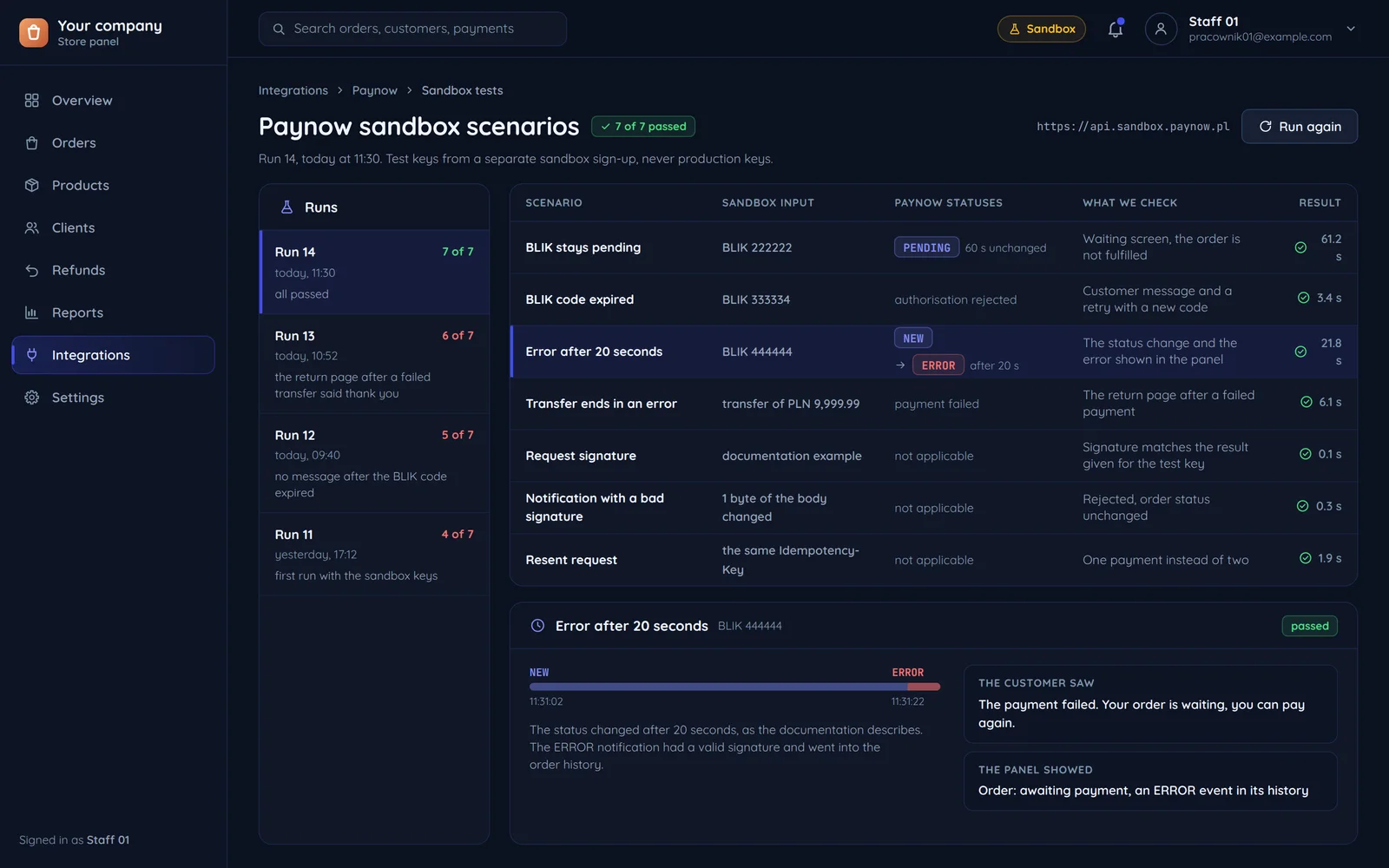
Paynow's test environment has codes that trigger specific behaviour. We use them to check paths you cannot trigger in a live store. For the tests you open a separate Paynow test account, or we use the public test keys.
Test BLIK codes
- BLIK 222222The payment stays in PENDING
- BLIK 333334Authorisation fails on an expired code
- BLIK 444444NEW for 20 seconds, then ERROR
Each code triggers its own behaviour. We check the waiting screen, the customer message with a retry, and error handling in the panel.
A transfer of the test amount
- Transfer of 9,999.99 PLNThe payment fails
This amount makes the payment fail. We check the return page, because the customer's return confirms nothing.
The result of every scenario
The customer seeswhat next after a failed paymentThe panel showsan ERROR event in the order historyA scenario passes when the customer and the panel see what we expect, and the order does not move before confirmation.
What flows between your system and Paynow
Each kind of data has its direction and its trigger. The order changes on the notification to your server, even when the customer closes the page after paying.
Checkout
- Payment, from your system to Paynowamount, order number, description, buyer emailwhen: the customer clicks "Pay"
- Payment methods, from Paynow to your systemavailable methods for your own pickerwhen: showing the checkout
Server
- Status change, from Paynow to your systema notification to the address set in the Paynow panelwhen: every payment status change
- Status on demand, both waysa status query by payment idwhen: the customer returns, or no notification came
Panel
- Refund, from your system to Paynowa refund and its status, with an option to cancelwhen: a decision in your panel
Payment built into your system, not beside it
A ready Paynow plugin is enough only when payment ends with a status change in the store platform itself. When payment is part of an app, a panel or a booking, we write an API integration that handles every status, refund and retry. Either way we check payments in tests before the first real one goes through.
A ready plugin
- The store runs on a platform Paynow has a plugin for.
- Payment ends with a status change in the platform itself.
An API integration
- Payment happens in an app, a client panel or a booking system.
- You want BLIK or a card on your own page with no redirect (white label).
- You need payment links, refunds from your panel or a marketplace.
Common questions about Paynow
Answers about the account, payment confirmation, retries, refunds, tests and the quote.

Read next
The other gateways and a comparison that helps you choose.
Want to take payments through Paynow?
Tell us which system payments should run in and which methods you need. We will reply within an hour with questions and a quote.