
Flaem
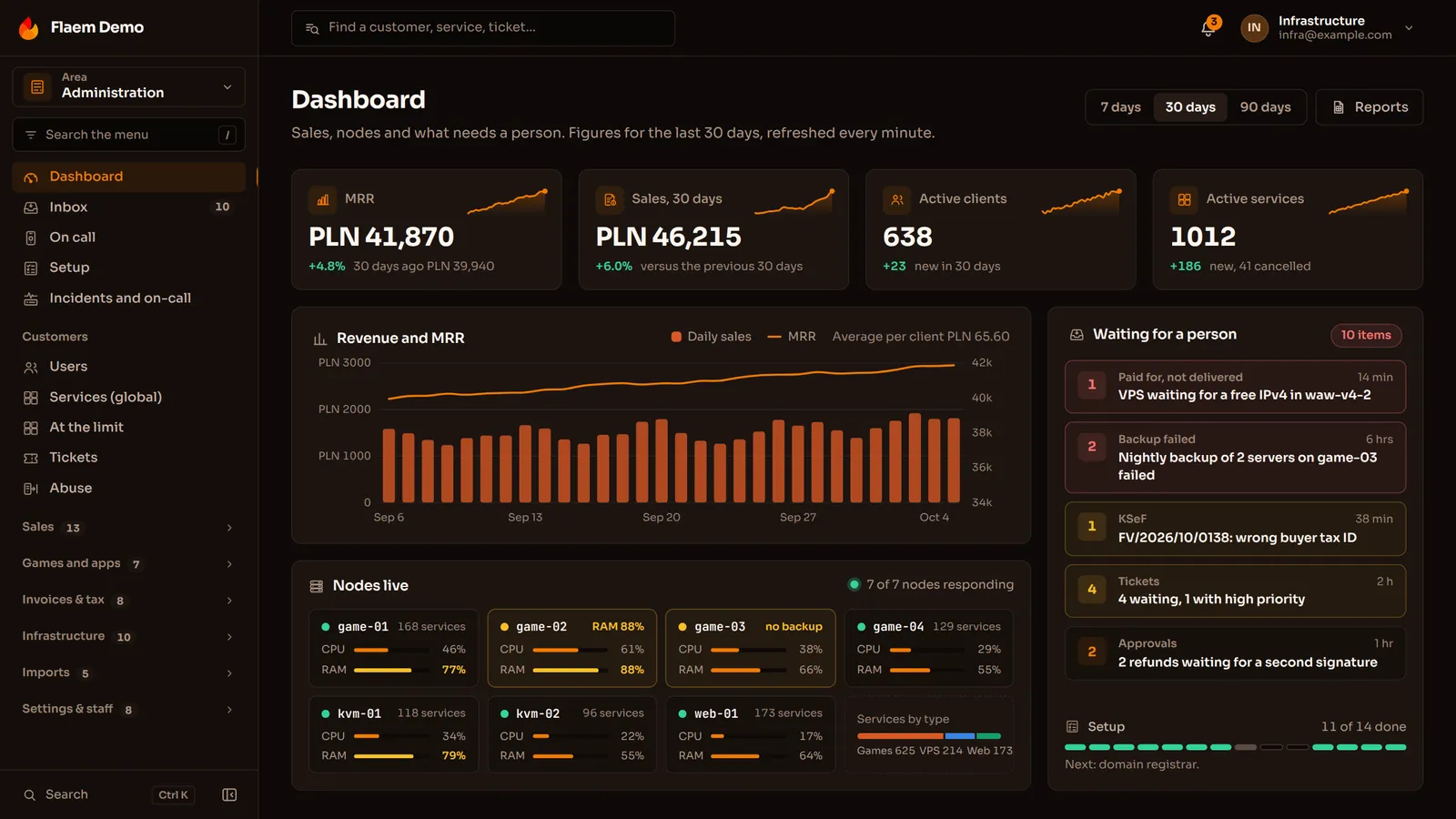
A native client of the Flaem hosting platform for Windows and Linux, written in C# on Avalonia, with no browser inside. Sign-in with a two-factor code, a dashboard, every service on the account, server details with power actions that match the server type, notifications, billing, the shop, tickets and account security. The Flaem address is entered in the app, so the same program connects to any operator.
Overview
Flaem is our hosting platform: a Rust core that runs accounts, billing and nodes, a panel in the browser, a product website, and apps for the phone and the desktop. The desktop client is a native window onto that platform for Windows and Linux, written in C# on Avalonia.
It is not a wrapped website. It talks straight to the Flaem API, the same one the browser panel uses, and draws its own native screens.
A panel you sit in all day
An admin of game servers does not check the panel once a week. They keep it open all day next to a console, a game client and a messenger. In that mode another browser tab is not convenience, it is a fifth wheel: it gets lost in a crowd of tabs, has no icon of its own on the taskbar and ignores system shortcuts.
We wanted to give the same scope as the browser panel, but as an app that behaves like the rest of the programs on the desktop. One hard condition: no wrapped Chromium. If the admin is going to spend most of the day here, the app has to be light, instant and native to their system, not another browser window pretending to be a program.
One contract with the Flaem API
The desktop client has no back end of its own and no simplified version of the API. Every call goes through a single HTTP client class that prefixes the installation address and the session token, and handles the errors Flaem returns as plain text and responses with no body. A server restart from the desktop window goes through the same contract as a restart from the browser.
Key calls
| Action | Endpoint |
|---|---|
| Sign in | POST /auth/login |
| List services | GET /resources |
| Service details | GET /resources/{id} |
| VPS power state | GET /resources/{id}/power |
| Power action | POST /resources/{id}/power |
| Packages | GET /plans |
An installation address instead of a hardcoded server
Every operator runs Flaem on their own, so the app has no server written into it. It resolves the installation address most specific first: the one saved on this computer, in a config file in the user's application data directory, then an environment variable, and finally a local address. The same program therefore connects to any operator's installation, and no secret sits in the repository.
The session token from sign-in is stored locally, so the app comes back signed in after a restart.
Screens
the installation address, a username or email, a password and an optional two-factor code.
every service with a type icon, the package name, a short id, its address and a coloured status, with ended services dimmed but never hidden.
for a VPS the live power state, package limits shown only when they actually arrive from the API, charts, the console and startup parameters.
notifications with preferences, billing, the shop, tickets with replies, the profile, password, backup codes and active sessions.
Power actions that match the service type
The power buttons follow the backend contract exactly. A game server has start, stop, restart and kill, a VPS has start, shutdown and restart, and web hosting and domains have none. An action that does not exist is not drawn as a greyed-out button, and destructive actions ask for confirmation first.
Native, without Chromium
Avalonia draws the interface through Skia, along the same path on Windows and Linux, with the dark Fluent theme and compiled views in which every data binding is checked at build time. The pure logic, meaning power action decisions, formatting and statuses, has its own tests in a separate project, and the app ships as a self-contained binary, with no .NET runtime to install on the user's machine.
What the finished product delivers
The admin gets a program that sits on the taskbar like any other app, connects to their operator's Flaem installation and shows the same services as the browser panel, because it reads them from the same API. The window never gets lost among tabs, never shows buttons that do nothing and needs nothing beyond a single file.
On Flaem's side the desktop is not a separate product with its own logic to maintain, just another client of the same API. A new capability in the back end reaches the desktop through the same contract the browser and the phone use.
Questions about Flaem

More projects
More work from the same category - see how we tackle similar challenges.
Have a similar project?
Get in touch - a quote is free and comes back within an hour.