
Staff panel
An internal staff panel that brings VulCode and Aphrodi clients together in one place. Account flags, wallets, the affiliate program, audit and billing - with permissions scoped per brand. One source of truth for the whole support team.
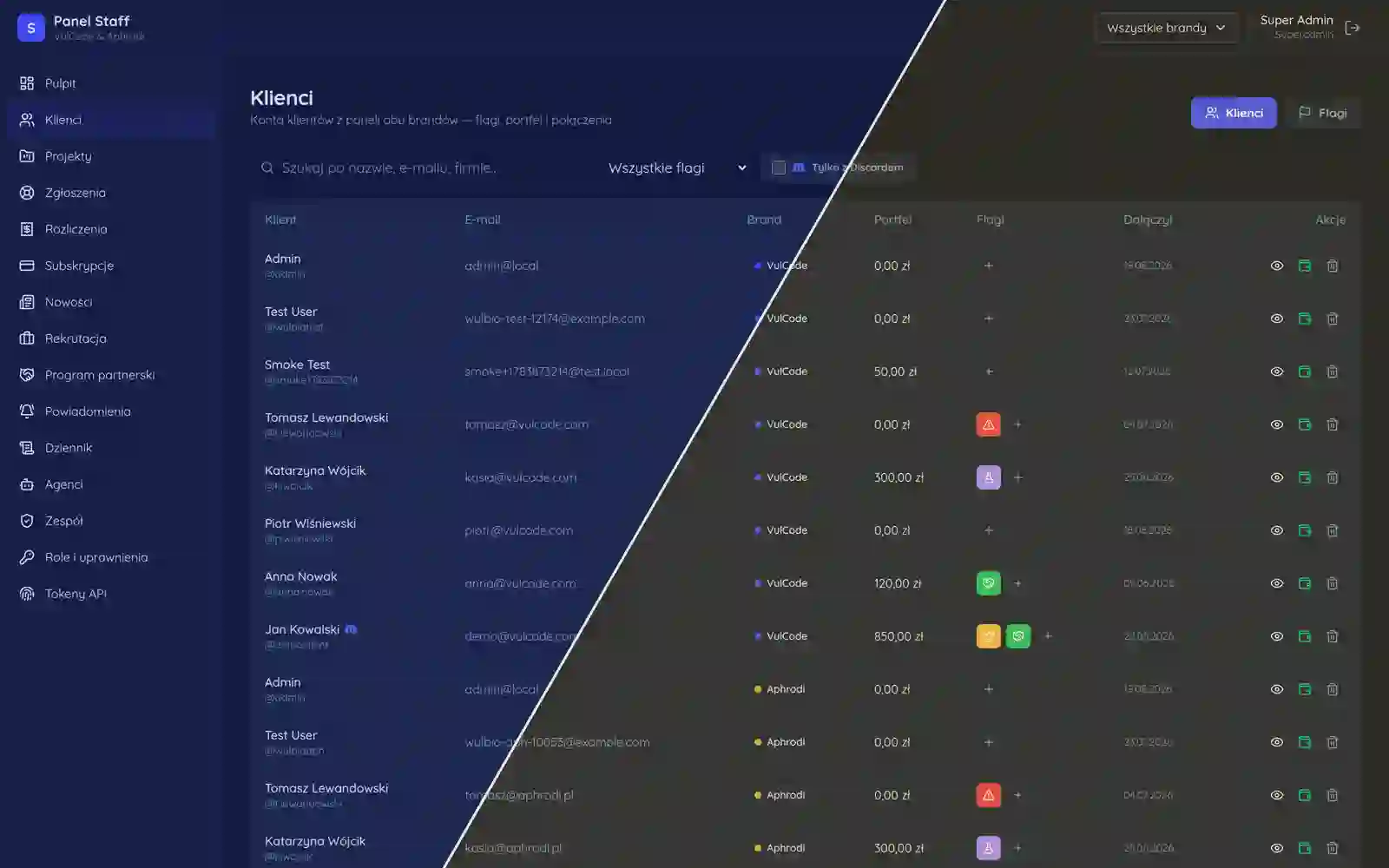
Overview
When you run one brand, an internal panel is simple: one team, one set of clients, one set of rules. When there are several brands, it gets tricky. The easiest thing is to stand a second panel next to the first, but then the same accounts, the same wallets and the same commission rules are maintained twice, and every fix has to land in two places or the versions drift apart.
The staff panel is our answer to that tension. One dashboard brings VulCode and Aphrodi clients together, handled from one view, but with a hard boundary: a person assigned to one brand does not see the other's clients. On top of that comes the thing every support team eventually asks about: who changed this flag on the account, and when.
Twice the same work
Running two brands from two separate panels looks innocent until you count how much repeats between them. The client model is the same. The wallet is the same. The affiliate program and commission rules are the same. Invoices, account flags, permission logic - all the same, just in two copies someone has to keep in sync by hand.
That is not only double the work, it is a double chance to slip. A commission-rule fix lands in one panel and not the other, because someone forgot. A new field on a client account appears in one brand and is missing in the other. The longer it lives, the further the two copies drift, until you can no longer say which one is right.
So we decided the core is one. Clients of both brands live in one back office, on one data model, served by one API. The difference is made not by separate code but by the permission scope laid over the shared whole.
Permissions that end at the brand boundary
The heart of this panel is access control scoped per brand. An employee's role is not global. It is bound to a specific brand, and the reach of their permissions ends exactly at that brand's boundary. Someone from the VulCode team sees VulCode clients and only them, even though those clients physically sit in the same back office as Aphrodi's.
What matters is where that boundary is checked. If the scope were only a UI filter, you could dodge it by appending someone else's id to the URL. So the scope check sits at the API entry and rejects the request before it touches data, regardless of what the front end shows or hides.
Who changed this flag and when
In a panel where you can flag an account, change a commission rate or move a wallet balance, the question "who did this" is inevitable. Without an answer all that is left is guessing after the fact and hunting for blame by memory, which is both unfair and useless.
So every sensitive action records itself in an audit log: who performed it, what it concerned and when it happened. This is not a technical log for developers but a readable trace for the support team. When a question about an account change comes up, the answer is in the log, not in anyone's head.
The same mechanism plays a second, quieter role. The awareness that every action leaves a trace tidies the work by itself. It is not about suspicion; in a team handling other people's money, transparency is a condition for trust, not an add-on.
One core, many brands
The whole construction rests on one separation: what is shared and what is separate. Shared is the core - the API, the data model, client accounts and wallets, and the audit log. Separate is only the permission scope and the client visibility that follows from it. Nothing more needs to branch.
The consequence of that split is practical and long-lived. Adding another brand to the staff panel is a scope config, not another panel to build and maintain. A new commission rule, a new account field, a new operation - all of it lands once, in the shared core, and applies everywhere at once, except each person sees it within the bounds of their brand.
What is shared and what is separate
| Element | Shared core | Per brand |
|---|---|---|
| API and data model | yes | - |
| Client accounts and wallets | yes | - |
| Commission rules and wallets | yes | - |
| Audit log | yes | - |
| Permission scope | - | yes |
| Client visibility | - | yes |
What the finished product actually delivers
The team works from one place, not two browser tabs it has to keep in its head and watch so they do not drift apart. Clients of both brands are where they should be, each employee sees exactly their slice, and the boundary between brands holds at the API level, not on the good will of the interface.
When a question about an account change comes up, the answer is in the audit log, not in someone's memory or in guesses. That turns "who did this" conversations from conflict into a simple fact check, which in a team handling other people's money is the difference between trust and constant tension.
Most importantly, another brand does not mean another panel, just another scope on the same core. Developing the back office does not multiply by the number of brands, because what is shared stays shared and what is separate is limited to what genuinely must be separate.
Questions about Staff panel

More projects
More work from the same category - see how we tackle similar challenges.
Have a similar project?
Get in touch - a quote is free and comes back within an hour.