VulCode

Fakturownia and wFirma API integration

The invoice is created in the app your accountant already knows, with the data supplied by your store, app or Stripe. The app itself sends it to KSeF, and the KSeF number and status come back to your system.

Invoicing and ERP
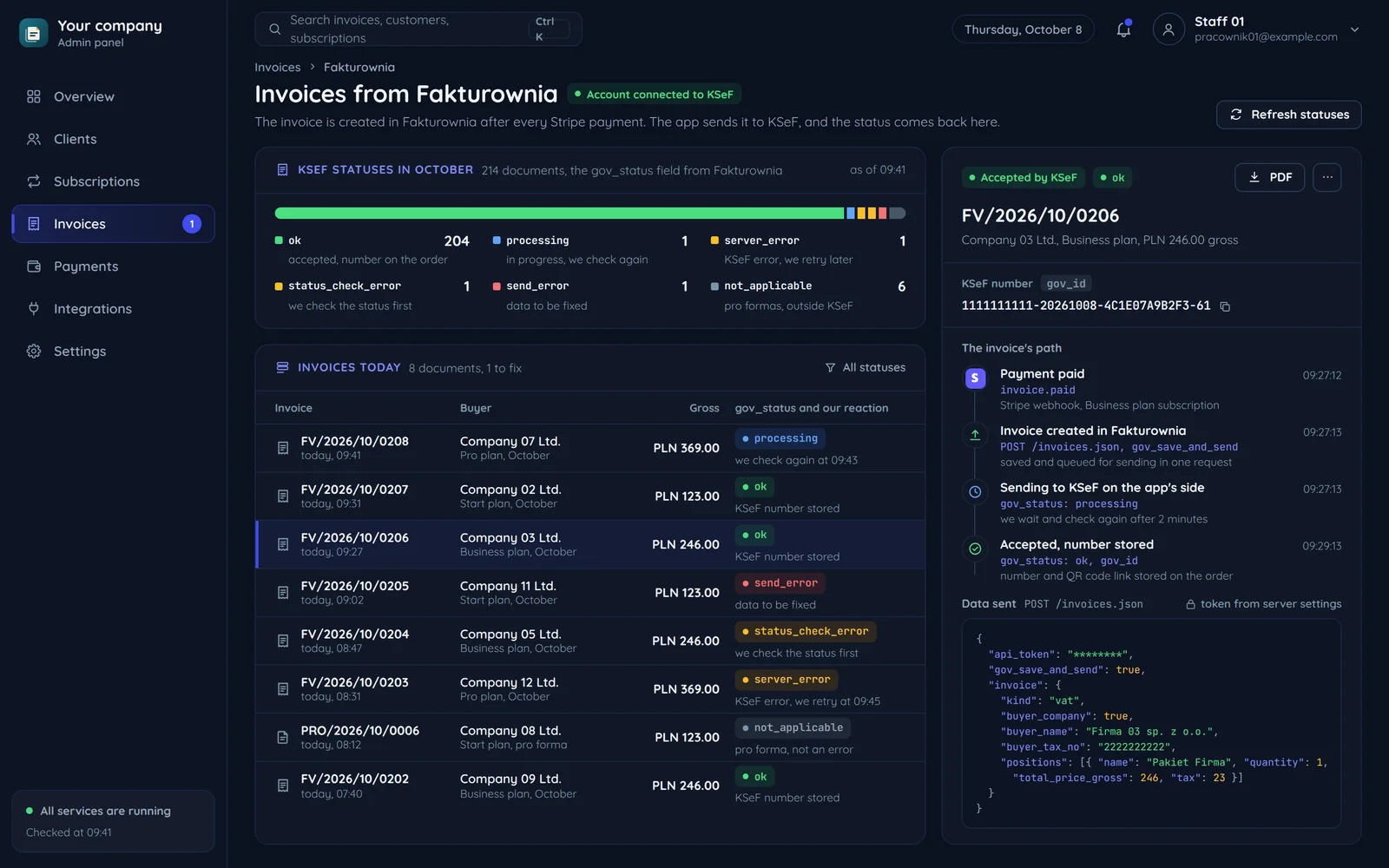
An admin panel with invoices from Fakturownia: KSeF statuses from the gov_status field, today's invoices with the reaction to each status, and one invoice's way from the payment to its KSeF number

KSeF on the invoicing app's side or in your code

This is the first decision. With Fakturownia and wFirma the app usually wins, but not always.

Invoice data from your store, app or Stripe

Who sends the invoice to KSeF?

The app sends to KSeF

When
  • Your accounting already works in Fakturownia or wFirma.
  • You want one place for invoices, corrections and their KSeF statuses.
  • Your system only has to supply data and receive the KSeF number.
Conclusion

An integration with the app's API: we create the invoice with a KSeF send request and read its status.

Your system sends to KSeF

When
  • Invoices are created in your system and should stay there.
  • You need full control over the queue, offline modes and QR codes.
Conclusion

A direct KSeF API integration in your code, with no invoicing app in between.

Fakturownia and wFirma from the API side

Both apps have a public API, but you talk to them differently.

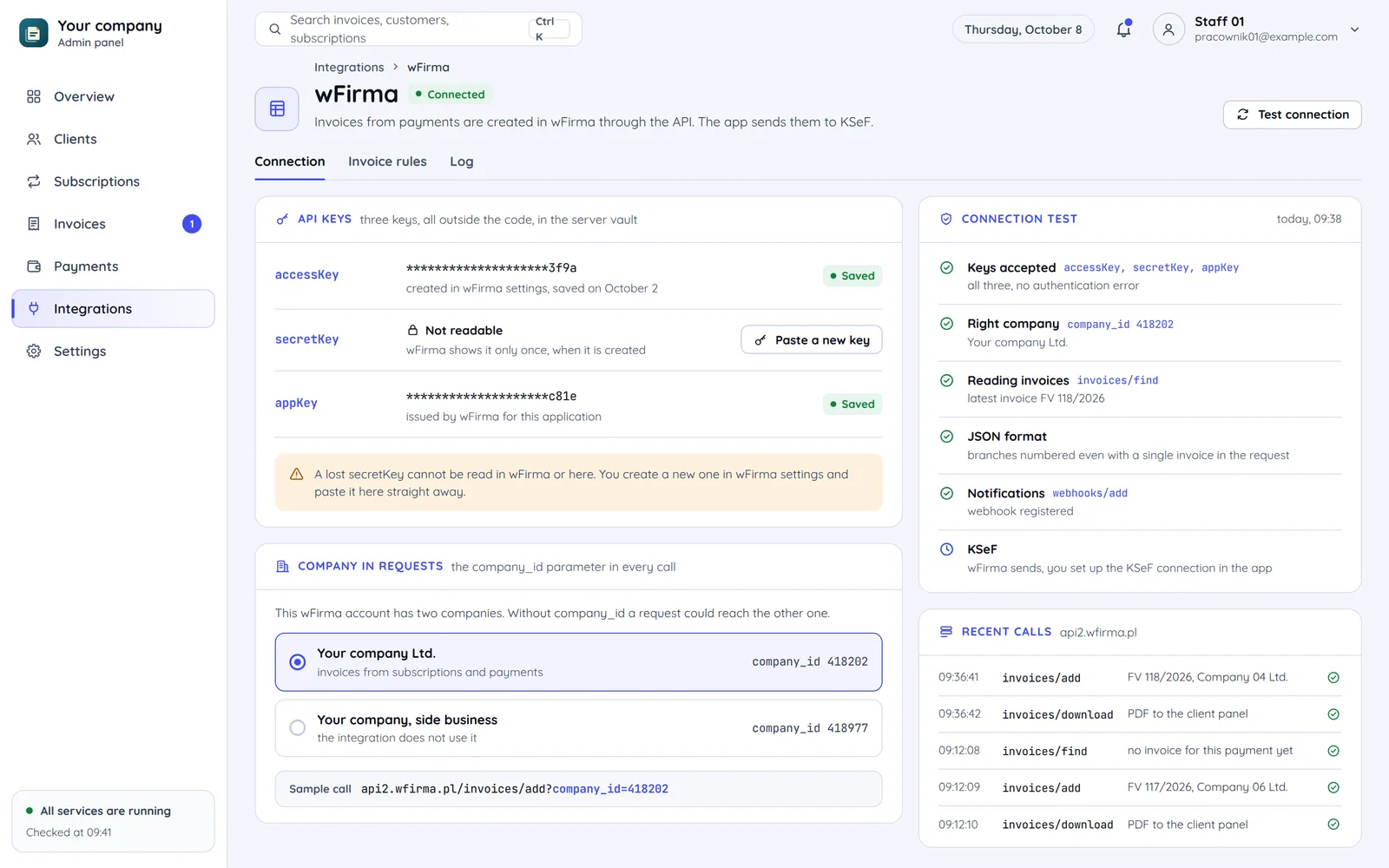
The wFirma connection settings in an admin panel: three API keys, a secretKey that cannot be read back, the company picked by company_id and a connection test
  1. Three keys instead of one token

    Fakturownia connects with one API token from account settings. wFirma wants an accessKey and a secretKey from settings plus an appKey it issues for the application, or OAuth; all keys stay outside the code.

  2. The secretKey is shown once

    wFirma shows it only when it is created. You pass it to us straight away through a secure channel, or create a new one.

  3. company_id on every request

    In Fakturownia another company is a separate account domain. In wFirma a request without company_id can reach another of the user's companies, so we set it on every call.

An order turned into an invoice

The mapping for Fakturownia. The buyer needs the most care, as KSeF sending depends on it.

Order in your system
Rule
Invoice in Fakturownia
  1. Order in your systema business customer with a tax number
    →required with KSeF
    Invoice in Fakturowniabuyer_company: true, buyer_tax_no
  2. Order in your systeman EU company with an EU VAT number
    →the number in EU format
    Invoice in Fakturowniabuyer_tax_no_kind: "nip_ue"
  3. Order in your systema private person
    →buyer_company: false, no tax number
    Invoice in Fakturowniabuyer_first_name, buyer_last_name
  4. Order in your systema cart line
    →name and quantity
    Invoice in Fakturowniapositions[].name, quantity
  5. Order in your systemgross amount and rate
    →the rate as a number, e.g. 23
    Invoice in Fakturowniatotal_price_gross, tax
  6. Order in your systemthe KSeF number after sending
    ←written back to the order
    Invoice in Fakturowniagov_id

The buyer_company field
It drives automatic sending. In the business-only modes the app sends to KSeF only invoices marked true.
The buyer tax number with KSeF active
It is required for companies unless the number kind is set to empty.
Buyer data at purchase
The checkout asks whether the customer buys as a business and collects a Polish or EU VAT number.
Seller data, addresses and account settings go into configuration, so they are not repeated in every request.

KSeF statuses in Fakturownia

The gov_status field tells you what is happening to an invoice. Each status has its own reaction in your panel.

  1. Your system

    After a paid payment it creates the invoice with the buyer data and the order lines.

    At the start
    an invoice for a plan paid through Stripe
  2. Fakturownia

    Saves the invoice with gov_save_and_send and requests the KSeF send itself.

    From step 1
    buyer data and lines
  3. KSeF

    Accepts the invoice and gives it a number. In Fakturownia gov_status goes from processing to ok.

    From step 2
    sending to KSeF
  4. Your system

    Reads gov_status and the gov_id number through a webhook or a periodic check and stores them with the order.

    From step 3
    number and status
  • When KSeF accepts the invoice

    Accepted by KSeF. We store the gov_id number and the verification link for the QR code.

  • Panel: invoices to fix

    From step 3: send_error

    A send error. We show the gov_error_messages text so the data can be fixed.

  • When the invoice needs a fix

    The admin panel shows each invoice's gov_status and the list of those needing a fix.

processing

Being sent. We wait and check again.

server_error

An error on KSeF's side. We retry later without touching the invoice.

status_check_error

The status check failed, and the invoice may already be accepted. We check first, then retry if needed.

offline

Issued in offline mode, waiting to reach KSeF within the legal deadline.

duplicate_error

An invoice with this number is already in KSeF. We check whether it is the same invoice sent twice.

not_connected

The account is not connected to KSeF. It needs authorisation in the app, not a code change.

Pitfalls we check

Each comes from the API documentation of the two apps.

  • DEMO mode before production

    Invoices in DEMO mode go to the pre-production KSeF with demo_-prefixed statuses. That is how we test the whole path.

  • Validation before sending

    With validation on, bad data blocks saving. With it off, errors land in gov_error_messages, which must be read.

  • Documents outside KSeF

    Pro formas, receipts and other documents get not_applicable. We do not treat it as an error.

  • Numbered branches in JSON

    In JSON, module branches must be numbered even when there is only one. A common reason for rejected requests.

Common questions

Answers about KSeF sending, statuses, keys and the integration code.

What should your invoices be made from?

Tell us where orders or payments come from and which app your accounting uses. We will reply within an hour with questions and a quote.