
ERP integration: Subiekt, Optima, enova, Symfonia
Your store, portal or app connected to the program your accounting and warehouse use. Products, stock, orders and documents flow by themselves, and invoices reach KSeF from the program that already does it.
The programs we connect to
Each has its own page with the integration route, pitfalls and a sample rollout.
- Products, prices and stockfrom the program to sales
- Ordersfrom sales to the program
- Contractorsboth ways
- Documents and the KSeF numberfrom the program to sales
Subiekt GT and nexo
Sfera or the BaseLinker integratorStock and prices to the store, orders as documents in Subiekt.
- Products, prices and stock
- Orders
- Contractors
- Documents and the KSeF number
More: Subiekt GT and nexo
Comarch ERP Optima
Comarch tools or a connectorOrders into Optima, stock and prices to the store, contractors looked up by tax number.
- Products, prices and stock
- Orders
- Contractors
- Documents and the KSeF number
More: Comarch Optima
enova365
ready connections and a B2B portalThe catalogue, individual prices and stock to the B2B portal, orders into enova365.
- Products, prices and stock
- Orders
- Contractors
- Documents and the KSeF number
More: enova365
Symfonia
Handel, FK and Web API BankOrders into Handel, bank payments into FK, settlements and invoices to the client panel.
- Products, prices and stock
- Orders
- Contractors
- Documents and the KSeF number
More: Symfonia
Fakturownia and wFirma
invoices from payments via APIInvoices from orders, payments and subscriptions, KSeF statuses back.
- Orders
- Documents and the KSeF number
More: Fakturownia and wFirma
KSeF
from the program or from your codeThe invoice from the program or from your code, the KSeF number back once accepted.
- Documents and the KSeF number
More: KSeF
The programs side by side
What each does by itself, and the route when code is needed.
| Subiekttrade and warehouse | OptimaSMEs and accounting offices | enova365trading firms and B2B | Symfoniafirms with FK and banking | Fakturownia, wFirmaservices, SaaS, small stores | |
|---|---|---|---|---|---|
| KSeF in the program | Subiektyes | Optimayes | enova365yes | Symfoniayes | Fakturownia, wFirmayes |
| Ready sales connections | SubiektyesBaseLinker, vendero, Sello | OptimayesComarch e-Sklep and e-Sale | enova365yesAllegro, Shoper, WooCommerce and more | Symfoniayese-Commerce Integrator | Fakturownia, wFirmayesplugins and partner integrations |
| Route for your own integration | Subiektwith a conditionSfera | Optimawith a conditionper version and licence | enova365with a conditionwith the implementation partner | Symfoniawith a conditionwith the Symfonia partner | Fakturownia, wFirmayesa public API |
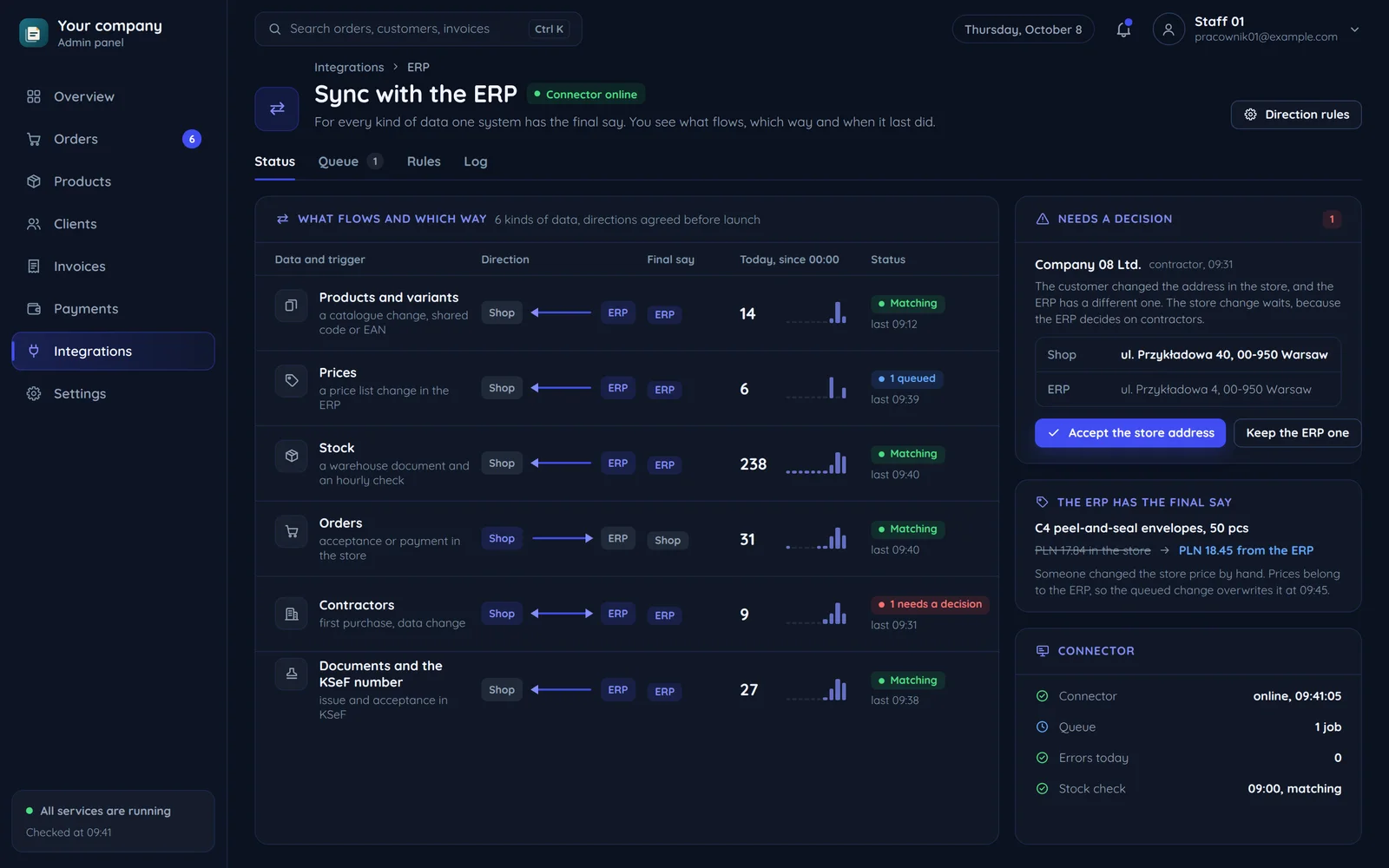
What flows between sales and the ERP
The directions we settle in every project. One system always has the final say.
Products and variants
When: a catalogue changea shared id: code or EANPrices
When: a price list changeStock
When: a warehouse document and a periodic checkOrders
When: acceptance or paymentContractors
When: first purchase, a data changewhich system decides is agreed at the startDocuments and the KSeF number
When: issue and KSeF acceptance
How an ERP integration goes
The same order whatever the program. Agreements take longest, not code.
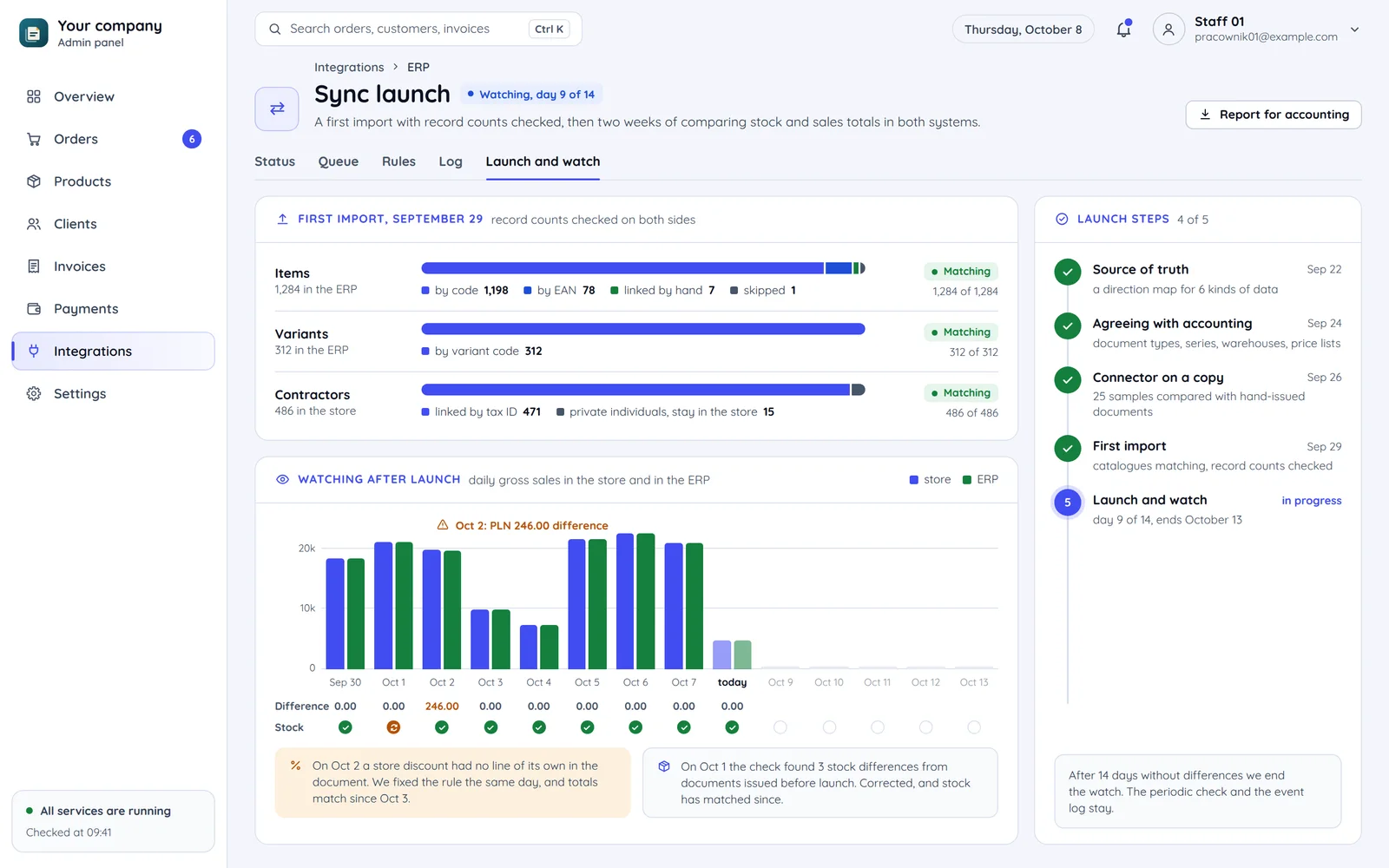
A first import with record counts
Moving product and contractor links with record counts checked.
Leaves behind: matching catalogues
Totals compared after the start
Switching the sync on and comparing stock and totals for the first weeks. The screen shows one day's difference, fixed by a document rule.
Leaves behind: sales with no retyping
Five steps, the agreements take longest
The source of truth, the agreements with accounting and the connector on a data copy come before the first import. Agreements take longest, not code.
Leaves behind: a direction map, written document rules, signed-off samples
A ready connector or your own integration
Honestly: in many firms a ready tool is enough. We write code where it stops.
A store on a popular platform and a standard flow
- The program or an intermediary supports the store's platform.
- Order, document and stock follow the standard route.
- Configuration with the program partner or through BaseLinker.
- A connector with a queue and an event log.
- Tests on a data copy.
- The code repeats what the ready connection already does.
Configuration with the program partner or through BaseLinker. We can help, but we do not sell code you do not need.
A custom B2B portal with contractor discounts and limits
- A custom portal is missing from ready connections.
- Contractor discounts, limits and kitting stay outside the standard flow.
- ERP data does not reach the client panel.
- The route your program offers: an API, extensions or import and export.
- The process rules in the connector: contractor discounts, limits, kitting, several warehouses.
- ERP data in the client panel and reports, checked on a data copy.
A connector with a queue and an event log, via the route your program allows, tested on a data copy.
Common questions about ERP integrations
Answers about unlisted programs, accounting and updates.

Read next
Integrations that usually go with an ERP.
Which program runs your accounting?
Tell us which program you use and where orders come from. We will reply within an hour with a suggested route and a quote.