
Business process automation with n8n and scripts
VulCode automates repetitive work in companies that sell online or serve customers: retyping orders into invoices, sending invoices to KSeF, sales reports and team notifications. We build the workflows in n8n when you want to see and change the steps, or write them as code when the process is complex. They run on your server, with retries and an alert on failure.
from PLN 499
The figure for your scope comes in a free quote.
What we automate most often
What automates best is what someone does the same way every day: retyping, copying, sending and checking. Almost every business that sells online or serves customers has processes like these.
Orders
By hand todaySomeone retypes every paid order into the invoicing app or the ERP, line by line.
Starts itA paid store orderComes outA document in the ERP or invoicing appWith the same lines as in the store.
Invoices
By hand todayAn invoice waits until someone sends it to KSeF and separately to the customer, and longer when that person is off.
Starts itAn issued invoiceComes outSending to KSeF and an email to the customerThe invoice status shows next to the order.
Reports
By hand todayThe summary is built from exports downloaded by hand, so it is only as fresh as the last copy and paste.
Starts itA schedule, e.g. Monday morningComes outA summary from several systems in one placeIt waits in one place before anyone asks for it.
Notifications
By hand todayThe team hears about a ticket, low stock or an outage only when someone notices.
Starts itA new ticket, low stock, an outageComes outA message to the team channel or a textStraight away, including whoever is on call.
CRM
By hand todayA contact form lands in the inbox and has to be moved into the CRM before sales even hears of it.
Starts itA contact form, a new customerComes outA contact with history and a task for salesWith no data moved by hand.
We leave decisions to people. Automation gathers data, prepares the document and asks for approval where a mistake is costly. When a process needs text judgement, we combine it with an AI assistant.
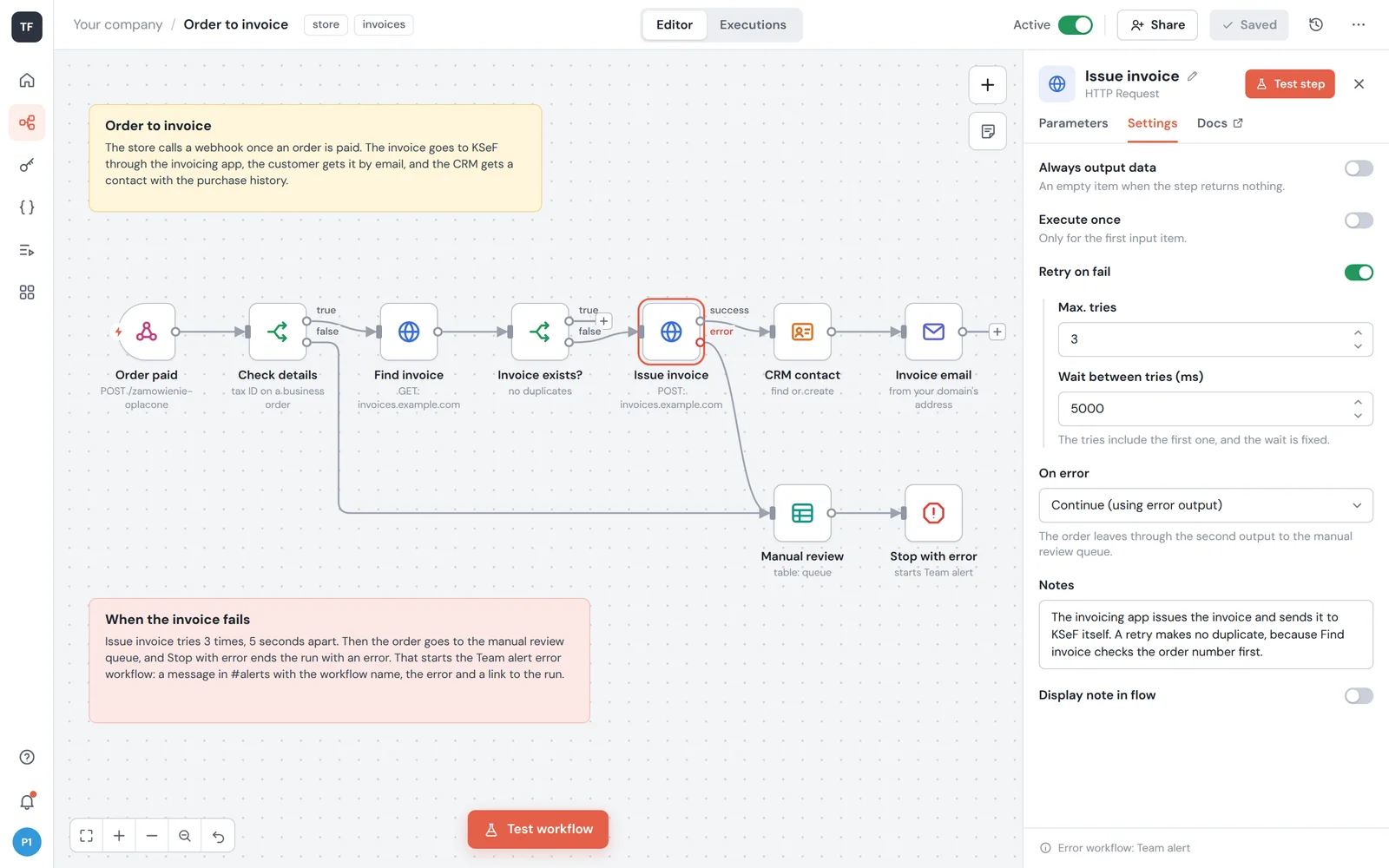
From a paid order to an invoice and the CRM
One order passes through several systems, and the workflow talks to each of them through its API. The details of each integration are on its own page.
It calls the workflow address once an order is paid. WooCommerce disables a webhook after more than 5 failed deliveries in a row, so that address always answers.
E-commerce platformsThe workflow reads the order event journal and recognises an order by its id, so none is ever created twice.
AllegroIt checks the invoice details, such as a tax ID on a business order, and whether the order already has an invoice.
If the invoicing app does not respond, the step retries a few times, then the team gets an alert with the order number.
It issues the invoice from the order data in your numbering series and stores its number with the order.
Fakturownia and wFirmaThe KSeF number goes to the order, and a rejection shows the reason KSeF gave rather than just the word error.
KSeFIt looks the customer up by email and creates a contact only when there is none.
The invoice goes to the customer from an address on your domain, with SPF and DKIM set up so it stays out of spam.
When everything goes through: The invoice is issued, the customer gets it by email, and the CRM has a contact with the purchase history.
Spreadsheets and any system with an API or webhooks connect the same way.IntegrationsAn n8n workflow with retries and an alert
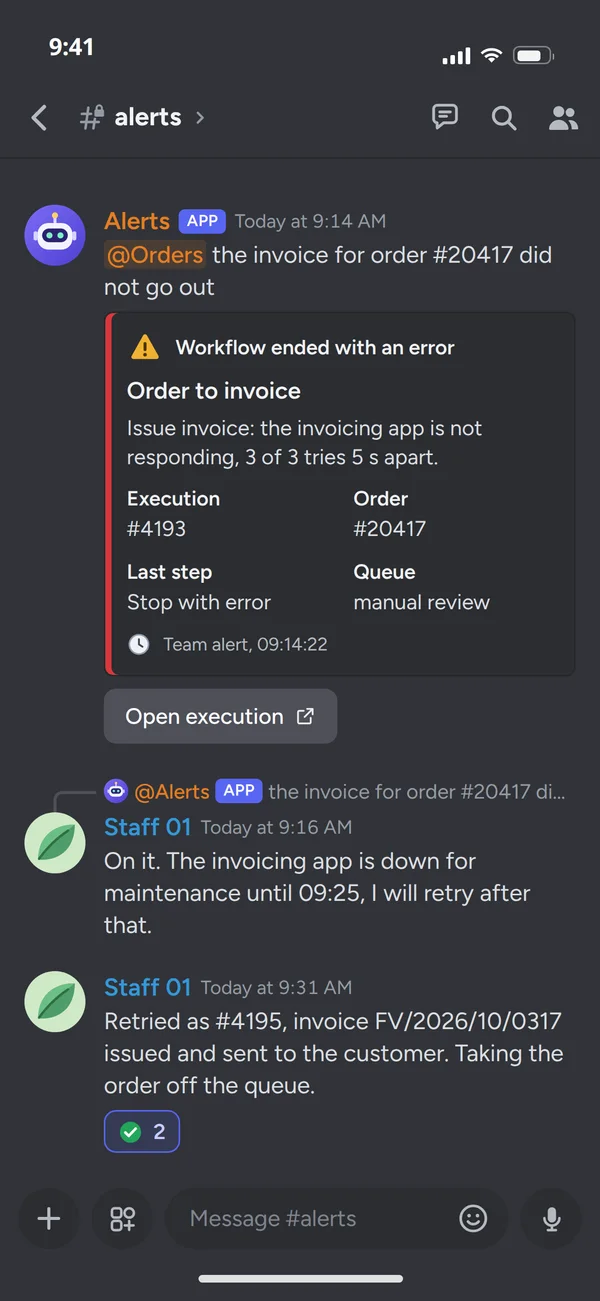
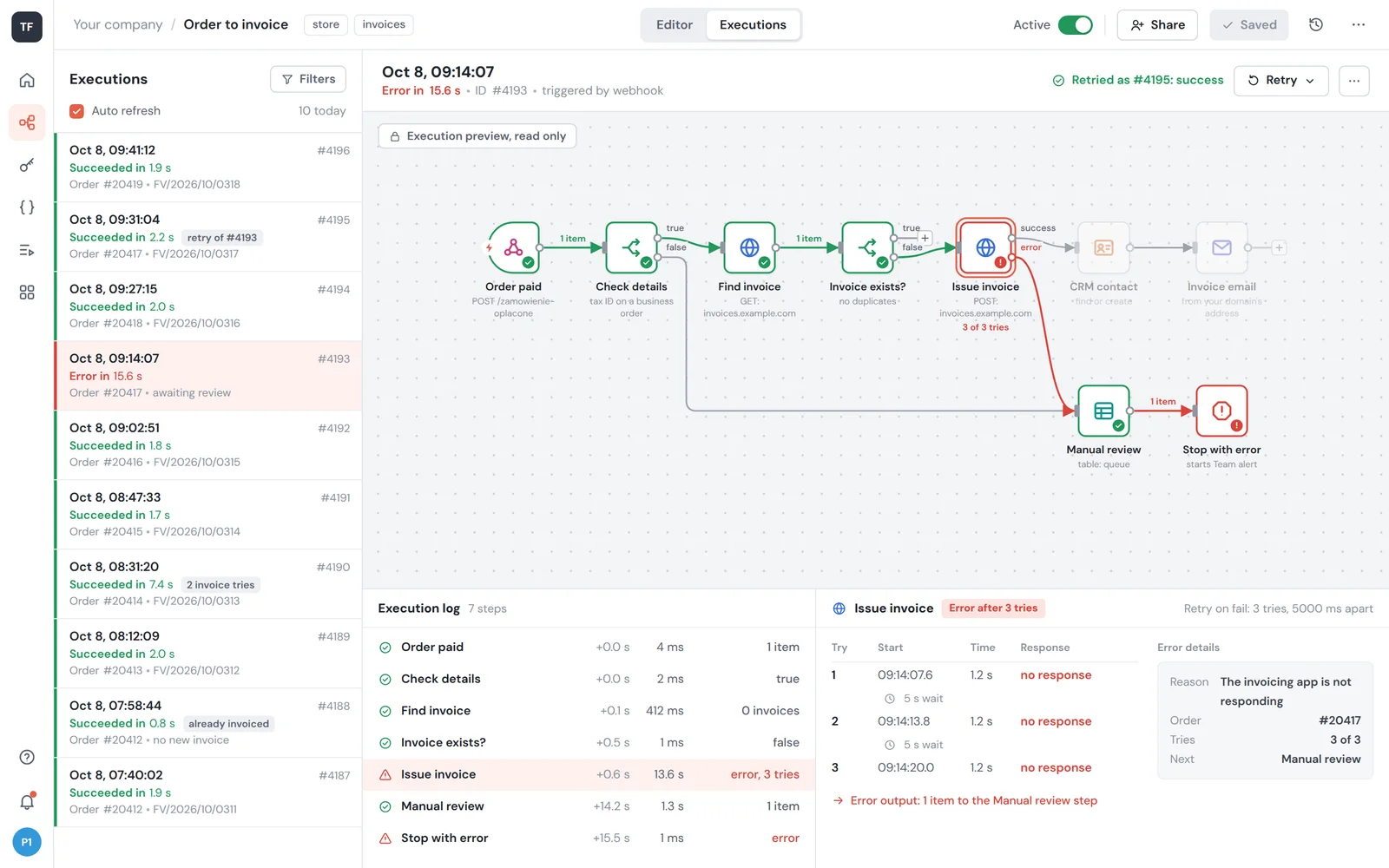
When the invoicing app or another system does not respond for a moment, the workflow tries again by itself. If it still fails, the order goes for a check and the team gets an alert.
- We retry before anyone noticesThe workflow waits 5 s and tries again, up to 3 times. A short outage on the other side ends without anyone lifting a finger.
- No order gets lostIf it still fails, the order goes on a list for a manual check, together with the history of tries.
- You get an alertThe team gets a message with the order number and what went wrong, and after the fix it reruns the execution with one click.
Where it runs and how we catch failures
Workflows run on your side, not in someone else's cloud, unless you deliberately choose otherwise. An automation whose failures nobody notices is worse than none.
- Webhooks from the store and forms
- A schedule
- New files and messages
- n8n or scripts
Every step with retries, and every workflow with its error workflow.
- Workflow database
Covered by backups, like the rest of the server.
- Passwords and keys
Service credentials live in the credential store, not inside the workflow. Each service gets its own key with minimal permissions.
- Execution history
You can see which order went through and which waits for a manual check.
The store webhook arrives at an address on this server, so the order data never passes through someone else's cloud. Without a licence key, n8n runs as the free Community edition.
- Team channel or a text
An alert with the workflow name, the error and a link to the run, so it is clear at once what to fix.
- Repository
A JSON export of every workflow in a repository, so you know who changed what.
Automation you do not have to watch
The difference shows at the first failure: our workflow retries, raises an alert and loses no orders.
We build workflows in n8n, and where there are many rules or the process reaches inside your system, we add code, such as an API integration. We make that choice for you when quoting.
Our automations
We automate our own work first. These tools took over routine work across our infrastructure and the products we build.
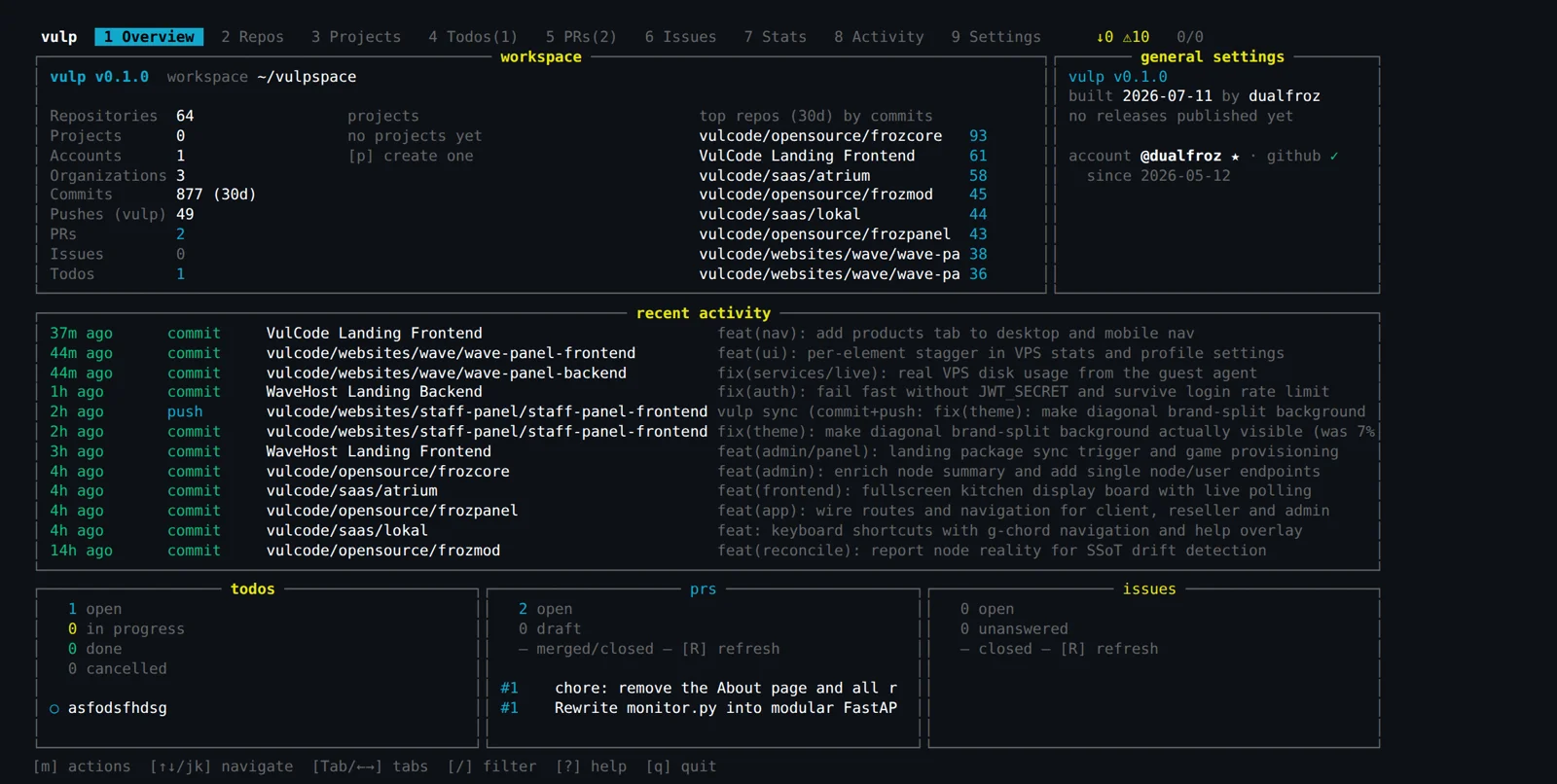
- vulp
The state of dozens of repositories in one view and the same operations in batch, with guardrails against pushing the wrong thing. The terminal view serves people, and a JSON CLI serves scripts.
- Flaem case study
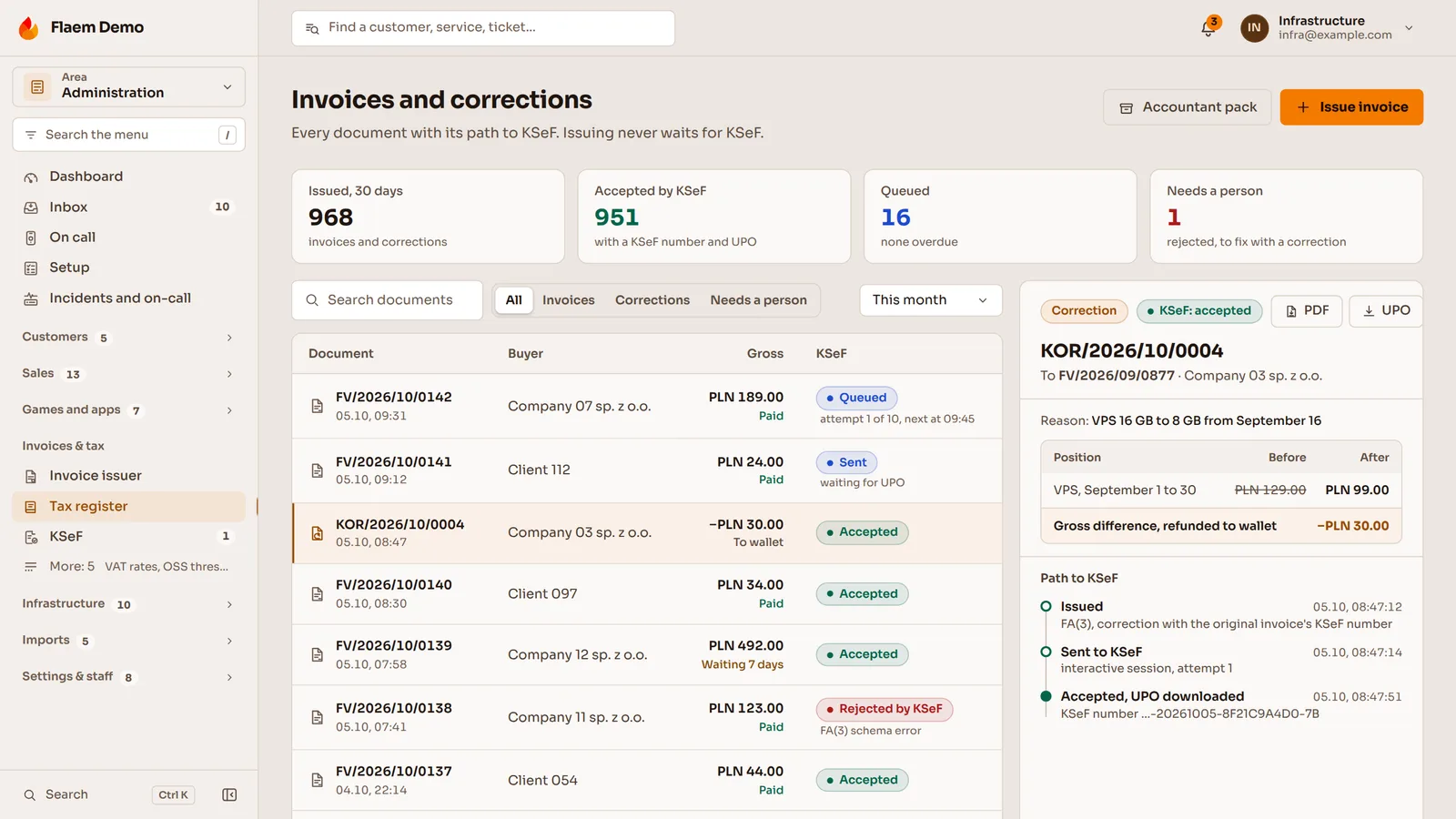
An invoice waits in a queue and goes to KSeF in the background with retries, so a KSeF outage never blocks a purchase.
Common questions about automation
Answers on where n8n runs, who changes the workflows, what it costs and who owns the code.

Read next
Integrations and services we most often automate together. Below them, blog articles on the same subject.
What in your business gets done the same way every day?
Describe the process you want to automate and which systems it uses. We will reply within an hour with questions and a quote.