
Symfonia Handel and FK integration with sales and KSeF
A store order becomes a document in Symfonia Handel, a bank payment settles it in FK and the invoice goes to KSeF. We link these steps so nobody moves data between programs by hand.
The Symfonia pieces we work with
Symfonia is several programs and add-ons. The integration touches only those involved in sales.
Before we start
- We establish which Symfonia Handel line you run, as it decides which ready tools apply.
- We check whether your bank works with Web API Bank before promising automatic payment settlement.
- We agree program configuration changes with your Symfonia partner.
Sales channels
- custom store
- e-commerce platforms
- Allegro via an intermediary
e-Commerce Integrator
- two-way data exchange
- universal and professional lines
This is where we choose: the Integrator or our own connector
Symfonia Handel
- contractors
- goods and stock
- sales documents
KSeF
- sending and receiving invoices
- Symfonia KSeF Plus
Symfonia FK and the bank
- posting
- Web API Bank
- settlements
From an order to a posted payment
The full sales path through Symfonia programs. The integration joins the places where someone retypes data today.
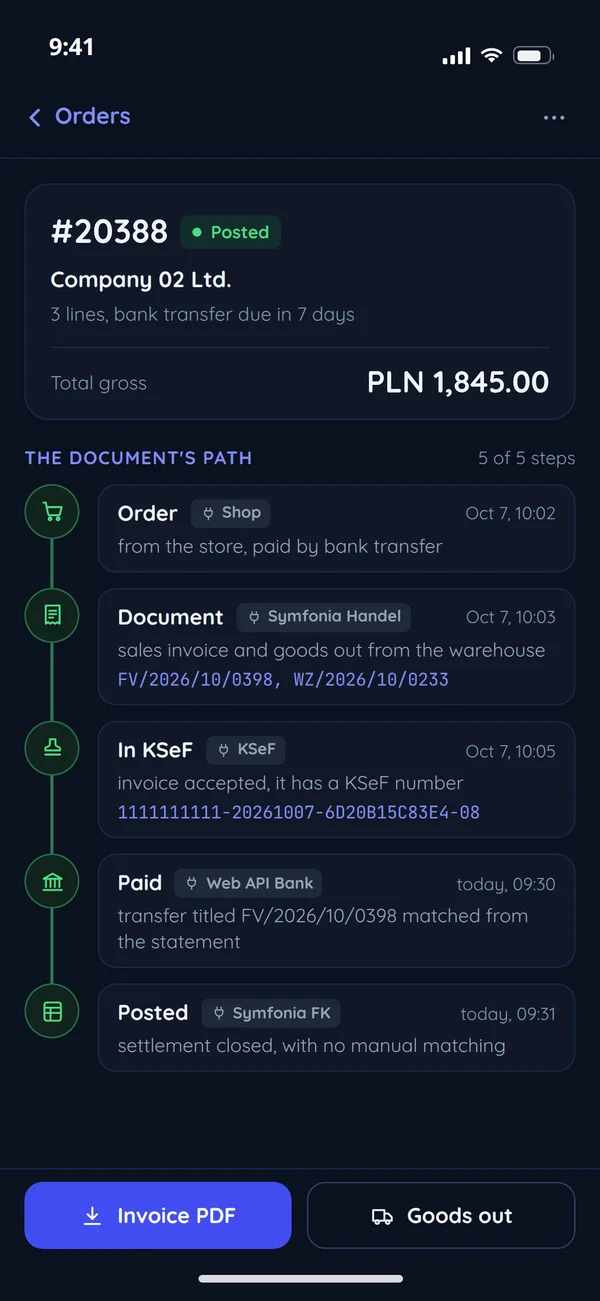
Order
A store, platform or B2B portal.
through the integrationDocument Symfonia Handel
A sales document and goods out.
from the programIn KSeF
An invoice with a KSeF number.
the customer's paymentPaid Bank
The customer's payment.
through Web API BankPosted Symfonia FK
Settlement and posting.
Invoice paid and posted with no manual matching
Symfonia's Integrator or your own integration
The e-Commerce Integrator is the first choice if it supports your platform.
The e-Commerce Integrator is enough
- The store runs on a platform the integrator supports.
- You need a standard exchange of products, stock and orders.
- A Symfonia partner deploys it, and we adapt the store on its side.
You need your own integration
- The store, B2B portal or app is custom-built.
- Data should reach a client panel: invoices, settlements, statuses.
- The process has rules the ready tool does not know.
The store runs on a platform the Integrator supports
Outweighs: The e-Commerce Integrator is enough. The Integrator, deployed by a Symfonia partner. We can help adapt the store on its side.
A custom B2B portal, with invoices and settlements due in the client panel
Outweighs: You need your own integration. A connector between your system and Symfonia Handel, with a queue, an event log and tests on a data copy.
The life of a sales document
From order to posting. Every status says what comes next and who does it.
Order
Arrived from the store or portal and awaits fulfilment.
Document
Symfonia Handel issued the sales document and goods out.
Rejected
KSeF rejected the invoice. The fix goes through the program, with the reason in the log.
In KSeF
Invoice accepted, it has a KSeF number.
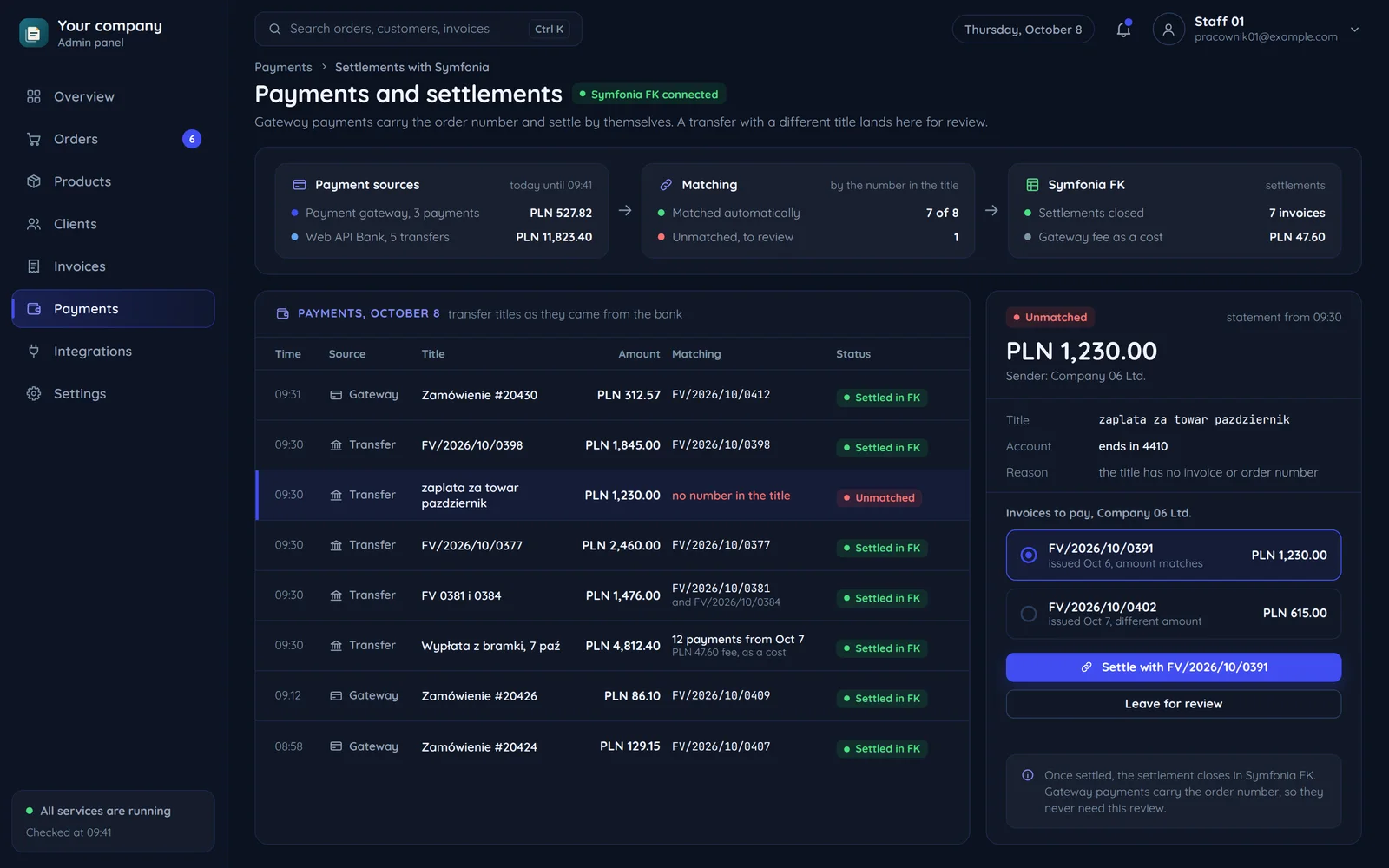
Unmatched payment
A payment with no match, e.g. a different title. It goes to manual review.
Paid
A bank payment matched to the invoice.
Posted
The settlement closed in Symfonia FK.
What we look at with Symfonia
Questions that save weeks of work later.
Symfonia Handel line and version
The e-Commerce Integrator supports the universal and professional lines. Other setups need a different route.
- The e-Commerce Integrator: the universal and professional lines.
- Your channel within the Integrator's reach: a Symfonia partner deploys it.
- A line or channel outside it: our own connector to Symfonia Handel.
KSeF handling in the program
Symfonia sends invoices to KSeF, including with the Symfonia KSeF Plus add-on. We check how yours is configured.
- Symfonia sends invoices to KSeF, also with the Symfonia KSeF Plus add-on.
- We check how KSeF is configured in your program.
- The integration brings the document complete data.
Your bank in Web API Bank
Automatic statements work for banks Symfonia connects with. Without that, settlements stay on files.
- A bank Symfonia connects with: statements and transfers with no intermediate files.
- A bank without the link: settlements stay on files such as MT940.
- We promise automatic payment settlement only after this check.
Payment title
Matching a payment to an invoice depends on the transfer title. Paying through a gateway with the order number solves this.
- A gateway payment carries the order number.
- The payment settles against the right invoice.
- A transfer with a different title goes to manual review.
Gateway and delivery costs
The gateway fee and delivery cost need a place in the documents for the settlement to close.
- The gateway fee has its place in the documents.
- The delivery cost has its own line.
- For the first weeks we compare sales totals in the store and in Symfonia.
Common questions about Symfonia integration
Answers about KSeF, bank statements and Allegro.

Read next
Integrations we most often combine with Symfonia.
Where does someone retype data into Symfonia today?
Tell us which Symfonia programs you have and where sales come from. We will reply within an hour with questions and a quote.