
Linux desktop add-ons
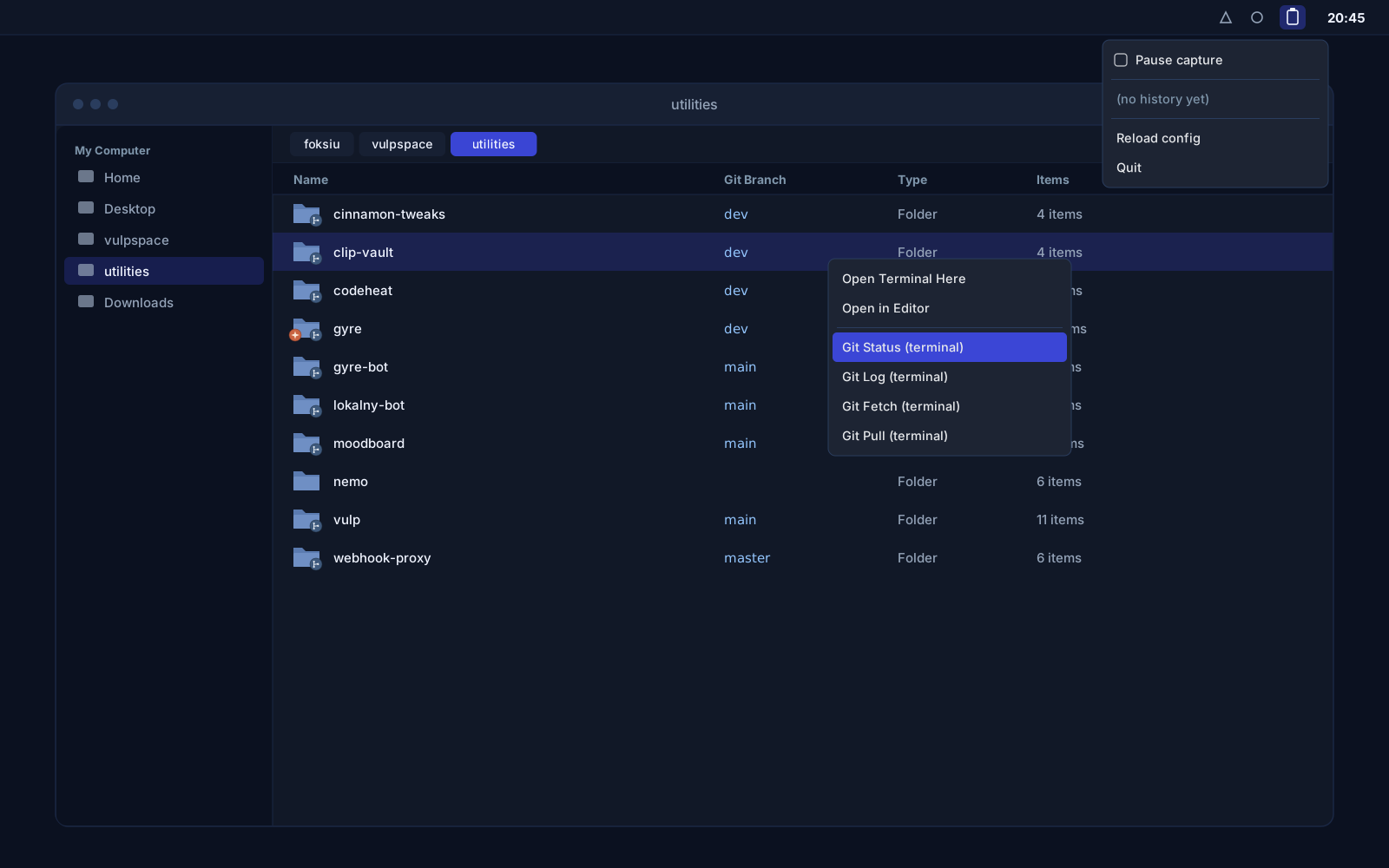
Add-ons for the Linux desktop: clip-vault keeps a clipboard history with pinning, a tray icon and blindness to password managers, and notif-vault archives every desktop notification to search from the terminal. Two Cinnamon tools manage keyboard shortcuts and the panel, and extensions for the Nemo file manager show the state of git repositories in columns, emblems, menus and folder properties.
Overview
The Linux desktop gives a lot of freedom, but a few things vanish on it the moment they happen: copied text, a notification that flashed in the corner of the screen. Settings changed all the time are buried several clicks deep, and the file manager knows nothing about the git repositories you work in. We built a set of small add-ons, each of which solves one of these.
All of them keep their data locally and send nothing anywhere until you write a webhook into the config yourself.
clip-vault: clipboard history
clip-vault runs in the background, stores everything you copy to the clipboard and gives the history back through a tray icon and a command line.
the same content copied twice moves back to the top instead of being repeated.
pinned entries survive history trimming and clearing.
every entry remembers the title of the window it was copied from.
clipboard content from KeePassXC, Bitwarden and 1Password and private keys are never stored at all.
From the tray you pause capture and re-copy one of the recent entries with one click, and from the terminal you search, show, copy, pin and delete entries.
notif-vault: notification archive
notif-vault listens on the session D-Bus and records every desktop notification: the app, the title, the body, the urgency and the icon. It does not display, suppress or replace notifications, so the system daemon keeps working untouched. The archive is searched by app, text and age, tailed live in a terminal, and apps on the ignore list never get into it.
Both tools can forward entries to webhooks with rules: clip-vault by a content pattern, notif-vault by app and minimum urgency, with a quiet window that pauses forwarding during chosen hours. Every webhook ships disabled.
Cinnamon tools
shortcut-manager gathers every custom keyboard shortcut into one table and lets you add, edit and delete them. You record a combination by pressing it instead of typing it out, and before saving, the dialog warns you when the shortcut is already taken. panel-tweaks gives one-click auto-hide, edit mode, the panel height on a slider and an applet list with switches.
Both read and write the same settings keys Cinnamon itself uses, so a change is live immediately, survives logout and shows up in the system settings.
Nemo extensions for repositories
Extensions for the Nemo file manager
| Extension | What it adds |
|---|---|
| nemo-repo-columns | Git branch and status columns in list view |
| nemo-repo-emblems | Emblems on folders with uncommitted work or unpushed commits |
| nemo-repo-git-menu | Git commands in the right-click menu |
| nemo-repo-properties | A Git tab in folder properties |
| nemo-folder-tools | Opening a folder in a terminal or in an editor |
All of them stand on a shared core that calls git without blocking the file manager and caches the results, so git does not run on every icon redraw.
Questions about Linux desktop add-ons

More projects
More work from the same category - see how we tackle similar challenges.
Have a similar project?
Get in touch - a quote is free and comes back within an hour.