
Streamer websites, bots and overlays for Twitch, Kick and Discord
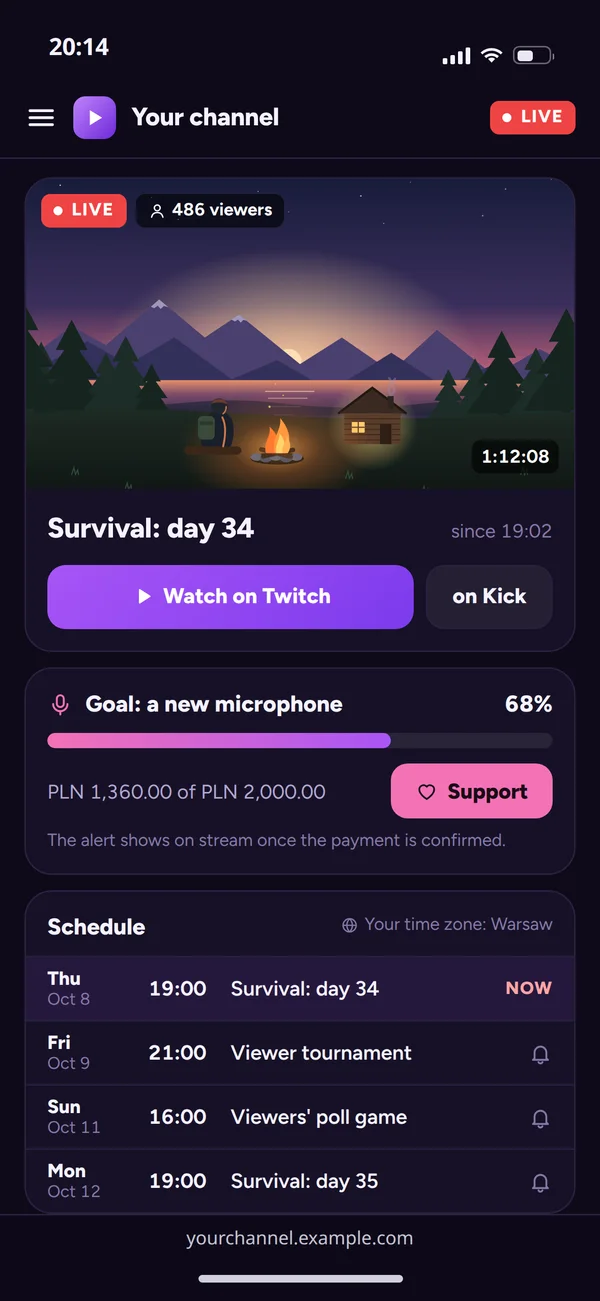
A website with your schedule and live status, bots with commands and channel point rewards, custom overlays and alerts plus a store. All under your brand, not a template.
An overlay that is part of your stream, not a template
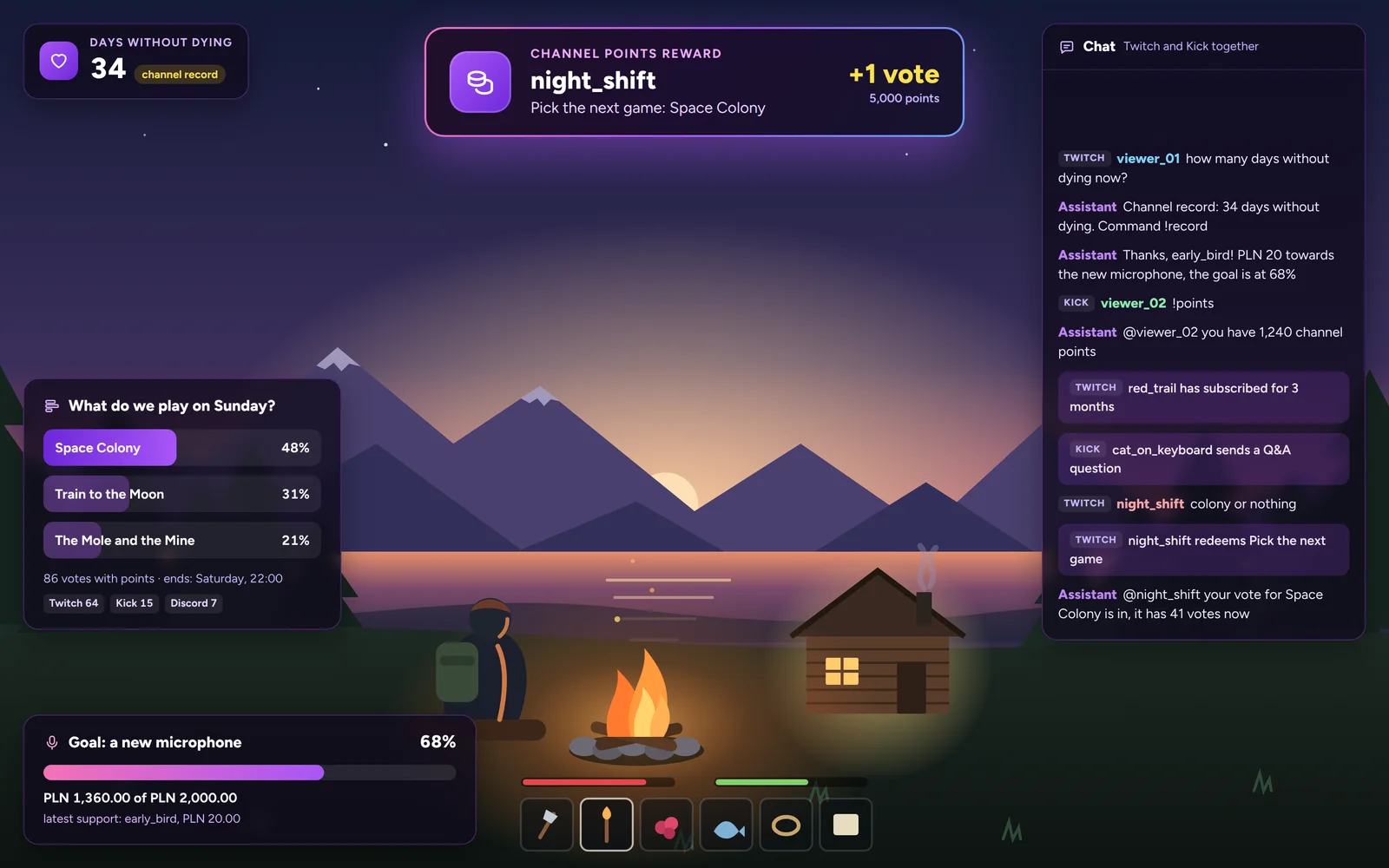
We design alerts, goals and chat around your brand and connect them to platform events, so they react to what happens on the channel.
Counters
A days-without-dying counter or a viewer tournament score, controlled from the panel or a command.
Support goal
The support goal bar, the same on the overlay and on the website.
Alerts from real events
Subscriptions, channel points and support reach the overlay through official platform APIs, not by reading the screen.
One source in OBS
The overlay is a web page you add as a browser source in OBS. Changing the look does not mean digging through scenes.
A bot panel on your phone
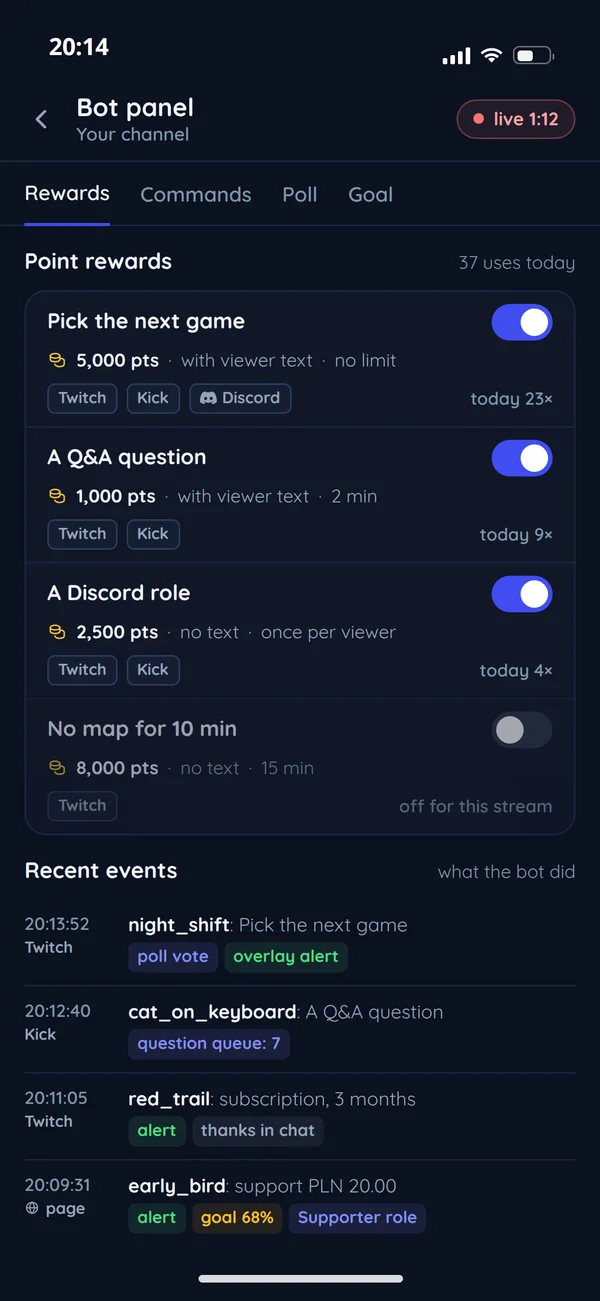
Change rewards and commands from your phone mid-stream, without switching windows.
Twitch, Kick and Discord: what we build on each platform
Each platform exposes different events and permissions. There is one bot, and we fit the modules to where you stream. The scope depends on what each platform documents for developers: Twitch EventSub and Kick Dev. We check before quoting, because APIs change more often than bots.
Modules fitted to where you stream.
Twitch
Kick
Discord
A channel point reward turned into a vote and an alert
One reward redemption on Twitch goes through the bot and ends as a poll vote and an alert on the overlay.
Channel point reward
- Platform
- Twitch
- Viewer
- night_shift
- Reward
- Pick the next game
- Cost
- 5,000 pts
- Viewer text
- Space Colony
Event from Twitch EventSub
- Event
- the redemption, by webhook to your server
The bot gets events from Twitch EventSub, so it keeps working when chat is flooded.
The bot's rule
- Rule
- Pick the next game: a poll vote and an alert
The same event counts a viewer vote and shows an alert. More effects are added in one place.
Poll
- Space Colony
- vote in, 41 votes
Viewers vote with points, and the result is on screen.
Alert on the overlay
- the reward and the game picked
- the bot's confirmation in chat
You set it in the panel, viewers get it on stream
The bot and overlay panel has only what you use during a broadcast.
- You setA channel point rewardViewers getAn effect on stream and a bot confirmation
- You setA command with a replyViewers getA reply in chat on Twitch, Kick and Discord
- You setA poll on the next gameViewers getVoting with points and the result on screen
- You setA support goalViewers getA progress bar on the overlay and the website
- You setThe weekly scheduleViewers getTimes on the website in their own time zone
- You setA going-live announcementViewers getA Discord ping and a website banner while you are live
One viewer's support in four places at once
One click from a viewer starts a chain that ends with a thank-you on stream and a role on Discord.
- Viewer
- WebsiteSupport log
- Streamoverlay and chat
- Discordthe community server
- ViewerWebsite
Krok 1 z 5: Support or purchase
A payment on your website or a platform event.
- WebsiteStream
Krok 2 z 5: Alert and thanks (then automatically)
An overlay alert and a bot message in chat. It appears once the payment is confirmed.
- WebsiteDiscord
Krok 3 z 5: Supporter role (then automatically)
The bot grants a role and access to a supporters channel.
- StreamViewer
Krok 4 z 5: A thank-you on stream
- DiscordViewer
Krok 5 z 5: The role and the supporters channel
Questions streamers ask
What creators ask before ordering a bot and overlay.

Read next
Creators, communities and tournaments.
Tell us about your stream
Send a link to your channel and tell us what your current tools lack. We will reply with a proposal and a free quote.