VulCode
Blog

Your first Minecraft plugin on Paper 26.3: from project to test server

You set up a Gradle project with Paper API 26.3 and Java 25, write a command and an event handler, and start a test server with one command. Following the PaperMC documentation, including what changed in 26.1.

VulCodeVulCode12 min read
Your first Minecraft plugin on Paper 26.3: from project to test server - VulCode
What you will buildJava, 7 steps
  1. ProjectGradlePaper API 26.3 and Java 25.
  2. Plugin descriptorplugin.ymlName, main class, api-version.
  3. Command and eventJava/powitanie and a greeting on join.
  4. Test serverrun-paperPaper downloaded and started with one command.

The guide at a glance

You will build a plugin that greets every player with a message from config.yml and has a /powitanie command: a player sees their greeting, and an admin reloads the configuration without restarting the server. MiniMessage formats the messages, so colours and gradients go into the config as tags.

Your first Minecraft plugin on Paper

Group
Games and Discord
Level
intermediate
Reading time
about 12 min
Code
Java

Files: build.gradle.kts, settings.gradle.kts, plugin.yml, config.yml, PowitaniePlugin.java, PowitanieCommand.java; plus commands in the terminal.

Steps
7 steps

7 of them with code or commands to copy.

Check
Gradle 9.8.0, Java 25

Plugin built and loaded, the start waits for the EULA

Documentation
4 official documents

PaperMC: project setup; PaperMC: plugin.yml; PaperMC: BasicCommand; run-task (run-paper) on GitHub

From our code
Flaem (frozcraft)

frozcraft/src/main/java/com/vulcode/frozcraft/store/StoreClient.java

Before you start

Version 26.1 changed how Paper is numbered. Before it the dependency looked like {VERSION}-R0.1-SNAPSHOT; now it is {VERSION}.build.{number}, and older tutorials online will not compile against the new API. This guide targets Paper 26.3.

What you need
Your first Minecraft plugin on Paper
JDK 25
Paper 26.3 requires Java 25. Gradle picks the JDK through the toolchain, but you need Java on the machine to run Gradle itself.
Gradle or IntelliJ IDEA
PaperMC recommends Gradle with the Kotlin DSL. In IntelliJ the Minecraft Development plugin creates the same project from a wizard.
A package name
The package is your domain reversed plus the project name, for example com.example.powitanie. Without a domain use io.github.yourname.
Accepting the Minecraft EULA
The test server will not start until its owner accepts the EULA by setting eula=true in run/eula.txt. It is a legal decision for whoever runs the server, so do not automate it in a script.

Versions used in this guide

ItemVersionWhere from
Paper API26.3.build.157-betarepo.papermc.io
Java25toolchain in build.gradle.kts
Gradle9.8.0the gradle:9.8.0-jdk25 image
run-paper3.1.0plugins.gradle.org

Step by step

7 steps. The window beside them shows the file or the commands of the step you are reading.

Create the Gradle project

The PaperMC repository and a compileOnly dependency: the server provides the API, so you do not bundle it into the jar. The + in 26.3.build.+ picks the latest 26.3 build. When you need reproducible builds, write a specific number, for example 26.3.build.157-beta.

The run-paper plugin adds a runServer task that downloads Paper in the given version and starts it with your plugin.

Name the project

rootProject.name becomes the jar name: build/libs/powitanie-1.0.0.jar.

Describe the plugin in plugin.yml

The required fields are name, version and main, the full name of the class that extends JavaPlugin. api-version says which API version the plugin targets. The powitanie.admin permission with default op is held only by server operators.

Add the default configuration

saveDefaultConfig writes this file to plugins/Powitanie/config.yml on first start. The admin edits the message there, and your code reads it with getConfig.

Write the main class and the event

In onEnable you register the event listener and the command. Paper's registerCommand registers the command in code, with its description and suggestions, with no commands entry in plugin.yml.

Placeholder.unparsed inserts the player's name as plain text. If you glued the name into the template with string concatenation, a player with MiniMessage tags in their name could change how the message looks.

Write the command

BasicCommand is the simplest way to write a command in Paper: execute receives the source and the arguments, and suggest returns suggestions. getExecutor is whoever the command runs as, including under /execute as, and getSender is whoever typed it.

Build the plugin and start a test server

gradle build creates the jar in build/libs. gradle runServer downloads Paper 26.3, starts it in the run directory and loads the plugin. On first start the server stops at the EULA: read it, set eula=true in run/eula.txt and start again.

For a real server you copy just the jar into the plugins directory and restart the server.

Code windowstep 1 of 7
build.gradle.ktsNew file, 25 lines
plugins {    java    id("xyz.jpenilla.run-paper") version "3.1.0"} group = "com.example"version = "1.0.0" repositories {    maven(url = "https://repo.papermc.io/repository/maven-public/") {        name = "papermc"    }} dependencies {    compileOnly("io.papermc.paper:paper-api:26.3.build.+")} java {    toolchain.languageVersion.set(JavaLanguageVersion.of(25))} tasks.runServer {    minecraftVersion("26.3")}
settings.gradle.ktsNew file, 1 line
rootProject.name = "powitanie"
src/main/resources/plugin.ymlNew file, 9 lines
name: Powitanieversion: 1.0.0main: com.example.powitanie.PowitaniePlugindescription: Wita graczy wiadomością z config.ymlapi-version: '26.3'permissions:  powitanie.admin:    description: Przeładowanie konfiguracji    default: op
src/main/resources/config.ymlNew file, 2 lines
# MiniMessage: <green>, <bold>, <gradient:#61cafa:#2112fc> i placeholder <gracz>wiadomosc: "<green>Witaj na serwerze, <gracz>!</green>"
src/main/java/com/example/powitanie/PowitaniePlugin.javaNew file, 31 lines
package com.example.powitanie; import net.kyori.adventure.text.Component;import net.kyori.adventure.text.minimessage.MiniMessage;import net.kyori.adventure.text.minimessage.tag.resolver.Placeholder;import org.bukkit.entity.Player;import org.bukkit.event.EventHandler;import org.bukkit.event.Listener;import org.bukkit.event.player.PlayerJoinEvent;import org.bukkit.plugin.java.JavaPlugin; public final class PowitaniePlugin extends JavaPlugin implements Listener {     @Override    public void onEnable() {        saveDefaultConfig();        getServer().getPluginManager().registerEvents(this, this);        registerCommand("powitanie", "Pokazuje albo przeładowuje powitanie", new PowitanieCommand(this));        getLogger().info("Powitanie gotowe");    }     Component powitanie(Player player) {        String template = getConfig().getString("wiadomosc", "<green>Witaj, <gracz>!");        return MiniMessage.miniMessage().deserialize(template, Placeholder.unparsed("gracz", player.getName()));    }     @EventHandler    public void onJoin(PlayerJoinEvent event) {        event.getPlayer().sendMessage(powitanie(event.getPlayer()));    }}
src/main/java/com/example/powitanie/PowitanieCommand.javaNew file, 41 lines
package com.example.powitanie; import io.papermc.paper.command.brigadier.BasicCommand;import io.papermc.paper.command.brigadier.CommandSourceStack;import java.util.Collection;import java.util.List;import org.bukkit.command.CommandSender;import org.bukkit.entity.Player; public final class PowitanieCommand implements BasicCommand {     private final PowitaniePlugin plugin;     PowitanieCommand(PowitaniePlugin plugin) {        this.plugin = plugin;    }     @Override    public void execute(CommandSourceStack source, String[] args) {        CommandSender sender = source.getSender();        if (args.length == 1 && args[0].equalsIgnoreCase("przeladuj")) {            if (!sender.hasPermission("powitanie.admin")) {                sender.sendRichMessage("<red>Brak uprawnienia powitanie.admin");                return;            }            plugin.reloadConfig();            sender.sendRichMessage("<green>Przeładowano config.yml");            return;        }        if (source.getExecutor() instanceof Player player) {            player.sendMessage(plugin.powitanie(player));        } else {            sender.sendRichMessage("<gray>Użycie: /powitanie albo /powitanie przeladuj");        }    }     @Override    public Collection<String> suggest(CommandSourceStack source, String[] args) {        return args.length <= 1 ? List.of("przeladuj") : List.of();    }}
gradle2 commands
gradle buildbuild/libs/powitanie-1.0.0.jargradle runServerLatest build for 26.3 is 157.[PluginInitializerManager] Bukkit plugins (1): - Powitanie (1.0.0)

Check that it works

We built the project from this guide on 6 October 2026 in Gradle 9.8.0 with Java 25. The 26.3.build.+ dependency resolved to 26.3.build.157-beta, and the classes have class file version 69, which is Java 25. runServer downloaded Paper 26.3 build 157, verified the jar's SHA-256 hash and listed our plugin among the Bukkit plugins. Start-up stopped at the EULA, which we do not accept on your behalf.

terminal6 October 2026Gradle 9.8.0, Java 25
$ gradle runServer
Fetching latest Paper build for version 26.3...
Latest build for 26.3 is 157.
Verified SHA256 hash of downloaded jar.
[bootstrap] Running Java 25 (Eclipse Adoptium Temurin-25.0.4.1+1)
[bootstrap] Loading Paper 26.3-157-main@4728a90 for Minecraft 26.3
[PluginInitializerManager] Bukkit plugins (1):
- Powitanie (1.0.0)
You need to agree to the EULA in order to run the server.
Plugin built and loaded, the start waits for the EULA
What the output lines mean
  1. lines 2-4Paper downloaded and checked

    runServer downloaded Paper 26.3 build 157 and checked the file's SHA-256 hash.

  2. lines 5-6Java 25

    The server runs on Java 25, the one the toolchain in build.gradle.kts sets.

  3. lines 7-8The plugin on the list

    Powitanie 1.0.0 is on the list of Bukkit plugins.

  4. lines 9Stopped at the EULA

    The start stopped at the EULA, which we do not accept for you. Put eula=true in run/eula.txt once you have read it.

How you know it works on your side

  • gradle build ends with build/libs/powitanie-1.0.0.jar.
  • After accepting the EULA, the server log has the line "Powitanie gotowe".
  • A joining player sees a green message with their name.
  • /powitanie przeladuj works only for an operator.

The errors you will meet

The same path as "What you will build" at the top of the page, with the places where the work stops most often. For each error: the symptom, the cause and what to do.

Where it stops and why

Project

Gradle

Paper API 26.3 and Java 25.

  • Stops here: Could not find io.papermc.paper:paper-api:1.21...-R0.1-SNAPSHOT for 26.x

    The old version format from tutorials written before 26.1. What to do: Use 26.3.build.+ or a specific build number.

  • Stops here: Unsupported class file major version 69

    Compiling or running the server on Java older than 25. What to do: Set the toolchain to 25 and run the server on Java 25.

Plugin descriptor

plugin.yml

Name, main class, api-version.

  • Stops here: The plugin does not load, Invalid plugin.yml in the log

    Missing name, version or main, or main points to a class that does not exist. What to do: Check the full class name including the package.

Command and event

Java

/powitanie and a greeting on join.

  • Stops here: A player name changes the message colour

    The name glued into the MiniMessage template by concatenation. What to do: Insert player data with Placeholder.unparsed.

Test server

run-paper

Paper downloaded and started with one command.

  • Stops here: You need to agree to the EULA

    No eula=true in the test server's eula.txt. What to do: Read the EULA and set eula=true in run/eula.txt.

How we do it in our own code

The same topic in code we maintain: Flaem (frozcraft).

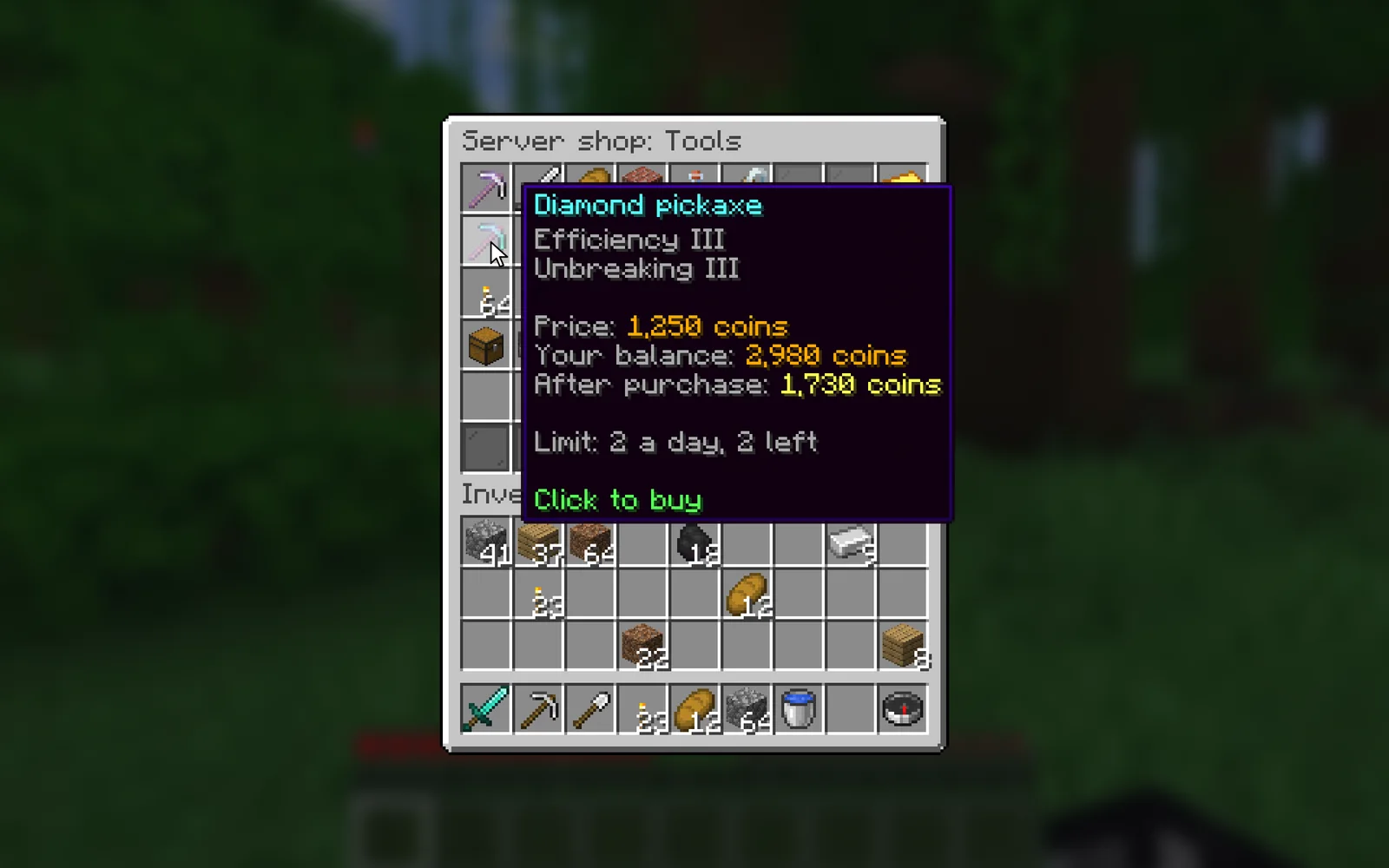
A Minecraft server store in the inventory window with the price, the balance and a daily limit

The Paper plugin in Flaem

Frozcraft is a Paper plugin that connects a Minecraft server to the Flaem platform: the player list with skins, TPS and MSPT stats, moderation actions and handing over store purchases. It runs on Paper, Purpur and Folia because it uses Paper's schedulers (GlobalRegionScheduler and the entity scheduler), which are the same on all three.

The key rule in this code helps in any plugin: checking the player and running the command happen on the server thread, never on the thread that waited for a network response.

frozcraft/src/main/java/com/vulcode/frozcraft/store/StoreClient.javajava, 25 lines
/** * Polls FrozCore's own delivery queue directly over outbound HTTPS. * A leased delivery for a player who is not online right now is left * un-acknowledged rather than retried locally: FrozCore's lease expires * on its own and offers the same delivery again. */private void handleOne(String leaseToken, Map<String, Object> delivery) {    String deliveryId = (String) delivery.get("id");    String playerIdentifier = (String) delivery.get("player_identifier");    String command = (String) delivery.get("command");    if (deliveryId == null || playerIdentifier == null || command == null) {        return;    }     Player player = schedulers.onGlobal(() -> resolvePlayer(playerIdentifier));    if (player == null) {        // Not online - leave it leased. FrozCore offers it again once the lease expires.        return;    }     String resolvedCommand = command.replace("{player}", player.getName());    boolean dispatched = schedulers.onGlobal(            () -> Bukkit.dispatchCommand(Bukkit.getConsoleSender(), resolvedCommand));    // ...}

An excerpt of the frozcraft plugin, shortened.

Related pages and sources

The service, tools and terms this guide leads to, and more guides.

Official documentation

Rather have it done by someone who has done it before?

Describe your system. We reply within an hour with an integration plan and a quote.

Questions