
PrestaShop modules and integrations with ERP, payments and couriers
PrestaShop offers three routes to store data: the Webservice, the new Admin API from version 9 and a custom module that reacts to store events. We pick the route for the process and write modules that survive the next upgrade.
Three routes to PrestaShop data
Each suits something else, so for every job we take the one that does it most reliably. An integration often combines two.
A new order reaches the ERP
- The integration regularly asks the store for orders, because the API does not react to store events.
- A key with access to orders only.
- The order arrives with the next read.
- The module reacts to a new order during checkout.
- The module only writes the event to its table, so the customer does not wait.
- A background job sends it to the ERP, also when the ERP comes back after an outage.
The module, because only it reacts to store events.
Stock from the ERP to a PrestaShop 8 store
- The Webservice works in PrestaShop 8, the Admin API only from 9.
- The key has access to stock levels only.
- Every stock write names the shop it is for.
- A module works in 8 too, but has full access to the store.
- Full permissions mean code to review.
- On a store upgrade it needs a compatible version range.
The Webservice with a key for stock only: the fewest permissions, works in 8 and 9.
A complex operation in the store
- The Webservice only reads and writes objects, so it cannot run a complex action.
- The PrestaShop 9 Admin API runs it as a single store operation.
- Access with narrow permissions, and in a live store over an encrypted connection only.
- A module reaches all store logic.
- It works in PrestaShop 8 too.
- The code needs a review, because its permissions are full.
In PrestaShop 9 the Admin API with scopes, in 8 a custom module.
A module that reports orders to the integration
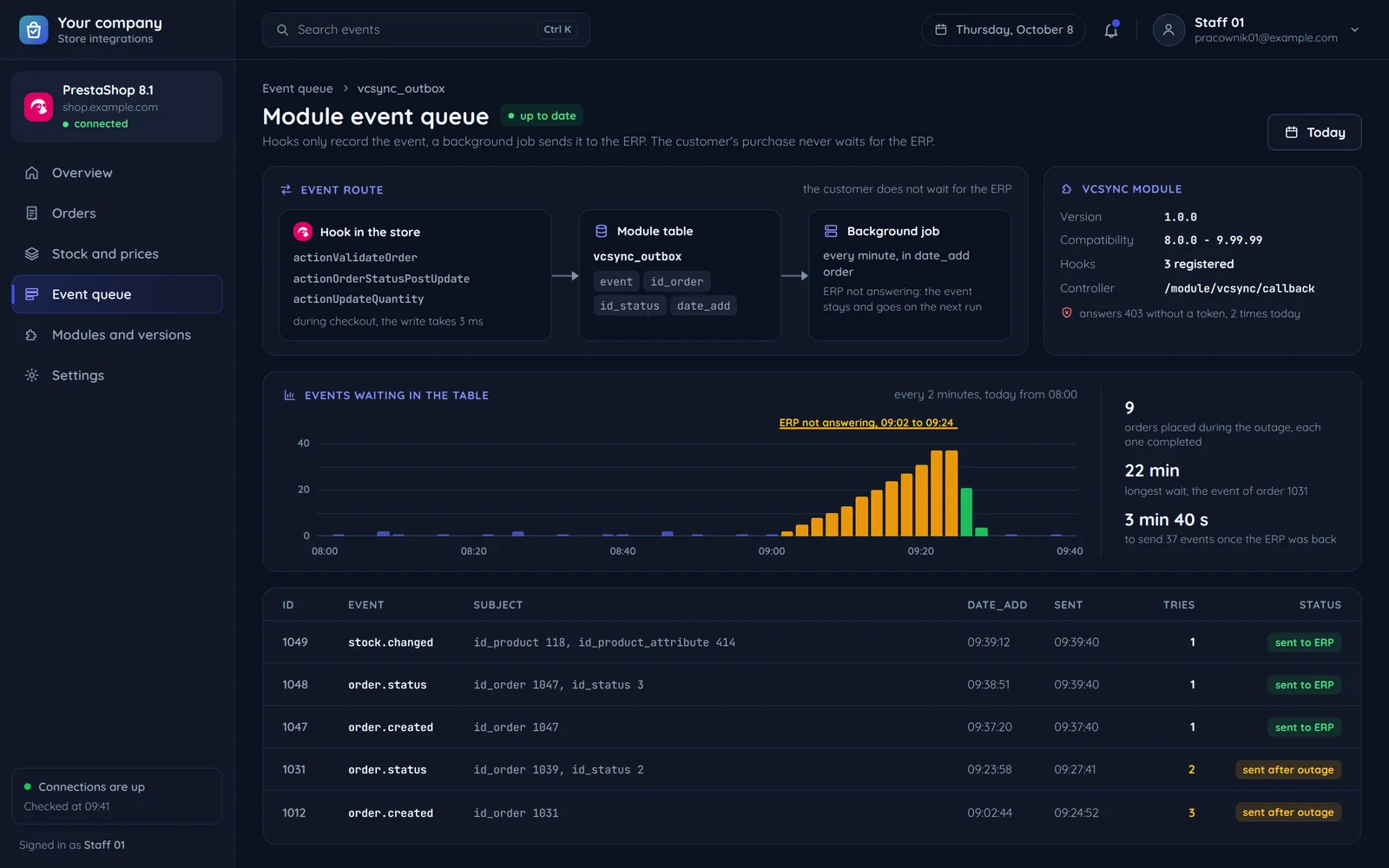
Hooks run while a customer places an order, so the module only records the event. Sending to the ERP runs in the background.
The store
a customer places an order- a new order
- an order status change
Checkout ends without waiting for the ERPThe module reacts to two store events: a new order and a change of its status.
The module table
The module records the PrestaShop versions it works with, because on an upgrade incompatible modules are uninstalled.
A background job
in the order events happenedWhen the ERP is down, the event stays in the table and goes out on the next run.
outageERP
not respondingEvents from the outage go out once it answers again.
PrestaShop stock versus the ERP record
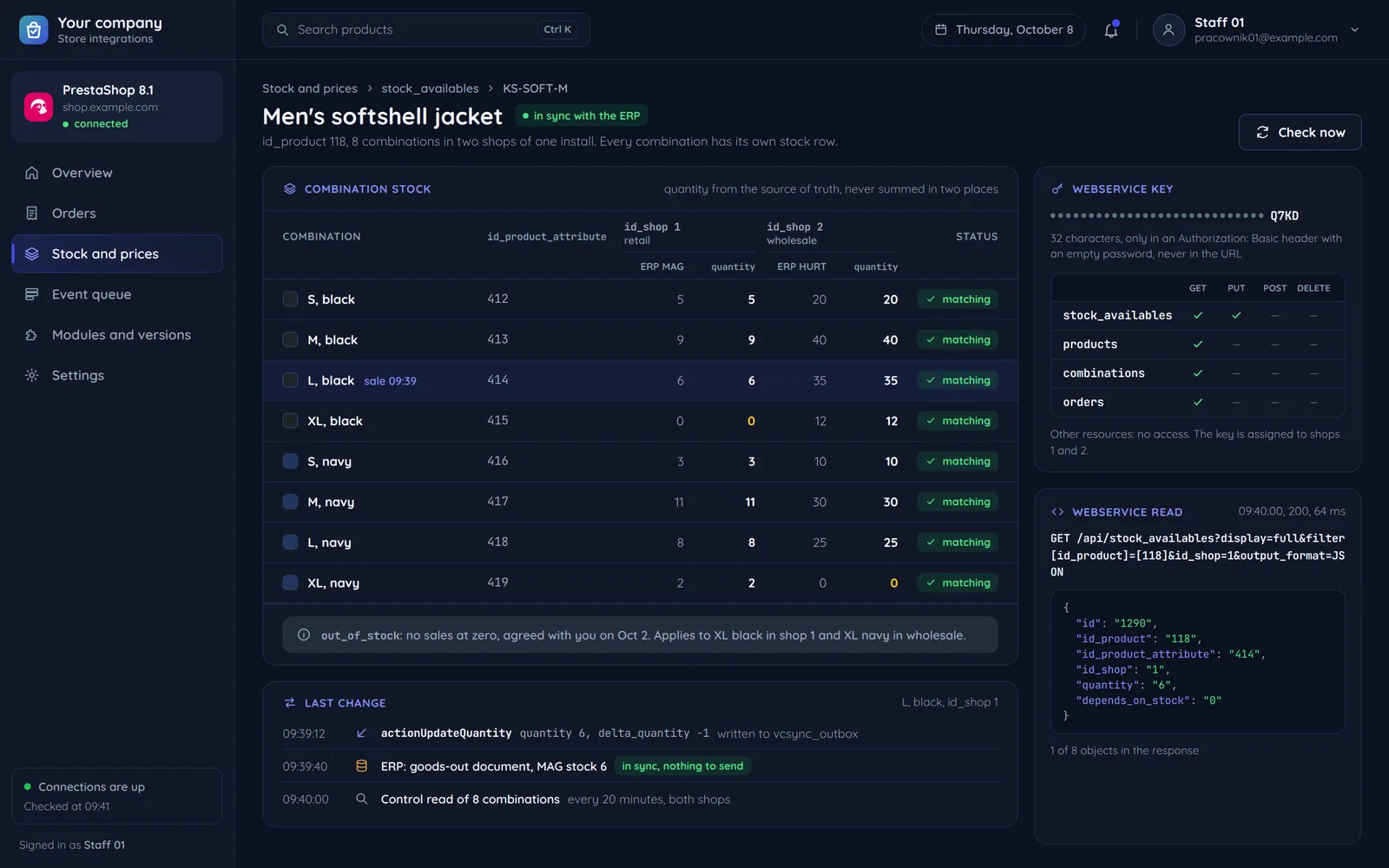
Every product variant, called a combination in PrestaShop, keeps its own stock. This is how we join it to the ERP record.
- productthe item record
Via a product map by code.
- combination, i.e. varianta variant, e.g. a size
Every combination has its own stock row.
- quantityavailable stock
From the source of truth, never summed in two places.
- selling at zerothe rule for selling at zero
Set once, together with you.
- shopa warehouse or channel
With several shops in one install.
Every stock change in the store fires an event the module can use to pass the new level on at once.
Webservice rules that shape the integration
Most PrestaShop integration problems start with one of these rules, so we set each one up from day one.
- Webservice: off by defaultWebservice: on when the integration uses it
Enabling
We turn it on only when the integration uses it.
- ••••••••••••••••••••••••••••Q7KD32 characters
read write stock levels products orders Other data: no access.
Key
A separate key per integration, with access to the data it needs only.
- The integration asks for stockthe key in the hidden part of the requestno passwordthe key in the address
The key outside the address
The key never goes into the address, where it would stay in the server logs.
- Readthe light JSON formatquantity: 6WritePrestaShop's blank templatequantity: to fill in
Reading and writing
We read in the light JSON format and write from PrestaShop's blank template, so every write has exactly the shape the store expects.
- a request for shop 1Shop 1, retailShop 2, wholesale
The key is assigned to both shops, and the request names one.
Multistore
Every request names its shop, so stock never lands in the wrong one.
Upgrading a store with custom modules
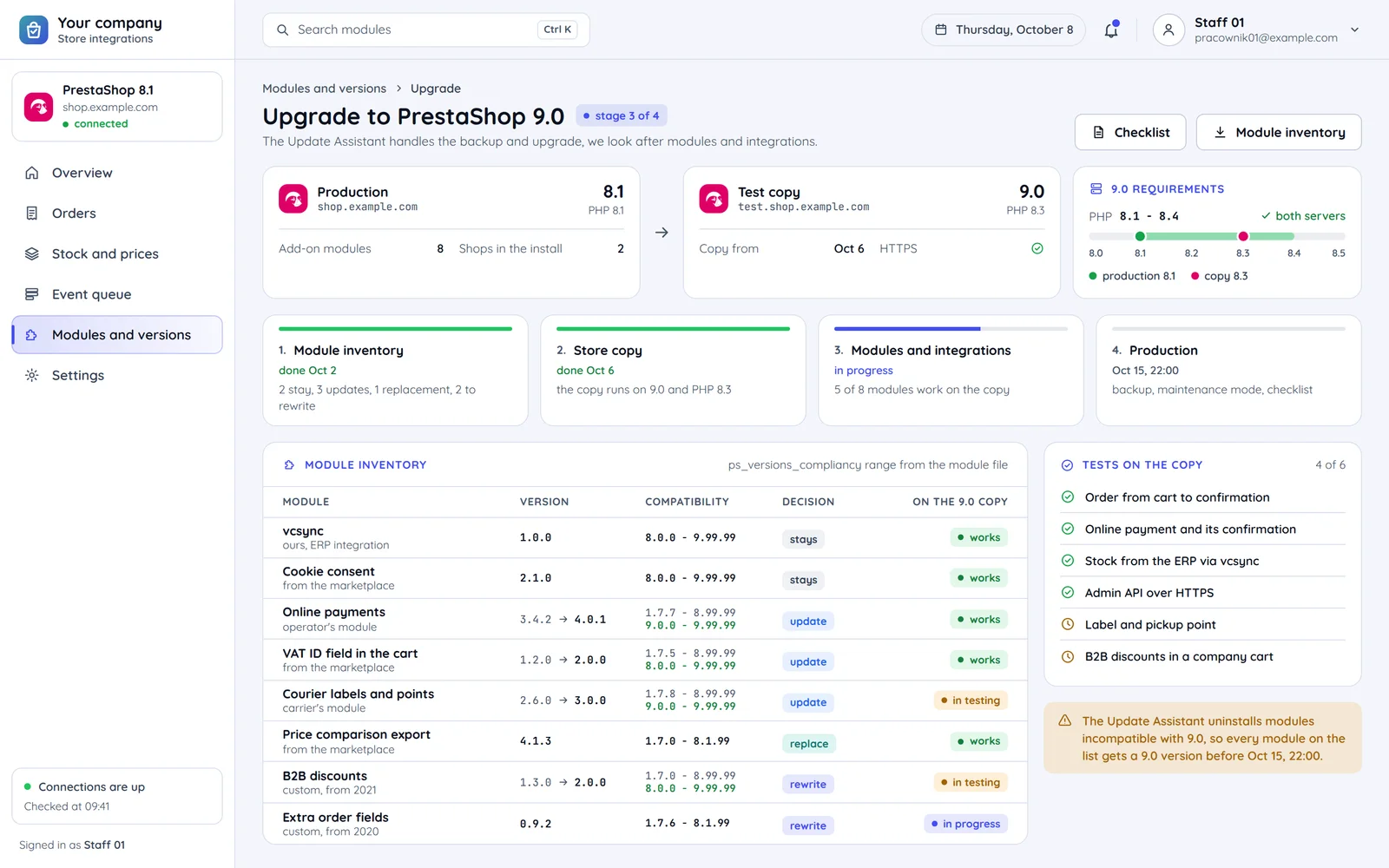
The Update Assistant handles the backup and upgrade, and we look after modules and integrations so everything works afterwards.
Module inventory
We check each module's version range and whether it has a release for the target PrestaShop.
Every module records the PrestaShop versions it works with, e.g. from 8 to 9.
Output: a list: update, replace, rewrite
Store copy
We upgrade a copy on a test server with the right PHP version.
We check that the server runs the PHP version the new PrestaShop needs.
Output: a working copy on the new version
Modules and integrations
We fix custom modules and test an order, payment and shipment end to end.
The Update Assistant uninstalls a module incompatible with the new version.
Output: a list of tested processes
Production
A backup, the upgrade in maintenance mode and the post-update checklist.
Output: the store on the new version
Common questions about PrestaShop
Answers about versions, upgrades, performance, ERP outages, modules and the quote.

Read next
Other platforms and store integrations.
Running a store on PrestaShop?
Tell us your version and what you want to connect or upgrade. We will reply within an hour with questions and a quote.