
Website and store migration without losing rankings
We move websites and stores to a new system without Google losing a single address: a 301 redirect map for every old page, content and data carried over, and after launch we watch Search Console until traffic settles.
Five kinds of migration
For sites that get Google traffic and cannot lose it in the move. Each kind changes something else, and when addresses change, you need a redirect map. Google advises changing one thing at a time. A new domain, system and design on the same day are three possible causes of a drop and no way to tell them apart.
New domain
e.g. after a company name change
- Addresses
- changes
- Content
- unchanged
- Server
- unchanged
The riskThe old domain's signals reach the new one only through a 301 from every page and the Change of Address tool in Search Console, run for every variant, with and without www.
New platform
e.g. from WordPress or WooCommerce
- Addresses
- changes
- Content
- changes
- Server
- depends on the project
The riskEvery system builds addresses its own way, so usually every old address needs a redirect, and content, products and accounts move by script from an export or the API.
New hosting
or a CDN, addresses unchanged
- Addresses
- unchanged
- Content
- unchanged
- Server
- changes
The riskThe risk sits in DNS and email: the TTL drops to a few hours at least a week ahead, and the MX, SPF and DKIM records move with the email.
New URL structure
on the same domain
- Addresses
- changes
- Content
- unchanged
- Server
- unchanged
The riskEvery old address needs a counterpart, and internal links, canonical tags and the sitemap must point at the new addresses from day one.
Merging sites
several sites into one
- Addresses
- changes
- Content
- changes
- Server
- depends on the project
The riskEvery merged domain gets a redirect map of its own, and content merged into one page leads to wherever its substance ended up.
The redirect map
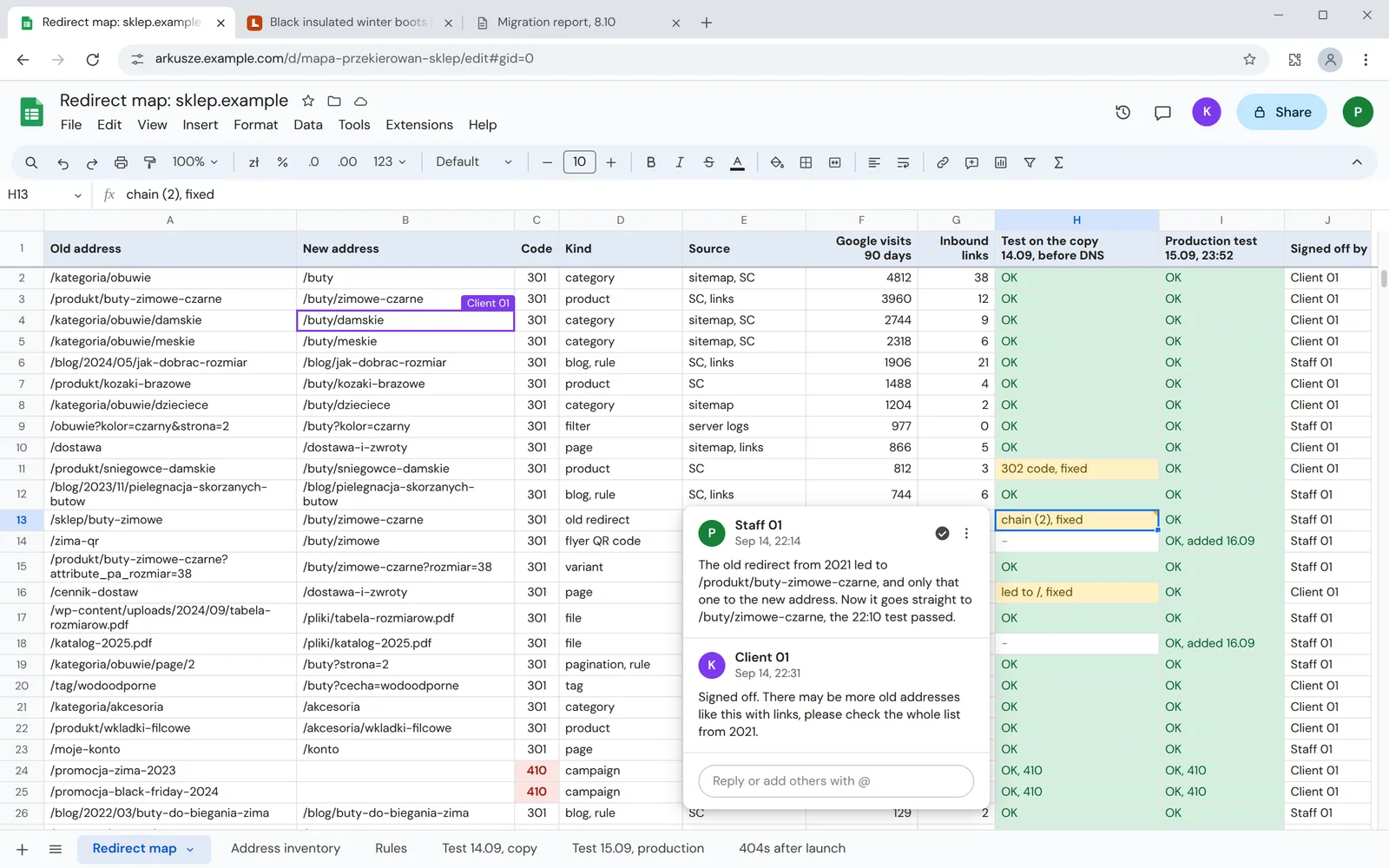
Every row of the sheet joins an old address to a new one, and the server gets a ready file from it. We keep redirects as long as possible, at least a year according to Google.
A 301 for every page with traffic
Columns F and G: Google visits and inbound linksAddresses with visits and links are mapped by hand, each to its counterpart, and rules cover the long tail without traffic.
A 410 for content with no counterpart
Column C: the response codeA finished campaign gets a 410 instead of a forced redirect. To Google it means the same as a 404, but the logs show a decision, not a gap in the map.
Addresses with parameters
Column A: the old addressFilters, pagination and variants get rows of their own, and campaign parameters such as utm_source do not break the match.
What we move and how we check it
The old site's inventory is built from several sources at once, as each catches something the others miss. Every layer has its own test, before DNS changes and once more after the switch-over.
Addresses
Old sitesitemap, Search Console, server logs, inbound linksNew sitea 301 and 410 redirect mapA script requests every old address: it has to answer 301 or 308 and lead in one hop to where the map says.Content and images
Old sitepages, posts, images, PDFs, metadataNew sitethe same content with titles, descriptions and structured dataWe compare counts and samples, and images and files get rows of their own in the map, as they have addresses of their own.Products, customers and orders
Old sitevariants, customer accounts, order historyNew sitethe same records in the new storeRecord counts before and after, and orders placed during the work move in a final sync in the switch-over window.Forms and integrations
Old siteforms, payments, links to other systemsNew siteconnected to the new systemWe test forms and payments on a copy with real data before DNS changes.Email and DNS
Old siteA, MX, SPF and DKIM recordsNew sitea new server, the same emailThe TTL drops to a few hours a week ahead, and the old server keeps running until traffic in its logs drops to zero.Analytics
Old siteSearch Console, the performance reportNew sitethe same property, a new sitemapWe save the performance report data before the switch-over, through the API for a larger site, as an export stops at 1,000 rows.
The details that cost migrations their traffic
Each of these mistakes goes unnoticed until someone requests the old address. This is the same address before the fix and after it.
The home page instead of a counterpart
An old address with no counterpart lands on the home page. Google treats it as a missing page and drops it from results.
Beforetwojsklep.pl/cennik-dostaw- 301/
- 200the home page
Google: a soft 404Aftertwojsklep.pl/cennik-dostaw- 301/dostawa-i-zwroty
- 200
The same content at the new addressA redirect chain
After a few restructures an address hops through redirect after redirect. Every hop slows the visit, and some robots give up on the way.
Beforetwojsklep.pl/oferta/obuwie-zimowe- 301/sklep/buty-zimowe
- 301/produkt/buty-zimowe-czarne
- 301/buty/zimowe-czarne
- 200
Three hops instead of oneAftertwojsklep.pl/oferta/obuwie-zimowe- 301/buty/zimowe-czarne
- 200
One hop, straight to the targetA temporary redirect
A 302 tells Google the change is temporary, so the old address stays in results and its rankings do not pass to the new one.
Beforetwojsklep.pl/produkt/sniegowce-damskie- 302/buty/sniegowce-damskie
- 200
The old address stays in resultsAftertwojsklep.pl/produkt/sniegowce-damskie- 301/buty/sniegowce-damskie
- 200
The new address replaces the old one in resultsAn address from off the site
Addresses from flyers, QR codes and old campaigns are not in the sitemap. Without the inventory from the logs and from you, they are easy to miss.
Beforetwojsklep.pl/zima-qr- 404a flyer QR code missing from the inventory
A customer from the flyer gets an errorAftertwojsklep.pl/zima-qr- 301/buty/zimowe
- 200
Added to the map and tested
How the migration works
From the map to the weeks of watching after launch. Until the switch-over the old site runs unchanged, and each stage shows what we need from you.
- serves customers
- test version
- backup to go back to
The map
An inventory of old addresses from the sitemap, Search Console and logs, and each gets a counterpart and a 301 or 410.
From you: access
Test version
The new site with the moved data on a copy: redirects, forms, payments, speed and indexing.
From you: sign-off
Switch-over
At the quietest time: the final sync, DNS to the new server and the test version's blocks taken off.
From you: DNS
Checks
The same test of the whole map in production, the new sitemap in Search Console and addresses from the 404 logs added to the map.
From you: acceptance
90 days of watching
Our standard support and monitoring after acceptance: 404s, indexing and Google clicks week against week.
From you: bug reports
After the migration
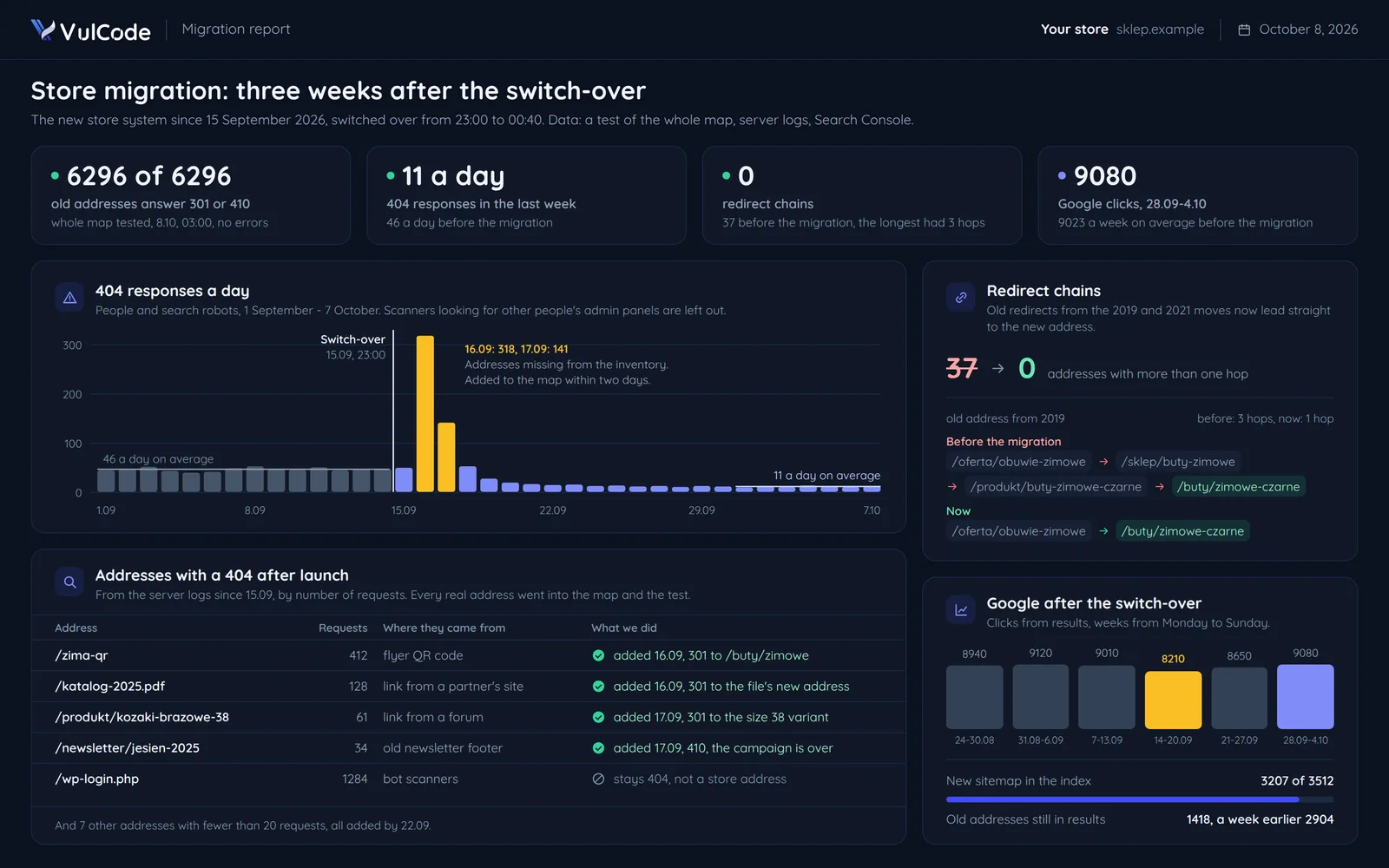
After the switch-over you get a report: every old address tested, the 404s from the logs with what we did about them, redirect chains and Google clicks week against week.
Common questions about migrations
Answers about Google rankings, store data, downtime and the quote.

Read next
Services that often go with a migration, and our guide that walks through the whole process.
Planning a new system or a new domain?
Tell us where your site is moving from and to. We will reply within an hour with questions and a quote.