
WHMCS modules for Proxmox, Pterodactyl and custom panels
WHMCS handles clients, invoices and due dates. A provisioning module makes a VPS or game server appear on its own once the order is paid, and get suspended when payment is overdue. We write such modules and hooks, and when WHMCS stops being enough, we talk about our Flaem panel.
How a provisioning module works
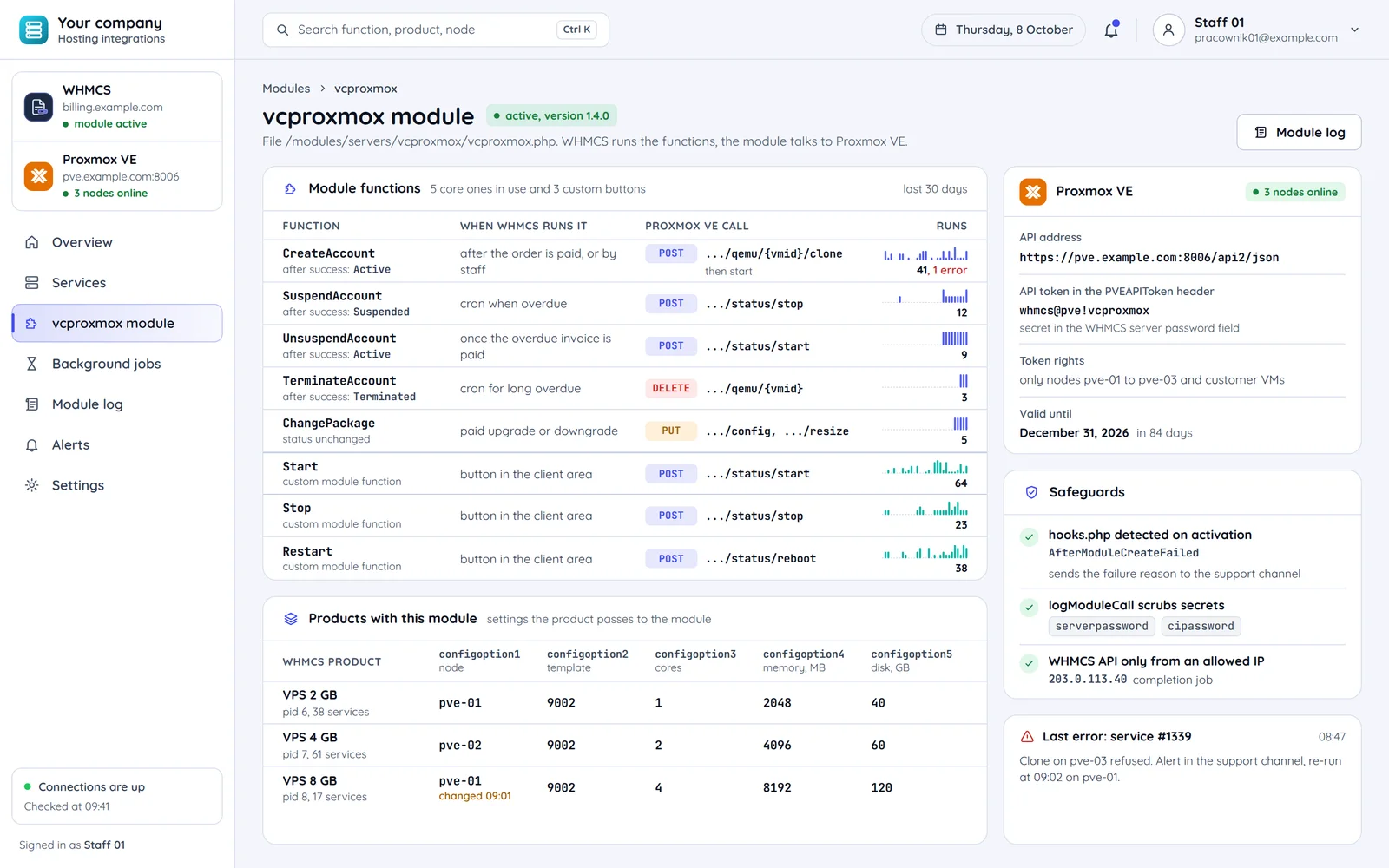
A module is a PHP file in /modules/servers/ with functions WHMCS calls at set points in a service's life.
When WHMCS runs the function
A paid order
Or staff creating the service.
An overdue invoice
The WHMCS cron job when payment is overdue.
The overdue invoice paid
The client pays the overdue invoice.
Long overdue
The cron job, when removal is enabled.
Module function in /modules/servers/
CreateAccount
Creates the service in the panel or hypervisor. A product passes settings configoption1 to configoption24 to the module, e.g. node and template.
After: A paid order
SuspendAccount
Suspends the service in the panel or hypervisor.
After: An overdue invoice
UnsuspendAccount
Brings the suspended service back.
After: The overdue invoice paid
TerminateAccount
Removes the service from the panel or hypervisor.
After: Long overdue
What WHMCS sets after success
Active and a welcome email
The client gets an email with the service details.
After: CreateAccount
Suspended
WHMCS sets the status, not the module.
After: SuspendAccount
Active
The service is running again.
After: UnsuspendAccount
Terminated
The service ends in WHMCS.
After: TerminateAccount
CreateAccount for Proxmox
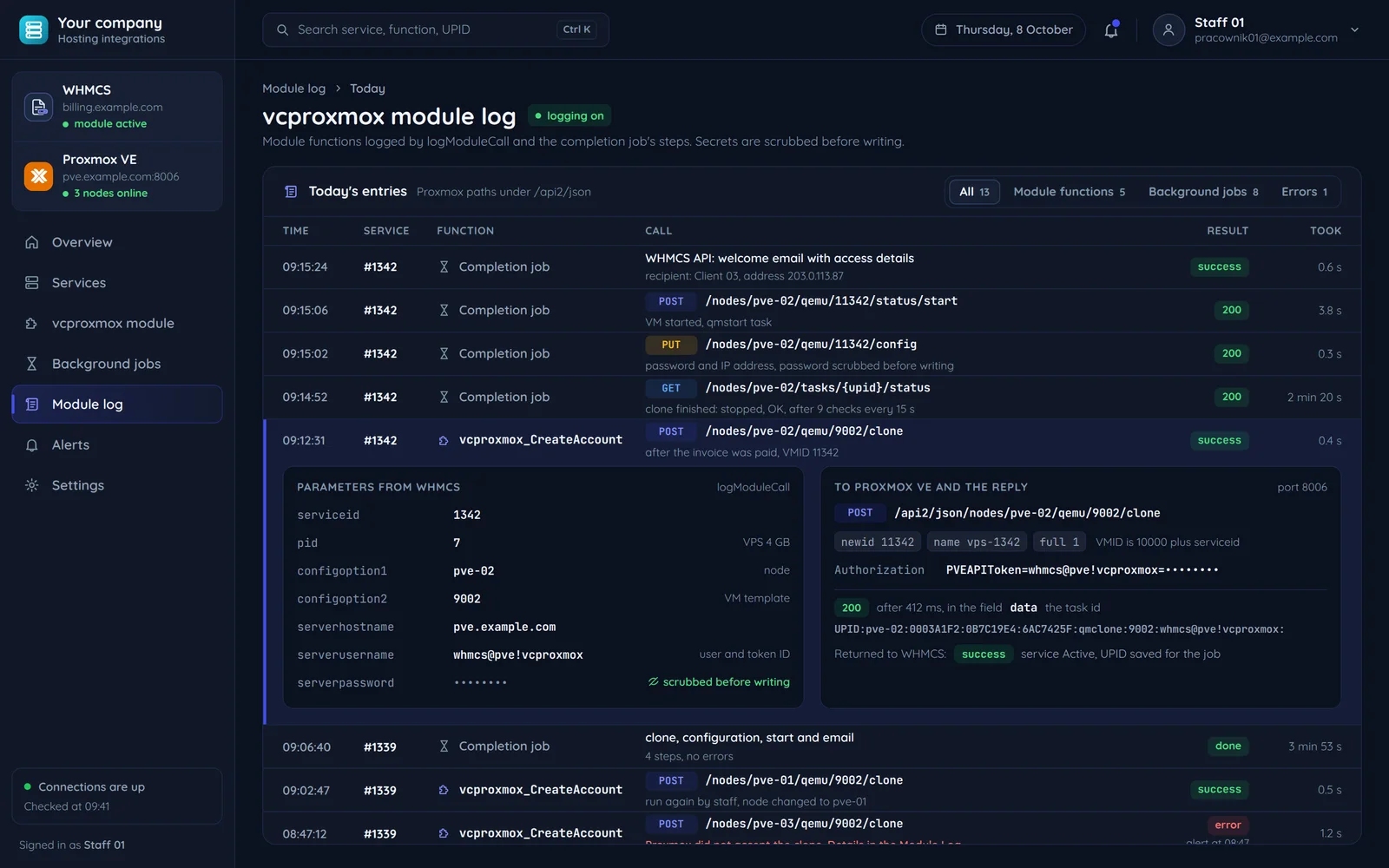
One CreateAccount call in the module log: the parameters from WHMCS, the request to Proxmox VE and what goes back to WHMCS. The token secret never reaches the log.
Node and template from the product
Node and template come from product settings. The VMID derives from the service id, so a retry cannot create a second VM.
The secret stays out of the log
An entry in the Module Log, with the token secret scrubbed out. The Proxmox API token: user and token id in the server username field, the secret in the password field.
success, the rest in the background
The task id waits for completion: configuration, password and VM start.
Proxmox and Pterodactyl from the module side
The two most common WHMCS module targets at hosting companies.
CreateAccount
The client paid the order and the service has to appear on its own.
- POST .../qemu/{vmid}/clone clones the VM template
- Proxmox returns a UPID task id and the clone runs in the background
- A completion job waits for it to end, then configuration and start
- POST /api/application/servers with the order's external_id
- The server is in the panel at once
- Wings does the install per the egg
With Proxmox the module needs a job that finishes the work after the clone. With Pterodactyl one call is enough.
A retry after a failure
The same function runs a second time, e.g. after a dropped connection.
- The VMID derives from the service id
- The retried clone gets the same VMID
- A second VM cannot appear
- The external_id field ties the server to the order
- The retry first looks the server up by external_id
- The existing server comes back instead of a second one
Duplicate protection comes from a fixed VMID in Proxmox and from the external_id field in Pterodactyl.
SuspendAccount and UnsuspendAccount
The invoice is overdue, then the client pays it.
- The WHMCS cron job calls SuspendAccount when overdue
- POST .../status/stop or suspend
- After payment POST .../status/start
- The WHMCS cron job calls SuspendAccount when overdue
- POST /servers/{id}/suspend
- After payment POST /servers/{id}/unsuspend
In Proxmox the module stops or suspends the VM, in Pterodactyl it calls the server suspension. In both cases WHMCS sets the Suspended status.
How the module authenticates
Proxmox VE: an API token with its own permissions and expiry. Pterodactyl: a Bearer application key.
- Proxmox VE
- The Pterodactyl Application API
From payment to a running VPS
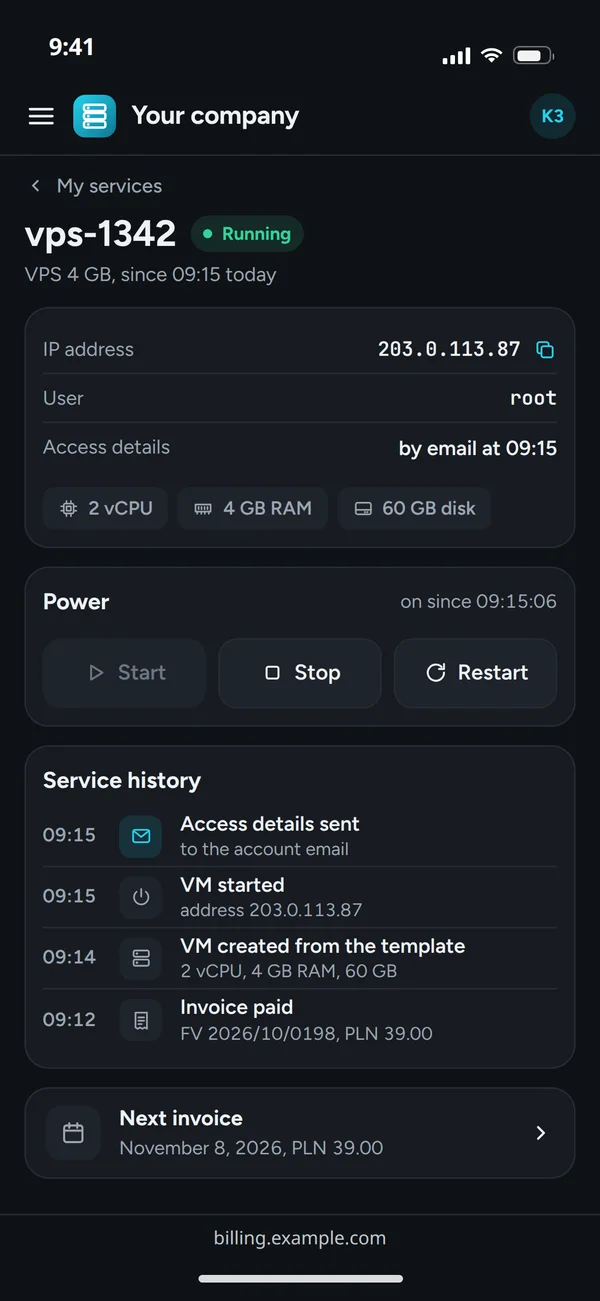
The run with a Proxmox module: the service history in the client area and what WHMCS, the module and Proxmox VE do meanwhile.
Invoice paid
- ClientWHMCSpays the order
- WHMCSModuleCreateAccount with the product's parameters
A VM from the template
- ModuleProxmox VEclone the VM templateAPI token in the header
- Proxmox VEModulea UPID task id
- ModuleWHMCSsuccessstatus Active
Start and access details
- ModuleProxmox VEonce the task ends: configure and start
- WHMCSClientwelcome email and access details
Long operations
Proxmox returns a task id and the clone runs in the background. The module stores it, and a job that checks the status finishes the work.
Buttons in the client area
VM start, stop and restart as custom module functions, shown with the service in the WHMCS client area.
Common questions about WHMCS
Answers about ready modules, several nodes, panel sign-on, failures and the quote.

Read next
Other integrations for hosting and game servers.
Setting up WHMCS services by hand?
Tell us which panel or hypervisor you use and what should happen after payment. We will reply within an hour with questions and a quote.