
Technical SEO audit and Core Web Vitals
We check what writing more content will not fix: indexing, redirects, structured data and Core Web Vitals. We measure on real-user data, and we make the fixes in the code instead of handing over a PDF of advice.
When an audit makes sense
The audit is for sites that have content Google does not show, or shows too low. We deal with how the site is built, not with writing content or building links.
What clients come with
- A traffic dropGoogle traffic fell after a site change or for no visible reason.IndexingStructure
- A slow siteRed Core Web Vitals in Search Console and slow loading on phones.Speed
- Pages left out of the index"Discovered, not indexed" on pages that matter.Indexing
- Several languagesHreflang Google ignores and language versions competing with each other.StructureMultilingual sites
- An online storeFilters and variants that create thousands of useless addresses.IndexingStructured data
- A new site before launchA launch in Google is spoilt by settings carried over from staging: noindex, a robots.txt block or a canonical to the test address.IndexingPre-launch checklist
Where we look for the cause
- IndexingRobots.txt and sitemap, canonical addresses, redirects and pages left out.The signals must not contradict each other, such as a sitemap listing addresses that redirect.
- StructureHeadings and internal links, duplicate content, hreflang for several languages.A move made only by script, with no address in a link, leads the crawler nowhere.
- Structured dataBusiness, products, articles and questions, checked in Google's tools.Full product data, with price and availability, gives Google more to show in results.
- SpeedLCP, INP and CLS from real users, lab measurements.We judge real-user data, because that is what Google does.
Speed: the Core Web Vitals thresholds
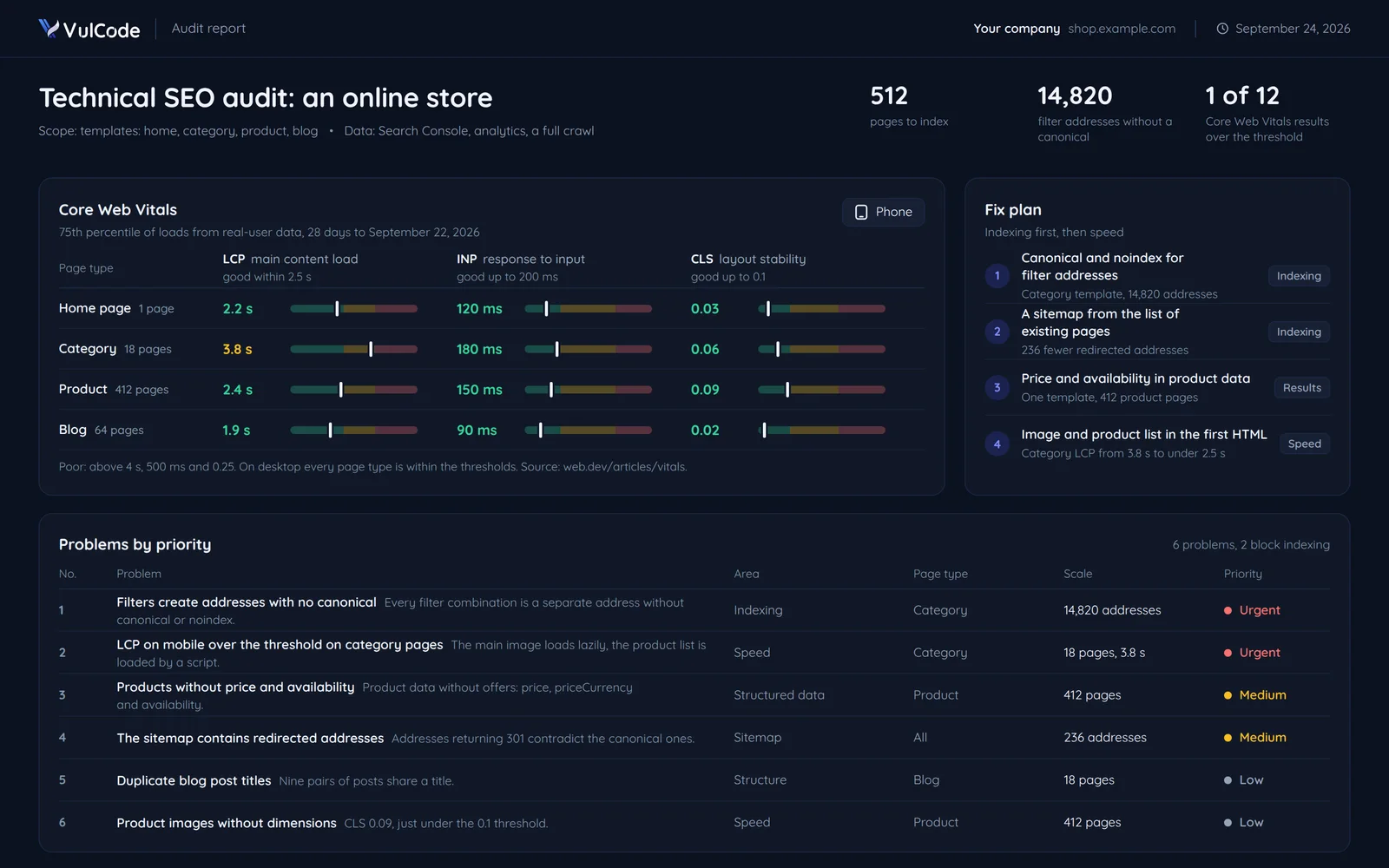
Google judges a page at the 75th percentile of loads, separately on mobile and desktop. So we look at real-user data, not a single test. Thresholds: good within 2.5 s, 200 ms and 0.1, poor above 4 s, 500 ms and 0.25. Techniques with code: Core Web Vitals in practice.
LCP
main content load- Home page1 page2.2 s
- Category18 pages3.8 s
- Product412 pages2.4 s
- Blog64 pages1.9 s
Content in the first HTML, the main image fetched straight away at high priority, images in AVIF and WebP at the right size, and those below the first screen loaded only when visible.
INP
response to input- Home page1 page120 ms
- Category18 pages180 ms
- Product412 pages150 ms
- Blog64 pages90 ms
Heavy scripts and main thread blocking: first a visible response to the click, then the work in short chunks, and third-party scripts only after the page has loaded.
CLS
layout stability- Home page1 page0.03
- Category18 pages0.06
- Product412 pages0.09
- Blog64 pages0.02
Image dimensions, fonts with a fallback face of the same proportions, and a cookie banner that overlays the content instead of pushing it down.
What Google sees when the site is a JavaScript app
Per Google's documentation, the crawler first fetches the HTML, while rendering waits in a queue. React and other SPA sites often serve an empty container in the first HTML. Google says server rendering or prerendering is still a great idea, as the site is faster for people and crawlers. Moving to prerendering often changes addresses too. Then we combine it with a migration and a redirect map.
SPA without prerendering
Without it the page looks empty until rendered, and not every crawler runs JavaScript.
HTML fetchAn empty containerRender queueWaits in the queueRenderingScripts add the contentIndexContent and links only now- Content in the first HTML: no
- Works for crawlers without JavaScript: no
- An interactive app: yes
- A fast first load: partly
Prerender or SSR
With prerendering or server rendering the content is already in the first HTML, so the crawler does not wait for scripts.
HTML fetchContent and links at onceRender queueNo wait in the queueRenderingNo wait for scriptsIndexContent and links from the first responsePrerendering that silently failsPages loaded lazily through React.lazy can end up in the server HTML as an empty placeholder, with no error in the console. On our own site we run once over every route before the real render, so that each such module has time to load.- Content in the first HTML: yes
- Works for crawlers without JavaScript: yes
- An interactive app: yes
- A fast first load: yes
Static HTML
A ready HTML file: the crawler gets everything in the first response, but the app is only partly interactive.
HTML fetchContent and links at onceRender queueNo wait in the queueRenderingNo wait for scriptsIndexContent and links from the first response- Content in the first HTML: yes
- Works for crawlers without JavaScript: yes
- An interactive app: partly
- A fast first load: yes
How we check the first HTML
We check the HTML the server sends before any script runs, because it is the only part indexing can rely on. The same check runs over every page of vulcode.com, and we set it up in your project. The product name never appears in the category's first HTML, because the product list arrives only by script.
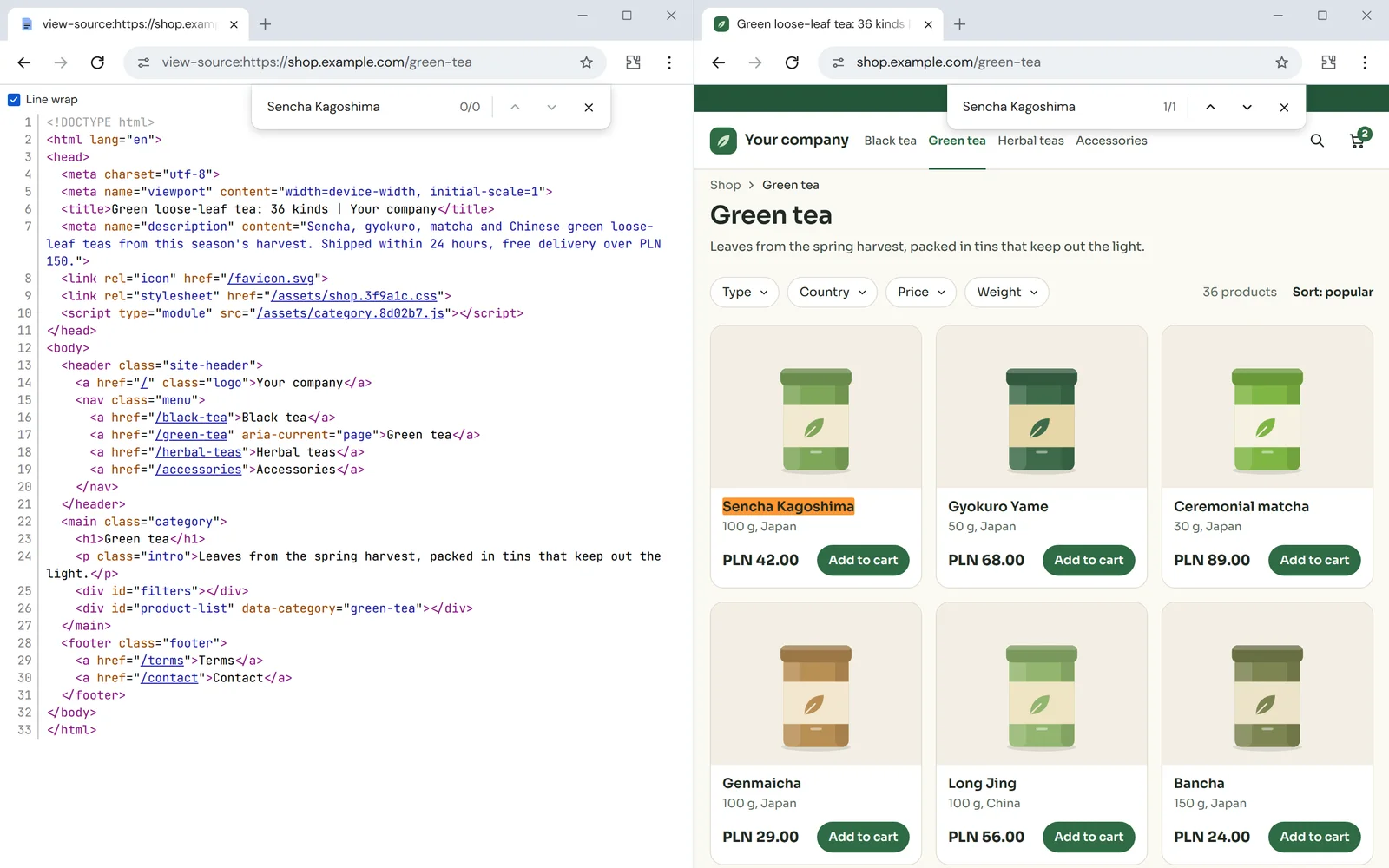
- Title45 characters, limit 45-60Title and description length limits within which Google usually shows them in full.
- Description138 characters, limit 135-155The description fits the limits within which Google usually shows it in full.
- H1 headingoneExactly one H1 heading per page.
- Canonical addressmissingEvery indexed page has a canonical address. It is missing here, so every category filter creates an address of its own.
- Product listan empty containerThe check runs on the finished HTML, which is what a crawler gets before scripts run. The product list arrives only by script.
The full version also checks hreflang, whether canonical and hreflang lead to pages that exist, duplicate titles and descriptions, double FAQPage blocks, an H1 that ends with an animation cursor, typographic dashes and curly quotes in the title and description, and internal links to pages that do not exist.
What the audit report looks like
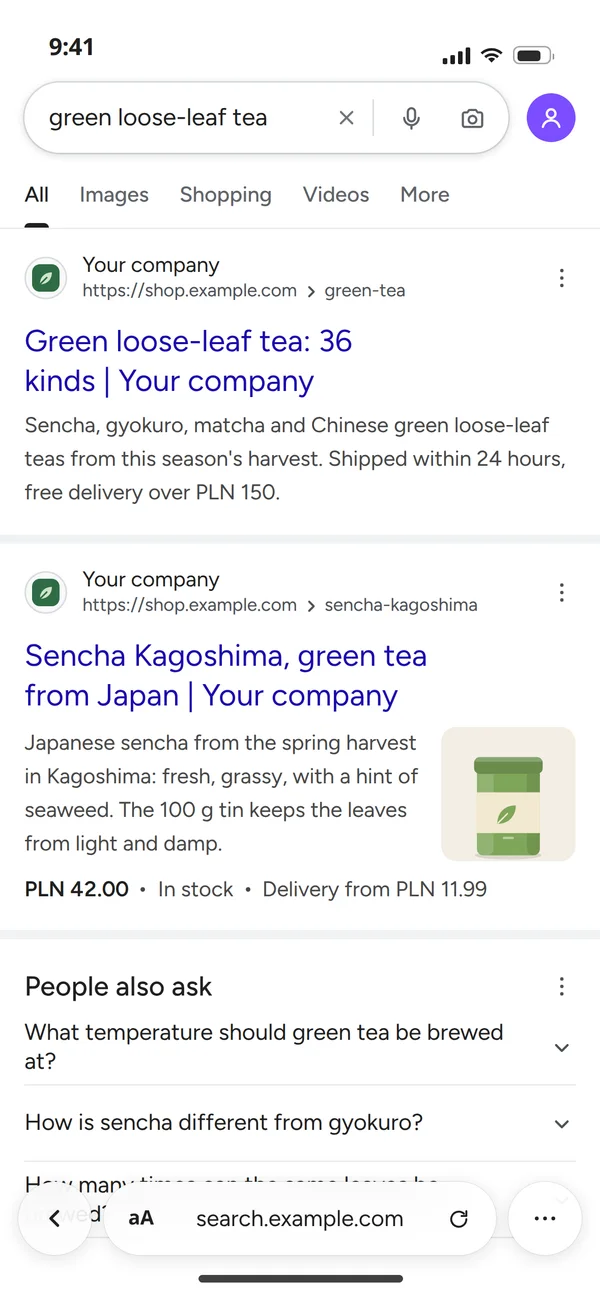
The report ends with a plan: the problems in order, first what blocks indexing, speed last. Beside it, what that plan changes in search results. After the fixes the category shows its full title and description from the first HTML in results, and the product its price and availability from structured data.
- Indexing firstIndexing: filters create addresses with no canonicalUrgent14,820 addresses, the category template
Problems that block indexing or create thousands of useless addresses come first.
- Sitemap: contains redirected addressesMedium236 addresses
The sitemap, canonicals and redirects must not contradict each other.
- Then resultsStructured data: products without price and availabilityMedium412 product pages
Full product data in schema gives Google more to show in results.
- Speed lastLCP on mobile: over the threshold on category pagesUrgent18 category pages, 3.8 s
A fix in the category template fixes hundreds of pages at once, so we report by page type.
Our own site as proof
vulcode.com is a React app, and every address has full HTML generated before publishing. The figures come from our measurement: the first HTML of every Polish and English address in the sitemap, and five pages opened in a headless browser.
- ContentThe page text is in the HTML before any JavaScript runs.
- Title and descriptionEvery address has its own title and description in results.
- CanonicalPoints to the same address the page stands at.
- HreflangThe Polish and English versions point to each other.
The first HTML of every sitemap address, fetched with the Googlebot user agent.
| 390 px | 768 px | 1440 px | |
|---|---|---|---|
| /pl | |||
| /pl/oferty | |||
| /pl/oferty/website | |||
| /pl/platformy | |||
| /pl/portfolio |
- 0 errors in the browser console
- 0 images without alt text
- 0 links without an address, empty or just #

VulCode
A React 19 and Vite SPA with server rendering, in two language versions with hreflang and separate URLs.
- One list of routesThe finished HTML of every address and the sitemap both come from it.
- Full HTML for every addressLinks are plain tags with an address, and JavaScript starts once the content is on screen and loads only that page's code.
- Compression at build timeBrotli and gzip at the highest level, once, so the server compresses nothing on the fly.
- A sitemap from the route listIt lists only addresses that really exist.
How the technical SEO work goes
Measure, list the problems, fix the code and measure again.
We gather Search Console, analytics and speed data and run a full crawl of the site. Speed is measured in mobile mode and over several runs, because the score shifts by a few points between runs.
We check indexing and canonicals, headings and internal links, structured data and speed for every page type.
First what blocks indexing, then speed. Each problem is prioritised by traffic impact and fix cost.
Images and fonts, content rendering, sitemap and redirects, first on a test version, then in production after sign-off. That way no fix blocks the index by mistake.
We compare before and after, report the fixes in Search Console and watch until Google processes them. You get the speed results as a link to a PageSpeed Insights report you can rerun yourself.
- Access and baseline
We gather Search Console, analytics and speed data and run a full crawl of the site. Speed is measured in mobile mode and over several runs, because the score shifts by a few points between runs.
you get: A baseline in numbers - Audit
We check indexing and canonicals, headings and internal links, structured data and speed for every page type.
you get: A prioritised report - Fix plan
First what blocks indexing, then speed. Each problem is prioritised by traffic impact and fix cost.
Images on product pagestoo heavy on a phoneyou get: A quote for the fixes - Fixes in the code
Images and fonts, content rendering, sitemap and redirects, first on a test version, then in production after sign-off. That way no fix blocks the index by mistake.
Pages out of the indexa noindex carried over from stagingyou get: Changes in production - Measuring after
We compare before and after, report the fixes in Search Console and watch until Google processes them. You get the speed results as a link to a PageSpeed Insights report you can rerun yourself.
Home page speedthe same measurement as at the startcompared with the measurement of step: Access and baselineyou get: A final report
Common questions about technical SEO
Answers about the audit's scope, results and quote.

Read next
Services that often go with technical SEO, and our guides to what we check.
Is Google not showing your pages?
Send us the site address and what changed. We will reply within an hour with questions and an audit quote.