
Source code and application security audit
A code audit is a review of your repository by developers who do code review every day, on our own work and in other people's open source projects. You get a report listing the risks ranked by urgency, each with its place in the code and a proposed fix, plus a call to go through the findings.
A code audit, a penetration test and a scanner
Three different things, often confused. An audit often comes before a pentest, as it removes the obvious bugs more cheaply.
Code audit
Reads the source code from the inside and gives every finding a file, a line and a fix.
- Looks at the source codeYes
- Attacks the running app from outsideNo
- Finds permission logic flawsYes
- Points to the file and the fixYes
- Filters out false alarmsYes
Penetration test
Attacks the running app from the outside, as an attacker would, without seeing the code.
- Looks at the source codeNo
- Attacks the running app from outsideYes
- Finds permission logic flawsPartly
- Points to the file and the fixNo
- Filters out false alarmsYes
A scanner alone
A tool flags suspicious places in the code, but nobody checks which of them are real problems.
- Looks at the source codeYes
- Attacks the running app from outsideNo
- Finds permission logic flawsNo
- Points to the file and the fixPartly
- Filters out false alarmsNo
When it is worth it
For anyone making a decision based on code they do not read themselves.
Before a purchase or investment
You check what the product you are buying really contains: whether the code is safe, whether it can grow and what it will cost to put it in order. The report helps you settle the price and the terms.
Before accepting a project
A second opinion before you pay the contractor's final instalment. You know what to have fixed under warranty and what is already your cost, in writing for the acceptance talk.
The audit report
An independent review of an application that tells you what in the code is a risk, before that risk becomes an outage or a leak.
14 findings, most urgent first.
When everything slows down
Every change takes longer and breaks something else. We show which parts of the code slow the team down and where to start, so new features go in quickly again.
Before a takeover
You want to know whether the code can grow or needs a restart. You get the list of risks and an estimate of the work for both paths. See also project takeover.
What we check
An audit is an independent review of an application that tells you what in the code is a risk, before that risk becomes an outage or a leak. We check the four areas where a bug costs the most.
- 1347
Security
Authentication and permissions, input and database queries, secrets in the repository.
The highest-priority findings usually sit here.
- 69101213
Code quality
Structure and duplication, error handling, whether the code can be changed safely.
Technical debt is the shortcuts in the code that sped up the start and now slow down every change.
- 211
Dependencies
Outdated libraries, known vulnerabilities, an update plan.
A known vulnerability is a publicly described security flaw in a library, with a version that fixes it.
- 5814
Deployment and infrastructure
How code reaches the server, backups, whether the environment can be rebuilt.
Deployment and backups are part of the audit, because data gets lost there too.
We audit what we write every day, including TypeScript and JavaScript, React, Node.js, PHP, Python, Go, Rust and C#. We raise any other technology before quoting, not mid-audit.
What one finding looks like
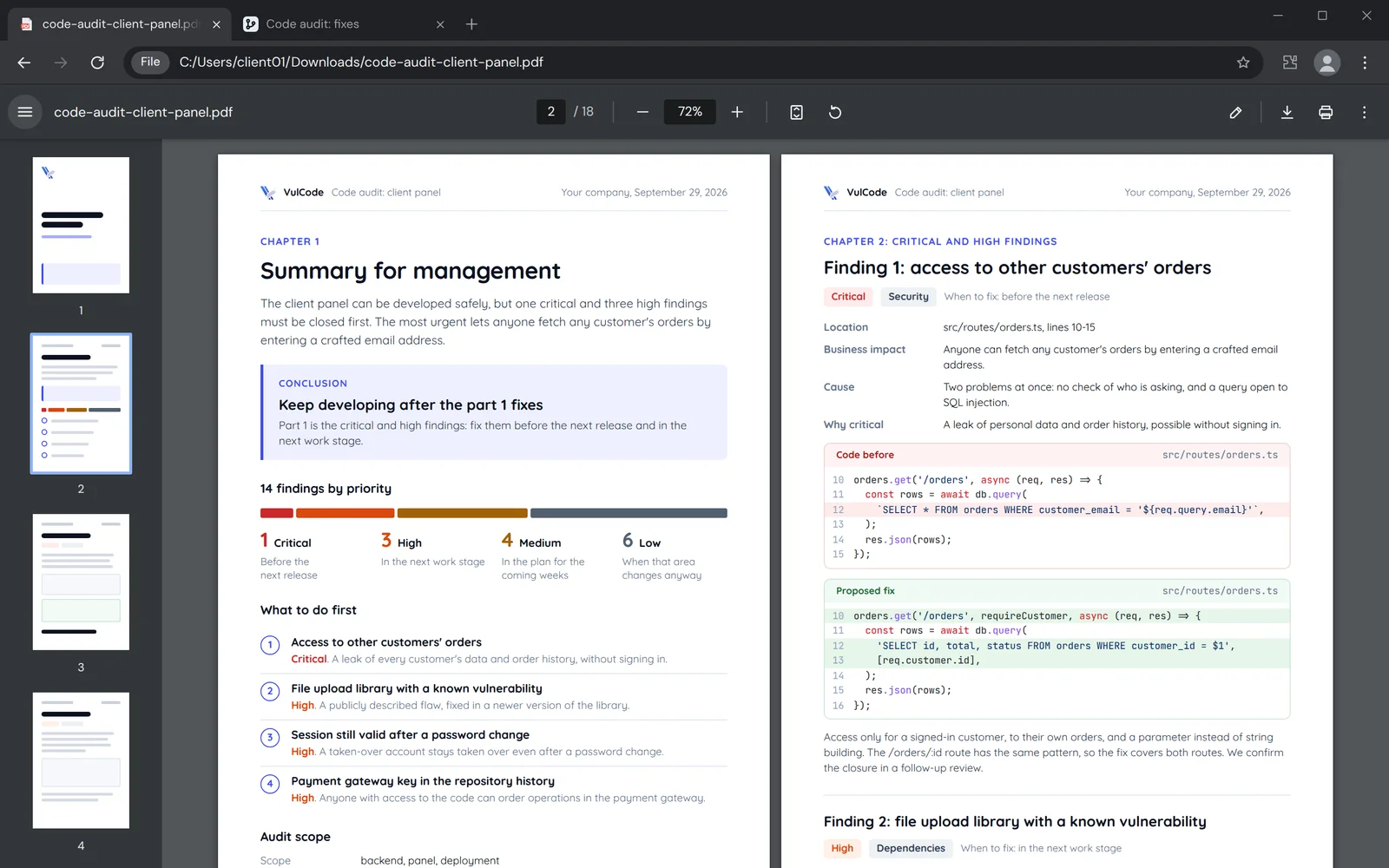
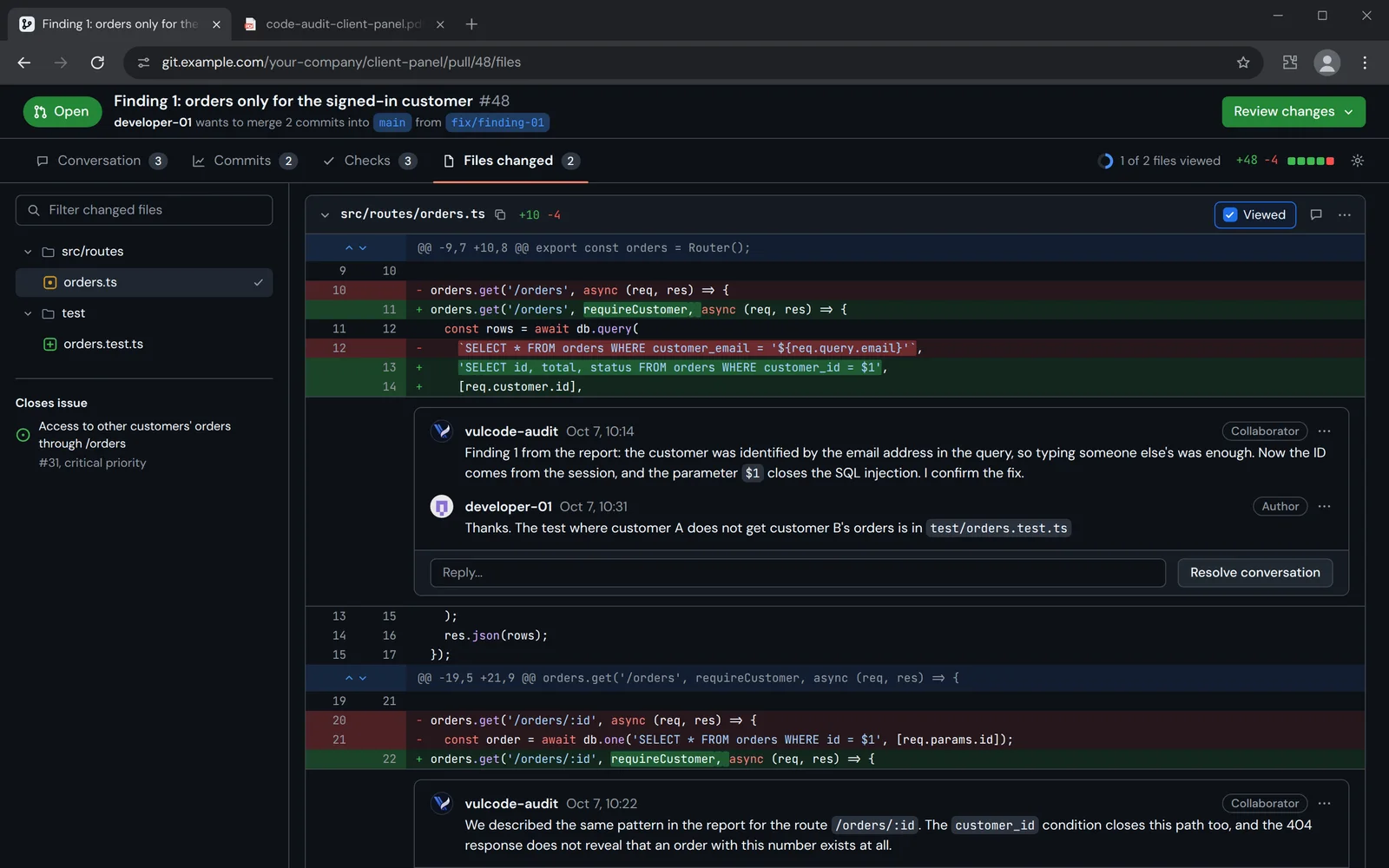
Tools cover part of it, but the most important bugs are found by a person reading the logic. This is what one finding in a report looks like: what is wrong, what is at risk and how to fix it, without reading code. Beside it, the same fix in a pull request, confirmed by the auditor.
- Priority
- Critical
- Where
- Customer panel, order list
- Checked
- By hand, on the test version
- Fix
- About 2 hours of work
- What is wrongThe order list does not check who is asking, and the database query is built from the email typed into the page address.Every finding starts with a description free of jargon.
- What is at riskAnyone who knows the panel address can fetch the data and orders of every customer of the shop.The priority follows from the impact on the business, not from the kind of bug.
- How to fix itThe list only for the signed-in customer and only with their orders, the query with a parameter instead of glued text.The description is enough for your team, or for us, to make the fix.
- How to check the fixA test signs in as customer A, asks for customer B's orders and is refused.Every finding has a test that confirms the problem is gone.
In a real report a finding also has the file path and line number from your repository.
A report that helps you decide
The report is there to help you decide, not just to count bugs. Every finding gets a priority from the same scale, and the priority says when to fix it.
The panel works and can grow, but two bugs must go before the next release.
A leak of customer data through the order list and a break-in through an old library.
- Close access to other customers' orders
- Update the library with the vulnerability
- Turn on a database backup off the server
Critical
Before the next release
A data leak, account or money takeover.
Example from the report2Access to other customers' ordersHigh
In the next work stage
An outage or an easily exploited weakness.
Example from the report3A library with a public vulnerabilityMedium
In the plan for the coming weeks
A conditional risk.
Example from the report4No database backup off the serverLow
When that area changes anyway
Technical debt and readability.
Example from the report5Pricing logic repeated in three placesTechnical debt is kept apart from security risk, so it is clear what is urgent.
How we keep the report useful
Four rules we follow in every audit, so the report can be used for a decision.
- Behind the curtain4
Behind the curtain
Business context
Priority depends on impact, not on the number of lines. Before we start, we ask which parts of the app earn money and where customer data lives.
No false alarms
We check tool output by hand. Only what can be reproduced and is a real problem goes into the report.
Confidentiality
We read your code under a confidentiality agreement and do not copy it outside the agreed environment. We agree the scope of access with you before we start.
Plain language for management
The report opens with a jargon-free summary for people who do not read code. Every finding also has a technical part for your team.
How the audit works
From repository access to a walk-through of the report.
We agree which modules and environments to audit, the goal of the audit and what matters most to you. We read your code under a confidentiality agreement and do not copy it outside the agreed environment.
Tools check vulnerable libraries, secrets in the repository and code quality through static analysis. Static analysis means checking code with a tool without running it.
We read the logic: authentication and permissions, input and queries, architecture and tests. We verify tool output, and only real problems make it into the report.
Findings ranked by urgency, each with a file, line, impact and a proposed fix.
We go through the report with you or your team and answer questions. Fixes are a separate order.
- Scope
We agree which modules and environments to audit, the goal of the audit and what matters most to you. We read your code under a confidentiality agreement and do not copy it outside the agreed environment.
Payment moduleadded to the scope at the walk-throughyou get: a quote and a report date - Automated pass
Tools check vulnerable libraries, secrets in the repository and code quality through static analysis. Static analysis means checking code with a tool without running it.
you get: a list of candidates to check - Manual review
We read the logic: authentication and permissions, input and queries, architecture and tests. We verify tool output, and only real problems make it into the report.
you get: confirmed findings - Report
Findings ranked by urgency, each with a file, line, impact and a proposed fix.
A library with a vulnerabilityflagged by the tool, confirmed by handAccess to other customers' ordersfound while reading the permissionsyou get: a report with a summary - Walk-through and fixes
We go through the report with you or your team and answer questions. Fixes are a separate order.
a new area goes back to: Scopeyou get: a decision on what next
- You have your own team to make the fixes.
- You need an assessment before a purchase or acceptance decision.
- You have no team, or it is busy.
- You want confirmation that the findings are closed.
We do code review every day
We do it on our own projects and in other people's open source projects, where our changes pass the maintainers' review. Below are some of the bugs we found and fixed in other people's code, and what they taught us.
- The project's maintainer reads every change, runs the tests and asks for corrections before merging it. Only the version they accepted goes into the code.
- It teaches us what we look for in an audit: how someone outside the team reads code that was obvious to its author.
- In an audit we work the same way: we write every finding so it can be checked and fixed without us.
- Proxmox VEPerl and JavaScriptInput validationIn a large infrastructure project the interface must validate data the same way the API does, or users only learn about an error after submitting.
- MonologPHPSecrets in logsRedacting secrets in logs has to walk into nested data.
- WhoopsPHPEscapingEscaping on an error page is a security matter too: only http and https links should be clickable.
- PHPMailerPHPConnection state and errorsSMTP has states, and a command sent in the wrong one becomes part of the message.
- SonicRustBackupsA backup taken while running must capture a consistent state rather than lock the store or read it mid-write.
- Pelican PanelPHPUpdatesAn update that fails halfway must not leave the system worse off than before.
Common questions about code audits
Answers about the scope, confidentiality and quote of an audit.

Read next
What usually follows an audit, and how we protect the code you trust us with.
Want to know what your code hides?
Tell us what the app does and what it is written in. We will reply within an hour with questions and an audit quote.