
Plazer: a messenger whose server cannot read private conversations
Plazer is our own messenger for communities: servers, channels, roles, voice and video calls, with private messages, groups and private channels encrypted on the device. Anyone can host a community server.
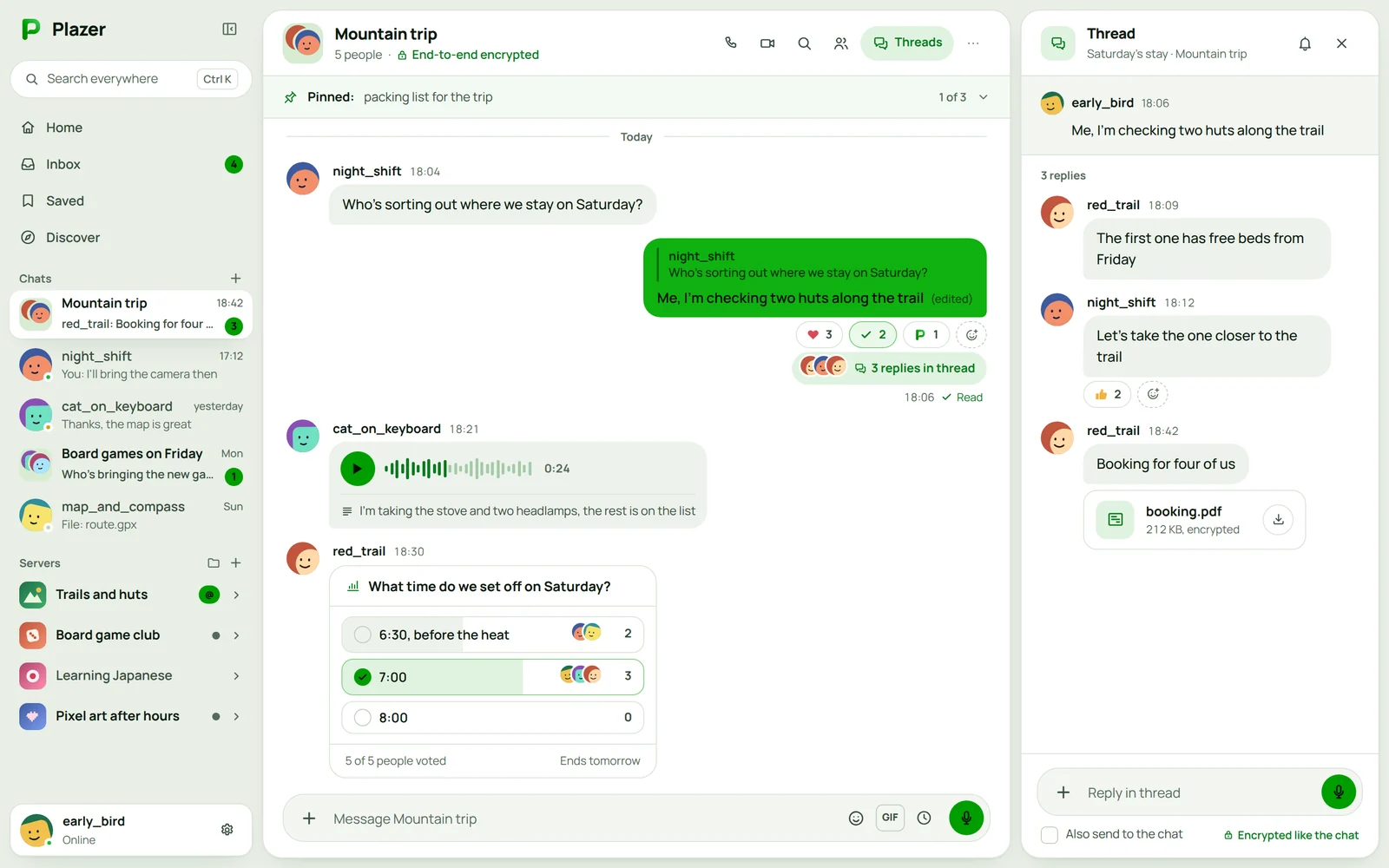
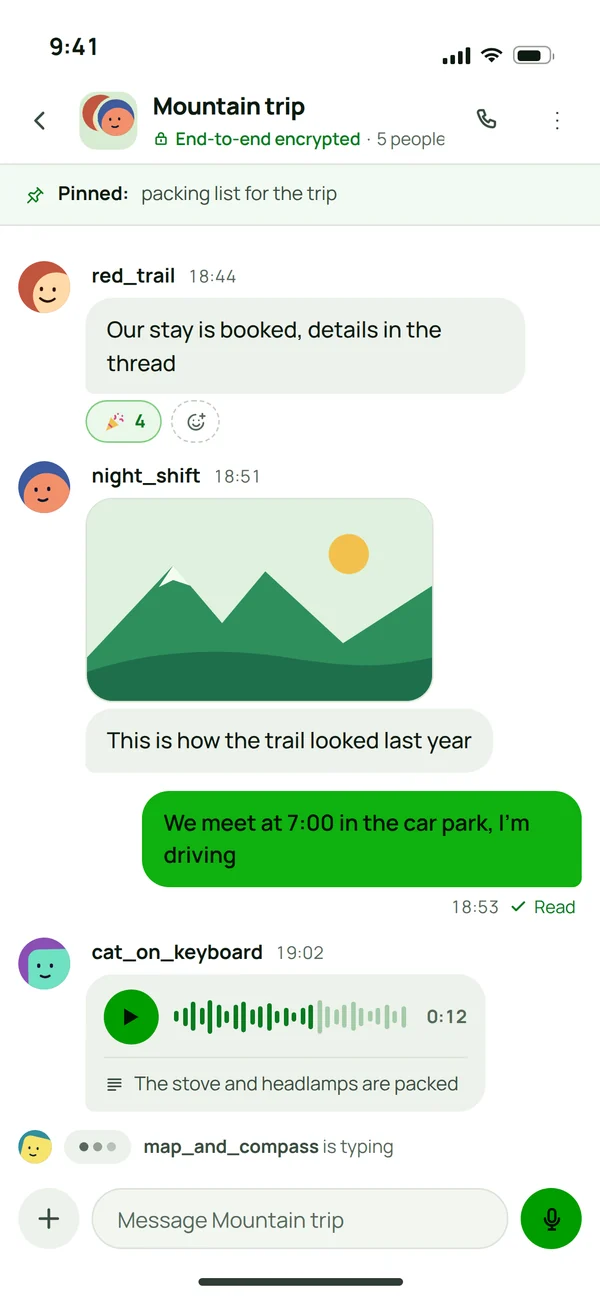
Messages, replies and voice notes, in encrypted chats too
Replies with a quote, reactions, threads, polls, voice notes and files work the same in a server channel, in a group and in a one-to-one chat. In direct messages, groups and private channels the sender's device encrypts all of it before anything reaches a server.
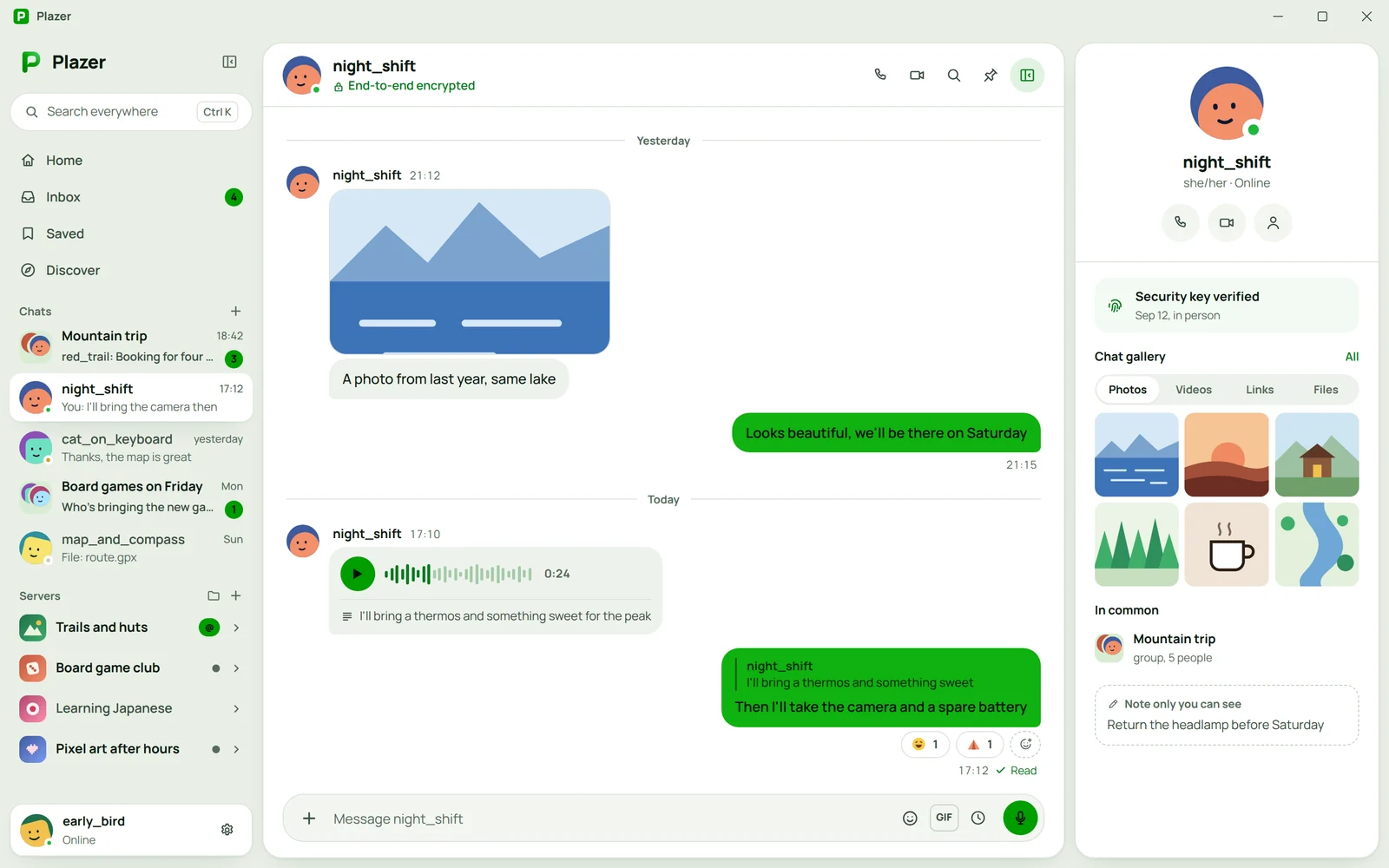
Replies with a quote and reactions
A reply shows a piece of the message it answers, so an hour later everyone still knows who replied to whom. Reactions carry the full emoji set plus emoji from every server you are on.
Voice notes with transcripts
You record up to 5 minutes and the recipient sees the waveform. When they cannot listen, they read a transcript made by their own device, without the recording going to a server.
Files with no limit and a chat gallery
A large file travels straight from device to device once the recipient accepts it. Photos, videos, links and files from the whole conversation sit in one gallery, with no scrolling back.
The profile beside the chat
Next to the conversation you see when you compared security keys, the groups you share and a note about the person that only you can see.
The server carries a message it cannot read itself
The sender's device encrypts direct messages, groups and private channels with MLS, the IETF standard published as RFC 9420. The server gets a sealed block, passes it on and never sees what is inside.
- okHave a look tonightSharing the plans for Friday, have a look tonight and let me know
The sender's device encrypts
The message turns into ciphertext before it leaves the phone or the computer. Private keys never leave the devices they were created on.
The server sees only ciphertext
Every message is padded to one of a few fixed sizes, so network traffic cannot tell a short "ok" from a long paragraph.
- okHave a look tonightSharing the plans for Friday, have a look tonight and let me know
The recipient decrypts on their device
Only the people in the conversation hold its keys, so only their devices can read what was said.
What the encryption covers
Text, reactions, polls and the group name
Replies, mentions, edits and deletions too. The server knows not a word of the conversation, and even the group's name and avatar stay between you.
Files and voice notes
Every file gets its own random key, which travels to the recipients inside the encrypted message.
Video and audio in calls
A server can carry the call but cannot hear it or put itself in the middle, in public channels too.
A change of members
When someone joins or leaves, the group moves to a new key. Someone new cannot read the history from before they joined, and someone removed cannot read new messages.
Public channels
They are readable by their server, but the author's device signs every message, so the server can hide it but cannot forge it.
History backup
By default your history is not copied anywhere. Once you turn the backup on, your account key encrypts it before it leaves your device.
An account with no phone number and no email
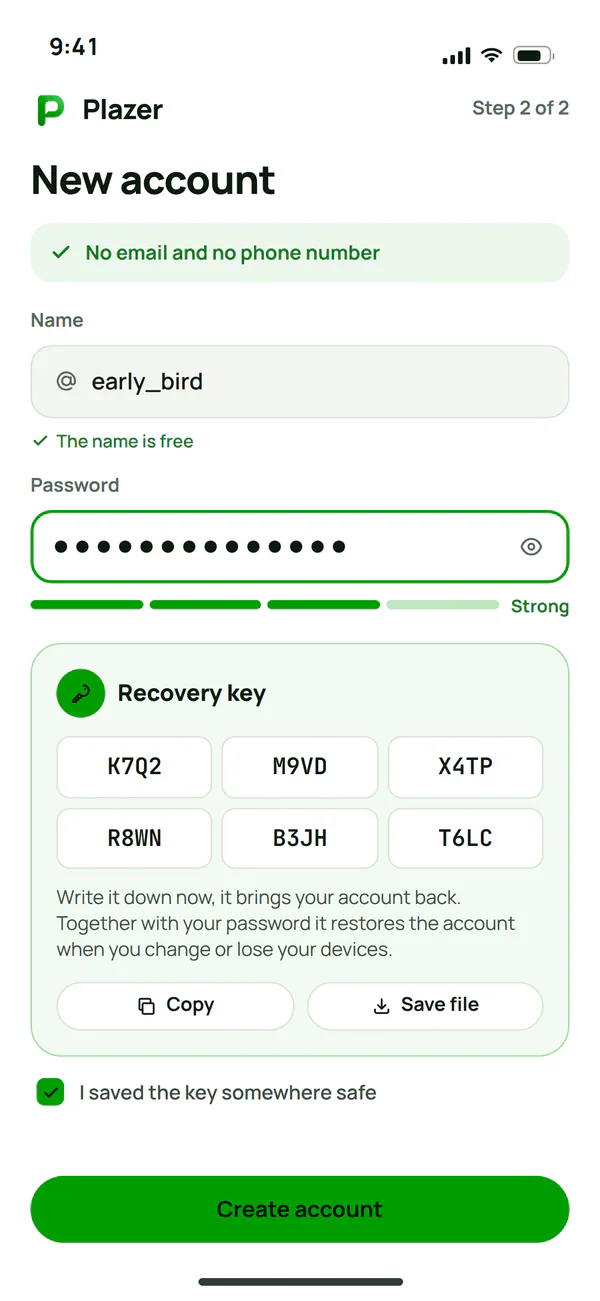
A name and a password are all it takes to create an account, so nobody can link it to a SIM card, a mailbox or the contacts on a phone. The same account works on every community server and every device.
A name and a password
A name of 3 to 32 characters that friends find you by, or a QR code when you are next to each other.
A recovery key
You get it once, when you sign up. Together with your password it brings your account back when you change or lose your devices.
Two-step sign-in
A code from an authenticator app or a passkey: your fingerprint, your face or a hardware key.
A device list
Remove one device or sign out of all of them at once, and a signed-out device comes back only with your password.
Message requests
Messages from strangers land in a separate list, and a spam and word filter sorts out the rest before you see anything.
Your data
Download all your data with the encrypted history from this device, and a deleted account goes away after 7 days.
Search, link previews and notifications without sending content to a server
Some of the work messengers usually hand to a server, Plazer does on the device. The server then gets nothing it could read.
Search on the device
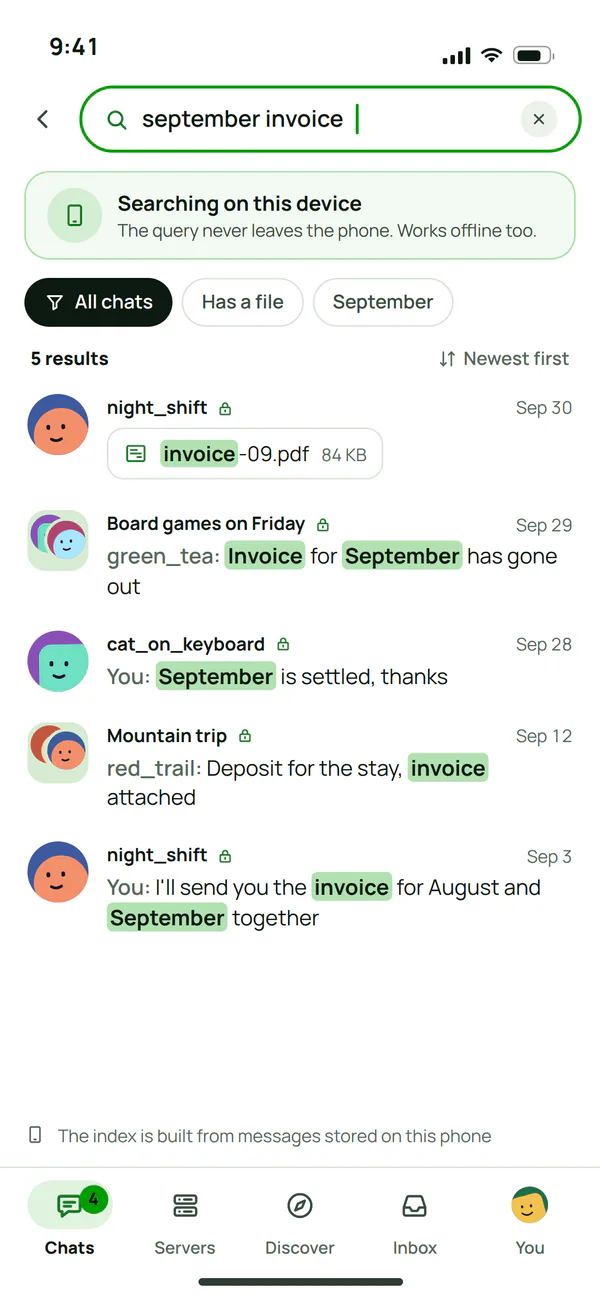
The message index lives on the phone or the computer, so the server never knows what you look for. Filters by author, chat, files and date work offline too.
The sender makes the link preview
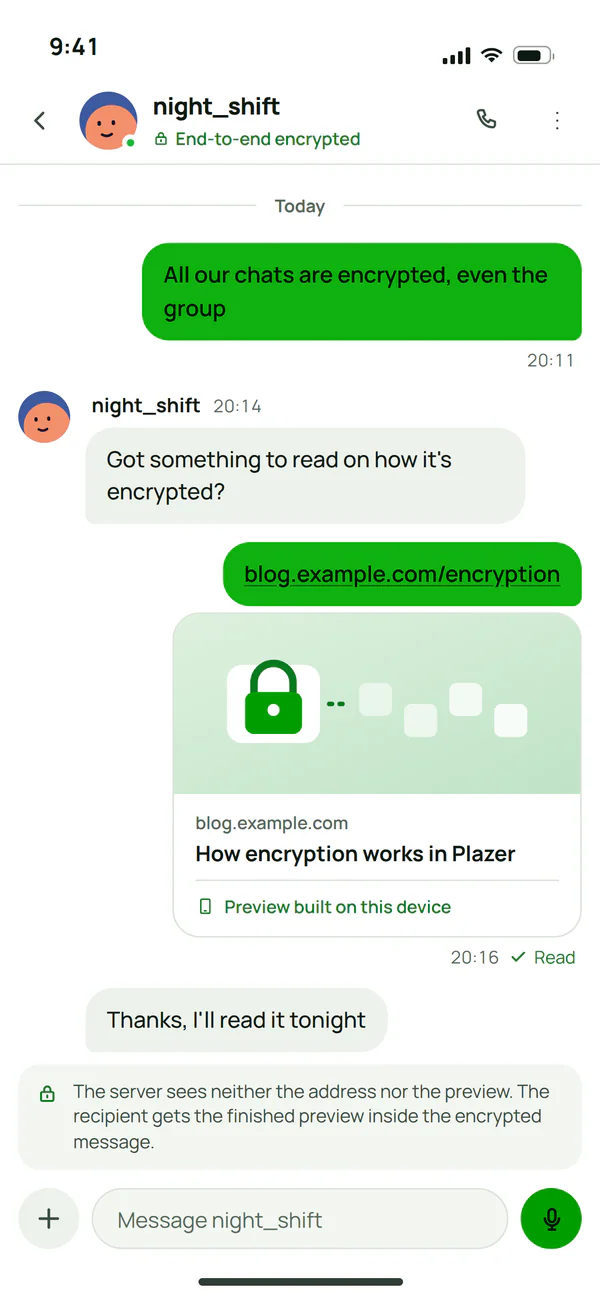
The sender's device prepares the page preview and sends it encrypted. The server never sees the address, and the recipient's app does not contact the page until someone clicks.
Notifications without content
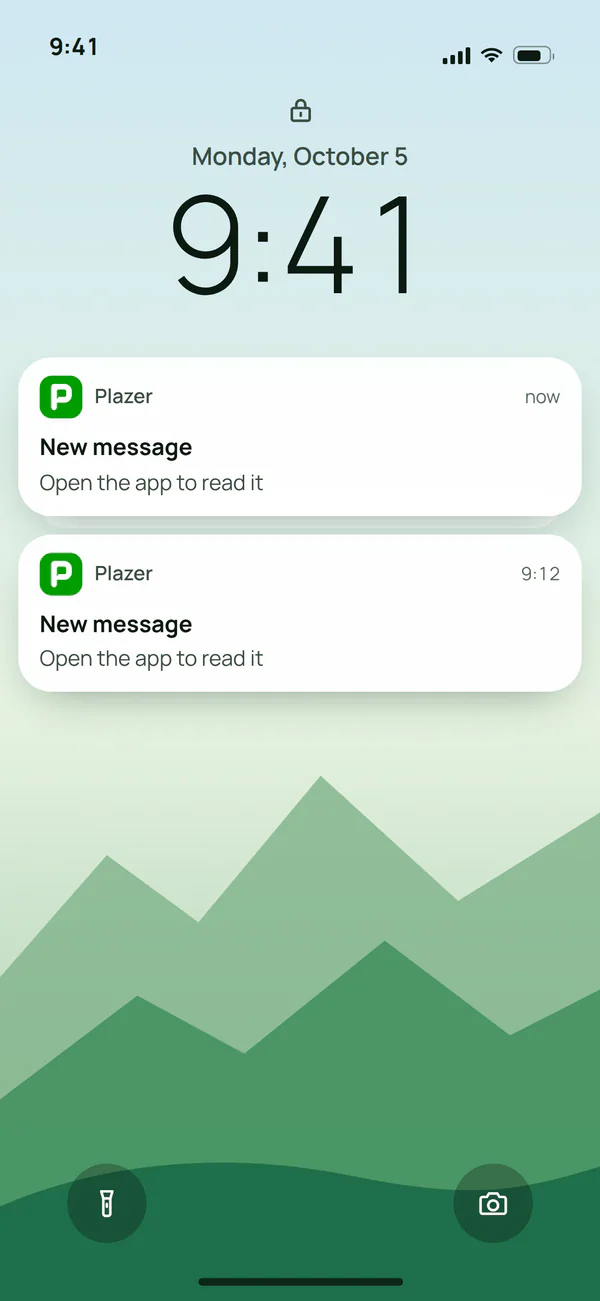
The lock screen only shows "New message". The service that wakes the phone knows the time and the fixed size of the notification, nothing more.
Disappearing messages and hidden chats
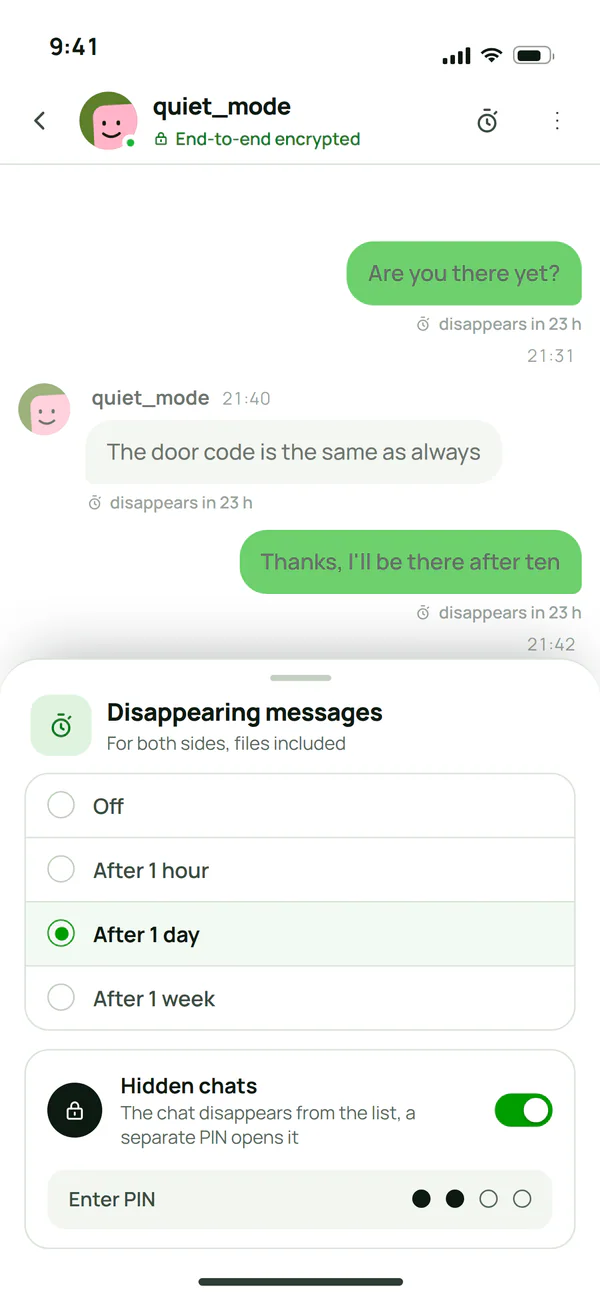
You set the timer separately for a chat, a group and a channel, and hide chosen conversations behind a separate PIN.
A community server with a channel for every occasion
Every kind of channel has its own tools: a forum has tags, a stage has an audience, an event channel has a calendar. The owner arranges categories and channel order by dragging.
Text channel
A conversation with threads, pinned messages and everything messages can do in Plazer.
Voice channel
A call with a chat next to it, a channel status, pins and a list of who was here recently.
Forum with tags
Every topic is its own thread, and tags let you filter the forum in a second.
Announcements
Publish a message from an announcement channel to every server that follows it, in one click.
Stage
Speakers on stage, listeners in the audience. A listener raises a hand and the host invites them to speak.
Media channel
Photos and videos laid out in a grid, with a thread under every post.
Event channel
Its own voice channel, text channel and calendar where attendees pick a time that suits everyone.
3D room
An isometric room you walk around with your character. Walk up to people and talk up close.
Anonymous channel
Only the owner and moderators see who wrote a message, so people ask questions they would never ask under their own name.
Private threads
A thread visible only to the people you invite, without creating a new channel.
18+ channel
A channel for adults only, with a confirmation before the first visit.
Private channel
End-to-end encrypted, with the keys held only by the people who have access to it.
Roles, moderation and bots built into the server
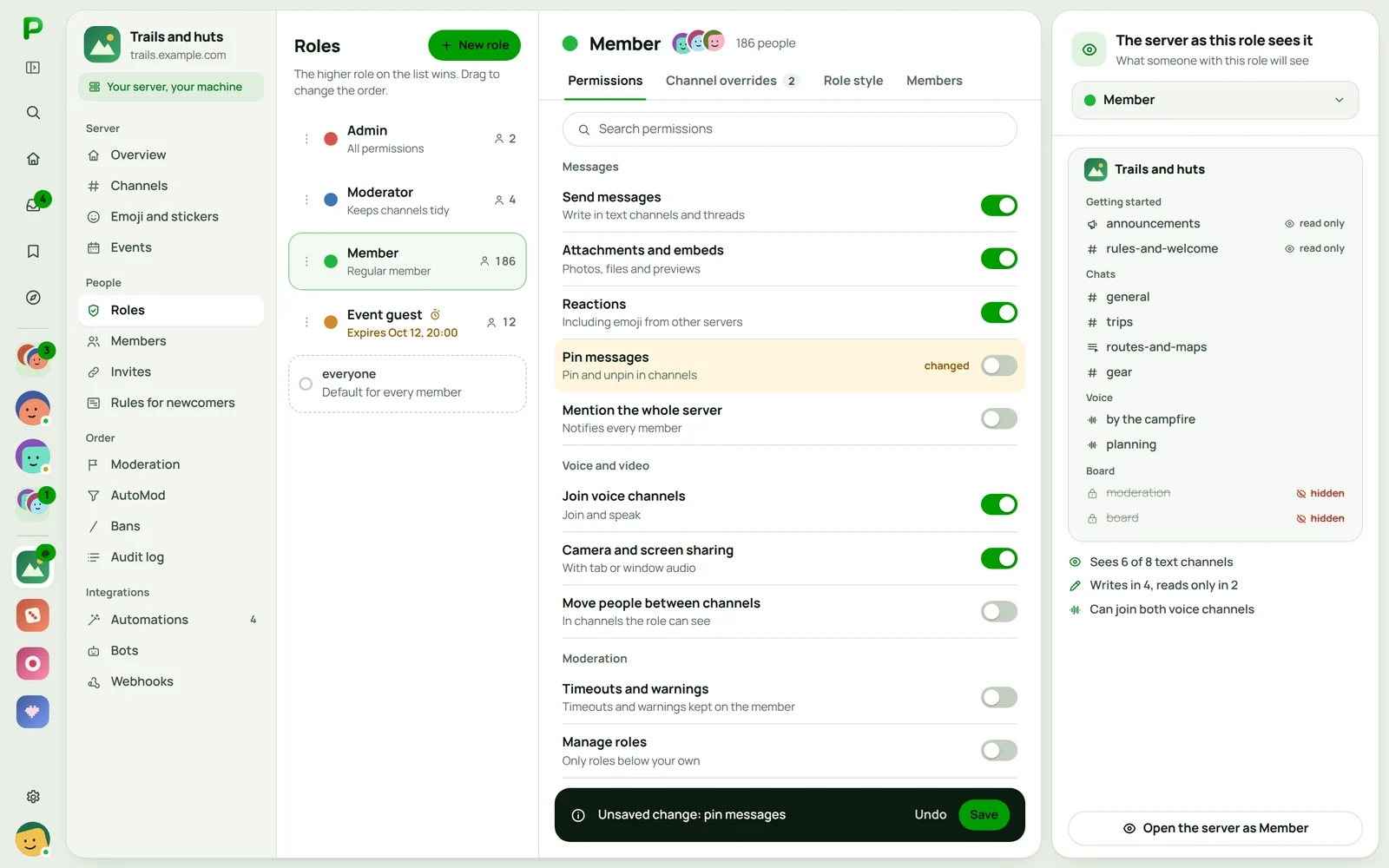
The owner sets permissions for every role and every channel, and before a change reaches people, sees the server through the eyes of a chosen role. Moderation and automations work without adding outside bots.
Roles and permissions
A full set of permissions
From sending messages to managing the server, every permission on its own.
Channel overrides
The same member can write in one channel and only read in another.
Temporary roles
A role with an end date, for example for the guests of one event, disappears on its own.
Moderation and AutoMod
AutoMod
Checks every message before anyone sees it: word lists, regular expressions, spam, links and mass mentions.
Moderator tools
Timeouts, warnings saved on the member and notes that members never see.
Audit log and raid alerts
Every decision with its author and time, and an alert when many new accounts join at once.
Bots and automations
Automations without code
"When X, do Y" rules: welcomes, roles from reactions, reports and levels, set up without writing a bot.
Bots with commands
Slash commands with hints for every field. A bot gets a role and only the permissions you give it.
A bot in an encrypted channel
It gets keys like any participant and stands on the list of key holders, and once removed, the keys change.
Voice and video calls encrypted in every channel
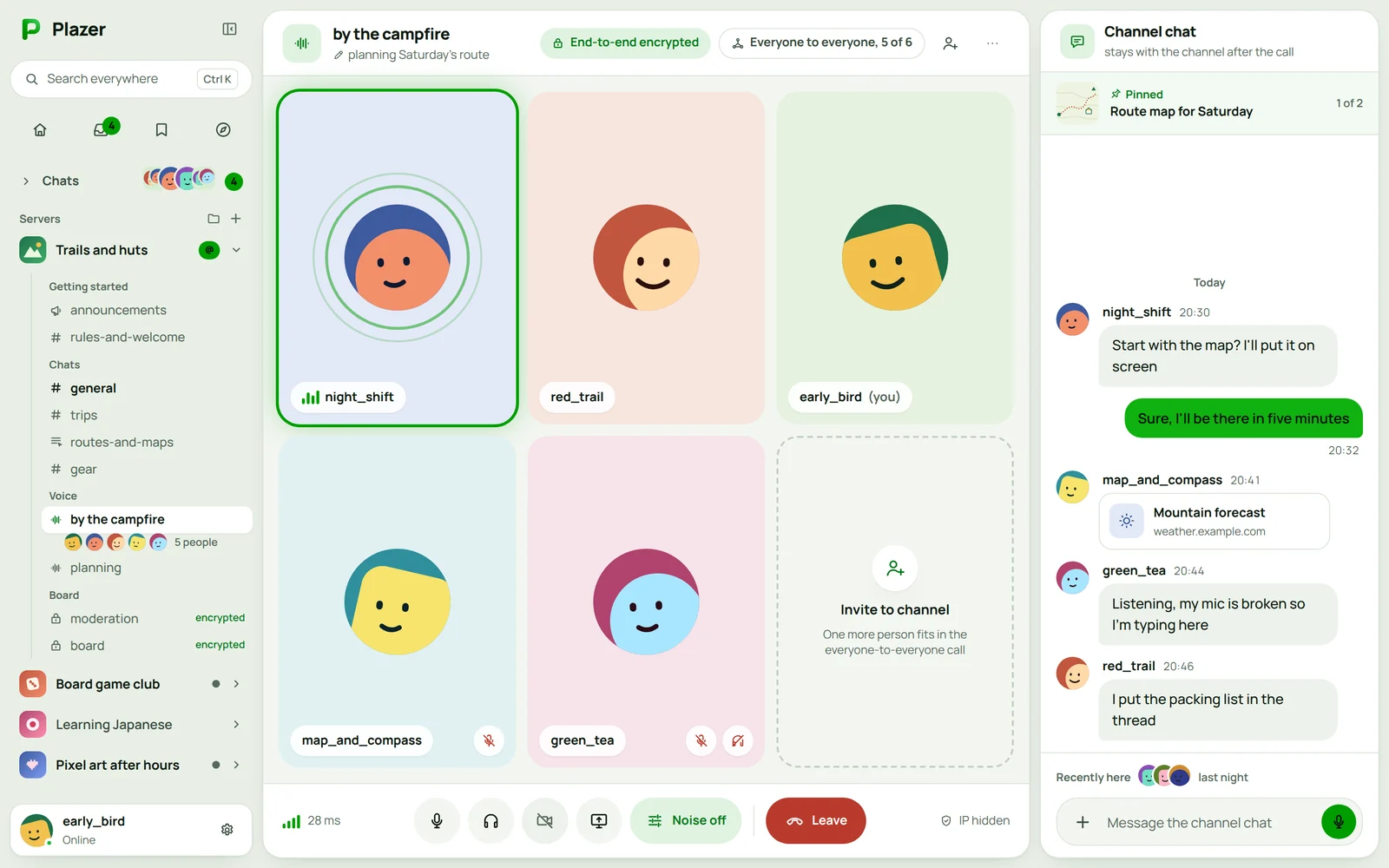
Video and audio are encrypted between the devices of the people talking, in a server's public channels too. Plazer picks how to connect people on its own, and only the people in the room know the call key, with a new key every time someone joins or leaves.
Two people: straight to each other
A call between two people connects the devices directly, by the shortest route, so the delay is as low as it gets, which you notice most while gaming.
A small room: everyone to everyone
Up to 6 people by default, every device connects to every other one, and the server owner sets that limit anywhere from 2 to 12. Camera video steps down smoothly from 720p to 180p as people join.
A big room: the server forwards but does not listen
Above the limit the community server forwards video and audio, but every frame is encrypted with a key the server does not know. Only the machine it runs on limits the number of people.
A voice channel that works like a room
You see who is in it and walk in without calling, and next to the call there is the channel chat, a status, pinned messages and a list of who was here recently.
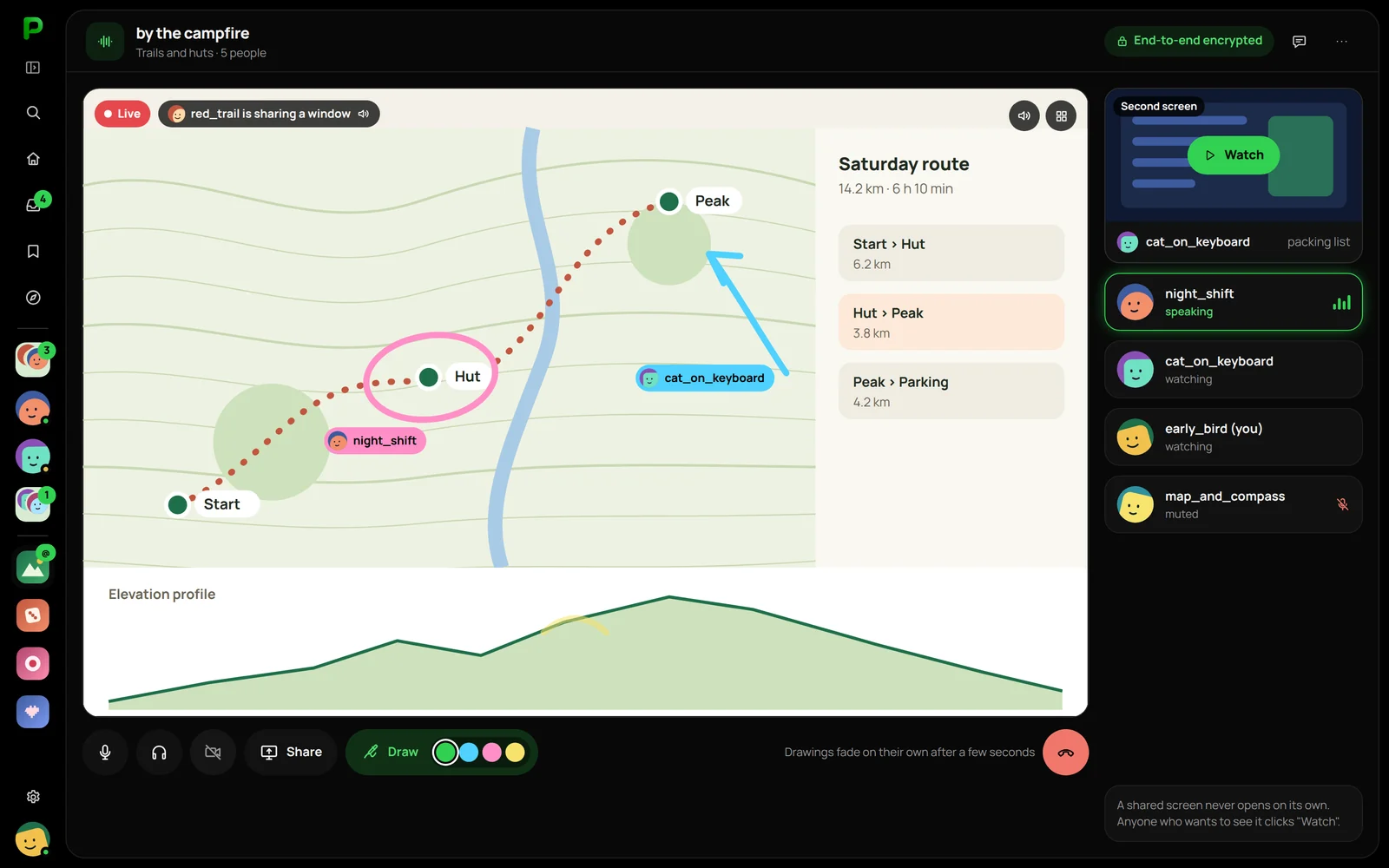
Screen sharing with audio, watched on demand
You share a screen, a window or a tab with its sound, and the picture opens for others only after they click "Watch". Viewers draw arrows on the screen that fade after a moment.
Whisper
You talk to one person without leaving the channel. The rest of the room does not hear it.
Waiting room
You get into the channel when someone already inside lets you in.
Moving the call
You start on your computer and finish on your phone, without hanging up.
Live streams with no viewer limit
Live, with a chat alongside, a recording and clips, and a premiere starts for everyone at the same time.
Studio
A call recorded on separate tracks, one per person, ready to edit.
Clean sound
Noise suppression, push to talk, microphone sensitivity and the volume of each person on its own.
A community server on your own machine, claimed from the app
A community server runs with us or on its owner's hardware: a VPS, a home computer or a dorm network. A new server has no owner, so you become one in four steps in the regular app, and each step confirms you are connecting to your own machine.
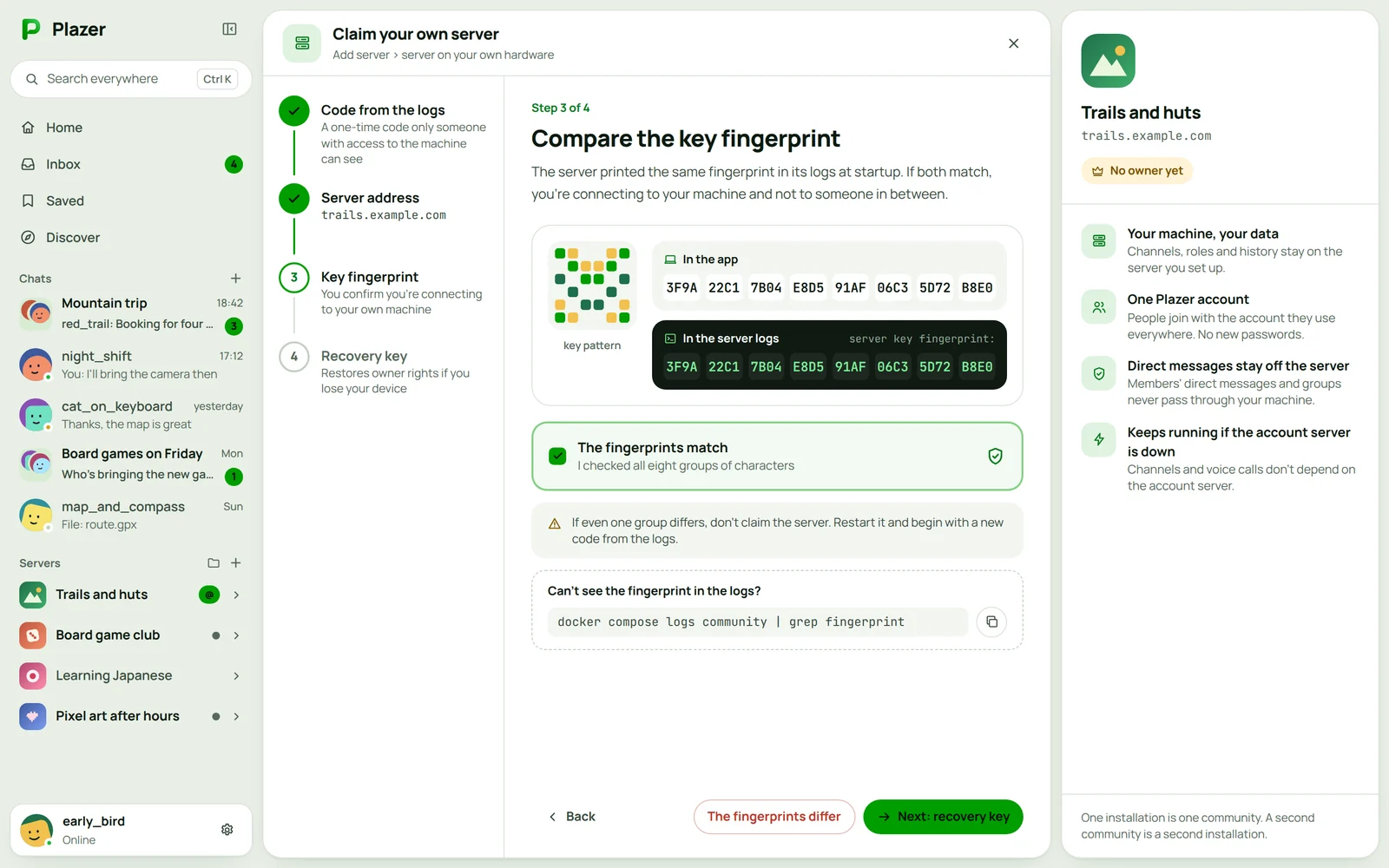
A code from the logs
A freshly started server prints a one-time claim code in its logs. Only someone with access to the machine can see it.
Add the server in the app
You enter the address and the code from your normal Plazer account, with no separate admin password.
The key fingerprint
The app shows the server's key fingerprint. It matches the one in the logs, so you are talking to your machine and not to someone in between.
The server recovery key
It restores your owner rights if you lose the device you claimed the server from.
Invites with the key fingerprint
Every link shows a preview of the server and its key fingerprint before anyone joins, so nobody can slip in another server.
One command
The server starts from a ready Docker image together with its PostgreSQL database and Redis cache, and an update means pulling the new image.
docker compose -f docker-compose.community.yml up -dMoving with one button
The server travels to another machine with everything in it, and members do not have to do a thing.
- Channels and categories
- Roles and permissions
- Channel history
- Emoji and settings
A server on a local network
On an ordinary computer on the same network as its users. Channel chat and voice then travel over the local network.
- Dorm
- LAN party
- Office and studio
One Plazer account, the server at its owner's
People do not create accounts on servers. They sign in with the one account they use everywhere, while channels, roles and history live on the server owner's machine. That is why a break on the central server's side does not stop the channels.
Plazer central server
shared by every server
- Accounts and sign-in
- Friends and message requests
- Direct messages
- Private groups
Anyone with a Plazer account joins any server from an invite in one click, and their friends and private chats come along.
Community server
on its owner's machine
- Channels, categories and their history
- Roles and permissions
- Voice calls and streams
- Invites, bans and the audit log
One install is one community with its own data. Members' direct messages and groups never pass through the server, so even its owner does not touch them.
When the central server takes a break
Apps for the computer, the phone and the browser
On computers and phones Plazer is a native app, without a browser built in underneath: on a computer it takes 17.8 MB of memory at rest. In the browser it runs with nothing to install, on the same account.
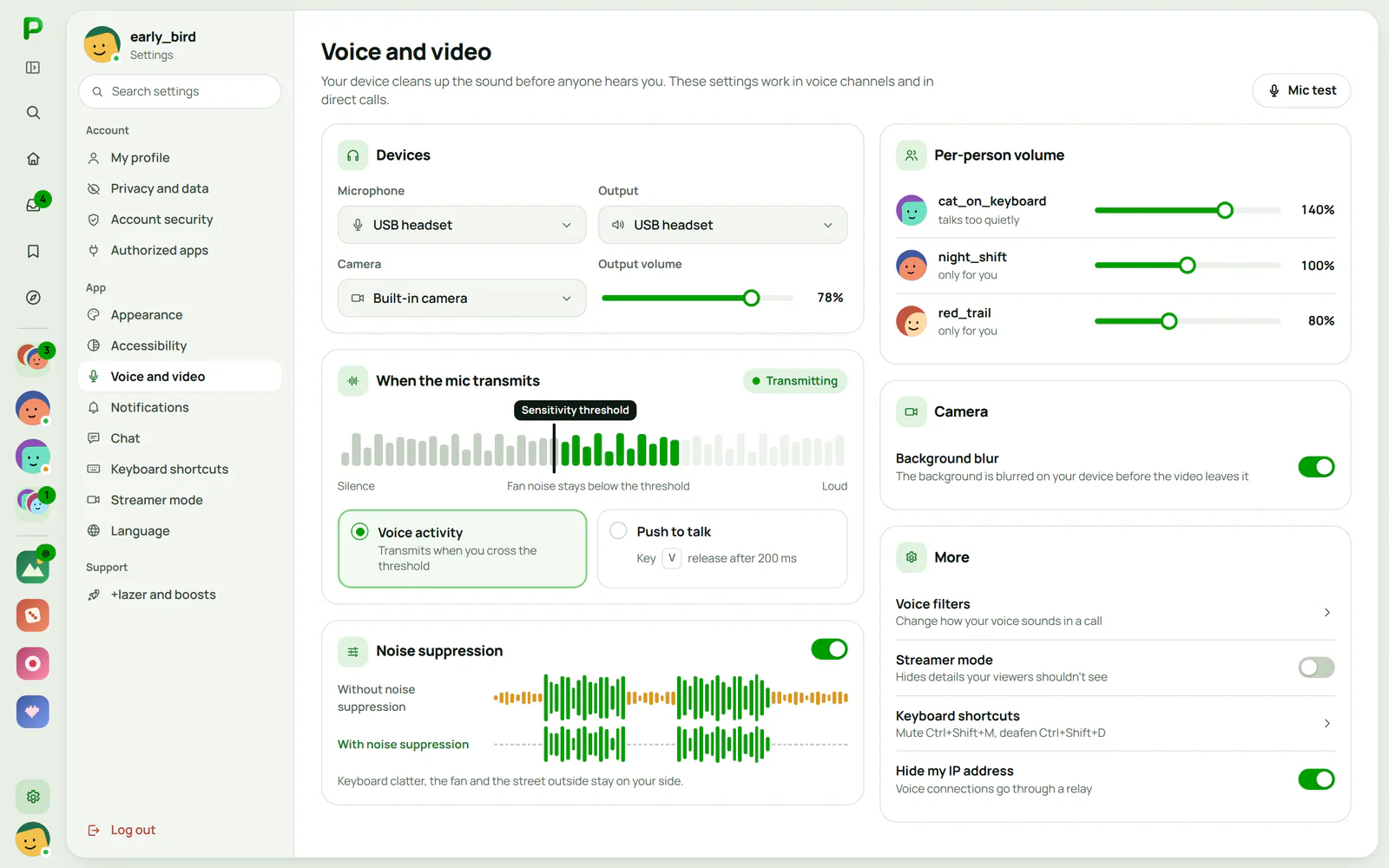
Computer
Windows, macOS and Linux
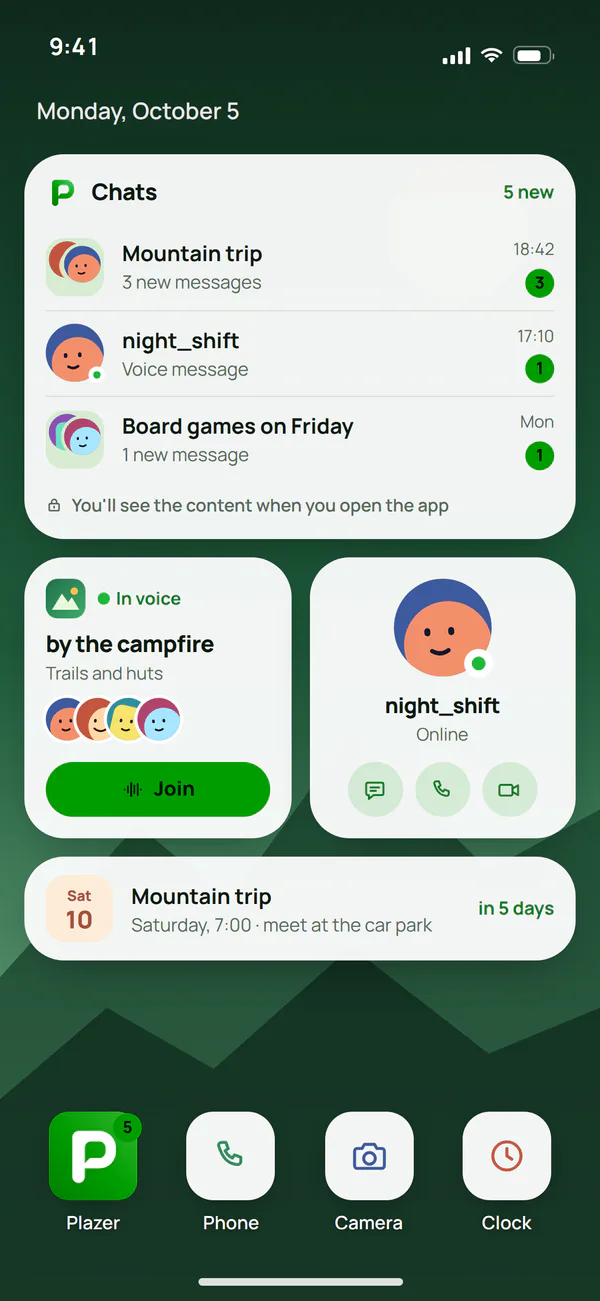
Phone
Android, including without Google services
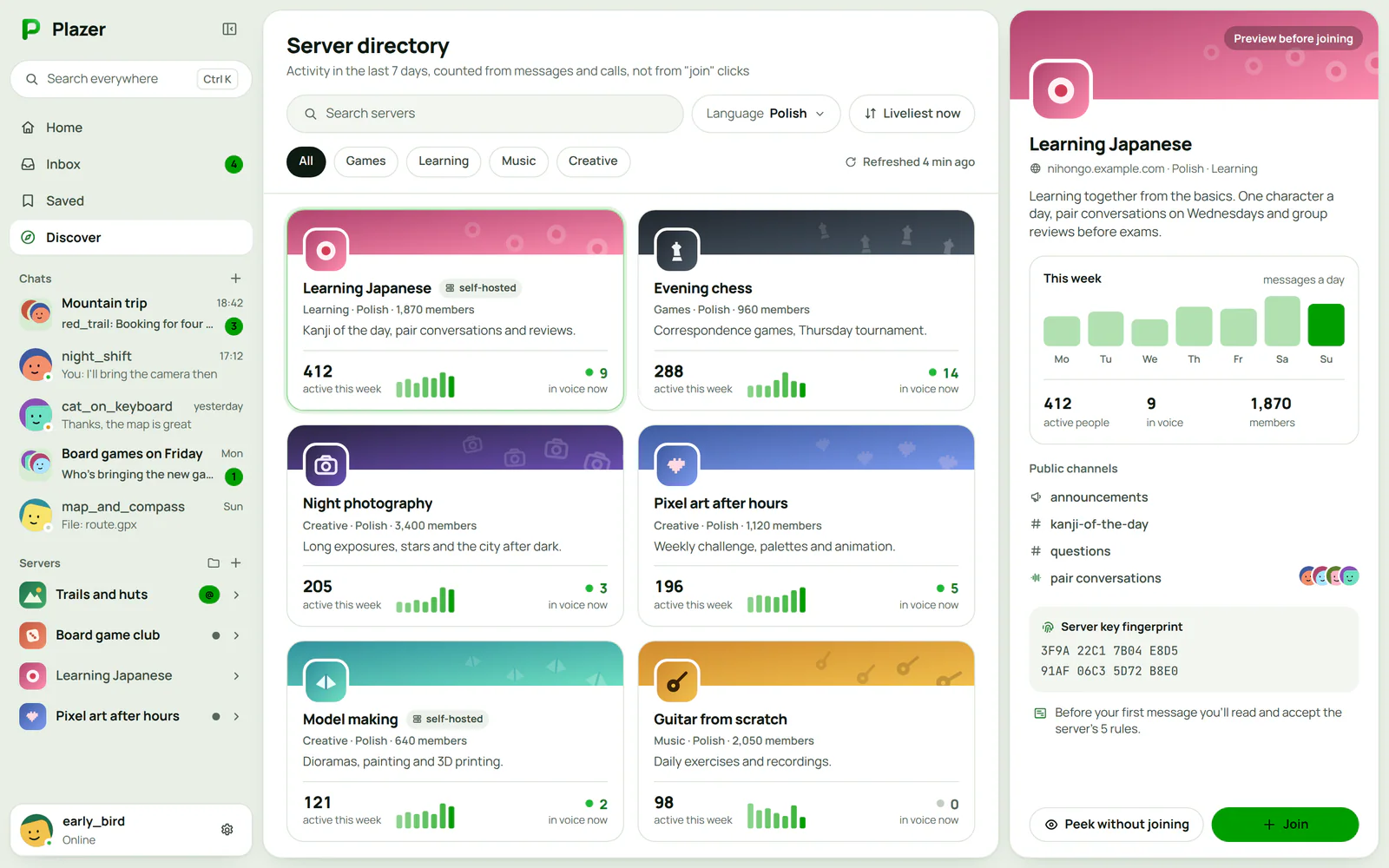
Browser
Any modern browser
Computer
Windows, macOS and Linux
- Installation
- One installer file, with no extra libraries to install
- Updates
- New versions arrive inside the app
- Notifications
- System notifications, without message content
- On screen
- A desktop widget with your chats
Phone
Android, including without Google services
- Installation
- From the Plazer website, like any other Android app
- Updates
- New versions arrive inside the app
- Notifications
- Without Google services too, through UnifiedPush, never with content
- On screen
- Home screen widgets
Browser
Any modern browser
- Installation
- Nothing to install: you open Plazer and sign in
- Updates
- Always the latest, because the code arrives on every visit
- Notifications
- Only "New message", without content
- On screen
- A permanent reminder that the page code comes from the server
- One account
- You pair a new device with a QR code or a number code from the old one, and your chats move encrypted straight between the devices, without going through the server.
- Appearance
- Five themes, 12 gradients and a custom theme with contrast control, accessibility settings, plugins switched on with one toggle and the whole app in Polish or English.
One encryption core under every app
Account identity, devices, MLS groups and chat state live in one Rust library. The browser, desktop and Android apps call the same code, so none of them touches cryptography on its own, and a fix to the encryption reaches all of them at once.
Browser app
- TypeScript
- The core as WebAssembly
- AGPL-3.0
It calls the core compiled to WebAssembly and never touches keys outside it.
Desktop app
- Rust and Slint
- Windows, macOS, Linux
- GPL-3.0
Native, without a browser underneath. To this app the core is an ordinary library in the same language.
Android app
- Kotlin
- The core through UniFFI
- AGPL-3.0
It calls the same core through generated bindings, and gets notifications without Google services too.
Central server
- Go
- Accounts, friends, private chats
- AGPL-3.0
It passes the encrypted blocks of direct messages and groups between devices without knowing what is in them.
Community server
- Go, PostgreSQL, Redis
- A Docker image
- AGPL-3.0
The channels, roles, events, moderation and voice calls of one community, on its owner's machine.
Protocol specification
- Identity, MLS groups, metadata
- Test vectors
- MIT or Apache-2.0
The core and the servers do what it describes, so anyone can build a compatible app or check the encryption.
Questions about this project

Read next
The other case studies and the services that draw on this work.
Is your project like this one?
Describe what you want to build. We reply within an hour with questions and a free quote.