
Flaem: one system for a hosting company instead of four
A hosting company usually sells through a billing system, keeps game servers in one panel and virtual machines in another, and glue modules hold it together. Flaem, our own product, does it in one installation on the operator's hardware: sales with local and European payments, the client panel, and game servers, VPS, dedicated servers, mail and websites.
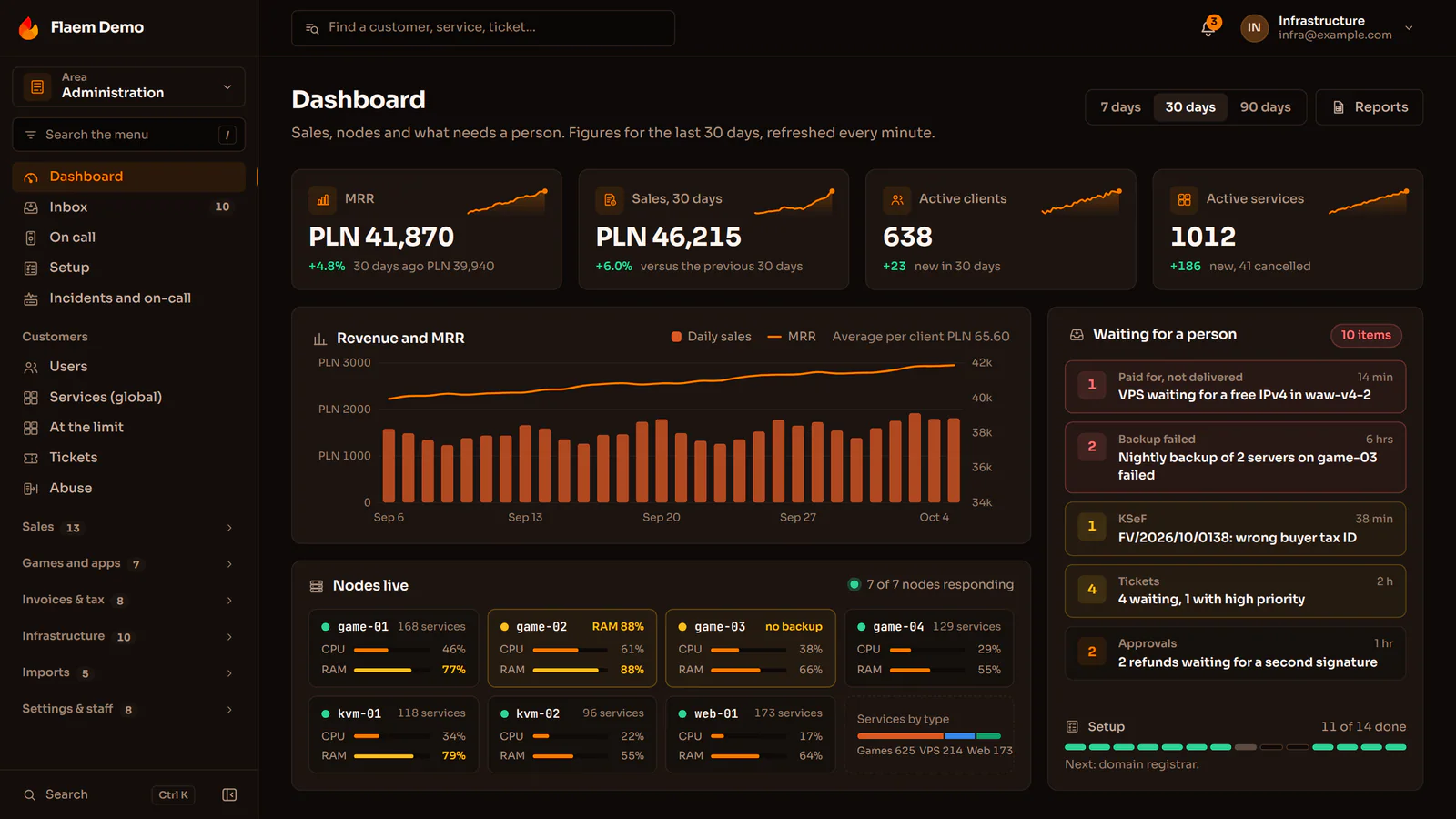
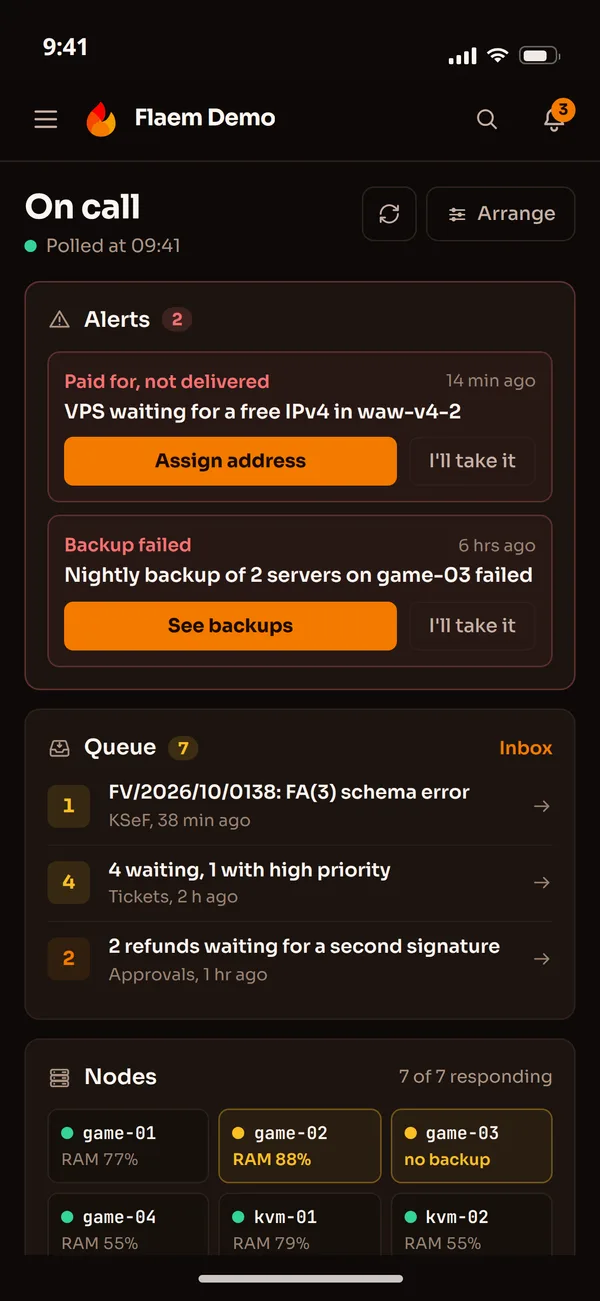
The operator panel: from an empty machine to everyday client care
The panel, the database and the clients' data sit on the operator's own machines. Installation, nodes, updates and failures are run from the panel, and tickets, chat and Discord land in one inbox next to the client's services and invoices.
Setup
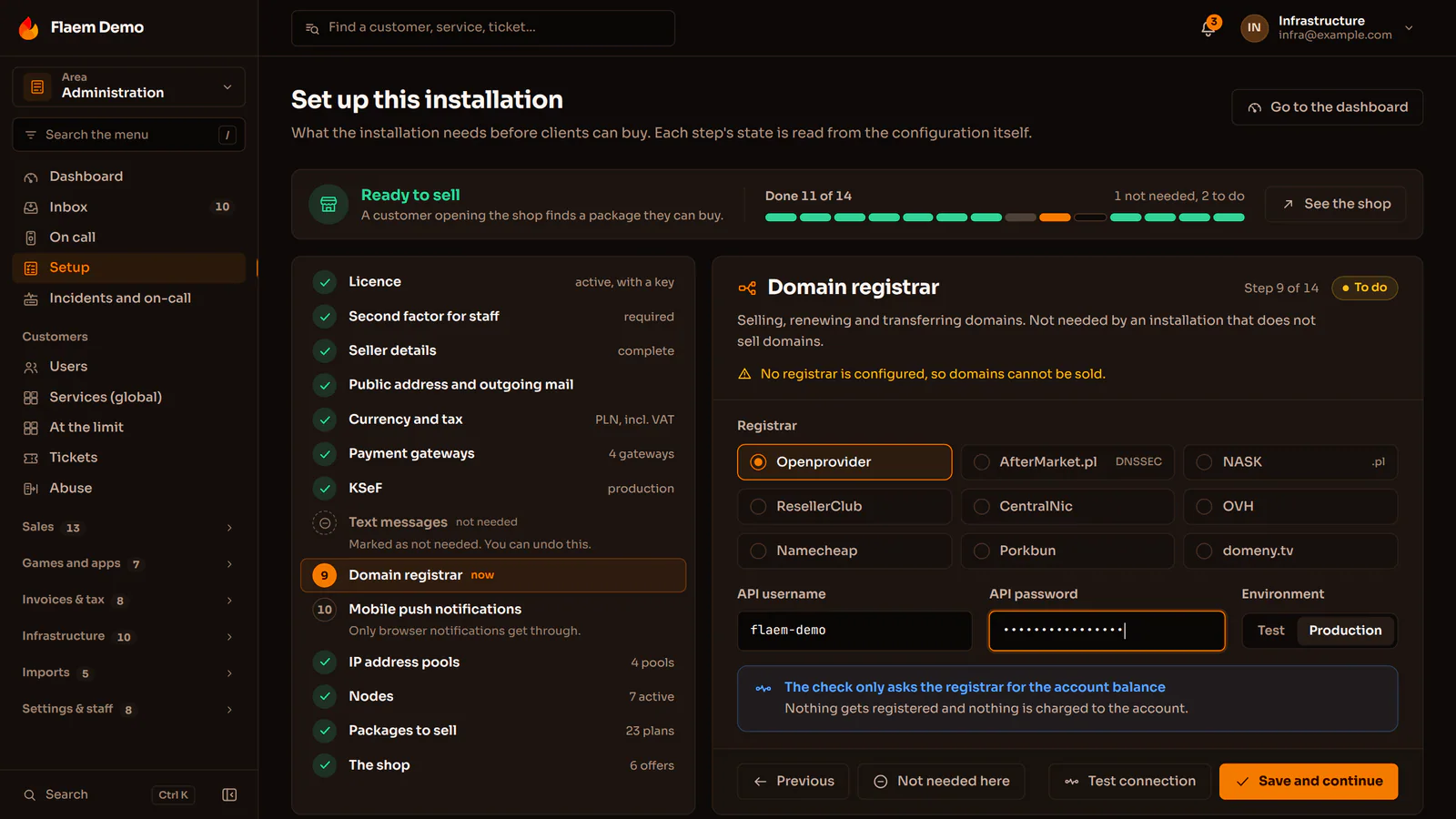
One-command install and a setup wizard
The installer asks for the address, HTTPS, the licence and the administrator, and does the rest on its own. The wizard then leads from the seller details to the first published offer and shows which integration is still missing.
Nodes and updates with a way back
A node joins with a command the panel prepares and is checked from inside and from outside. The operator starts an update in a window of their choice, and a node where the new version does not come up returns to the previous one by itself.
A node failure, decided by a person
The panel waits as long as the operator sets, notifies whoever is on call, then spreads the services over the remaining nodes with one command so that none goes over its threshold. Two control planes stand behind one shared address.
Tickets
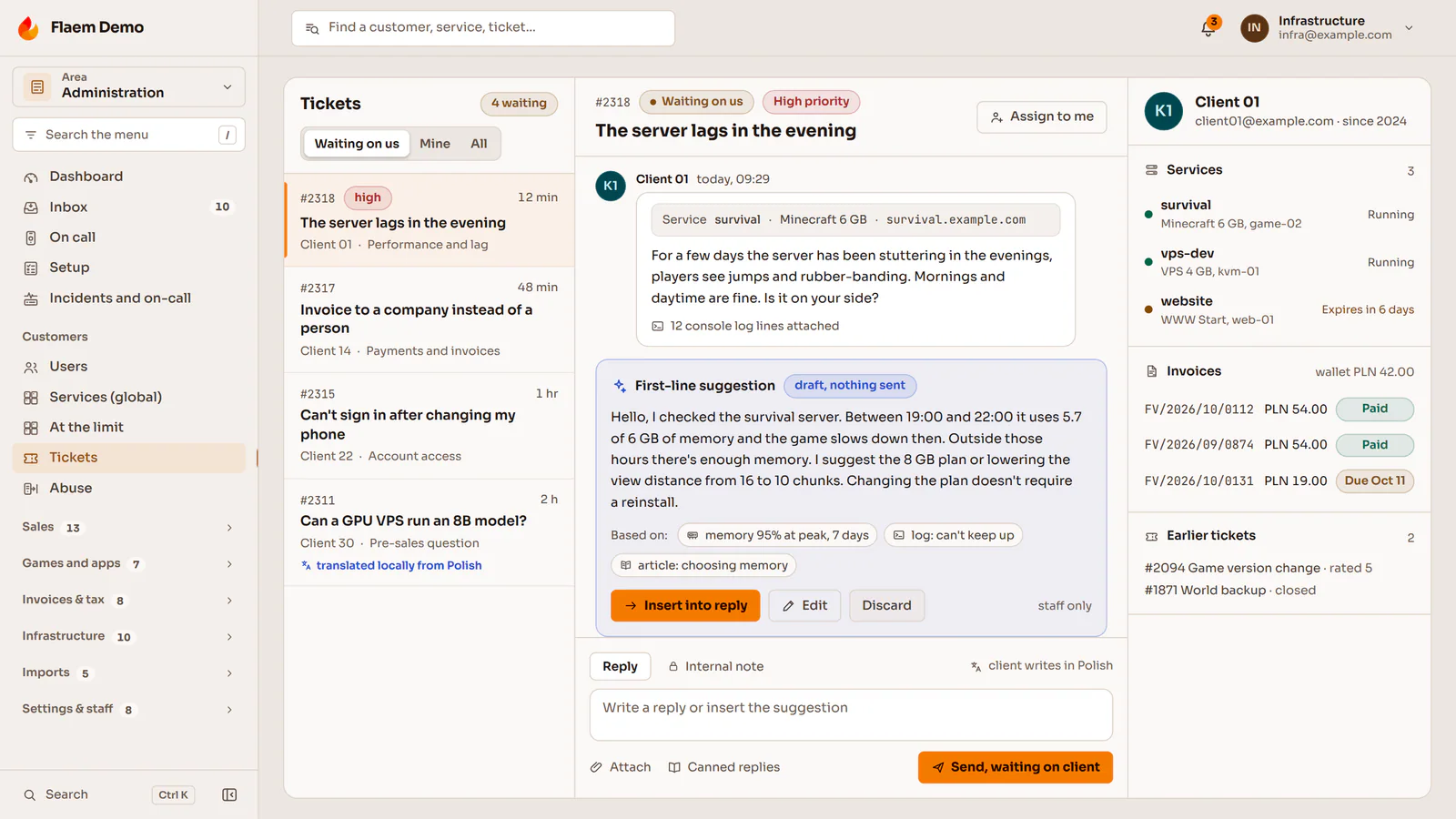
The conversation next to services and invoices
Tickets, chat and email land in one inbox, and the client's services, invoices and earlier cases sit beside the conversation. Staff reply from the panel or straight from a Discord thread.
A first line and translation on the operator's own model
A reply draft is built from the service data, the logs and the knowledge base, and a person sends it. Staff read a Czech ticket in Polish, and the translation runs on a model on the operator's side, so the contents stay there.
Knowledge base, on-call and a status page
A knowledge base in five languages suggests articles before the client sends a ticket. An unacknowledged alarm moves to the next person on the rota, and the public status page sits on the operator's own domain.
Game servers the client runs on their own
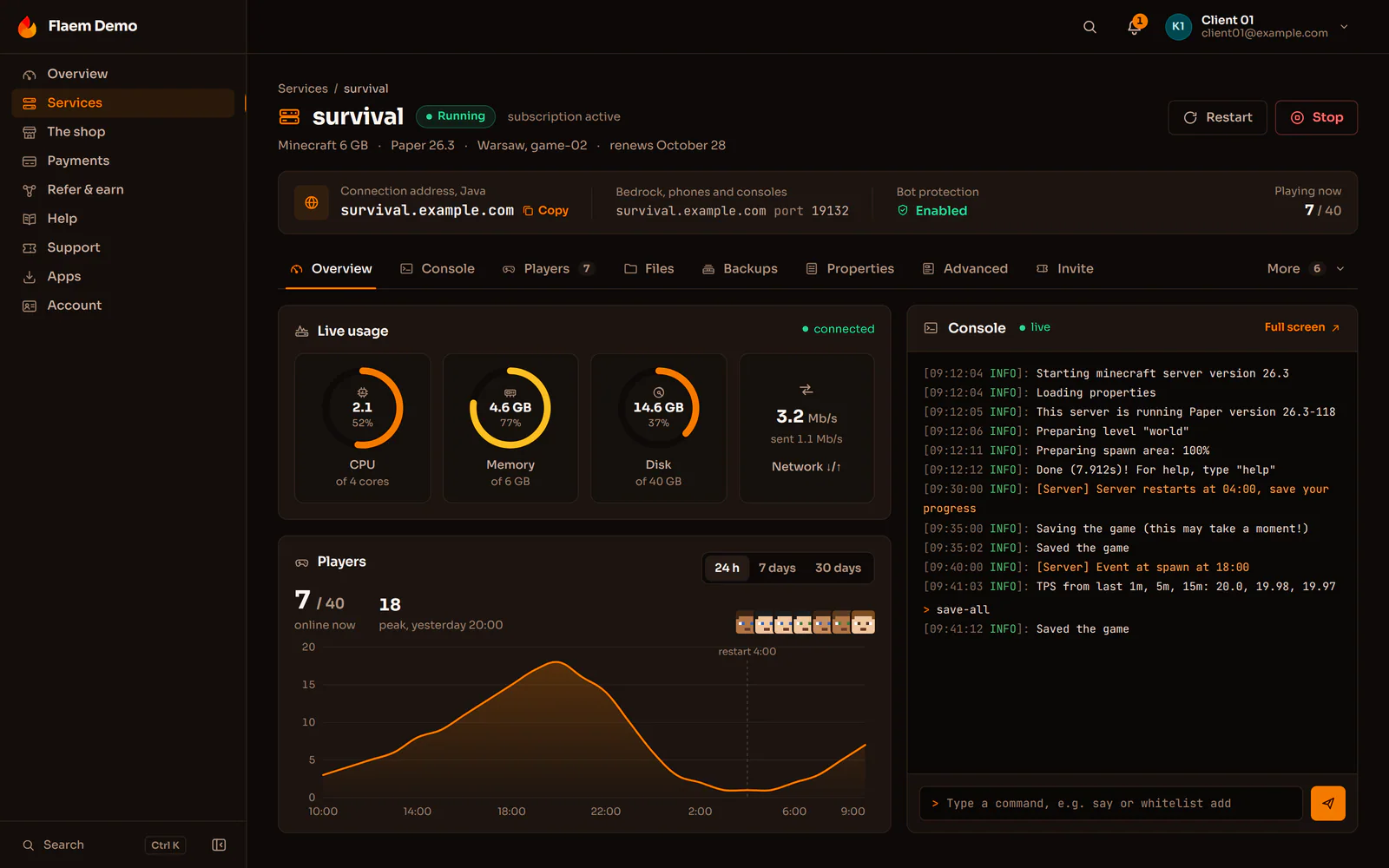
The client buys a game server in the operator's store and manages it straight away: the console, files, versions, mods and backups are in the panel, and the operator bills and invoices it in the same system. When a server crashes, the owner gets the cause in plain words and a fix button instead of a log.
A library of ready servers
A ready definition installs the server, keeps its version in check and shows the client what matters to them. The operator switches on the ones they want to sell, and adds games outside the library from Pterodactyl and Pelican eggs: from a file, a URL or a GitHub repository.
Console, files and backups without a ticket
A live console in the browser, a file editor much like VS Code, SFTP and a terminal in the container. Backups are incremental, and files shared by servers of the same game sit on disk once.
Mods, versions and settings in one click
Modpacks from Modrinth and CurseForge, mods from Steam Workshop and Thunderstore, the game or Java version from a list and the startup settings as a form with descriptions instead of raw variables.
Minecraft with the Flaem plugin
The client picks the engine and version at checkout, installs plugins from Modrinth, Hangar, SpigotMC and GeyserMC, and sets world rules and the server-list description with switches. The Flaem plugin shows players, TPS and statistics in the panel.
Discord, player funding and an in-game store
A bot on the operator's own Discord application shows the server status, alerts on crashes and takes commands. Players chip in for the renewal or buy items in the store on the server, and the money goes through the operator's billing.
VPS, VDS and LXC containers on the operator's own Proxmox
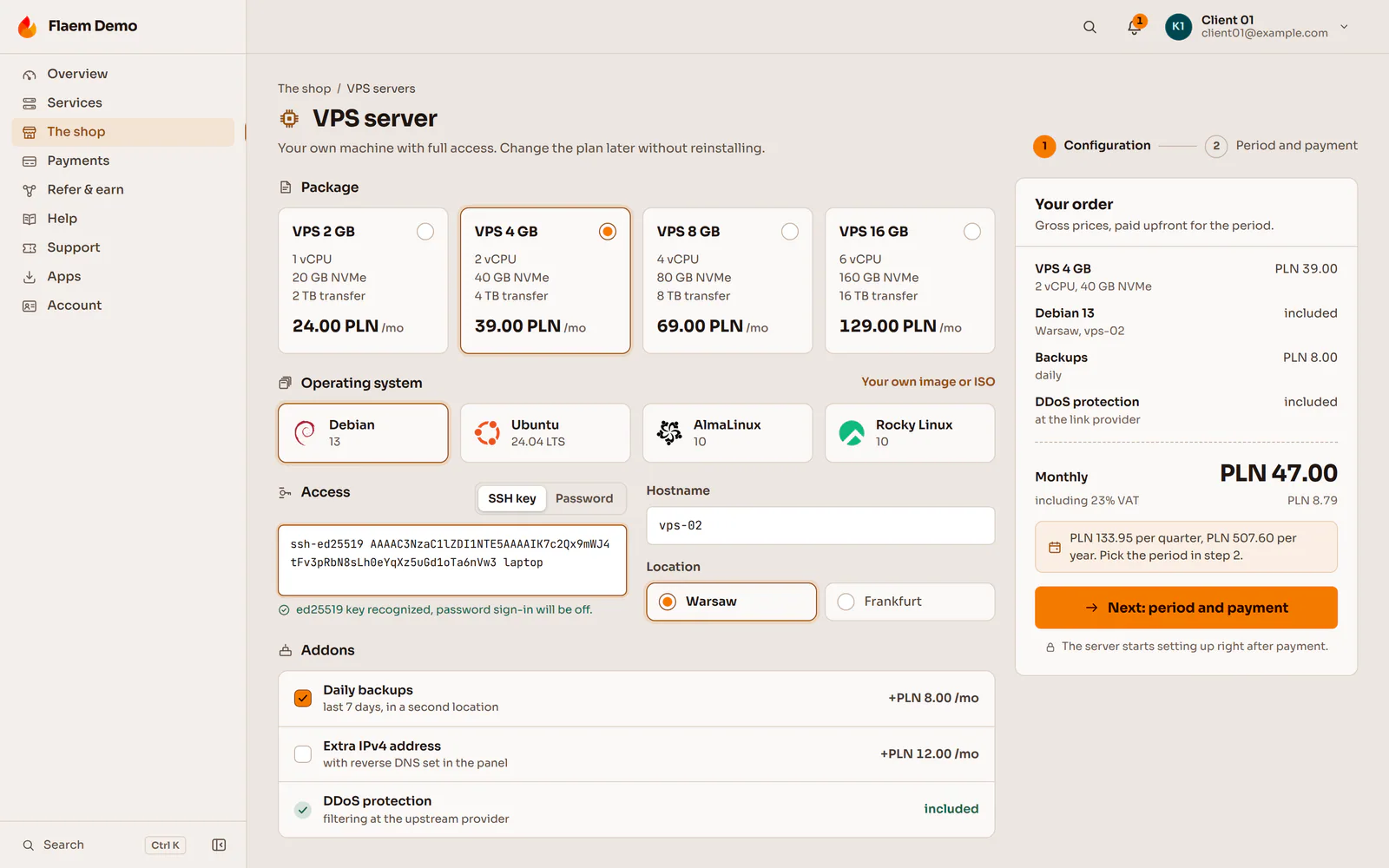
Flaem drives Proxmox VE 8 and 9. The client picks the plan, system, SSH keys and hostname in one step, pays and shortly logs in to a running machine, without the operator's team lifting a finger.
KVM VPS
A full virtual machine from a system template, from an ISO in the operator's catalogue or from the client's own image. The most popular plans wait ready in reserve, so an order starts in seconds.
VDS
Dedicated cores and memory on a virtual machine, sold as a separate product with its own price, limits and a virtual hardware profile for every plan.
LXC containers
Lighter than a VPS, so more of them fit on the same hardware. The client has the same set of actions in the panel, and nesting lets them run Docker inside.
What the client does alone, without a ticket
Browser console
noVNC and a serial console keep working even when the client has cut off their own network.
ISO images and rescue mode
Booting from an ISO in the operator's catalogue and fixing a broken configuration.
Snapshots and backups
A snapshot before a risky change and backups off the node, including a second location.
Firewall, rDNS and IP addresses
Traffic rules, reverse DNS and extra addresses from the operator's pool, set in the panel.
Plan changes
Bigger or smaller on any day of the period, with the difference priced to the second.
Statistics every second
Real peaks instead of an average
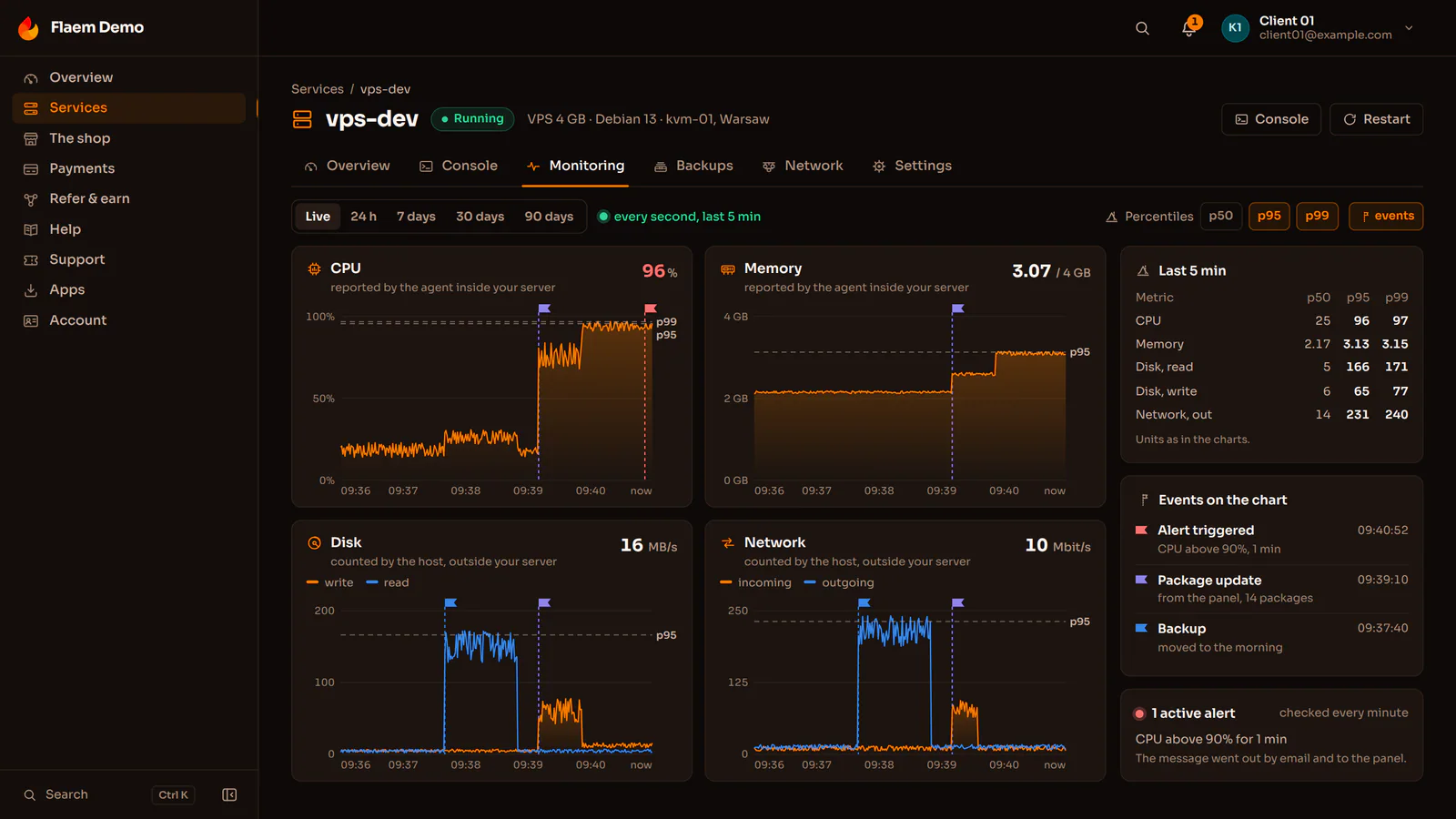
For every period the panel keeps the average, minimum, maximum and percentiles from p50 to p99, so a short spike does not vanish into an average.
Events on the chart
Restarts, backups, updates, attacks and maintenance are markers on the timeline, and when something breaks Flaem freezes the detailed data from just before it.
Alerts on the client's own rules
The client sets thresholds for CPU, memory, disk and network, and the alert arrives by email and in the panel before resources run out.
Who disturbs whom on a node
The operator sees the services that took the most in the minutes when steal or disk latency rose on the node, with their share in percent.
Dedicated and GPU servers: from the shelf in the rack to the client and back
A restart, a reinstall and the console are a button in the panel rather than a call to the data centre. The client buys a plan, not a particular box: Flaem picks a free machine with the plan's hardware in the location the client chose.
Machine inventory
Every machine has its location, rack, serial number and state, so the panel knows where it stands, what it is made of and whether it may be handed to anyone.
Burn-in before sale
Several hours under full load and a report with the figures, so faulty memory or a failing disk shows up in the test, not with the client.
Sold off the shelf
Reservation and payment are one operation, so the same machine can never be sold twice. The operator sets the price, and only the operator lowers it.
Network install
A Flaem foothold in every location serves DHCP, TFTP and iPXE, so the machine gets a fresh system with no USB stick, and the control plane needs no route into the management network.
Controller and console
Power through Redfish or IPMI, the SOL console and the KVM picture in the browser, and the controller's credentials never reach the client.
Safe return
When the contract ends, power is cut and the machine goes back to service with a note to wipe its disks. It never goes back on sale by itself.
GPU servers and AI models as a service
Telemetry for every card
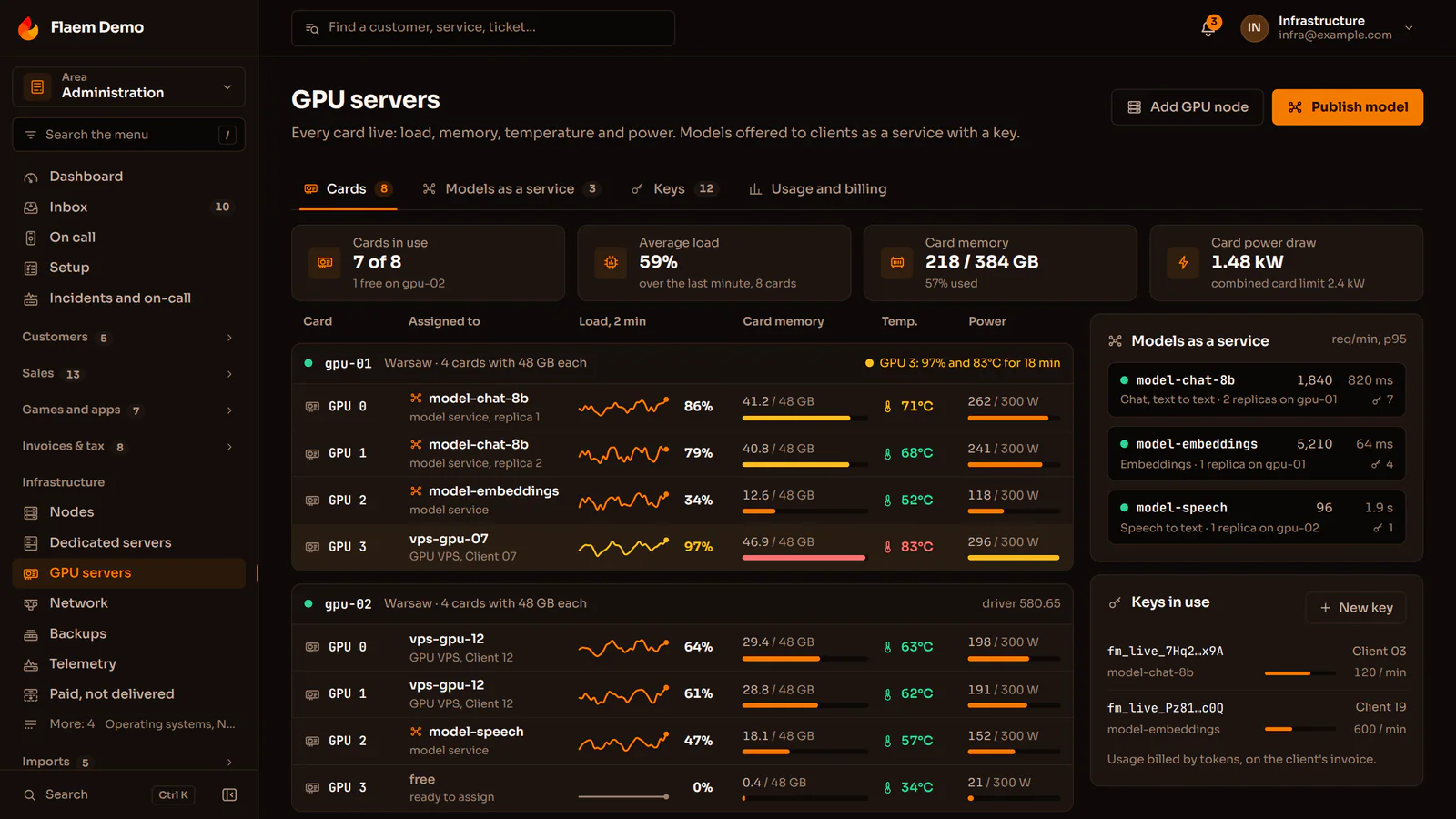
The load, memory, temperature and power draw of every card separately, next to the CPU, disks and network of the whole machine.
A dedicated server with GPUs
The client gets the whole machine with its cards, with a network install, the controller and the console.
A VPS with a card
A card assigned to a virtual machine on a Proxmox node, in the same panel as a regular VPS.
An AI model as a service
The model runs on the operator's cards, and the client sends requests with their own key and pays for the usage on the invoice.
The operator's network: IP addresses, BGP, RIPE and DDoS protection
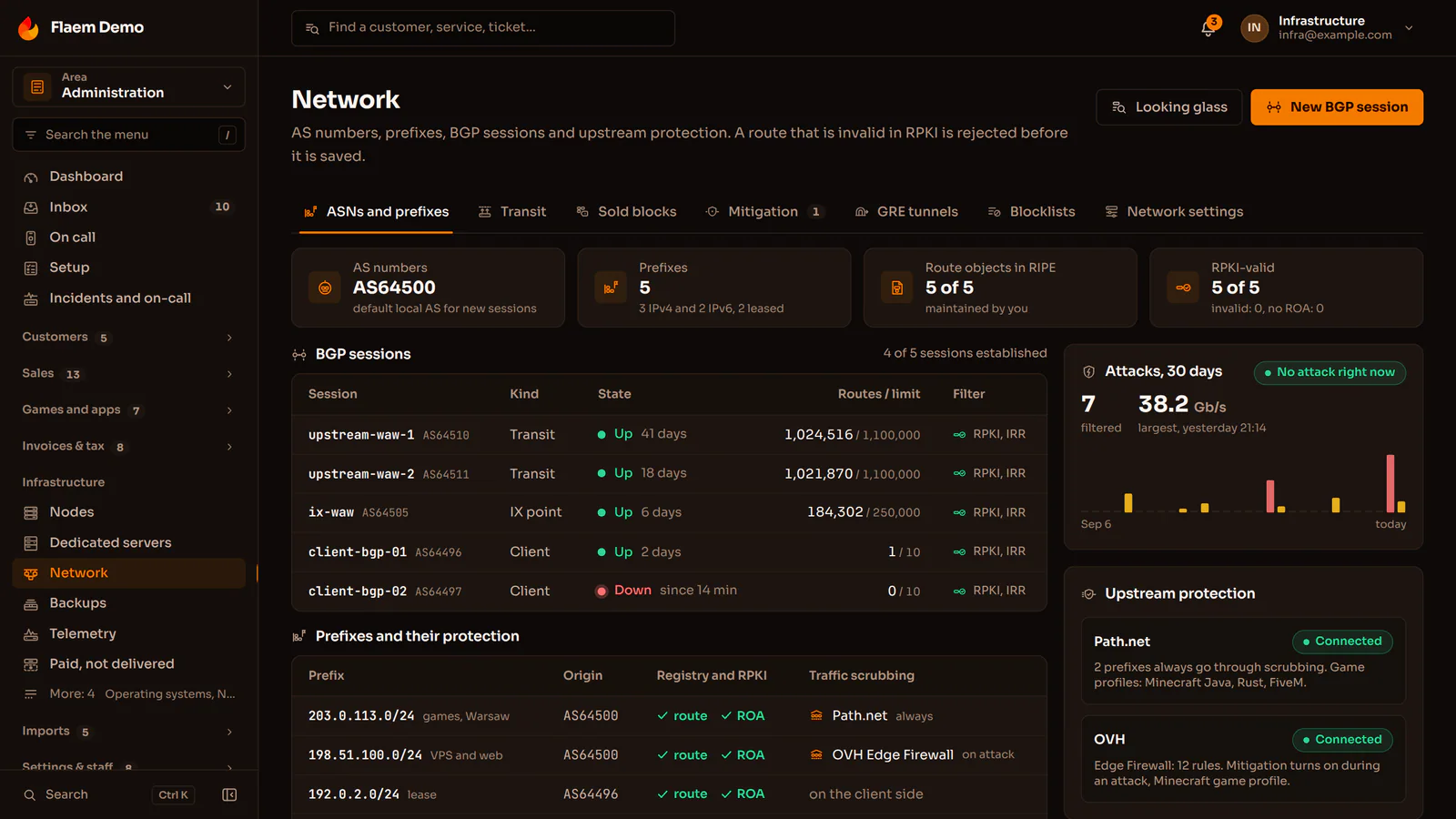
When an operator runs their own network, companies buy more than servers from them: internet access, addresses and help getting their own AS number. Flaem runs these services from the order in the store, through the BGP session and the RIPE database entry, to the invoice and the renewal.
Network services in the store
IP transit
For a company with its own ASN, with the BGP session set up in the panel.
GRE tunnel
Addresses delivered to a machine that sits outside the operator's network.
IPv4 and IPv6 leasing
A whole subnet as a service, with a RIPE entry and rDNS zones, released when it expires.
ASN registration
The application, documents and status in the client panel, while the operator files the request with RIPE NCC as a LIR.
BGP on BIRD 2 with RPKI
Sessions with clients, sub-operators and the upstream, each with an owner, a route filter and a history. A route that is invalid in RPKI is rejected before it is stored.
Addresses without conflicts
Every address has a state in the panel: free, assigned to a service, assigned permanently to an account or leased out. A game server gets a free port and a service an address from the pool, with no spreadsheet of taken addresses.
DDoS protection at the operator's provider
Path.net, OVH, Cloudflare Magic Transit or NeoProtect. The operator sets the filters once for a game's port ranges, and clients see attacks on their addresses in the panel.
Network tools
A looking glass and a latency test for clients, and for the operator link measurement, sFlow and NetFlow traffic analysis, switches from the panel and detection of attacks leaving client machines.
Websites, domains and email in the same cart as the server
The client puts sites on the operator's nodes, searches for and registers a domain, sets up the DNS zone and creates mailboxes in the panel where their server already is. They need no separate registrar account and no separate mail panel, and the operator sets the prices and the margin.
Full support for .pl domains
Through Polish registrars or directly with NASK, with transfer, WHOIS and DNSSEC in the client panel.
A price from cost or a fixed one
The margin is added to the registrar's cost, or a TLD has a fixed price that no price list will change.
Your own registrar
A registrar outside the list is described in a form or connected through a bridge, and an accredited registrar reaches the registry directly over EPP.
Registration with a fallback order
Openprovider, AfterMarket.pl, ResellerClub, CentralNic, OVHcloud, Namecheap, Porkbun, domeny.tv and NASK directly. When the first account does not answer, the registration goes through the next.
DNS zone
A zone editor on the operator's PowerDNS or in Cloudflare, with DNSSEC and glue records. Managed DNS also sells as an add-on.
Mail records
The moment email is switched on, Flaem adds MX, SPF, DKIM and DMARC to the zone, and the mail status screen shows whether everything matches.
Mailboxes
Mailboxes, aliases and catch-all on mailcow servers from a pool, in the plan price or as an add-on charged per domain.
Every site in its own container
Sites stand on the same nodes as the games, with a domain, a certificate, a database and backups. When resources run short, game servers come first.
WordPress with a restore point
Right before every update Flaem saves a restore point of the site that the client goes back to if something stops working.
Apps from git and a copy for testing
The app builds from a repository within the client's plan resources, and a risky change is tried first on a copy of the site with a temporary address.
PHP, traffic and statistics
PHP 8.2, 8.3 and 8.4 for each site separately, WAF and CDN, traffic rules in a form and visitor statistics from the server logs, with no tracking script.
One-click apps, also for clients who never open a terminal
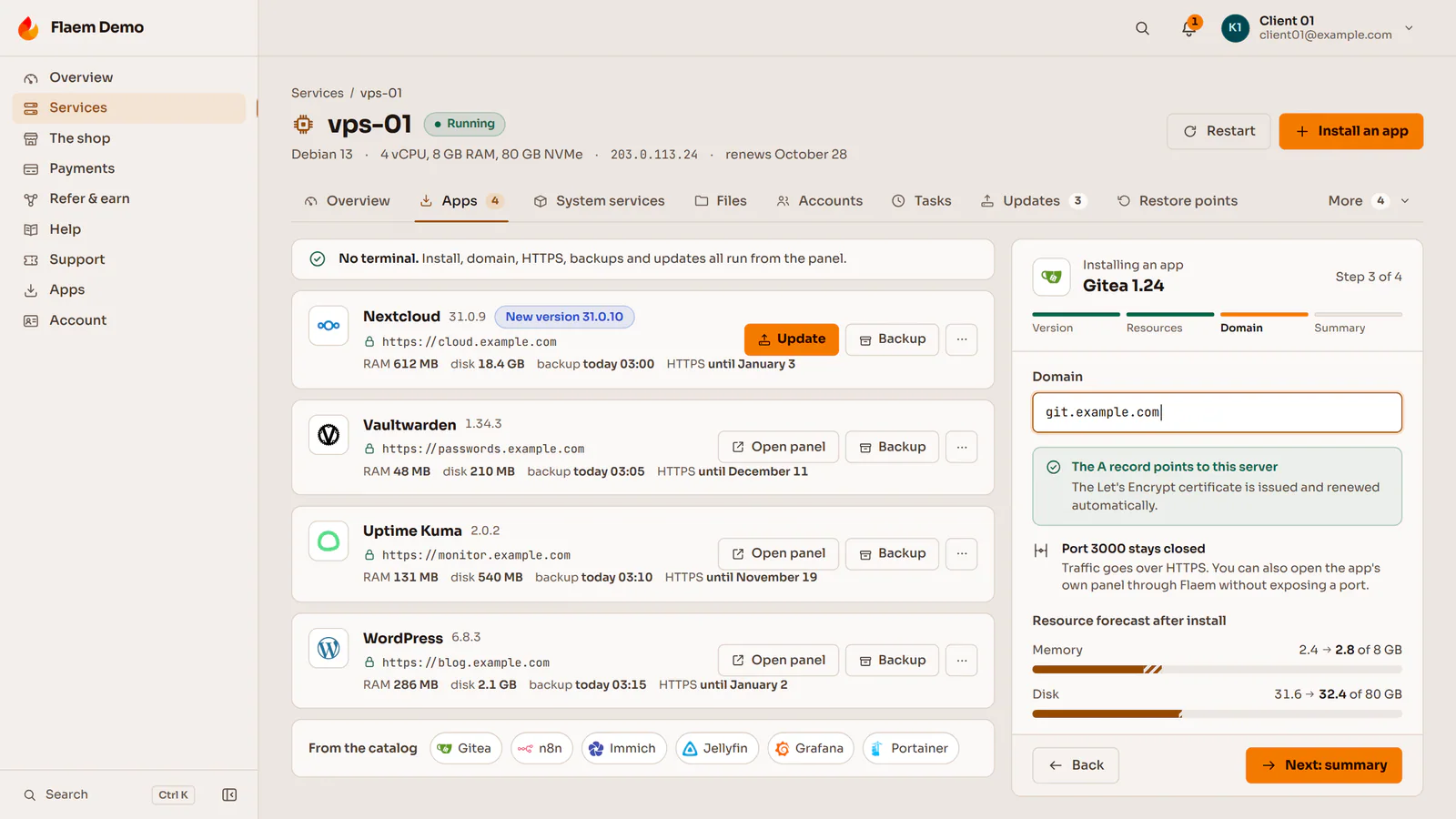
The Flaem agent runs inside the client's machine and does what usually takes commands: it installs apps, connects a domain with HTTPS, updates the system and keeps access in check. The operator sells VPS to people who have never opened a terminal, and sets the price of every app in the plan.
The install wizard
An app or a stack
From a signed catalogue of recipes rather than a script pasted from the internet, with suggestions of apps that are often useful together.
A resource forecast
Before the install the wizard shows how much CPU, memory, disk and network the app may take.
Port, domain and HTTPS
The client enters a domain, and the agent puts a reverse proxy and a certificate in front of the app, without exposing its port.
A restore point
Before a change from the panel the client ticks a restore point, and if something goes wrong, undoes just that one change.
Life after the install
Updates, backups and the app's admin panel from within Flaem, and for trouble the "Why is it slow" and "I cannot log in" buttons.
On a VPS
Apps installed by the agent, with a price set separately in every VPS plan.
- WordPress
- Docker
- Nextcloud
- n8n
- Uptime Kuma
- WireGuard
- Mailcow
- Coolify
In a web plan
Ready stacks on PHP, Node.js and Python environments, plus static sites, set up with a single choice.
- WordPress
- Joomla
- Drupal
- PrestaShop
- Laravel
- Nextcloud
- Ghost
- MediaWiki
On a game server
Mods, plugins and modpacks from catalogues players already know, with dependencies and a checksum check on every file.
- Modrinth
- CurseForge
- Hangar
- SpigotMC
- GeyserMC
- Steam Workshop
- Thunderstore
A store, a wallet, and local and pan-European payments
Clients pay the way people pay in their country: by card, bank transfer, BLIK, a PayPal account, a prepaid code, SMS or cryptocurrency. The operator switches gateways on with keys from their own contracts, and a payment issues the invoice and starts or renews the service in the same transaction.
- StripeCards and saved cards, every Stripe currency
- PayPalPayPal account, including EUR, USD and PLN
- Przelewy24Bank transfer and BLIK, in PLN, EUR, GBP and CZK
- PayUCard, transfer and BLIK, including PLN, EUR and USD
- TpayBank transfer and BLIK entered in the panel
- paysafecardPrepaid code, including PLN and EUR
- SimPayPremium SMS payment
- BTCPay ServerCryptocurrency straight to the operator's wallet





Invoices and tax across the EU
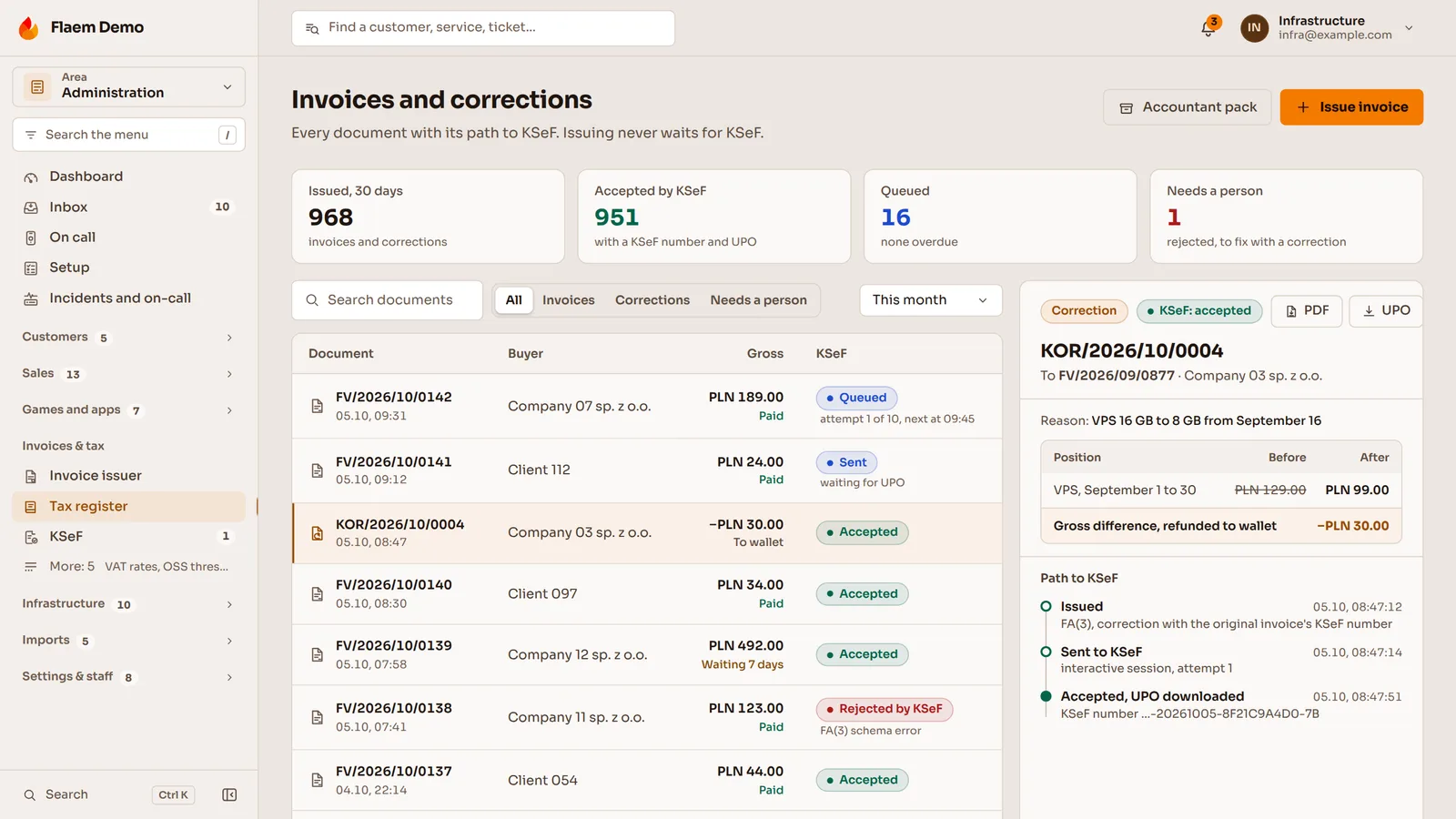
The invoice at the moment of payment
The document is created together with the payment, a correction shows the lines before and after, and the difference goes back to the client's wallet. The client downloads every invoice as a PDF.
VAT across the EU
VIES checks the VAT number, a business from another EU country gets the reverse charge, and a consumer above the threshold gets their own country's rate under the OSS scheme.
Many currencies
PLN, EUR, USD and GBP from the start, and any ISO 4217 currency added in the panel. Rates refresh in the background and never block a payment.
A package for the accountant
After the month closes, reports in CSV, XLSX and PDF in one package with the JPK file, and Polish invoices go to KSeF from a background queue, with no waiting at checkout.
One offer instead of ten
The client picks a resource plan in the offer and chooses the engine, game version, variant and add-ons in the cart. They see the amount before paying.
The client wallet
One balance for every service. Each service takes its fee on its own renewal day, and an unpaid one is suspended rather than deleted and comes back on its own after payment.
Periods in days, trials in hours
A billing period lasts as many days as the operator sets, and a plan change mid-period costs exactly as much as the time that is left.
Promotions, bundles and referrals
Coupons and promotions with a price preview before publishing, bundles with a discount set by hand, and referrals with the reward landing in the wallet balance.
Integrations: the operator's providers connected with keys in the panel
The operator connects payment gateways, registrars, DDoS protection, SMS, Discord and sign-in with keys from their own contracts, each integration on its own. The setup wizard shows which one is still missing.

Flaem
A public API described in OpenAPI 3.1, signed and retried webhooks, a TypeScript client, Terraform, a command line tool and an AI assistant over MCP, all on the same keys with scopes, rate limits and a log of calls.
Payment gateways
- Stripe, PayPal, Przelewy24, PayU, Tpay, paysafecard, SimPay and BTCPay Server
- Every gateway starts in test mode, and the keys are stored encrypted
- Full and partial refunds recorded in Flaem
Registrars and DNS
- Openprovider, AfterMarket.pl, ResellerClub, CentralNic, OVHcloud, Namecheap, Porkbun, domeny.tv and NASK
- Zones on PowerDNS or in Cloudflare
- A fallback account order for every TLD
DDoS protection
- Path.net, OVH, Cloudflare Magic Transit and NeoProtect
- Filters set for a game's port ranges
- Attacks on a client's addresses shown in their panel
Email, SMS and push
- mailcow servers and the operator's SMTP server
- SMS through Twilio, SMSAPI or SerwerSMS
- Push in the browser and over APNs and FCM
Discord and Telegram
- A bot on the operator's own Discord application, under their brand
- Tickets as threads, with the reply going back to the panel
- Server alerts and notifications on Telegram
Sign-in and fraud screening
- Google, GitHub, Discord, Steam and any OpenID Connect provider
- Order scoring with MaxMind minFraud or FraudLabs Pro
- A captcha on the forms
Mod catalogues and in-game stores
- Modrinth, CurseForge, Hangar, SpigotMC and GeyserMC
- Steam Workshop and Thunderstore
- Purchases from Tebex, CraftingStore, MineStoreCMS and ItemShop.pl handed out in game
Backups
- S3 storage, SFTP and Proxmox Backup Server
- A second location for VPS backups
- The client's own cloud drive
Billing systems
- WHMCS, Blesta, HostBill and Paymenter through the bridge
- The billing system keeps owning the client and the money
- Flaem creates, suspends and resizes the servers
Apps for the player, the client and the operator's on-call person
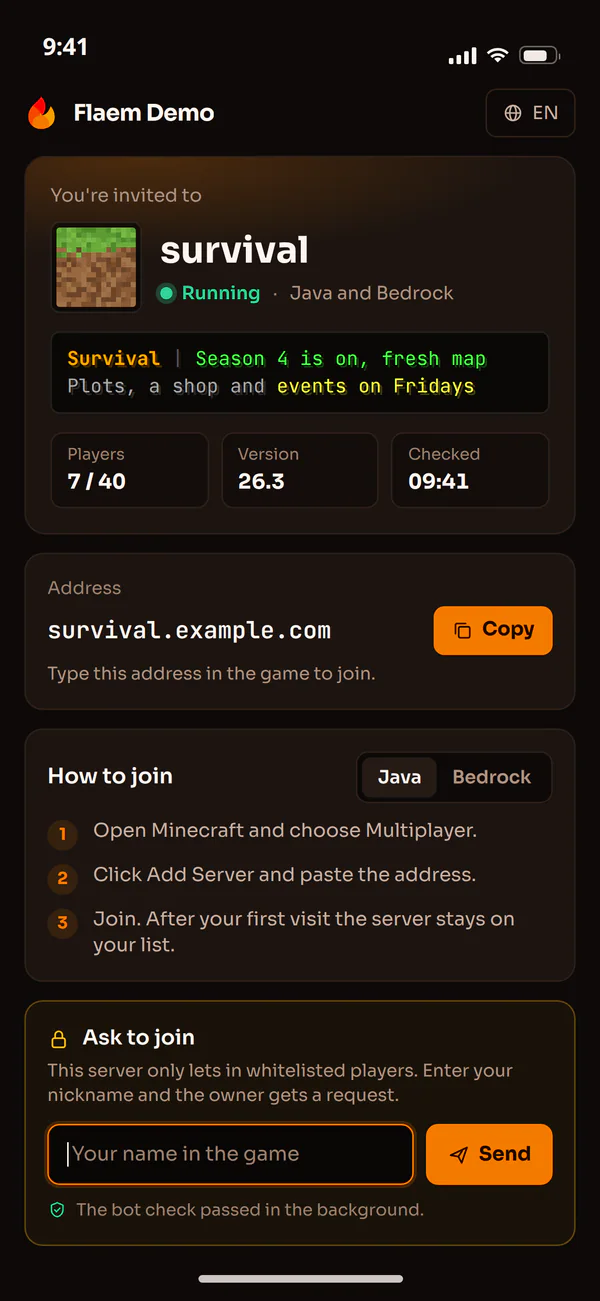
The panel runs as a web app with push notifications, and native apps for Android, iOS and desktops stand beside it. A player needs no account, a client buys and manages services from their phone, and the person on call has the alarms at hand.
Player: the invite card
A link with the address, server status, player count and how to join on Java and Bedrock. The player asks to be whitelisted in a form with a captcha, without creating an account.
Client: buying on a phone
Plan, server type, billing period and BLIK payment on one screen. A guest browses prices without signing in and creates an account without losing the chosen plan.
Everyone: the status page
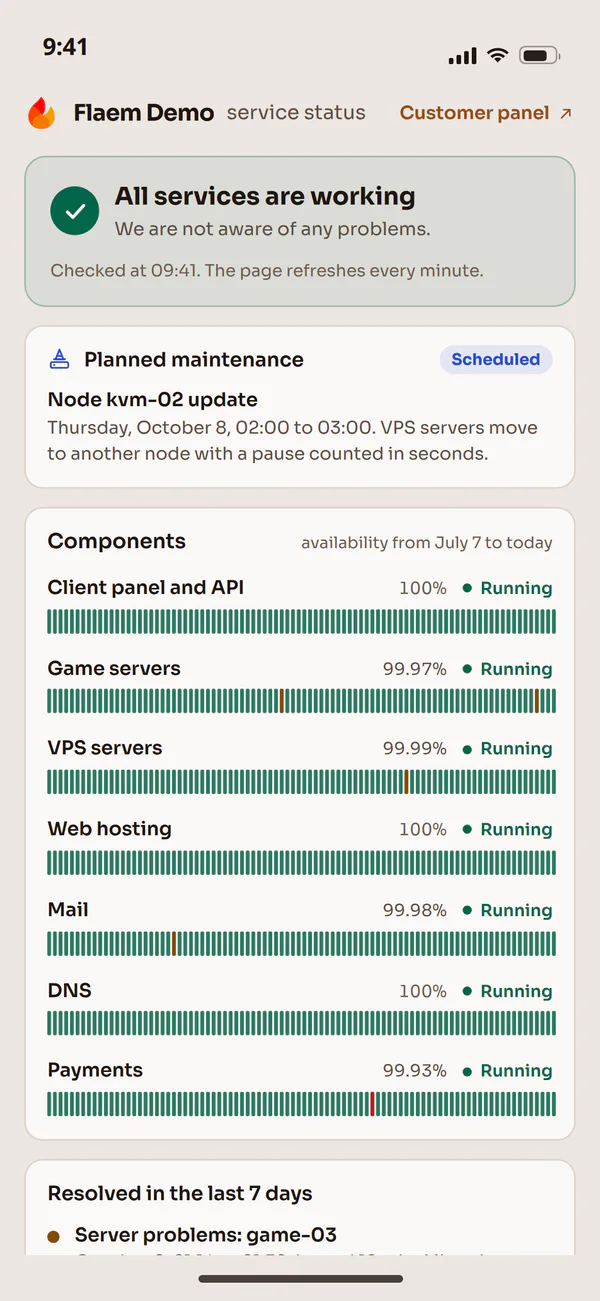
Live service status, a 90-day uptime bar and planned maintenance on the operator's own domain, with email sign-up for updates.
Operator: on call
Alarms, the queue and node health in one view. An unacknowledged alarm moves to the next person on the rota, and without a connection the phone shows the last known state.
Web app
The panel installs on phones and computers with the name and icon of the brand the client came in through, together with push notifications.
Android
A native app in Kotlin and Jetpack Compose: a dashboard with widgets, alarms and push notifications over FCM.
iOS
A native app in Swift: services, the store, invoices, tickets and notifications, with home-screen widgets and push over APNs.
Windows, macOS and Linux
A native client in C# and Avalonia instead of a browser in a window: the account's services, server details and power control.
White-label and resellers: one installation, many brands
A reseller buys services at a wholesale price and sells them under their own name. They get a panel with their own logo, domain, price list, invoices and ticket desk, while the operator sees their sales and settles the margin in the same system, on the same nodes.
Look and brand
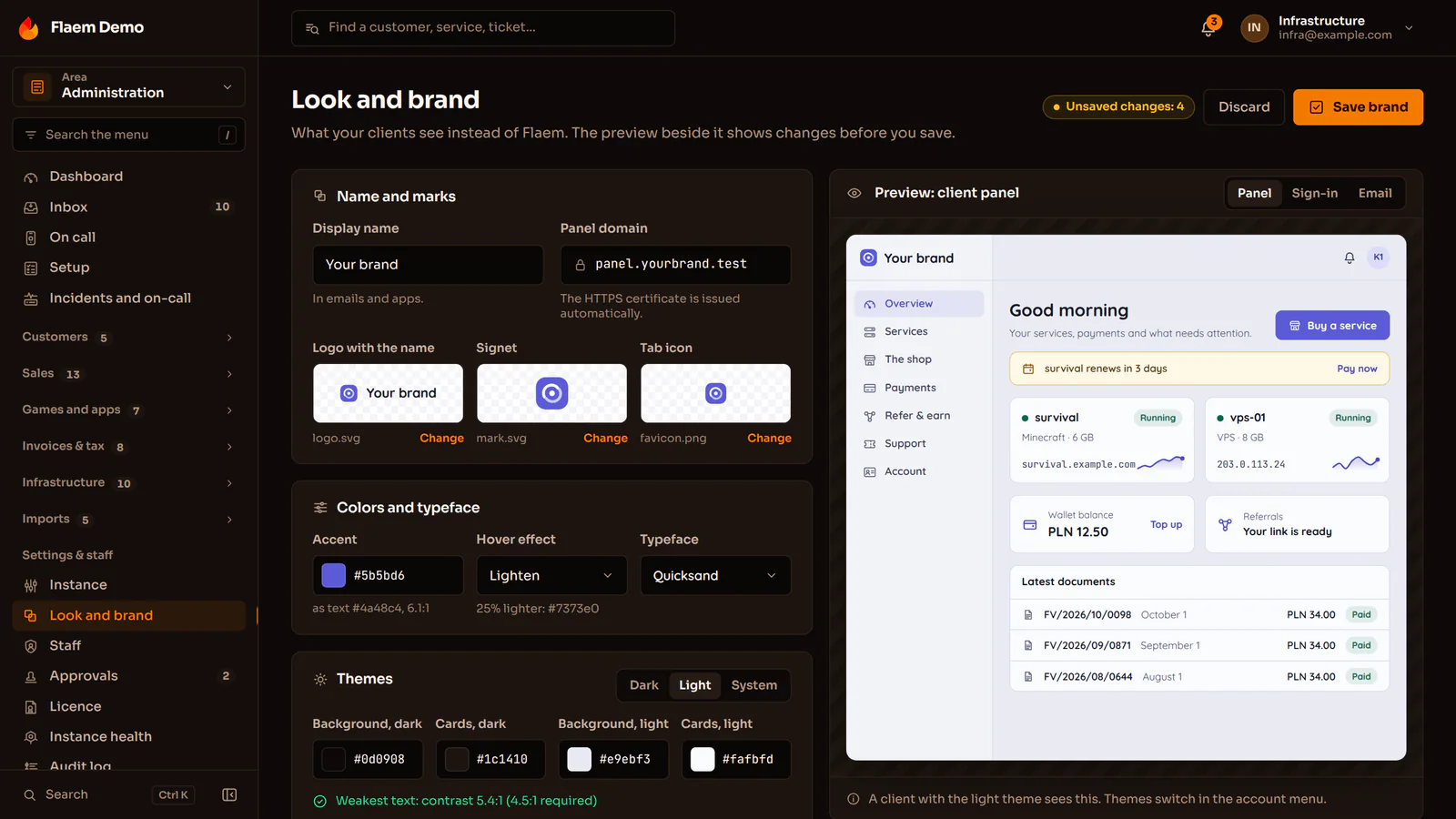
An editor with a preview beside it
The logo, mark, accent colour, typeface and the light and dark themes, with a preview of the client panel beside them. Every field has a strict shape, and the panel checks the text contrast.
The brand recognised by its domain
The same installation serves the operator's brand and every reseller's brand at once, and the HTTPS certificate for the panel domain is issued on its own.
From sign-in to the invoice
The email sender, message templates, invoice PDFs and the phone app with the brand name and icon. A reseller can link their own versions of the apps.
Reseller pricing
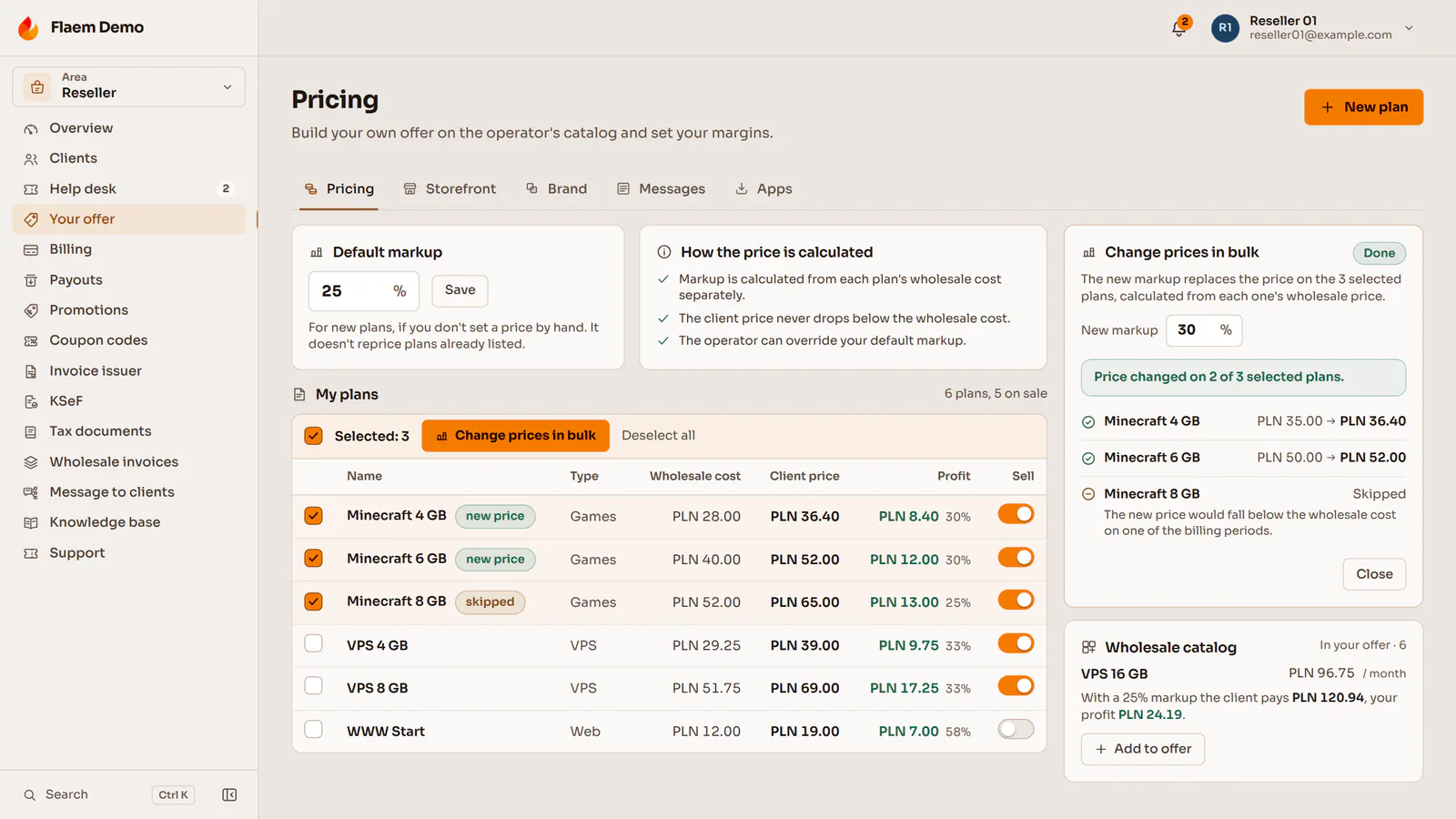
Prices never below wholesale
The reseller sets a default markup or a price for each period, and the panel will not save a price below wholesale on any enabled period.
Invoices in the reseller's name
The reseller invoices their clients in their own name and with their own numbering, and the operator invoices the reseller once a month.
The margin in a ledger, and payouts
Every sale and renewal adds the margin to the reseller's ledger, a refund reverses it with a negative entry, and the reseller pays out what they have earned.
Moving in from other panels, always starting with a dry run
Operators move to Flaem from billing systems, game panels, VPS panels and web hosting panels. Servers and machines that can stay on their hardware are taken over in place, and nothing is created in the new system until the operator approves the report.
- WHMCSClients, balances, renewals and the invoice archive
- PterodactylWings nodes taken over in place
- ConvoyMachines with the same VMID, no restart
- VirtualizorProxmox in place, KVM in a maintenance window
- SolusVMMachines, plans and IP addresses onto Proxmox VE
- VirtFusionMachines, plans and IP addresses onto Proxmox VE
- VMware ESXiVirtual machines onto Proxmox VE nodes
- cPanelSites, domains, DNS zones and mailboxes
- DirectAdminSites, domains, DNS zones and mailboxes
- PaymenterStays as billing, through the bridge
- BlestaStays as billing, through the bridge
- HostBillStays as billing, through the bridge











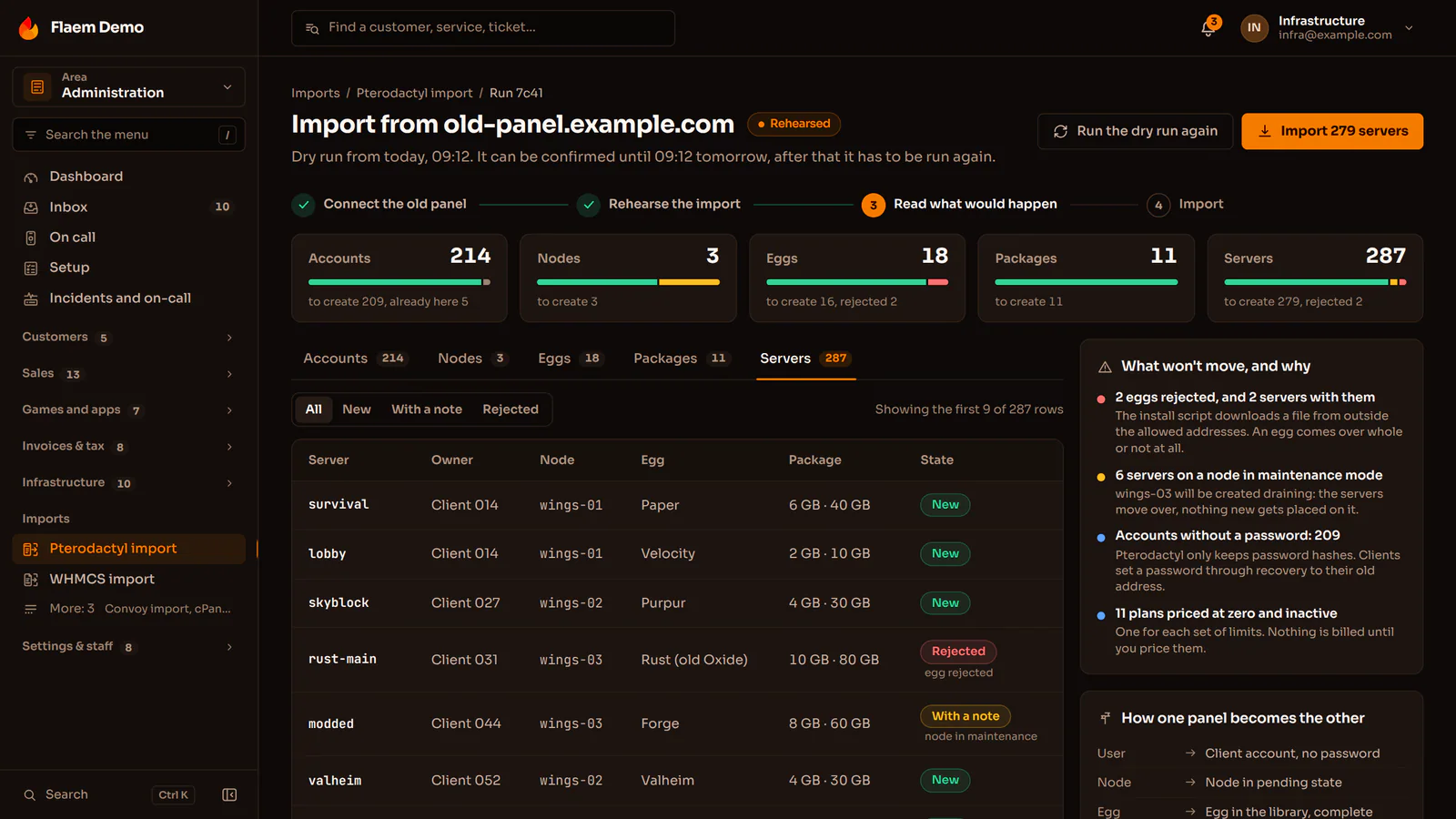
Every import runs the same way
Read
Flaem reads the data from the old system through its API, its database or an account backup, read-only.
A dry run report
The operator sees what will be created, what will change and what cannot be moved, with the reason.
Approval
Until then, nothing changes in the new system.
Import
Accounts, services and machines appear in Flaem, and an interrupted import resumes from where it stopped.
Pricing
Moved plans wait inactive, at a price of 0, until the operator sets prices and puts them on sale.
From Pterodactyl, field by field
| In Pterodactyl | In Flaem |
|---|---|
| User | A client account, with the password set anew through a reset |
| Wings node | A node taken over in place, with the daemon switched in a separate step |
| Port allocations | The servers' same addresses and ports |
| Egg | A complete definition in the Flaem library |
| Limits | A plan priced before it goes on sale |
| Server | A server with the same identifier and owner |
During the move
No invoices by mistake
Client services work from the first moment, but until the operator prices them, nobody gets an invoice or a block by accident.
Nodes stay where they are
When a server already sits on hardware Flaem supports, only the panel changes, and players do not notice the move.
The billing can stay
An operator who stays with WHMCS, Blesta, HostBill or Paymenter connects Flaem through the bridge: the billing system runs the clients and the money, and Flaem runs the servers.
Security for accounts, the team, the money and the nodes
Every screen and every action in the panel has its own permission, the riskiest actions wait for a second person, and client accounts are protected by a second step and passkeys. Orders are screened for fraud before anything starts.
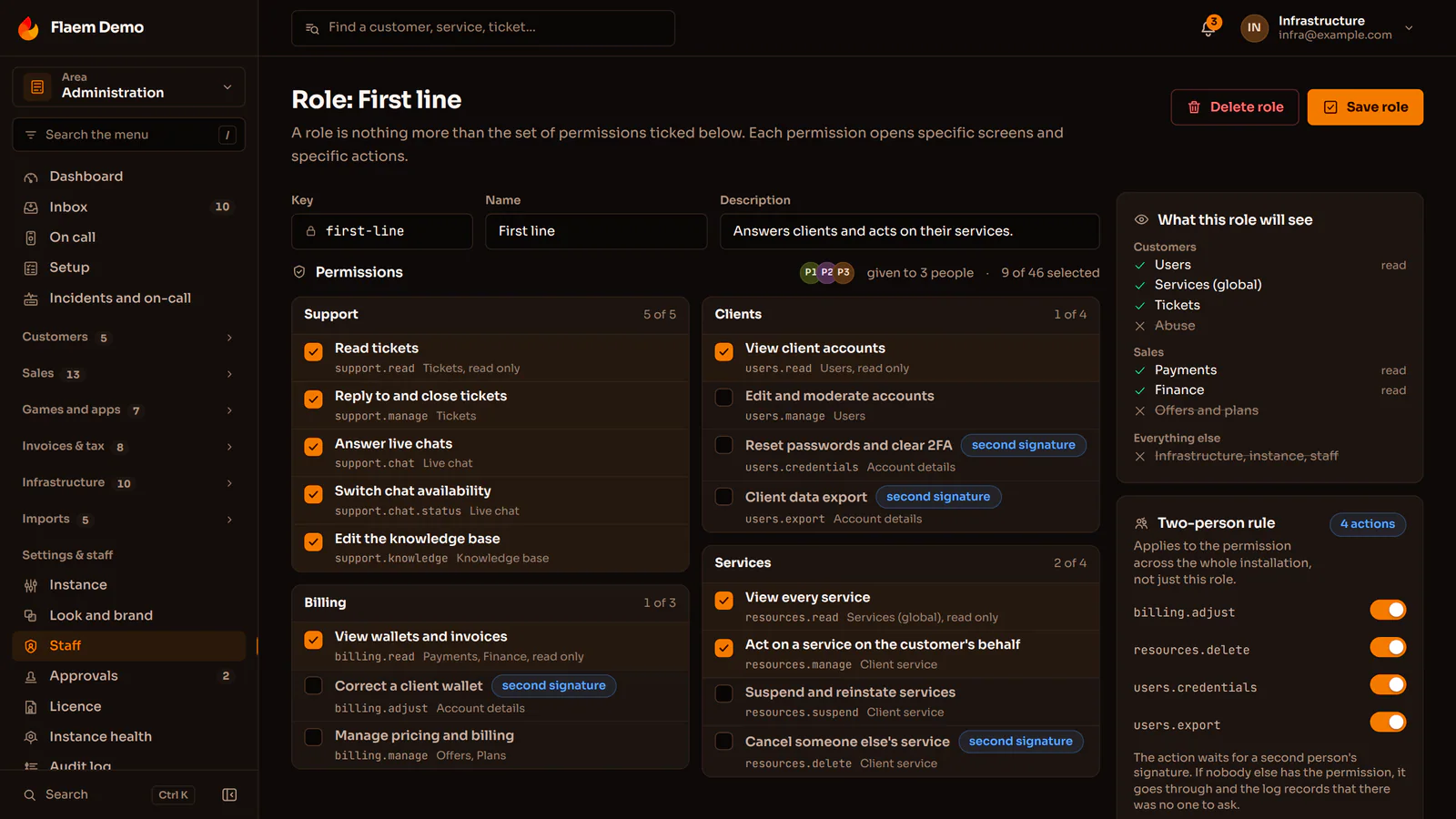
The operator's team
A permission for every action
Roles are built from single actions split into "sees" and "may change", so support reads invoices without issuing refunds. Beside them you see what the role will see.
The two-person rule
Deleting a service, deleting a node and moving money become a request that another authorised person approves. The approval carries out the saved action at once.
The audit log
Every staff action leaves an entry: who, what, when, from where and on whom. Two-step verification is mandatory for the team.
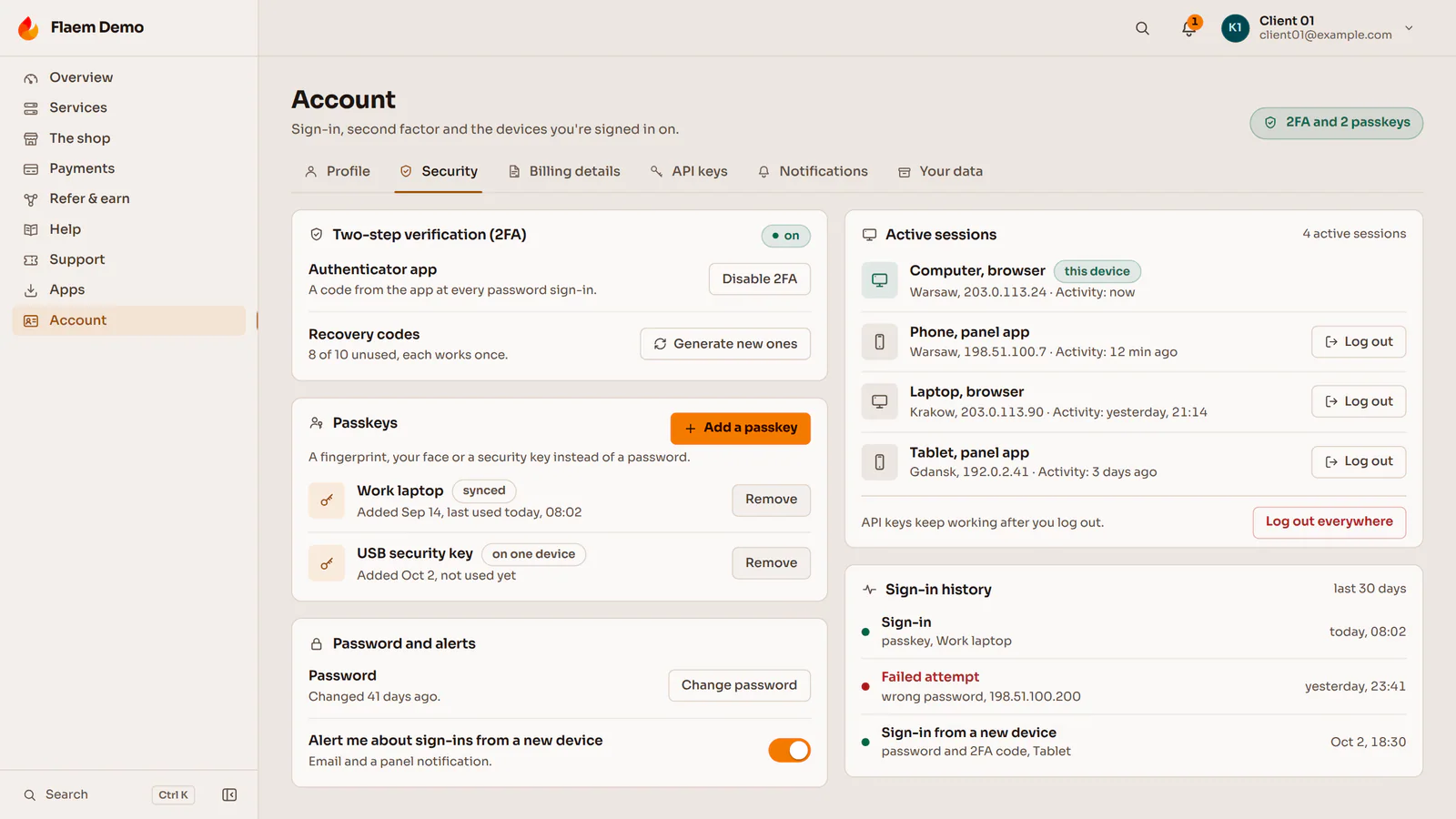
The client account
A second step and passkeys
A password with an authenticator app, a passkey with no password, or a Google, GitHub, Discord, Steam or any OpenID Connect account.
Sessions and notifications
A list of devices with signing out everywhere in one click, and a message about every sign-in from a new device.
A recovery code treated as an alarm
Flaem treats every use of the code as a possible takeover and clears the account of everything an attacker could have had.
Fraud screening before start
An order is accepted, sent for review or rejected. On review the sale is recorded, and only the delivery waits.
Abuse detection
Miners, spam, scanning and attacks leaving client machines, with a step-by-step response and the client told what was noticed.
Nodes and releases
The channel between the control plane and the nodes is always encrypted, a node knows who it is talking to, and every release of the panel and the agents is signed.
Client data and the GDPR
The client downloads their data as JSON or CSV and closes the account, and closing it does not destroy the accounting records the operator must keep.
Questions about this project

Read next
The other case studies and the services that draw on this work.
Is your project like this one?
Describe what you want to build. We reply within an hour with questions and a free quote.