
Sellasist integration with marketplaces and ERP
Sellasist has ready connections to Allegro, Amazon, Temu, Erli, stores and accounting software. We connect your system to it through the REST API when none of the ready connections covers it.
What Sellasist connects by itself
Per the vendor. These connections are set up in the panel without writing code.
Sellasist
Configure the ready connections. We can help set them up.
- Orders
- Stock
- Invoices
- Shipping
Marketplaces
- Allegro, eBay, TemuListings, orders, messages
- Amazon, Erli, eMAG, KauflandSelling in more markets
Stores and programs
- WooCommerce, Shoper, PrestaShopStores on popular platforms
- Subiekt, Comarch, WaproDocuments in the trading program
- Fakturownia, inFakt, wFirmaInvoices from orders
Outside the ready connections
Your system: through the REST API when it is not on the list
- The store or system is custom-built.
- Data should reach a client panel or wholesaler.
- You need rules the panel cannot set.
Changes since last time
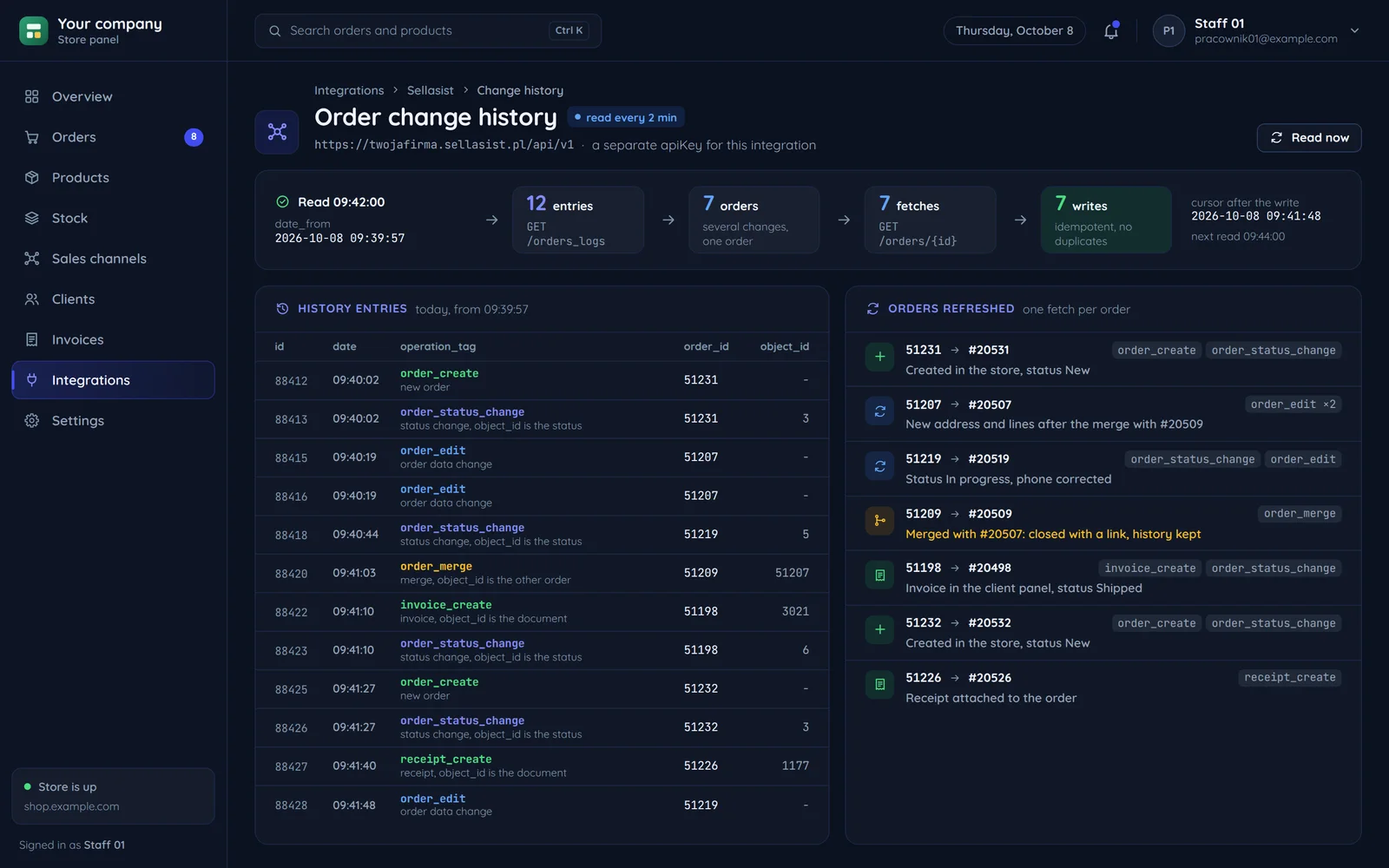
The API spec has no webhooks, so we read changes from the history. The drawing shows one such read with the values of the sample screen.
GET /orders_logsGET /orders/{id}- 512312 entries
- 09:40:02order_create
- 09:40:02order_status_change
#20531 created in the store, status New
- 512072 entries
- 09:40:19order_edit
- 09:40:19order_edit
#20507 a new address and lines after the merge with #20509
- 512192 entries
- 09:40:44order_status_change
- 09:41:48order_edit
#20519 status In progress, the phone number corrected
- 512091 entry
- 09:41:03order_merge
#20509 merged with #20507, closed with a link
- 511982 entries
- 09:41:10invoice_create
- 09:41:10order_status_change
#20498 the invoice in the client panel, status Shipped
- 512322 entries
- 09:41:27order_create
- 09:41:27order_status_change
#20532 created in the store, status New
- 512261 entry
- 09:41:40receipt_create
#20526 the receipt attached to the order
The account address and the key
Each account has its own API address, and the key goes in the apiKey header.
Many changes, one fetch
Several changes to one order mean one fetch. The write is idempotent.
The cursor after the write
The cursor moves after the write, so an interruption loses nothing.
What the order change history says
Every entry has an operation tag. From it the integration knows what to do, without guessing. The screen shows two orders of the same buyer merged in Sellasist.
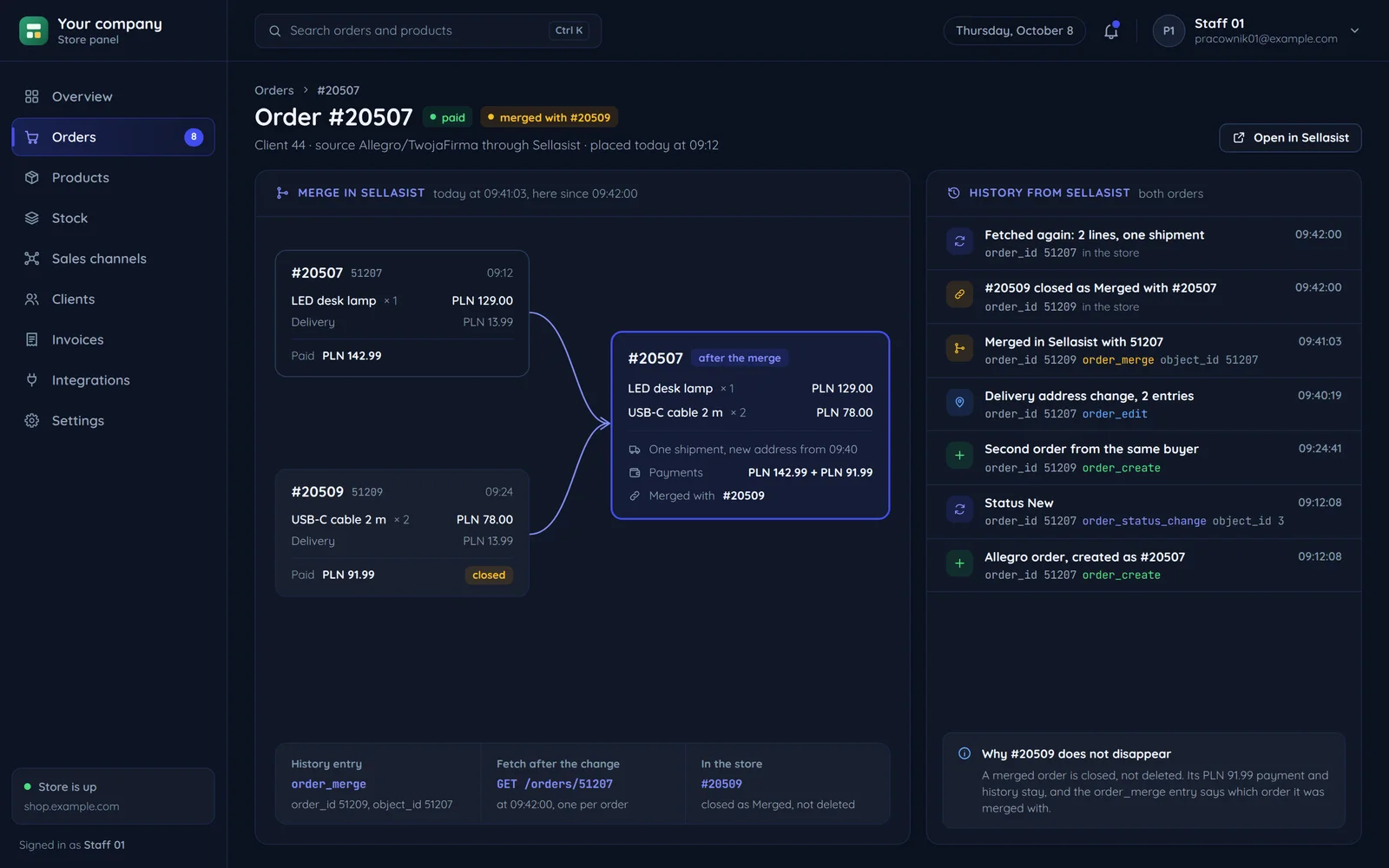
Orders merged
Orders merged. The related id shows what was merged with what.
order_mergeAn order data change
A change to order data such as the address. We update only what changed.
order_editClosed, not erased
An order merged or deleted in Sellasist is closed on your side instead of erasing its history. Its payment and entries stay, so it is clear what happened.
order_delete
What flows which way
Sellasist holds the sales channels; your system holds what Sellasist cannot see.
The API spec has no webhooks, so what changed in Sellasist is read from the history at a fixed interval.
- Marketplace orders/orders
A new order from Allegro, Amazon or Temu once an entry shows up in the change history.
- Stock/products_stock
After a sale or a delivery, both ways.
Both ways: per the agreed source of truth
- Invoices/invoices
An invoice issued in Sellasist or the program reaches the order and the client panel.
- Shipments/ordersshipments
The shipment assigned to the order once the parcel is dispatched.
Custom store orders
They flow the other way: your system writes them to Sellasist on acceptance or payment.
Status and source dictionaries
Statuses and order sources differ per account. The integration fetches them from the API instead of hard-coding them.
A separate API key for the integration
Its own key can be disabled without stopping the account's other integrations.
When stock drifts apart
When stock changes on both sides, the agreed source of truth decides. The screen and the drawing under it show one such mismatch, step by step.
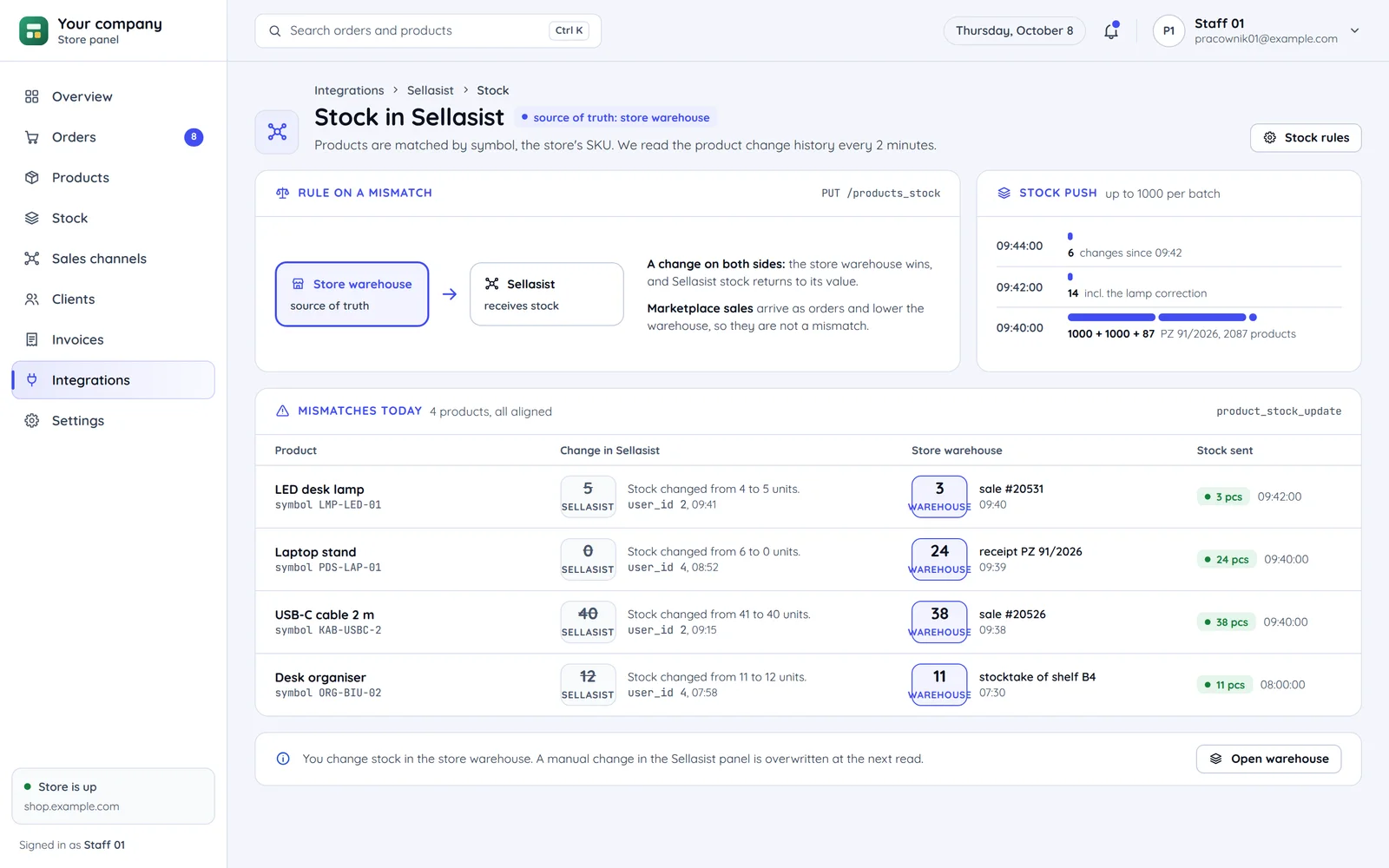
A change in Sellasist
from 4 to 5 pcsby hand in the panel, 09:41The change shows in the product change history, which we read like the orders.
The store warehouse
3 pcsafter sale #20531, 09:40The store warehouse changes on a sale or a delivery, here a marketplace sale.
The rule
the store warehouse winsWhen both Sellasist and your system change stock, we agree which wins on a conflict.
The stock sent
3 pcs09:42:00Sellasist gets the warehouse stock in a batch of stock changes.
Common questions about Sellasist
Answers about marketplaces, read intervals, choosing a system and the quote.

Read next
Channels and systems next to Sellasist.
Where do you sell through Sellasist?
Tell us which channels you run in Sellasist and which system should connect. We will reply within an hour with questions and a quote.