
A transport company website with ride quotes and booking
The customer enters the route, date and headcount, gets an indicative price and sends a request, and the dispatcher assigns a vehicle and driver on the schedule. No copying emails into a spreadsheet.
What we build for a carrier from scratch
A website with the fleet and a quote form is the first step. The dispatcher panel comes when requests outgrow the spreadsheet.
The carrier website
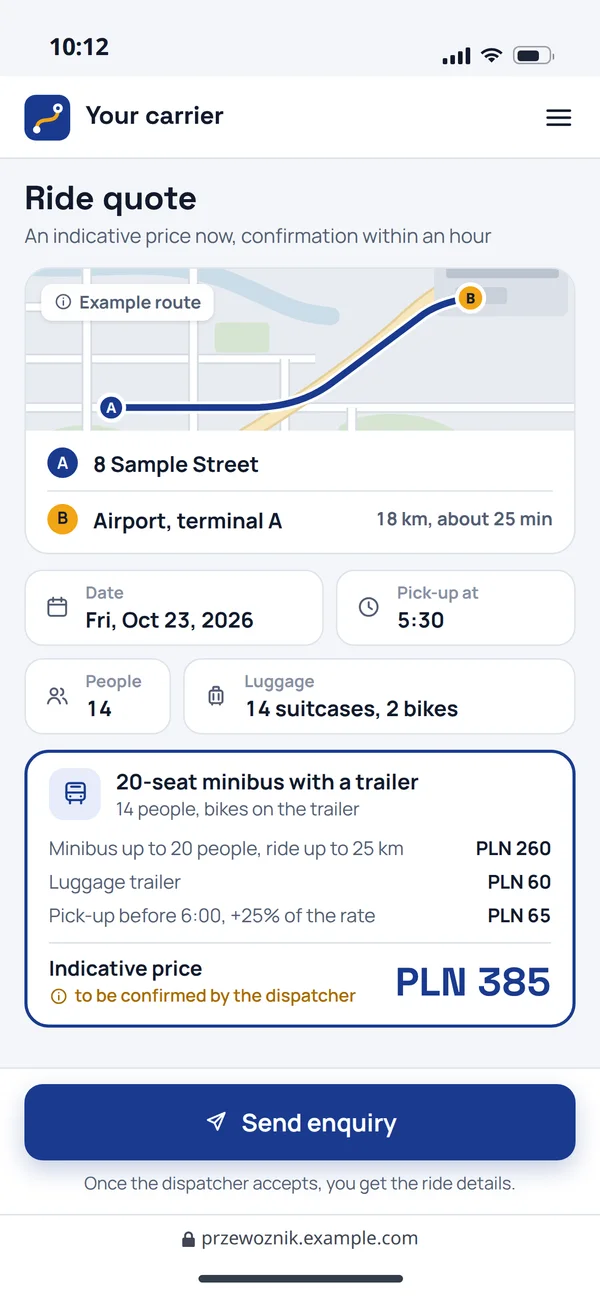
Services and the fleet described for your customers, and beside them the quote form: the customer sees an indicative price before sending the request.
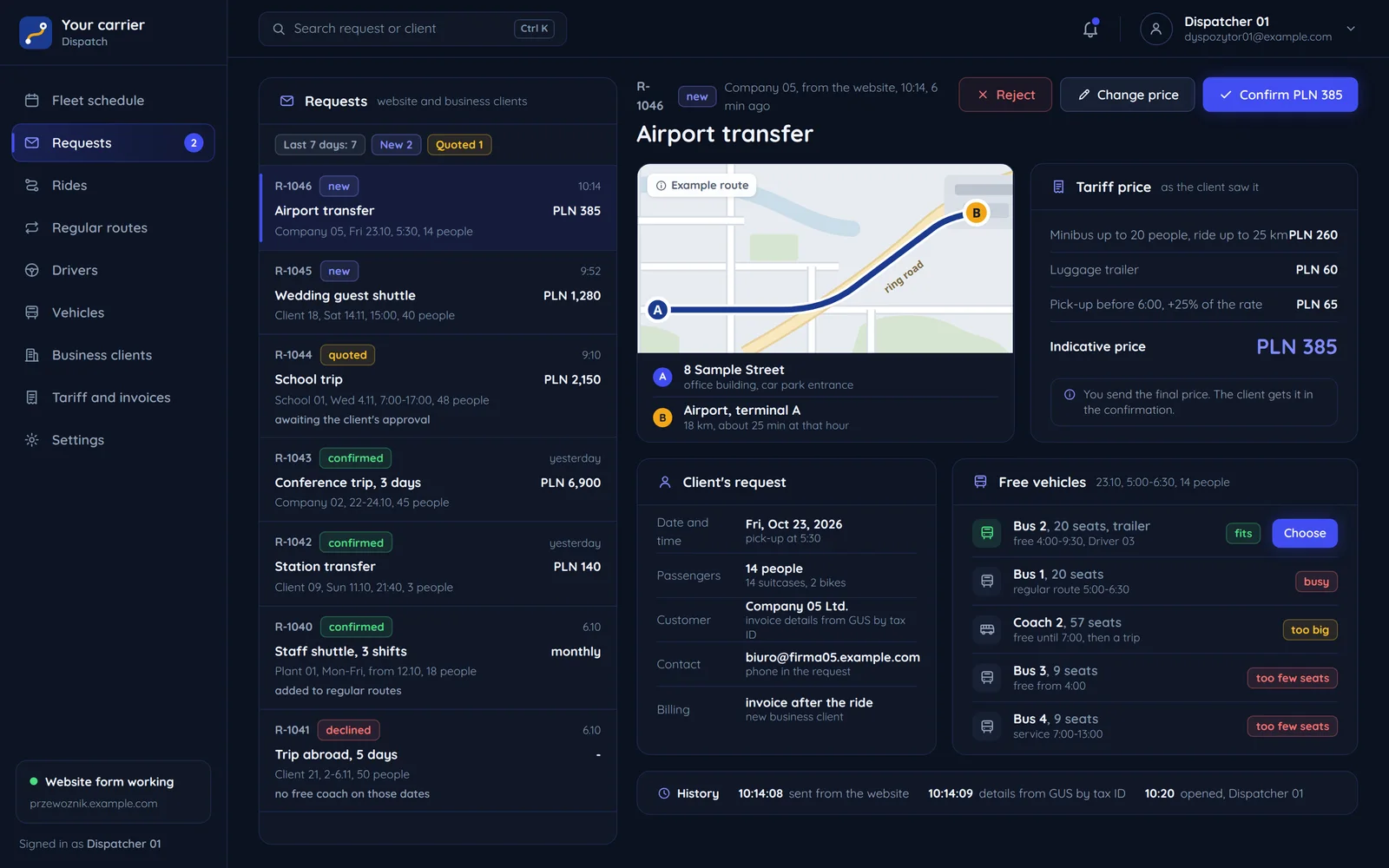
The dispatcher panel
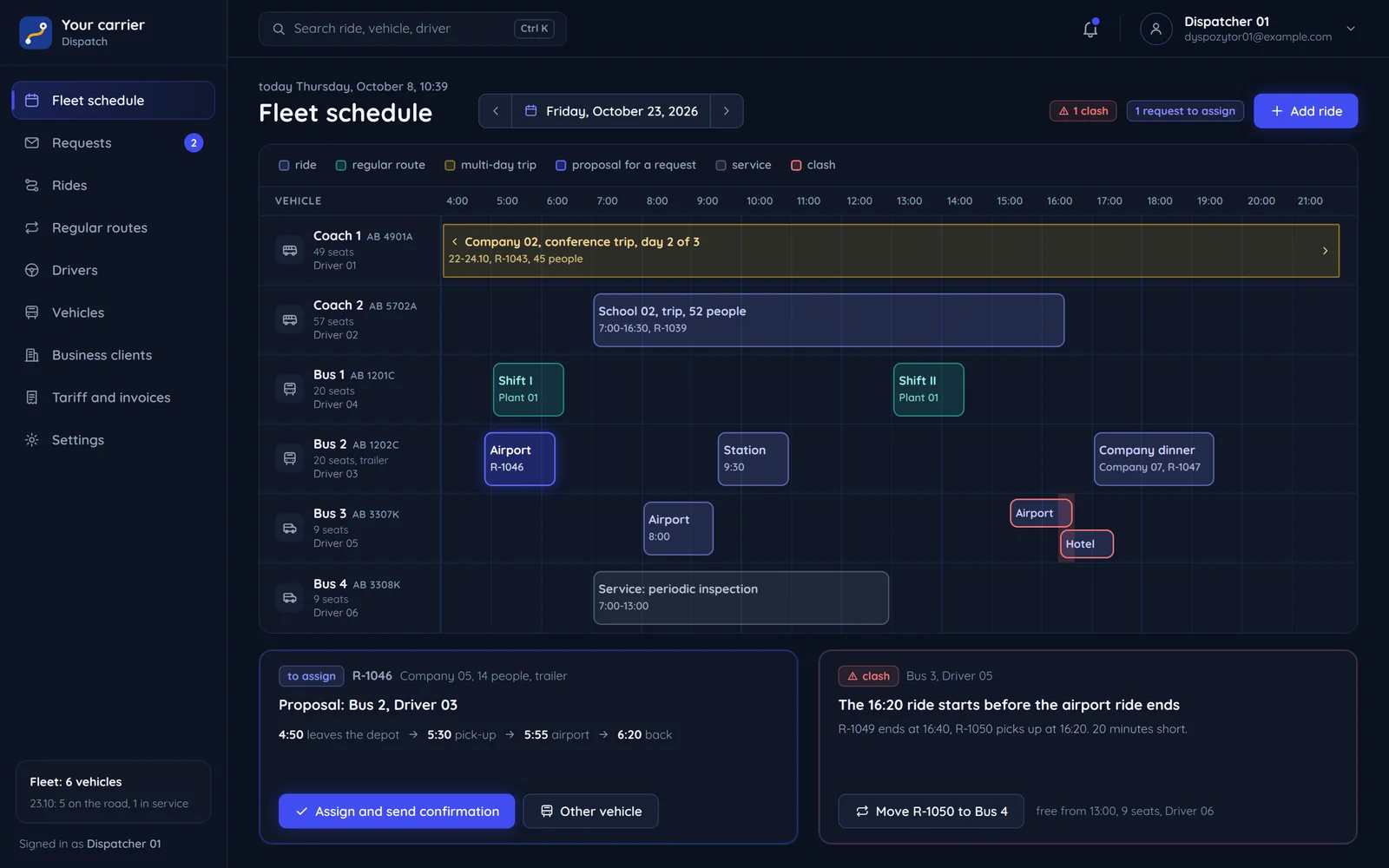
A website request lands in the panel with the route, the tariff price and the customer's details, and next to it the vehicles that fit. The dispatcher picks a vehicle and confirms the price.
What the carrier gets
- Services by customer
- Staff transport, airport transfers, company and school trips, written separately for companies, schools and individuals.
- The fleet with specs
- Each vehicle has photos and its specs, such as the number of seats.
- Local search
- Pages for services and the service area laid out for local transport searches.
- Content without a developer
- You change the fleet, services and service area yourself in the CMS.
From request to ride in three screens
The customer's path we propose to carriers: from the quote in the form to the reminder before the ride.
A quote in the form
Route, date, headcount and luggage. The form works out an indicative price from your tariff and says plainly that it still needs confirming.
- The dispatcher accepts
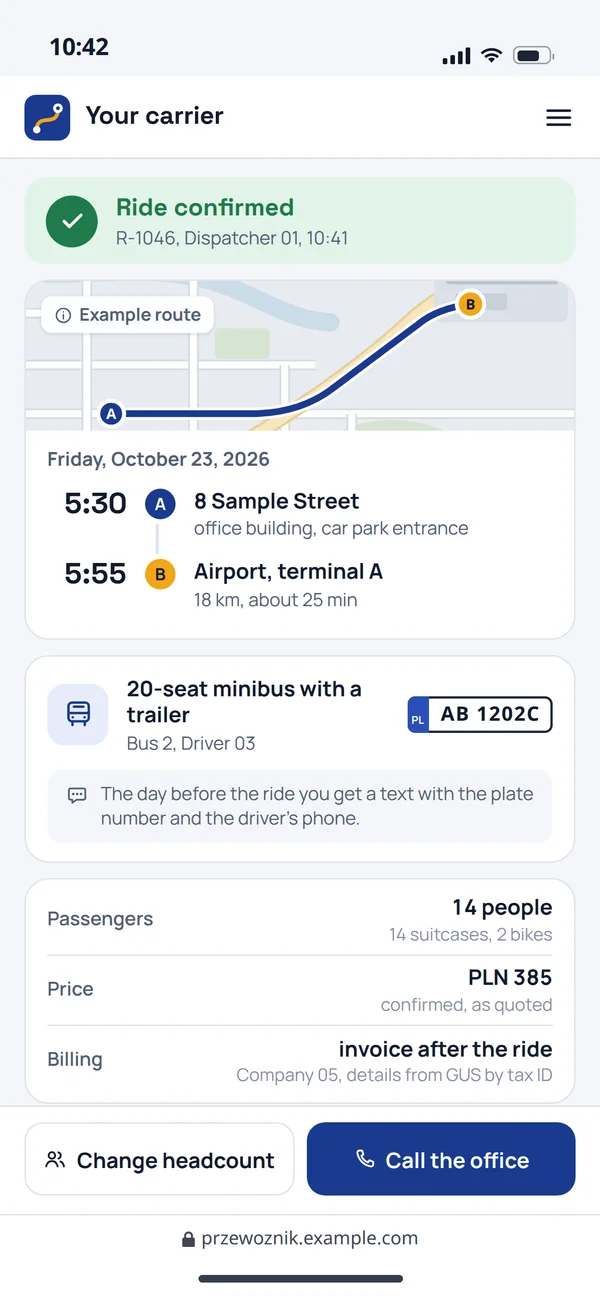
Ride confirmation
Once the dispatcher accepts, the customer gets the details: pick-up time, vehicle and how it will be billed.
- The day before the ride
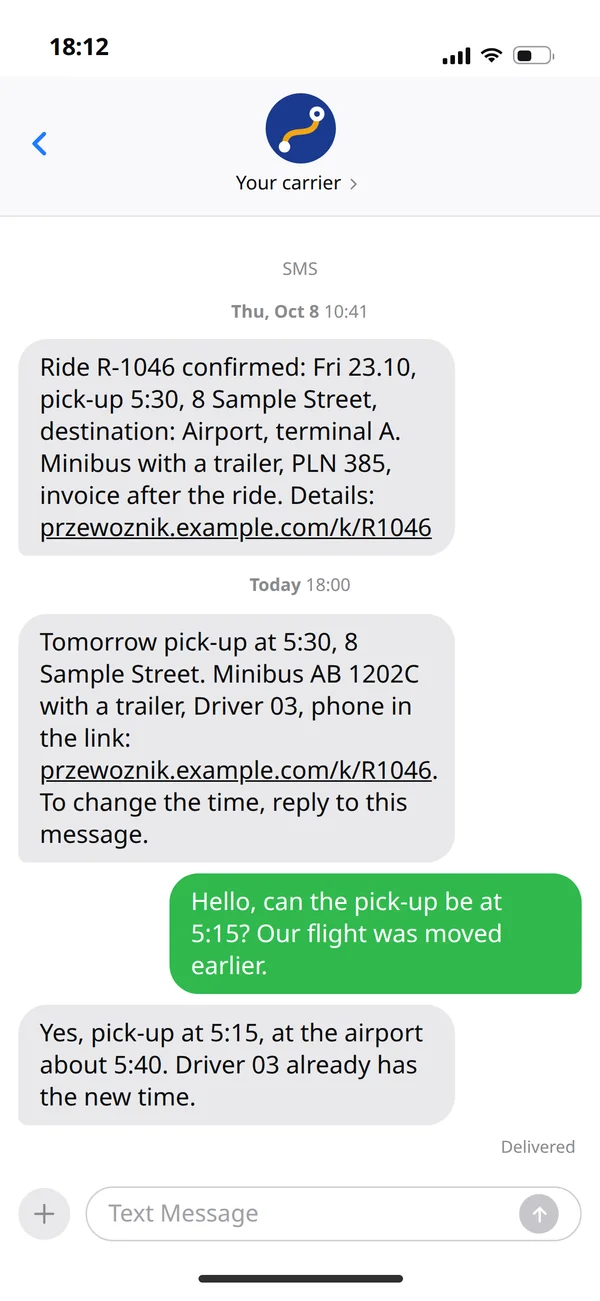
A reminder the day before
An SMS with the plate number and the driver's phone, sent automatically.
Who sees what in a carrier's system
We map permissions before building, because they decide what every screen looks like.
Customer
Business and individual customers see the same, except regular routes, which only a business client has.
- Ordering rides
The form works out an indicative price from your tariff and says plainly that it still needs confirming.
Dispatcher: A website request lands in the panel with the vehicles that are free and have enough seats. - Ride history and invoices
The client enters the NIP and the invoice details fill themselves in.
- Regular routes and monthly billing, business client only
You add a regular staff route once and the schedule repeats it every week. Monthly billing instead of an invoice per ride.
Dispatcher
Has everything customers and drivers have, and is the only one with the whole fleet and vehicle changes.
- Whole-fleet schedule
Single rides, regular routes and multi-day trips in one view, with collisions flagged before they happen.
- Confirming the price and the ride
The form shows an indicative price from your tariff and says so, and the dispatcher confirms the final price.
Customer: Once the dispatcher accepts, the customer gets the details: pick-up time, vehicle and how it will be billed. - Changing vehicle and driverDriver: a new vehicle or time shows in the driver's rides at once
Driver
Only the rides of the day. The whole fleet, orders and invoices stay with the dispatcher and customers.
- Own rides for today
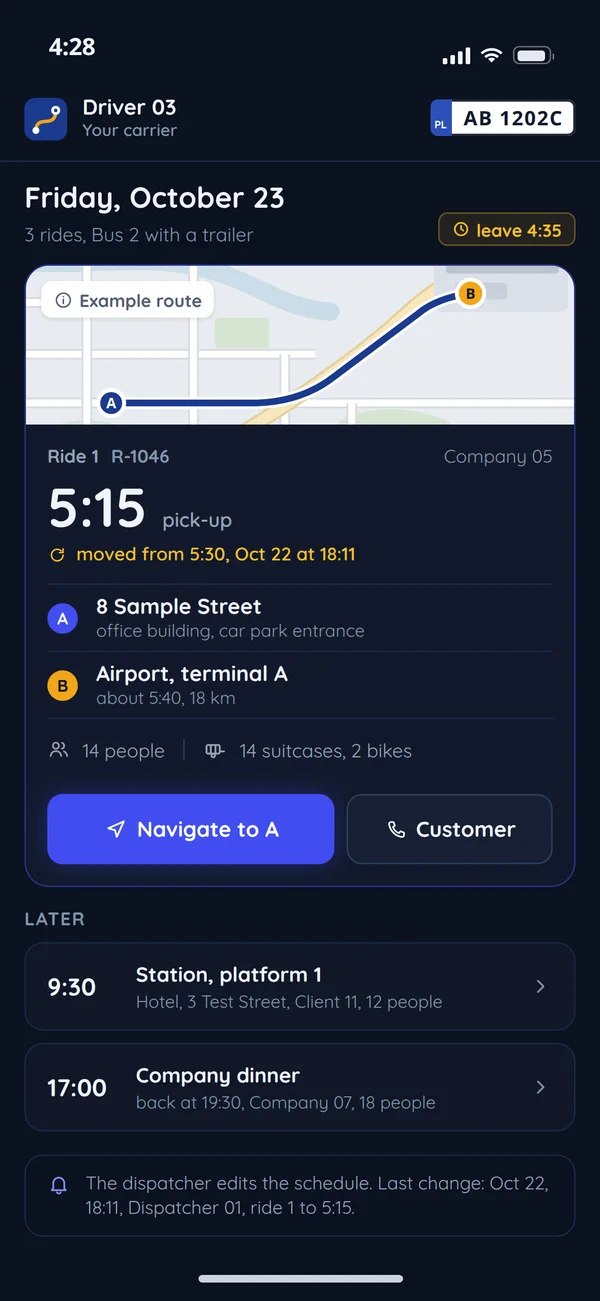
The driver sees today's rides and pick-up addresses.
- A panel in the browser and on a phone
A panel in the phone browser, installed like an app, is enough.
- Changes from the dispatcher
A ride moved by the dispatcher shows in the driver's day with its new time.
A fleet schedule instead of a whiteboard and a phone
The dispatcher sees every vehicle on a timeline, and each new request arrives with a free vehicle suggested.
Vehicles and drivers on one timeline
Single rides, regular routes and multi-day trips in one view, with collisions flagged before they happen.
Requests with a vehicle suggestion
A website request lands in the panel with the vehicles that are free and have enough seats.
Business clients and regular routes
You add a regular staff route once and the schedule repeats it every week. Monthly billing instead of an invoice per ride.
A panel in the browser and on a phone
We quote a custom panel like this for your fleet and schedule, and drivers see their rides on a phone.
A coach operator's website and accessibility
Poland's accessibility rules cover part of passenger transport. We check whether they apply to your company before designing the booking. We write this as the website builder, not a law firm, so it is not legal advice.
Bus and coach transport is in the act
Accessibility requirements cover websites, mobile apps, e-tickets and travel information accompanying bus and coach passenger transport services (art. 3(2)(3)).
- Websites
- Services on mobile devices, including apps
- E-tickets and e-ticketing
- Travel information, including real-time information
Exemptions
The act does not cover services of microenterprises or urban and municipal, county and regional public transport, except for interactive terminals (art. 4).
- Services of microenterprises
- Urban transport
- Municipal, metropolitan, county, county-municipal and regional transport
What it means for the form
Booking and tickets must work with a keyboard and screen reader, and error messages must say what to fix. We build this from the first screen and can run an accessibility audit.
A required field left emptyA message saying what to fix
Questions carriers ask
The most common questions from transport companies.

Read next
Travel and bookings that often go with transport.
Let us see how many requests the form can handle
Tell us how many vehicles you run and how you take orders today. We will reply with a proposed scope and a free quote.