VulCode
Blog

KSeF API 2.0 step by step: sending an invoice from your own system

From the KSeF token to the KSeF number and the UPO: authentication, an online session, RSA-OAEP and AES-256 encryption and sending an FA(3) invoice. Python code run against the Ministry of Finance test environment.

VulCodeVulCode14 min read
KSeF API 2.0 step by step: sending an invoice from your own system - VulCode
What you will buildPython, 8 steps
  1. KSeF tokenStep 1A secret with permission to issue invoices.
  2. Access tokenStep 2Challenge, encrypted token, redeemed token.
  3. Online sessionStep 3An AES-256 key sealed with the Ministry key.
  4. FA(3) invoiceStep 4Encrypted XML with two SHA-256 hashes.
  5. KSeF number and UPOResultProof that the invoice is in the system.

The guide at a glance

By the end of this guide your system sends a structured invoice to the National e-Invoicing System on its own and stores its KSeF number and the official receipt (UPO). All through API 2.0, with no manual login to the taxpayer app.

KSeF API 2.0 step by step

Group
Invoices and payments
Level
advanced
Reading time
about 14 min
Code
Python

Files: ksef.py.

Steps
8 steps

8 of them with code or commands to copy.

Check
Ministry of Finance TEST environment

Request accepted (202) and the deliberately fake token rejected with code 450

Documentation
3 official documents

KSeF API 2.0, OpenAPI documentation (TEST); KSeF 2.0 integration documentation (CIRFMF/ksef-docs); KSeF: legal basis and key deadlines

From our code
Flaem

frozcore/src/ksef/client.rs

Before you start

Issuing invoices in KSeF has been mandatory since 1 February 2026 for companies whose 2024 sales exceeded PLN 200 million, and since 1 April 2026 for everyone else. We work on the test environment, so nothing you send here has any tax effect.

What you need
KSeF API 2.0 step by step
A KSeF token for the TEST environment
A token is generated with POST /tokens after a one-time XAdES signature login. On TEST a self-signed certificate and a random NIP are enough. The token's permissions are fixed when it is created, so grant InvoiceWrite right away.
Python 3 with requests and cryptography
Two libraries: requests for HTTP and cryptography for RSA-OAEP, AES and reading X.509 certificates. Nothing else is needed.
An FA(3) invoice file
XML that matches the FA(3) schema, with the header kodSystemowy="FA (3)" and wersjaSchemy="1-0E". Use made-up data on TEST: the Ministry's documentation forbids real invoices and real company data there.
A safe place for the token
A KSeF token authenticates just like a qualified signature. Keep it in a secret manager or an environment variable, never in the repository.

The three KSeF API 2.0 environments

EnvironmentAPI addressWhat for
TESThttps://api-test.ksef.mf.gov.pl/v2Integration and release candidates; self-signed certificates allowed, data shared between integrators.
DEMOhttps://api-demo.ksef.mf.gov.pl/v2Final validation in a production-like configuration.
PRODhttps://api.ksef.mf.gov.pl/v2Invoices with full legal effect.

Step by step

8 steps. The window beside them shows the file of the step you are reading.

Fetch the Ministry public keys

The Ministry publishes two certificates: one for encrypting the KSeF token (KsefTokenEncryption), the other for encrypting the session key (SymmetricKeyEncryption). The endpoint is public and needs no login. The certificate arrives as Base64-encoded DER.

Encryption is always RSA-OAEP with SHA-256 and MGF1 with SHA-256. With any other hash the server cannot decrypt the data.

Get a challenge

POST /auth/challenge returns a one-time challenge and a timestamp in milliseconds. The challenge is valid for 10 minutes. To encrypt the token you need the timestampMs field, not timestamp.

Encrypt the token and start authentication

You encrypt the text token|timestampMs with the KsefTokenEncryption key and send it with the challenge and the context identifier. The context is the company you act for: type Nip and its NIP.

The server answers 202 with the operation reference number and an authentication token. That is not API access yet: with this token you only check the status and redeem the real one.

Wait for the result and redeem the access token

GET /auth/{referenceNumber} returns status 100 (in progress), 200 (success) or an error code. After 200 you call POST /auth/token/redeem and receive an accessToken and a refreshToken.

Redeeming works only once. When the accessToken expires you do not start over: you call POST /auth/token/refresh with the refreshToken.

Open an online session

You draw a 32-byte AES key and a 16-byte IV. You encrypt the key with the SymmetricKeyEncryption key and send the IV in plain Base64. The form code for an FA(3) invoice is systemCode "FA (3)", schemaVersion "1-0E", value "FA".

The server answers 201 with the session number and its expiry. In one session you send as many invoices as you like under the same key.

Encrypt and send the invoice

You encrypt the invoice XML with AES-256-CBC and PKCS#7 padding. The request carries the SHA-256 hash and size of the plain file and the hash and size of the encrypted one, all hashes in Base64.

The IV does not go into the invoice content: you gave it when opening the session.

Collect the KSeF number

You check the invoice status with GET /sessions/{ref}/invoices/{invoiceRef}. Codes 100 and 150 mean processing, 200 is success with the ksefNumber field. Code 440 is a duplicate: the same file was accepted before, and its number is in extensions.originalKsefNumber.

Treat a duplicate as success. That is how you recover a send that timed out after KSeF had already taken it.

Close the session and download the UPO

POST /sessions/online/{ref}/close closes the session (204). The collective UPO appears in GET /sessions/{ref} under upo.pages with download addresses. A single invoice also has its own upoDownloadUrl in its status.

Note
UPO download addresses expire (upoDownloadUrlExpirationDate). Download the file right away and store it with the invoice.
Code windowstep 1 of 8
ksef.pyNew file, 21 lines
import base64import requestsfrom cryptography import x509from cryptography.hazmat.primitives import hashesfrom cryptography.hazmat.primitives.asymmetric import padding API = "https://api-test.ksef.mf.gov.pl/v2"  def mf_key(usage: str):    certs = requests.get(f"{API}/security/public-key-certificates", timeout=30).json()    cert = next(c for c in certs if usage in c["usage"])    der = base64.b64decode(cert["certificate"])    return x509.load_der_x509_certificate(der).public_key()  def rsa_oaep(key, data: bytes) -> str:    sealed = key.encrypt(data, padding.OAEP(        mgf=padding.MGF1(algorithm=hashes.SHA256()),        algorithm=hashes.SHA256(), label=None))    return base64.b64encode(sealed).decode()
ksef.pyChanged in the file: 3 lines
challenge = requests.post(f"{API}/auth/challenge", timeout=30).json()# {"challenge": "20261006-CR-...", "timestamp": "2026-10-06T12:33:47+00:00",#  "timestampMs": 1791290027137, "clientIp": "..."}
ksef.pyChanged in the file: 12 lines
import os KSEF_TOKEN = os.environ["KSEF_TOKEN"]NIP = os.environ["KSEF_NIP"] plain = f"{KSEF_TOKEN}|{challenge['timestampMs']}".encode()init = requests.post(f"{API}/auth/ksef-token", json={    "challenge": challenge["challenge"],    "contextIdentifier": {"type": "Nip", "value": NIP},    "encryptedToken": rsa_oaep(mf_key("KsefTokenEncryption"), plain),}, timeout=30)init.raise_for_status()  # 202 Acceptedoperation = init.json()auth = {"Authorization": f"Bearer {operation['authenticationToken']['token']}"}
ksef.pyChanged in the file: 12 lines
import time while True:    status = requests.get(f"{API}/auth/{operation['referenceNumber']}",                          headers=auth, timeout=30).json()["status"]    if status["code"] == 200:        break    if status["code"] != 100:        raise RuntimeError(status)  # 415, 425, 450...    time.sleep(1) tokens = requests.post(f"{API}/auth/token/redeem", headers=auth, timeout=30).json()access = {"Authorization": f"Bearer {tokens['accessToken']['token']}"}refresh_token = tokens["refreshToken"]["token"]
ksef.pyChanged in the file: 9 lines
key, iv = os.urandom(32), os.urandom(16)  # AES-256 key and IV for this session opened = requests.post(f"{API}/sessions/online", headers=access, json={    "formCode": {"systemCode": "FA (3)", "schemaVersion": "1-0E", "value": "FA"},    "encryption": {        "encryptedSymmetricKey": rsa_oaep(mf_key("SymmetricKeyEncryption"), key),        "initializationVector": base64.b64encode(iv).decode(),    },}, timeout=30)opened.raise_for_status()  # 201 Createdsession_ref = opened.json()["referenceNumber"]
ksef.pyChanged in the file: 21 lines
import hashlibfrom cryptography.hazmat.primitives import padding as sym_paddingfrom cryptography.hazmat.primitives.ciphers import Cipher, algorithms, modes  def aes_cbc(data: bytes) -> bytes:    padder = sym_padding.PKCS7(128).padder()    padded = padder.update(data) + padder.finalize()    encryptor = Cipher(algorithms.AES(key), modes.CBC(iv)).encryptor()    return encryptor.update(padded) + encryptor.finalize()  def sha256_b64(data: bytes) -> str:    return base64.b64encode(hashlib.sha256(data).digest()).decode()  xml = open("faktura.xml", "rb").read()encrypted = aes_cbc(xml)sent = requests.post(f"{API}/sessions/online/{session_ref}/invoices", headers=access, json={    "invoiceHash": sha256_b64(xml),    "invoiceSize": len(xml),    "encryptedInvoiceHash": sha256_b64(encrypted),    "encryptedInvoiceSize": len(encrypted),    "encryptedInvoiceContent": base64.b64encode(encrypted).decode(),}, timeout=60)sent.raise_for_status()  # 202 Acceptedinvoice_ref = sent.json()["referenceNumber"]
ksef.pyChanged in the file: 10 lines
while True:    invoice = requests.get(f"{API}/sessions/{session_ref}/invoices/{invoice_ref}",                           headers=access, timeout=30).json()    code = invoice["status"]["code"]    if code == 200:        print("Numer KSeF:", invoice["ksefNumber"])        break    if code == 440:  # duplicate: the same file was accepted before        print("Już przyjęta:", invoice["status"]["extensions"]["originalKsefNumber"])        break    if code not in (100, 150):        raise RuntimeError(invoice["status"])  # 430, 435, 450...    time.sleep(2)
ksef.pyChanged in the file: 9 lines
requests.post(f"{API}/sessions/online/{session_ref}/close",              headers=access, timeout=30).raise_for_status()  # 204 while True:    session = requests.get(f"{API}/sessions/{session_ref}", headers=access, timeout=30).json()    pages = (session.get("upo") or {}).get("pages") or []    if pages:        for page in pages:            upo = requests.get(page["downloadUrl"], timeout=60)            open(f"upo-{page['referenceNumber']}.xml", "wb").write(upo.content)        break    time.sleep(5)

Check that it works

We ran steps 1 to 4 on TEST on 6 October 2026 with a deliberately fake token. The server accepted the request (202) and the operation status came back with code 450, "Invalid token encoding". That proves the encryption, the challenge and the request format are right: with a real token you get 200 at this point.

terminal6 October 2026Ministry of Finance TEST environment
$ python ksef.py
challenge 20261006-CR-2B26197000-FA464AB39C-AE
timestampMs 1791290044823
init 202
referenceNumber 20261006-AU-2B262EC000-FA4D7212F7-50
status 450
Uwierzytelnianie zakończone niepowodzeniem
z powodu błędnego tokenu
details: Nieprawidłowe kodowanie tokenu.
Request accepted (202) and the deliberately fake token rejected with code 450
What the output lines mean
  1. lines 2-3The challenge and its timestamp

    POST /auth/challenge returns a one-time challenge and timestampMs. That field, not timestamp, goes into the token encryption.

  2. lines 4-5Request accepted

    The server answered 202 with the operation reference number: the encrypted token, the challenge and the context are in the right format.

  3. lines 6-9The fake token rejected

    Code 450 is the expected result for a deliberately fake token. With a real token you get 200 at this point.

How you know it works on your side

  • The authentication status comes back as 200 and redeem returns an accessToken and a refreshToken.
  • Opening the session returns 201 and a session number.
  • The invoice status moves through 100 or 150 to 200 and carries a ksefNumber.
  • After closing the session, upo.pages holds the address of the collective UPO.

The errors you will meet

The same path as "What you will build" at the top of the page, with the places where the work stops most often. For each error: the symptom, the cause and what to do.

Where it stops and why

KSeF token

Step 1

A secret with permission to issue invoices.

  • Stops here: Status 415, no permissions assigned

    The token lacks the InvoiceWrite permission. What to do: Generate a new token with InvoiceWrite. An existing token's permissions cannot be changed.

Access token

Step 2

Challenge, encrypted token, redeemed token.

  • Stops here: Status 450, "invalid token time" or "invalid challenge"

    The token was encrypted with timestamp instead of timestampMs, or the challenge is older than 10 minutes. What to do: Fetch a new challenge right before encrypting and use timestampMs.

  • Stops here: A second redeem fails

    An authentication token can be redeemed for an access token only once. What to do: Keep the refreshToken and renew access with /auth/token/refresh.

Online session

Step 3

An AES-256 key sealed with the Ministry key.

    FA(3) invoice

    Step 4

    Encrypted XML with two SHA-256 hashes.

    • Stops here: Invoice status 435, file decryption error

      A different key or IV than when the session was opened, no PKCS#7 padding, or the IV glued to the content. What to do: Encrypt with the key and IV of the same session and send the ciphertext alone.

    • Stops here: Invoice status 430 or 450

      The XML fails the FA(3) schema or its semantics, for example a wrong field or element order. What to do: Validate the file locally against the FA(3) XSD before sending; elements are an xsd:sequence, so order matters.

    KSeF number and UPO

    Result

    Proof that the invoice is in the system.

      How we do it in our own code

      The same topic in code we maintain: Flaem.

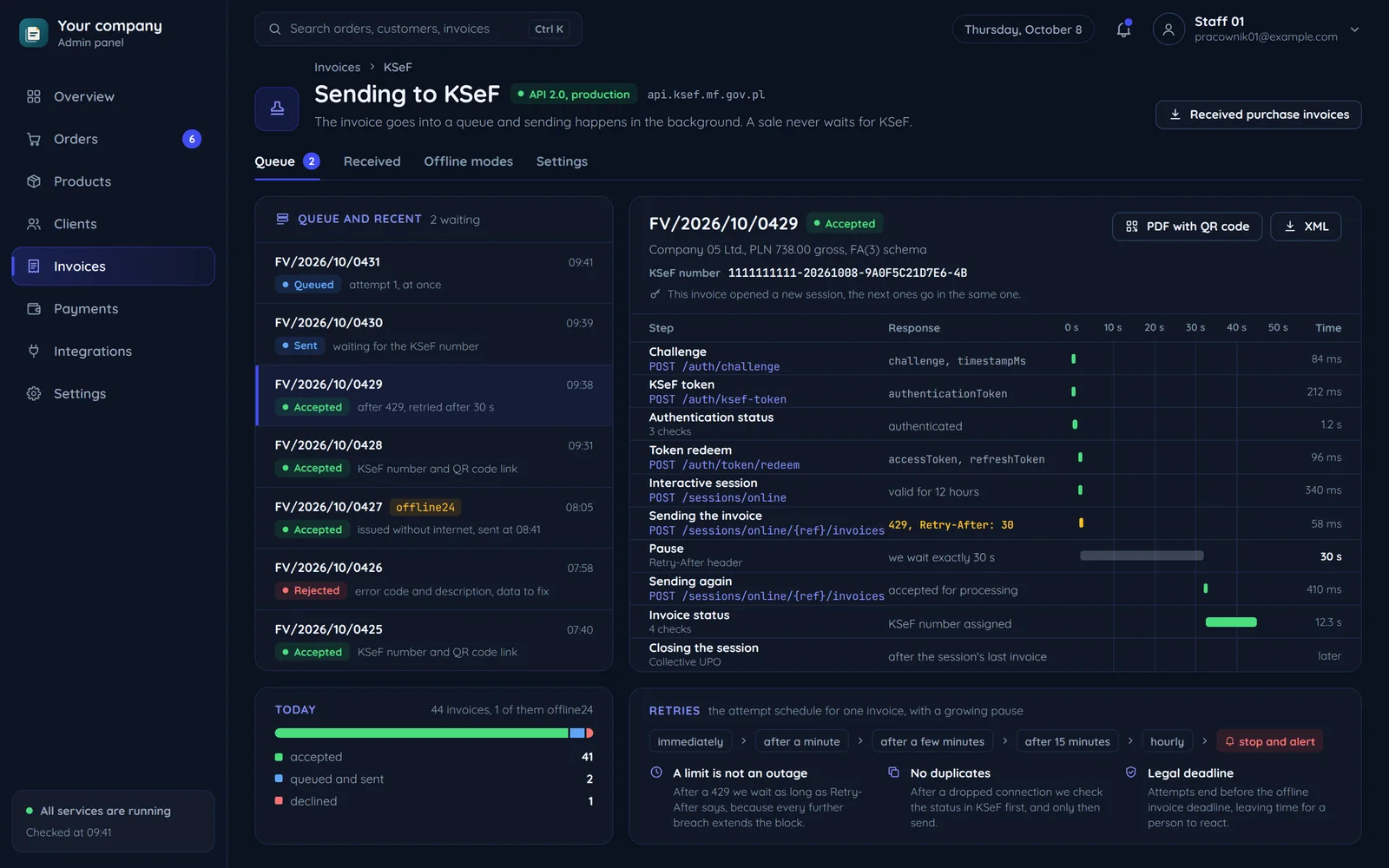
      A company panel with the KSeF invoice queue and the run of one send

      How Flaem sends it

      In Flaem we wrote the same flow in Rust, in frozcore/src/ksef. The key decision is not about encryption: issuing an invoice never waits for KSeF. The document is written together with a row in the ksef_submissions queue, and a separate worker does the sending.

      One invoice reaches KSeF once. Three layers guard that: the queue's primary key on the document id, a row lock when the worker claims it, and KSeF's own deduplication by file hash, status 440, which the worker records as success.

      frozcore/src/ksef/client.rsrust, 20 lines
      pub async fn open_session(&self, access: &str) -> Result<Session, ClientError> {    let key = self.public_key("SymmetricKeyEncryption").await?;    let mut symmetric = [0u8; 32];    let mut iv = [0u8; 16];    rand_core::OsRng.fill_bytes(&mut symmetric);    rand_core::OsRng.fill_bytes(&mut iv);     let wrapped = encrypt_rsa(&key.key, &symmetric)?;    let opened: Opened = self        .post_json("/sessions/online", Some(access), Some(serde_json::json!({            "formCode": { "systemCode": "FA (3)", "schemaVersion": "1-0E", "value": "FA" },            "encryption": {                "encryptedSymmetricKey": BASE64.encode(&wrapped),                "initializationVector": BASE64.encode(iv),                "publicKeyId": key.id,            },        })))        .await?;    Ok(Session { reference_number: opened.reference_number, symmetric, iv })}

      An excerpt of the Flaem KSeF client, with error handling trimmed.

      Related pages and sources

      The service, tools and terms this guide leads to, and more guides.

      Official documentation

      Rather have it done by someone who has done it before?

      Describe your system. We reply within an hour with an integration plan and a quote.

      Questions