VulCode
Blog

Przelewy24 REST API: a payment from registration to verification

You register the transaction, send the customer to Przelewy24, receive the notification and confirm the payment with verify. Without verification the money never reaches you. PHP 8 code checked against the sandbox.

VulCodeVulCode14 min read
Przelewy24 REST API: a payment from registration to verification - VulCode
What you will buildPHP, 7 steps
  1. RegisterYour storetransaction/register returns a token.
  2. Pays at P24CustomerRedirect to /trnRequest/{token}.
  3. NotificationP24Signed JSON to your urlStatus.
  4. VerifyYour storetransaction/verify confirms the payment.

The guide at a glance

The customer clicks "Pay", pays at Przelewy24 and comes back to the store, and the order turns paid on its own. Behind it are four calls and one rule many integrations forget: a transaction is confirmed only after verification.

Przelewy24 REST API

Group
Invoices and payments
Level
intermediate
Reading time
about 14 min
Code
PHP

Files: Przelewy24.php, konfiguracja.php, checkout.php, p24-powiadomienie.php, zamowienie.php.

Steps
7 steps

7 of them with code or commands to copy.

Check
Przelewy24 sandbox, PHP 8.3

401 for a deliberately wrong key and a 96-character SHA-384 sign

Documentation
2 official documents

Przelewy24 REST API documentation; Przelewy24, help centre for merchants

From our code
Flaem

frozcore/src/payments/gateways/przelewy24.rs

Before you start

The Przelewy24 documentation says it plainly: if the customer pays and the merchant does not verify the transaction, the amount reaches neither the merchant nor the settlements and stays with the customer as a prepayment.

What you need
Przelewy24 REST API
A Przelewy24 sandbox account
The sandbox uses test data and separate keys. From the panel you need the merchant ID, the shop ID (posId), the CRC key and the reports key, which is the API password.
PHP 8.1 or newer with curl and json
The class in the example uses readonly properties from PHP 8.1. We ran it on PHP 8.3.
A public HTTPS address for notifications
Przelewy24 posts the payment result to urlStatus from the internet. On a local machine you need a tunnel or a test server.
An orders table with the amount
Before registering you store the sessionId and the amount so you can compare them with the notification later. The documentation asks for exactly that.

Addresses and calls

WhatAddressMethod
Sandboxhttps://sandbox.przelewy24.pl-
Productionhttps://secure.przelewy24.pl-
Access test/api/v1/testAccessGET
Register/api/v1/transaction/registerPOST
Verify/api/v1/transaction/verifyPUT
Refund/api/v1/transaction/refundPOST

Step by step

7 steps. The window beside them shows the file of the step you are reading.

Write the API client and the sign

Authentication is HTTP Basic: the user is the posId and the password is the reports key. Every important request carries a sign field: the SHA-384 hash of a JSON object with specific fields in a specific order, always ending with the CRC key.

The documentation requires the JSON_UNESCAPED_UNICODE and JSON_UNESCAPED_SLASHES flags. Without them a slash in an address or a Polish letter in a description changes the hash and the sign fails.

Check the credentials

GET /api/v1/testAccess answers 200 with good credentials. With bad ones you get 401 and "Incorrect authentication". Do it once during setup, before you hunt for a bug in the sign.

Store the order before registering

The sessionId is your unique transaction id. Przelewy24 amounts are in grosze: PLN 123.00 is 12300. Store both fields with the order, because you will compare the notification against them.

Register the transaction and redirect the customer

The required fields are merchantId, posId, sessionId, amount, currency, description, email, country, language, urlReturn and sign. urlStatus is optional in the schema, but without it you get no notification, so in practice it is mandatory.

The registration sign covers sessionId, merchantId, amount, currency and crc, in that order. The response carries a token, and you send the customer to /trnRequest/{token} on the same environment.

Receive and check the notification

After payment Przelewy24 posts JSON to urlStatus, whether or not the customer came back to the store. Notifications arrive only for correctly paid transactions.

First you compute the sign from ten fields (merchantId through statement plus crc) and compare it in constant time. Then you check that the amount and currency match the order. Only then do you move on to verification.

Verify the transaction

PUT /api/v1/transaction/verify with the orderId from the notification. The sign covers sessionId, orderId, amount, currency and crc. A data.status of "success" means the money is yours: only now do you mark the order paid.

If verification does not happen, Przelewy24 resends the notification after 3, 5, 15, 30, 60, 150 and 450 minutes. Your code must therefore survive the same notification several times without marking the order twice.

Handle the customer coming back

urlReturn is only where the browser comes back to. Coming back is no proof of payment: the customer may return before the notification arrives, or return without paying. Show the order status from your database.

Note
The waitForResult registration parameter makes Przelewy24 redirect the customer only once the transaction result has arrived. It shortens the time the customer sees "waiting for confirmation".
Code windowstep 1 of 7
Przelewy24.phpNew file, 39 lines
<?phpdeclare(strict_types=1); final class Przelewy24{    public function __construct(        public readonly string $baseUrl,  // https://sandbox.przelewy24.pl        public readonly int $merchantId,        public readonly int $posId,        private string $apiKey,           // klucz do raportów (API) z panelu        private string $crc,              // klucz CRC z panelu    ) {}     /** SHA-384 z JSON-a o stałej kolejności pól, zawsze zakończonego kluczem CRC. */    public function sign(array $fields): string    {        $fields['crc'] = $this->crc;        return hash('sha384', json_encode($fields, JSON_UNESCAPED_UNICODE | JSON_UNESCAPED_SLASHES));    }     public function call(string $method, string $path, ?array $body = null): array    {        $curl = curl_init($this->baseUrl . $path);        curl_setopt_array($curl, [            CURLOPT_CUSTOMREQUEST => $method,            CURLOPT_USERPWD => $this->posId . ':' . $this->apiKey,            CURLOPT_HTTPHEADER => ['Content-Type: application/json'],            CURLOPT_RETURNTRANSFER => true,            CURLOPT_TIMEOUT => 30,        ]);        if ($body !== null) {            curl_setopt($curl, CURLOPT_POSTFIELDS, json_encode($body, JSON_UNESCAPED_UNICODE | JSON_UNESCAPED_SLASHES));        }        $raw = (string) curl_exec($curl);        $status = curl_getinfo($curl, CURLINFO_RESPONSE_CODE);        curl_close($curl);        return [$status, json_decode($raw, true)];    }}
konfiguracja.phpNew file, 10 lines
$p24 = new Przelewy24(    'https://sandbox.przelewy24.pl',    (int) getenv('P24_MERCHANT_ID'),    (int) getenv('P24_POS_ID'),    getenv('P24_API_KEY'),    getenv('P24_CRC'),); [$status, $body] = $p24->call('GET', '/api/v1/testAccess');// 200 przy poprawnych danych, 401 {"error":"Incorrect authentication"} przy złych
checkout.phpNew file, 5 lines
$sessionId = 'zamowienie-' . $order->id;  // unikalny w Twoim systemie$amount = 12300;                           // w groszach: 123,00 zł $db->prepare('UPDATE orders SET p24_session = ?, p24_amount = ? WHERE id = ?')   ->execute([$sessionId, $amount, $order->id]);
checkout.phpChanged in the file: 23 lines
[$status, $body] = $p24->call('POST', '/api/v1/transaction/register', [    'merchantId' => $p24->merchantId,    'posId' => $p24->posId,    'sessionId' => $sessionId,    'amount' => $amount,    'currency' => 'PLN',    'description' => 'Zamówienie ' . $order->id,    'email' => $order->email,    'country' => 'PL',    'language' => 'pl',    'urlReturn' => 'https://sklep.example/zamowienie/' . $order->id,    'urlStatus' => 'https://sklep.example/p24/powiadomienie',    'sign' => $p24->sign([        'sessionId' => $sessionId,        'merchantId' => $p24->merchantId,        'amount' => $amount,        'currency' => 'PLN',    ]),]); if ($status !== 200) {    throw new RuntimeException('P24 register: ' . json_encode($body));}header('Location: ' . $p24->baseUrl . '/trnRequest/' . $body['data']['token']);
p24-powiadomienie.phpNew file, 23 lines
$n = json_decode(file_get_contents('php://input'), true); $expected = $p24->sign([    'merchantId' => $n['merchantId'],    'posId' => $n['posId'],    'sessionId' => $n['sessionId'],    'amount' => $n['amount'],    'originAmount' => $n['originAmount'],    'currency' => $n['currency'],    'orderId' => $n['orderId'],    'methodId' => $n['methodId'],    'statement' => $n['statement'],]);if (!hash_equals($expected, (string) ($n['sign'] ?? ''))) {    http_response_code(400);    exit;} $order = findOrderBySessionId($n['sessionId']);if ($order === null || $order->p24_amount !== $n['amount'] || $n['currency'] !== 'PLN') {    http_response_code(400);    exit;}
p24-powiadomienie.phpChanged in the file: 8 lines
[$status, $body] = $p24->call('PUT', '/api/v1/transaction/verify', [    'merchantId' => $p24->merchantId,    'posId' => $p24->posId,    'sessionId' => $n['sessionId'],    'amount' => $n['amount'],    'currency' => $n['currency'],    'orderId' => $n['orderId'],    'sign' => $p24->sign([        'sessionId' => $n['sessionId'],        'orderId' => $n['orderId'],        'amount' => $n['amount'],        'currency' => $n['currency'],    ]),]); if ($status === 200 && ($body['data']['status'] ?? null) === 'success') {    markOrderPaid($order, $n['orderId']);  // dopiero tu zamówienie jest opłacone}http_response_code(200);
zamowienie.phpNew file, 6 lines
// zamowienie.php, adres z urlReturnif ($order->paid_at === null) {    echo 'Czekamy na potwierdzenie płatności z Przelewy24. Odśwież stronę za chwilę.';} else {    echo 'Płatność przyjęta. Dziękujemy!';}

Check that it works

We ran the class and the sign on 6 October 2026 on PHP 8.3. The access test with a deliberately wrong key got 401 from the sandbox, and the sign for the sample data is a 96-character SHA-384 hash. Compute the same hash in your environment to check that your JSON encoding matches.

terminal6 October 2026Przelewy24 sandbox, PHP 8.3
$ php test.php
401 {"error":"Incorrect authentication","code":401}
sign(zamowienie-1042, 11111, 12300, PLN, crc abcdef1234567890):
f71f64482a628172732cd86ec3e112cb351ab167366178593f3e394507346408
2658a500bdef37c6566755416a6bf5de
401 for a deliberately wrong key and a 96-character SHA-384 sign
What the output lines mean
  1. lines 2Access test with a deliberately wrong key

    The sandbox answered 401 "Incorrect authentication". With your sandbox credentials testAccess returns 200.

  2. lines 3The fields of the registration sign

    sessionId, merchantId, the amount in grosze, the currency and crc last, in this order.

  3. lines 4-5The SHA-384 sign

    96 hex characters over two lines. The same hash on your side means your JSON encoding matches.

How you know it works on your side

  • testAccess returns 200 with your sandbox credentials.
  • Registration returns a token and /trnRequest/{token} opens the payment page.
  • After a test payment, JSON with a valid sign reaches urlStatus.
  • transaction/verify returns data.status "success" and the order changes state once.

The errors you will meet

The same path as "What you will build" at the top of the page, with the places where the work stops most often. For each error: the symptom, the cause and what to do.

Where it stops and why

Register

Your store

transaction/register returns a token.

  • Stops here: 401 "Incorrect authentication"

    A wrong posId or reports key, often a production key used on the sandbox. What to do: The sandbox has separate credentials. Check them with testAccess.

  • Stops here: 400 on register, invalid sign

    A different field order, no crc at the end, or JSON with escaped slashes or Polish characters. What to do: Keep the documented order and the JSON_UNESCAPED_UNICODE and JSON_UNESCAPED_SLASHES flags. In Python json.dumps adds spaces: use separators=(",", ":") and ensure_ascii=False.

Pays at P24

Customer

Redirect to /trnRequest/{token}.

    Notification

    P24

    Signed JSON to your urlStatus.

    • Stops here: An order marked paid twice

      A resent notification handled as a new one. What to do: Mark the order conditionally, for example UPDATE ... WHERE paid_at IS NULL, and store the orderId.

    • Stops here: The notification amount differs from the order

      The amount was given in zloty instead of grosze, or changed after registering. What to do: Keep amounts in grosze as integers and reject a notification with a different amount.

    Verify

    Your store

    transaction/verify confirms the payment.

    • Stops here: The customer paid, but the money is not in the settlement

      transaction/verify was never called. What to do: Verify inside the notification handler. Without it the amount stays with the customer as a prepayment.

    How we do it in our own code

    The same topic in code we maintain: Flaem.

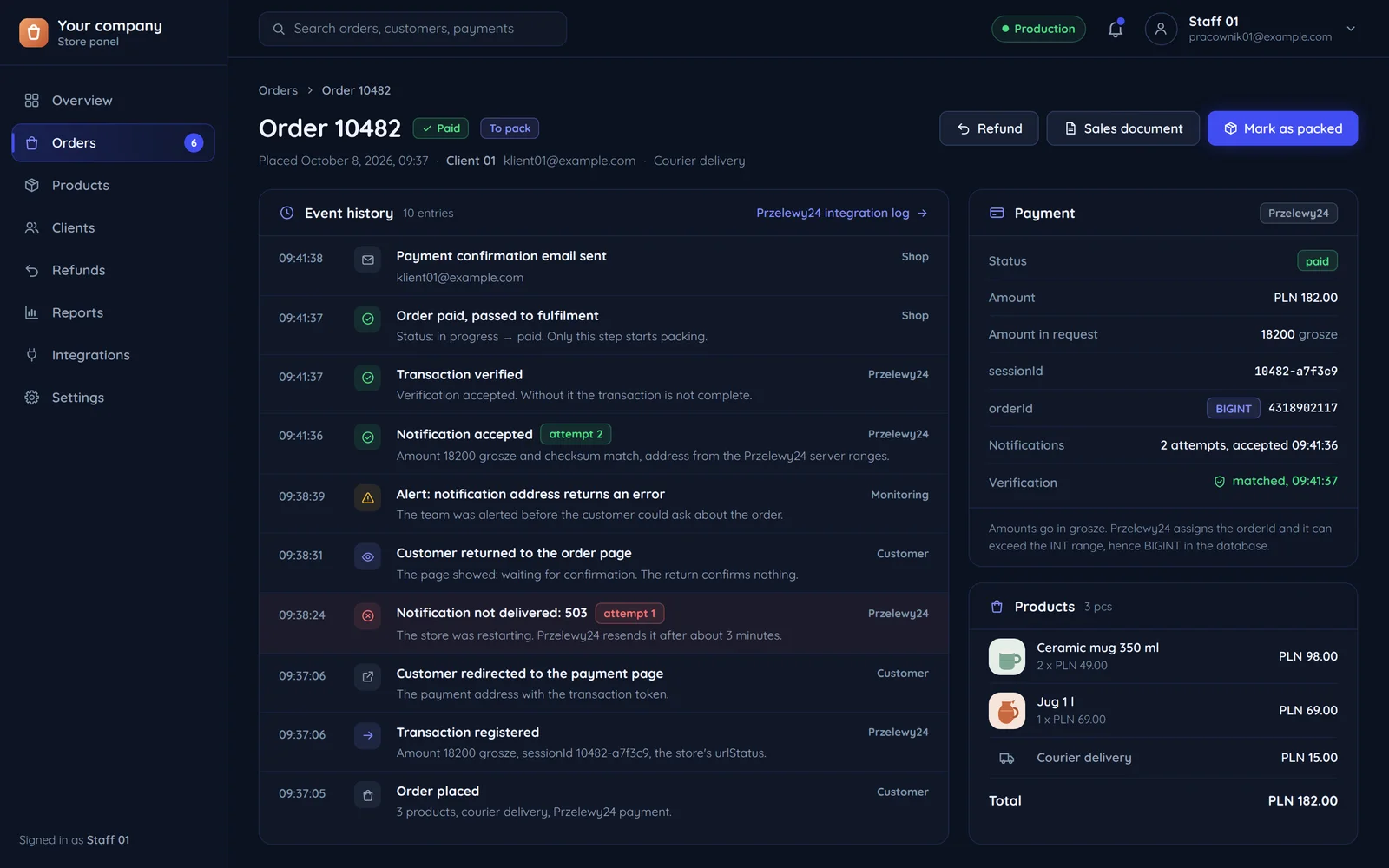
    An order in the store panel with the history of its Przelewy24 payment events

    Przelewy24 in Flaem

    Flaem supports Przelewy24 as one of its payment gateways, in frozcore/src/payments/gateways/przelewy24.rs. We build the sign by hand, field by field, instead of from a map, because key order in a map is the library's decision, not ours.

    For us a notification without verification is not a payment. We check the sign in constant time, and then whether the notification's merchantId and posId are ours, before anything reaches the ledger.

    frozcore/src/payments/gateways/przelewy24.rsrust, 14 lines
    fn notification_sign(&self, body: &serde_json::Value) -> Option<String> {    Some(Self::sign(&[        ("merchantId", SignValue::Int(body["merchantId"].as_i64()?)),        ("posId", SignValue::Int(body["posId"].as_i64()?)),        ("sessionId", SignValue::Str(body["sessionId"].as_str()?)),        ("amount", SignValue::Int(body["amount"].as_i64()?)),        ("originAmount", SignValue::Int(body["originAmount"].as_i64()?)),        ("currency", SignValue::Str(body["currency"].as_str()?)),        ("orderId", SignValue::Int(body["orderId"].as_i64()?)),        ("methodId", SignValue::Int(body["methodId"].as_i64()?)),        ("statement", SignValue::Str(body["statement"].as_str()?)),        ("crc", SignValue::Str(&self.crc)),    ]))}

    The notification sign in Flaem: the same ten fields in the same order as in PHP.

    Questions