
cinnamon-tweaks
Two GTK utilities in Python for the Cinnamon desktop. shortcut-manager manages custom keyboard shortcuts, captures the key combination and warns about conflicts, while panel-tweaks toggles panel auto-hide and edit mode, sets the panel height and enables applets. Both write the same keys as Cinnamon Settings.
Overview
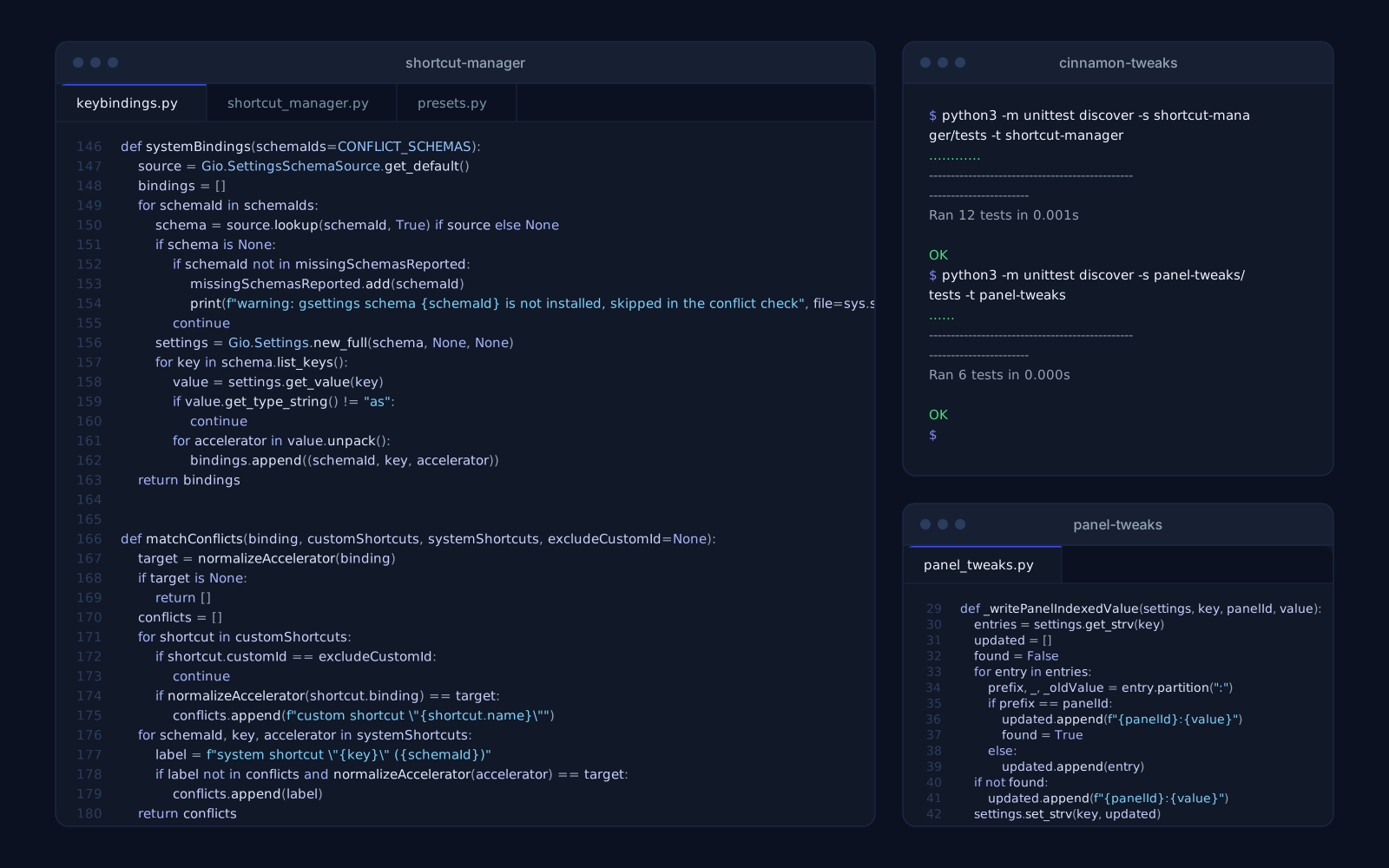
cinnamon-tweaks is two small GTK 3 utilities for the Cinnamon desktop that put frequently changed settings in one window instead of several pages deep in Cinnamon Settings. shortcut-manager lists, adds, edits and deletes custom keyboard shortcuts. panel-tweaks toggles panel auto-hide and edit mode, sets the panel height and enables or disables applets.
Neither tool has storage of its own. Both read and write the same gsettings and dconf keys Cinnamon uses, so every change applies immediately, survives logout and shows up in Cinnamon Settings. No daemon runs in the background, and the two tools install independently.
What each tool replaces
| Tool | Replaces | Interface |
|---|---|---|
| shortcut-manager | Settings > Keyboard > Shortcuts > Custom Shortcuts | GTK window, menu launcher |
| panel-tweaks | Settings > Panel | GTK window, menu launcher |
shortcut-manager: shortcuts in one table
The window shows the name, key combination and command of every custom shortcut in Cinnamon's custom-list in one table, and double-clicking a row opens it for editing. The shortcut field records the next combination you press instead of asking you to type <Super><Shift>t. Escape, or Backspace without modifiers, clears it, lone modifier keys are ignored, and only combinations GTK accepts as valid accelerators are recorded.
While you edit, the dialog lists every other custom shortcut and every built-in binding that already uses the same combination. Built-in bindings are read from five Cinnamon, Muffin and GNOME gsettings schemas, and a schema that is not installed is skipped with a warning. A conflict is a warning, not a block: you can still save.
Combinations are compared after normalization, so modifier order, the spellings <Control>, <Ctrl> and <Primary>, and the case of the key name do not hide a conflict.
Command presets and a tidy dconf
The add dialog offers quick-fill commands, each shown only when its program is installed. Picking a preset fills the command, and the name too if it is still empty.
Command presets
| Preset | Command |
|---|---|
| Terminal | gnome-terminal |
| File manager | nemo |
| Lock screen | cinnamon-screensaver-command --lock |
| Screenshot of an area | flameshot gui |
| Screenshot of the full screen | gnome-screenshot |
| Web browser | xdg-open http:// |
| Mute volume toggle | amixer -q set Master toggle |
| Text editor | gedit |
A new shortcut takes the lowest free customN id, also skipping ids that other tools left behind in dconf. Deleting a shortcut removes it from custom-list and resets its whole dconf path, so nothing is left orphaned. Nothing is removed without a confirmation.
panel-tweaks: the panel in one click
The second window gathers the panel settings worth a one-click toggle.
switched on or off with one toggle.
the mode in which applets can be dragged around the panel.
a slider from 20 to 80 pixels, applied live while dragging.
the panel's applets with each one's id and zone and a checkbox to enable or disable it.
All of these settings live in the org.cinnamon schema: panels-enabled, panels-autohide, panels-height, panel-edit-mode and enabled-applets.
Install, tests and limitations
Each tool has its own install.sh and uninstall.sh. Installing copies the tool into ~/.local/share/ and adds a launcher to the applications menu under Settings. Uninstalling removes the copied files and the launcher, while the shortcuts and panel settings changed through the tools stay in effect, because they belong to Cinnamon. Both tools also run straight from a checkout, with nothing to install or build.
The logic outside the interface has tests on the standard unittest module with no extra dependencies: accelerator normalization, conflict matching, reading built-in bindings and skipping a missing schema in shortcut-manager, and reading and writing the per-panel id:value lists in panel-tweaks. The gsettings tests compile a throwaway schema and use the in-memory backend, so they never touch your real settings.
The limits are stated plainly: the tools work in Cinnamon only, panel-tweaks manages one panel, the first id in panels-enabled, and the shortcut table does not refresh by itself when shortcuts change elsewhere. It is tested on Linux Mint 22.2 with Cinnamon on X11.
Questions about cinnamon-tweaks

More projects
More work from the same category - see how we tackle similar challenges.

Have a similar project?
Get in touch - a quote is free and comes back within an hour.